
Shopkeepers

Set up custom villager shopkeepers that sell exactly what you want them to sell and for what price. You can set up admin shops, which have infinite supply, and you can also set up player shops, which pull supply from a chest.
It will also prevent any other trades with non-shopkeeper villagers, if you want it to.
For those who are simply looking for a convenient way to modify the trades of vanilla villagers (as an alternative to using complex Minecraft commands), the plugin also includes a graphical editor for regular villagers and wandering traders.
Basic Features
- Easily create villager shopkeepers that trade the items you want them to trade.
- Admins shops with infinite supplies.
- Player shops which pull supplies from a chest.
- Different types of player shops: selling, buying, trading, and selling books.
- Various supported mob types to represent your shopkeeper, sign shops, and Citizens (NPC) shops.
- Editor for regular villagers and wandering traders.
- Many configuration options.
- Translatable messages.
- Open source (Source code on GitHub)
Supported server versions
Shopkeepers supports the latest versions of Bukkit / Spigot.
Note that this plugin is created to work with CraftBukkit (or alternatively Spigot). Bukkit does not have an API for some of the things necessary to make this plugin work. This means that other server software (Tekkit, Forge, Cauldron, etc.) will not work with this plugin.
Other CraftBukkit or Spigot derivatives/forks might work, but are not officially supported. So if you run into issues while using those, try to reproduce your issue on a fresh and up-to-date Spigot server first.
Getting started
All documentation can be found in the wiki:
- Downloads and changelogs for all files
- Installation
- Translations
- Configuration
- Permissions
- Creating shops
- Commands
- Frequently Asked Questions
Showcase
Admin shops:
Configure the trades via the in-game inventory menu:

Resulting trading menu:

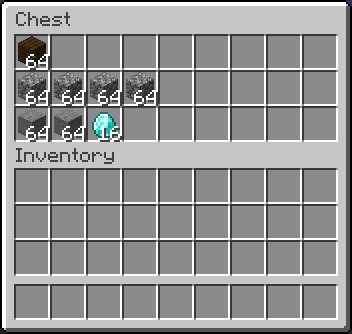
Player shops (ex. selling items):
Fill the shop chest with supplies:
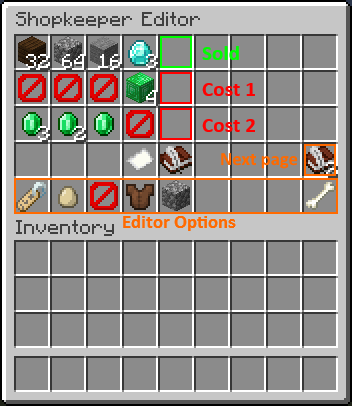
Configure the trades via the in-game inventory menu:
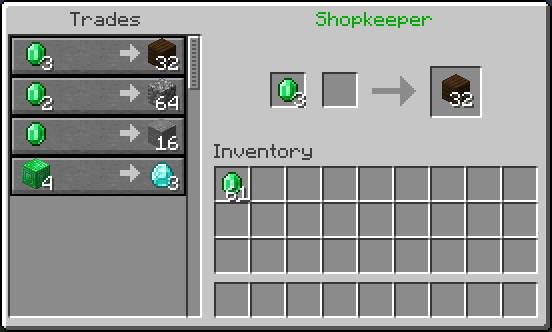
Resulting trading menu:
Video Tutorials
More video tutorials can be found in the wiki: https://github.com/Shopkeepers/Shopkeepers-Wiki/wiki/Video-Tutorials
Tutorial by Donnie, explaining the setup of the different shop types:
Tutorial by Fan Staaff showing the setup of the different shop types in detail:
Tutorial by LastKing2X,showing the setup of the different shop types:
Spanish tutorial by Ajneb97, also mentioning placeholder items and various config options:
Statistics
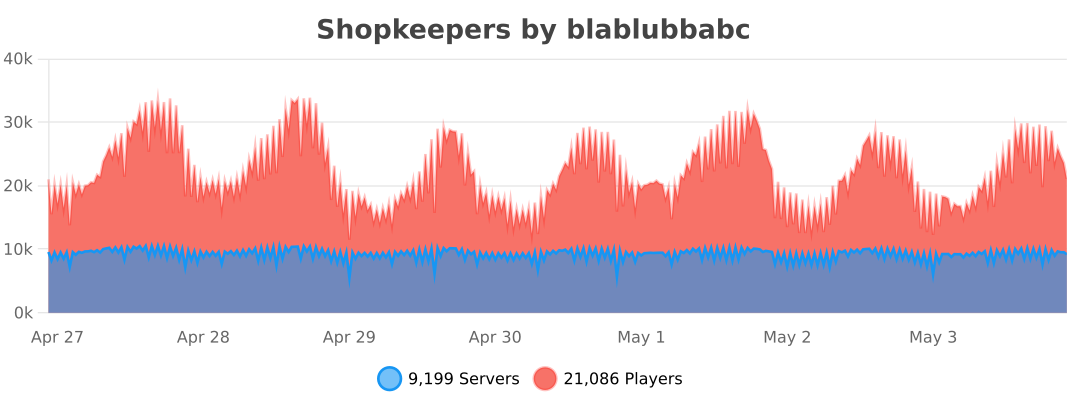
This plugin uses bStats to collect anonymous plugin usage statistics. This helps me to determine how many servers are using the plugin, which Minecraft versions it is used with the most, and to which degree the different features are used.
Here is a list of all currently tracked information:
- Common information: The number of servers using the plugin, the number of players on these servers, online mode, Minecraft version, plugin version, core count, system arch, operating system, server country, Java version.
- Shopkeepers specific information: Whether specific related plugins are used (Citizens, Towny, WorldGuard, Gringotts, other Vault economy plugins), number of shops, whether player shops are used, whether certain features are enabled in the config (ex. WorldGuard/Towny compatibility, Citizens shops, delayed saves, colored names, chest protection, removal of inactive shops, tax rate, strict item comparison, purchase logging, disabling of other villagers, ..), the number of worlds containing shops.
- All information can be publicly viewed here: https://bstats.org/plugin/bukkit/Shopkeepers/
If you want to disable bStats for all plugins on your server, edit the file plugins/bStats/config.yml, or alternatively disable it only for Shopkeepers by setting 'enable-metrics' to 'false' inside the Shopkeepers config.
Known potential issues
A list of known potential issues of the latest version of Shopkeepers can be found in the wiki: This documents differences between Minecraft/Spigot versions, and existing Minecraft/Spigot issues related to Shopkeepers.
If you run into an issue, check if this list already contains and maybe offers information on how to handle it.
Have issues or further questions?
If you have a pressing issue or simple question, you can join the discord server and ask other plugin users for help:

But submitting a ticket is the best way to get help or report a problem with the plugin.
Before submitting a ticket:
- Check if your question is already answered in:
- The documentation (wiki).
- The FAQ.
- The Known Issues.
- Check if there is already another ticket for your issue.
Before reporting an issue:
- Try to reproduce your issue when using:
- The latest versions of Spigot and Shopkeepers.
- No other plugins.
- No kinds of other server or client mods.
When reporting an issue:
- Provide the versions you are using of Minecraft, Spigot and Shopkeepers.
- Provide a detailed description of your problem and add as much information as possible which could help reproducing the issue.
- If possible, include step-by-step instructions on how to reproduce the issue on a fresh Spigot server.
Donations
If you like this plugin, consider supporting its developers by making a donation:
- To blablubbabc (current maintainer: Dec 2013 - today)
- To nisovin (former author: Aug 2012 - Dec 2013)
A big "thank you" to everybody who is keeping the motivation up through donations!
| Minecraft-Servers-Listing.com | TRS Game Servers | terminalserver.us |
| Minewind | mercurialmusic | timitimitimi |
| FatherWh0 (merchantvillages.com) | lukeeexd (tws-mc.com) | PapaJuan |
| EmeraldHaze (Ninjalette) | Espen | kbtalkin |
| Dimo (Beyond Vanilla) | RefugiaCraft | Frilioth |
| Tabletopcheese | Observant Minecraft Server | Ren B. |
| BadWolfMC | Michael M. | Alejandro A. |
| Michael B. |
Want to help?
Whether you are a programmer or not, there are many ways in which you can contribute! For example:
- Help users with issues and questions on Github, Discord, or the comment section.
- Create and update translations.
- Keep the documentation (the wiki) up-to-date with plugin updates.
- Write or maintain add-on plugins (see the open Github issues).
If you are interested or have other ideas on how you can contribute, feel free to contact me via PM.
Add-On Plugins
Sometimes, a feature is either to specific to include directly into the Shopkeepers plugin, or I did not yet have the time to add something similar myself. You can find a list of both official and third-party add-on plugins that extend the functionality of the Shopkeepers plugin in the wiki: https://github.com/Shopkeepers/Shopkeepers-Wiki/wiki/Add-On-Plugins
If you have also written an add-on plugin that you want to add to the list, let me know!
Comments


-

blablubb Owner
-

_ForgeUser8274522 Author
-
_ForgeUser9352339 Translator
-

nisovin Author
-
View User Profile
-
Send Message
Posted Jun 14, 2015@blablubbabc
err wear to start i'm useing spigot 1.8.3 the plugins i'm useing that are unusual are Coins, MythicDrops, DrugMeUp, EasyJetpack, HorseProtect, ImOnAHorse and MiningMachine thay all have Edited names and lores P.S i tryed copying the save.yml to me desktop as a backup but wean i went to use it the backup file was clear as well
-
View User Profile
-
Send Message
Posted Jun 14, 2015@xXAmyLouiseXx
Please don't post stacktraces directly into the comment section, but instead upload it somewhere (ex. pastebin.com) and only leave the link to it here:
http:pastebin.com/TX2d8wAG
This stacktrace is already more useful for me: It tells me that it (the server) can't serialize (save) a certain item enchantment.
What items are you trying to use in your shops? Any item with special/unusual enchantments? How do you create those items? Are you using the official spigot server?
-
View User Profile
-
Send Message
Posted Jun 14, 2015@xXAmyLouiseXx
Check if it saves the shopkeeper data at least once while your server is running. The save.yml file should then be non-empty.
Besides that I don't know how I could help you. On my test server no data is lost if I abruptly shutdown the server.. it keeps the data since the last save. The only time the save file is empty is if no save did occur yet (which should not be the issue as you have save-instantly enabled) or if it crashes exactly while it saves, which seems unlikely to me.
-
View User Profile
-
Send Message
Posted Jun 14, 2015@blablubbabc
yes i do have save-instantly set to true and i stoped from the console and the crash did not show up in the console its not done as of yet
its saving the save.yml but not keeping it wean i restart
-
View User Profile
-
Send Message
Posted Jun 13, 2015@xXAmyLouiseXx
Why did your server crash / did it crash during the saving? Maybe you could upload the crash report somewhere (don't paste it into the comment section here though).
So you created a citizens shopkeeper? Have you set save-instantly to true in the config / did it save the shopkeeper before you restrarted the server? How did you restart your server? Did you use the /stop command?
-
View User Profile
-
Send Message
Posted Jun 13, 2015Hi wean my server crashes unexpectedly I losts all the items in the shop and wean i restart my server thay all walk off and are no longer shops can any one help with this? I have tryed the command /shopkeeper npc and wean i restarted the server thay stoped being shops :(
-
View User Profile
-
Send Message
Posted Jun 13, 2015@phoenixlzx
If you have save-instantly set to true in the config (which it is by default) it should already save it after a change happened.
-
View User Profile
-
Send Message
Posted Jun 13, 2015@blablubbabc
Not server crashing or disk full... it's power failure, so no error log available.
Maybe you could save the file once it changed, so even if power down at last it could keep the latest data, and no need of saving the file when server closing - as there are many other disk operations.
-
View User Profile
-
Send Message
Posted Jun 13, 2015@phoenixlzx
It should not leave you with an empty save file if you unexpectly shutdown your server, it should leave you with the save content since the last save.
The only time it is left empty is if your server crashes during the few milliseconds it is saving, in which case the crash is very likely related to the saving itself: The first thing which comes to my mind here is that it might crash during the saving because your disk has not enough free space available, in which case it wouldn't be able to hold the save content in the first place.
Would you mind checking if you find errors in the log?
-
View User Profile
-
Send Message
Posted Jun 13, 2015Hello,
Yesterday my server shutted down unexpectedly, and Shopkeeper's save.yml lost its content again.
Could you fix the problem when server didnt shutting down cleanly just do not write a empty file to save.yml? The plugin has lost its content for several times.
THANK YOU.
-
View User Profile
-
Send Message
Posted Jun 12, 2015@EpicSplasherFailsMC
You need a permissions plugin of your choice for setting up the permissions. I personally use PEX, but there are a bunch of other popular permissions plugins available, like GroupManager, bPermissions, PermissionsBukkit, etc.
At the top of this page there is a tab saying 'Tickets'.
-
View User Profile
-
Send Message
Posted Jun 12, 2015Where do i put the perms? I'm new to bukkit and don't know how submit a ticket, either. Thanks!
-
View User Profile
-
Send Message
Posted Jun 12, 2015v1.60 for MC 1.6.2, 1.7.x, 1.8.x
@MineCraftMyph
Please check if this fixes the issue for you.
-
View User Profile
-
Send Message
Posted Jun 10, 2015@blablubbabc
Yes, this happens with villager admin shopkeepers.
-
View User Profile
-
Send Message
Posted Jun 10, 2015@blablubbabc
I have tried it, but for the moment I must do like that :
If I use - -shopkeeper.*, it dosen't work...
I will wait and see :)
-
View User Profile
-
Send Message
Posted Jun 10, 2015@MineCraftMyph
Maybe related to this one: http:dev.bukkit.org/bukkit-plugins/shopkeepers/tickets/321-strange-bug/
-
View User Profile
-
Send Message
Posted Jun 10, 2015@blablubbabc
BUG In your latest version, all the shopkeepers have 8 additional slots with nothing in them.
-
View User Profile
-
Send Message
Posted Jun 10, 2015@Almathy
Maybe try the other way around:
First add the permissions nodes they are allowed to have, like shopkeeper.trade
then negate the shopkeeper.* permission. At least that made it work for me on pex.
-
View User Profile
-
Send Message
Posted Jun 10, 2015@blablubbabc
I don't knwo too... But, this can help you : with the plugin mcmmo, it works
-
View User Profile
-
Send Message
Posted Jun 10, 2015@shaliquinn
You can either turn debug mode persistently on in the config, or turn it temporary on via the command /shopkeeper debug. It should print a message when it saves the shopkeepers. This is the case if you have just edited a shopkeeper and save-instantly is set to true in the config.