
Ships
Ships
|
|
|
|
|
|
|
Source Code - Github |
JavaDocs |
Sponge version |
Discord channel |
Translate Core |
|---|




Looking for Dev builds?
Dev builds give off new features and bug fixes before they are officially released, however these features and bug fixes may not have been tested as much as a release on here
Old page:
I am testing this new page out. I am aware of some parts that are missing such as ship types, but please say if there is anything that you wish to see. I plan on making a FAQ's that includes common questions such as how to change ship requirements.
If you want to see the old page, it is here
Video tutorial
Ships 6 changes
Ships has gone through many changes, Ships 6 is the latest rewrite of the plugin. The latest rewrite fixes multiple bugs found in the root of previous versions of Ships.
Features
Moving ships
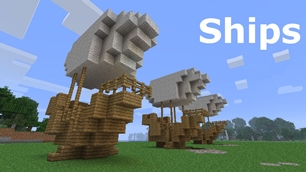
As the name of the plugin suggests, you can create your own ship and move it with just a single click.
Works with all blocks
There is a fully-fledged list where you can configure every block to react differently for the ships, including being able to add a block type to interact with Ships, detect it as a collide, and even not react at all.
Teleport to ships
There have been many requests to be able to teleport to ships for not only this plugin but others like it. This feature has been added to Ships, however, if it is something you do not wish, then you can disable to command by not adding the command.
Falling Ships
Ships will fall/sink if requirements are not met, this could be done through your own interaction such as running out of fuel, or by something else such as a TNT explosion.
Ship types
| Airship | Link |
| Ship | Link |
| Marsship | Link |
| Submarine | Link |
| Plane | Link |
| Hybridship | Coming soon |
Move the ship:
In Ships, movement is done by signs. You can see all signs here
Collide types:
| Name | ID | Description |
|---|---|---|
| Detect collide | DETECT_COLLIDE | If Ships detects this block in the way of a ship moving then the ship will not move with the error of this block being in the way |
| Material | MATERIAL | Material means that you can build a ship out of this block and the Ships block detection system will detect it as part of your ship |
| Ignore | IGNORE | If Ships detects this block in the way of a ship moving then the block will break and the ship will take its place |
Permissions
| Permission node | Description |
|---|---|
|
ships.cmd.info |
Allows the player to use the command '/ships info' |
|
ships.cmd.blockinfo |
Allows the player to use the command '/ships blockinfo' |
|
ships.cmd.shiptype.create |
Allows the player to use the command '/ships shiptype create' |
|
ships.cmd.config.set |
Allows the player to use the command '/ships config set' |
|
ships.cmd.config.view |
Allows the player to use the command '/ships config view' |
|
ships.cmd.blocklist.set |
Allows the player to use the command '/ships blocklist set' |
|
ships.cmd.blocklist.view |
Allows the player to use the command '/ships blocklist view' |
|
ships.cmd.ship.track |
Allows the player to use the command '/ships ship track' |
|
ships.cmd.ship.eot |
Allows the player to use the command '/ships ship eot' |
|
ships.cmd.ship.crew |
Allows the player to use the command '/ships ship crew' |
| ships.move.own.ships.airship | Allows a player to move own airship |
| ships.move.own.ships.watership | Allows a player to move own ship |
| ships.move.own.ships.marsship | Allows a player to move own marsship |
| ships.move.other.ships.airship | Allows a player to move anyones airship |
| ships.make.ships.airship | Allows a player to make a airship |
| ships.remove.other |
Allows a player to destroy anyones ships sign |
Developers:
Looking for a development wiki? maven/gradle dependencies? or something else relating to ships or translate core? Take a look at the getting started wiki
Comments


-

mosemister Owner
-

_ForgeUser7695435 Former Author
-
View User Profile
-
Send Message
Posted Mar 30, 2014I downloaded the plugin and pasted it in my plugins folder, but it never works i have other plugins and they work fine do i need to upgrade my craftbukkit version Plz help asap
-
View User Profile
-
Send Message
Posted Mar 30, 2014@uno28
yep .... this seems to be a very common problem now.
do a few checks for me then tell me the result before i can help you.
1) check what version of craftbukkit you are on
2) check what version of ships you are on
3) check your config. if it looks something like the following then i know the exact problem
airship: {}
airship2: {}
other: CreateConfig: false
-
View User Profile
-
Send Message
Posted Mar 30, 2014Hi MoseMister,
For some reason the when I try to use any ship I keep getting the message that my ship is too big. Please help!
Thank you, uno28
-
View User Profile
-
Send Message
Posted Mar 30, 20143.3 news: i have found a patch for the fuel consumption problem, going to be releasing a new beta that has the patch in
-
View User Profile
-
Send Message
Posted Mar 29, 2014A new hope
Ok a few things to share
-
View User Profile
-
Send Message
Posted Mar 29, 2014Best plugin ever!
-
View User Profile
-
Send Message
Posted Mar 27, 2014@Benz92
3.2.4 .... if createconfig was not working for that version then you did not have createconfig.jar running a long side ships.jar
but you got it working, thats the main thing.
happy to help
-
View User Profile
-
Send Message
Posted Mar 27, 2014@MoseMister
Cheers Mose!
Got it working with the 3.3 version :)
-
View User Profile
-
Send Message
Posted Mar 27, 2014@MoseMister
Im using Ships 3.2.4 now, and bukkit 1.7.2.530
-
View User Profile
-
Send Message
Posted Mar 27, 2014@Benz92
it will, long story why it does.
if the config file does not get created then i need some info. i thought you were using the pre release of 3.3 .... but if its not creating itself afterwards then your not using pre release 1.
so what version of ships are you using? what version of craftbukkit are you using?
-
View User Profile
-
Send Message
Posted Mar 27, 2014@MoseMister
Thank you!
Got the config with the CreateConfig setting. Only problem now tough, is that when i change it, it setts itself as false when i start up the server.
-
View User Profile
-
Send Message
Posted Mar 27, 2014hmmm. it seems ships version 3.3 maybe the start of advanced ships ...
-
View User Profile
-
Send Message
Posted Mar 27, 2014@mm75
hehe, i always though people preferred Qx2s stuff, thats why there is loads of options on 3.3 to change back to Qx2s code
-
View User Profile
-
Send Message
Posted Mar 27, 2014WOW! GOOD JOB MOSE!!! I haven't checked back here in ages and i can definitely say i like where this plugin is going now that your in charge. GOOD JOB!
-
View User Profile
-
Send Message
Posted Mar 26, 2014@Benz92 ah your using the pre release. go to the link shown in the change log when you download it, to get the config text you need to replace.
-
View User Profile
-
Send Message
Posted Mar 26, 2014@MoseMister
Thanks for the reply.
I did check the config, but this is all it shows:
airship: {} airship2: {} ship: {} marsship: {} motorboat: {} plane: {} lavaship: {} steamboat: {} submarine: {} Other: {}
-
View User Profile
-
Send Message
Posted Mar 26, 2014@nullschritt
They work in the exact same way as airships. I would recommend that you build the subs in the water then surface them later due to the water overflow patch
-
View User Profile
-
Send Message
Posted Mar 25, 2014How do the submarines work? Litterally exactly like the airships?
-
View User Profile
-
Send Message
Posted Mar 25, 2014@charlza
hmm i though i fixed the flooding problem in the last patch (not the most resent one ... the one before that). but im glad you like them.
-
View User Profile
-
Send Message
Posted Mar 25, 2014I wanted to say thanks for the submarines! They are working pretty good. I've seen a couple odd hick-ups, like reappearing outside of the submarine and sinking, but it's only happened once. I've also reappeared in the floor a couple of times and had to use the WorldEdit compass to get out of the floor.
The submarine is still cool though! I retrofitted one of my underwater bases with a docking bay last night that works pretty good. Once you understand the physics in Minecraft and how to work around the way water works...it's pretty simple! For instance, you can place signs against the wall of a side entrance in the submarine and it blocks the water from flooding the sub. If your build a side entrance in an underwater building and place stairs 1-2 blocks inside the air lock, when the sub 'docks', the water automatically drains, giving you a dry area to enter.
I plan to film a record a video this weekend...if I can find the time.