
Ships
Ships
|
|
|
|
|
|
|
Source Code - Github |
JavaDocs |
Sponge version |
Discord channel |
Translate Core |
|---|




Looking for Dev builds?
Dev builds give off new features and bug fixes before they are officially released, however these features and bug fixes may not have been tested as much as a release on here
Old page:
I am testing this new page out. I am aware of some parts that are missing such as ship types, but please say if there is anything that you wish to see. I plan on making a FAQ's that includes common questions such as how to change ship requirements.
If you want to see the old page, it is here
Video tutorial
Ships 6 changes
Ships has gone through many changes, Ships 6 is the latest rewrite of the plugin. The latest rewrite fixes multiple bugs found in the root of previous versions of Ships.
Features
Moving ships
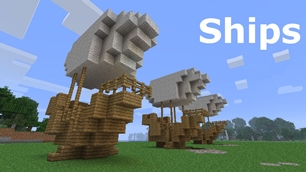
As the name of the plugin suggests, you can create your own ship and move it with just a single click.
Works with all blocks
There is a fully-fledged list where you can configure every block to react differently for the ships, including being able to add a block type to interact with Ships, detect it as a collide, and even not react at all.
Teleport to ships
There have been many requests to be able to teleport to ships for not only this plugin but others like it. This feature has been added to Ships, however, if it is something you do not wish, then you can disable to command by not adding the command.
Falling Ships
Ships will fall/sink if requirements are not met, this could be done through your own interaction such as running out of fuel, or by something else such as a TNT explosion.
Ship types
| Airship | Link |
| Ship | Link |
| Marsship | Link |
| Submarine | Link |
| Plane | Link |
| Hybridship | Coming soon |
Move the ship:
In Ships, movement is done by signs. You can see all signs here
Collide types:
| Name | ID | Description |
|---|---|---|
| Detect collide | DETECT_COLLIDE | If Ships detects this block in the way of a ship moving then the ship will not move with the error of this block being in the way |
| Material | MATERIAL | Material means that you can build a ship out of this block and the Ships block detection system will detect it as part of your ship |
| Ignore | IGNORE | If Ships detects this block in the way of a ship moving then the block will break and the ship will take its place |
Permissions
| Permission node | Description |
|---|---|
|
ships.cmd.info |
Allows the player to use the command '/ships info' |
|
ships.cmd.blockinfo |
Allows the player to use the command '/ships blockinfo' |
|
ships.cmd.shiptype.create |
Allows the player to use the command '/ships shiptype create' |
|
ships.cmd.config.set |
Allows the player to use the command '/ships config set' |
|
ships.cmd.config.view |
Allows the player to use the command '/ships config view' |
|
ships.cmd.blocklist.set |
Allows the player to use the command '/ships blocklist set' |
|
ships.cmd.blocklist.view |
Allows the player to use the command '/ships blocklist view' |
|
ships.cmd.ship.track |
Allows the player to use the command '/ships ship track' |
|
ships.cmd.ship.eot |
Allows the player to use the command '/ships ship eot' |
|
ships.cmd.ship.crew |
Allows the player to use the command '/ships ship crew' |
| ships.move.own.ships.airship | Allows a player to move own airship |
| ships.move.own.ships.watership | Allows a player to move own ship |
| ships.move.own.ships.marsship | Allows a player to move own marsship |
| ships.move.other.ships.airship | Allows a player to move anyones airship |
| ships.make.ships.airship | Allows a player to make a airship |
| ships.remove.other |
Allows a player to destroy anyones ships sign |
Developers:
Looking for a development wiki? maven/gradle dependencies? or something else relating to ships or translate core? Take a look at the getting started wiki
Comments


-

mosemister Owner
-

_ForgeUser7695435 Former Author
-
View User Profile
-
Send Message
Posted Jul 16, 2014sorry for the delay
if any of you use MoseCraftbukkitPlugins, you would have seen that it was not up to date, nether was the image showing the latest version on everything. Im working on a few plugins in the background and forgot about Ships. Anyway it is now up to date, with the latest projects on MoseCraftbukkitPlugins (and dont worry, its not staying like that for the plugin select bit).
Killing Floor testers
if anyone is happy using up some of their time to help a plugin then by all means contact me.
I am working on a few plugins i am labeling as the 'Killing Floor series" that adds the Killing Floor game features (Weld Tool, Trader, directions (I have a plan on how this one will work, no idea if it will)).
I am releasing them all separately instead of one massive plugin because i want people to be able to have the ability to use the features in their own minigame servers.
some suggestions would be
-
View User Profile
-
Send Message
Posted Jul 12, 2014SolarShip
who remembers me talking about that vessel?
I have started developing backend code that will make it work. I will be removing some vessels as well. Remember, you can see SolarShips first on MoseCraft-Ships.
back end code that needs to work before SolarShips see the light of day
^pun intended^
MoseCraft-Ships details
A lot of you dont know MoseCraft-Ships, but it is the exact same as ships (at the moment it does not work ...) but you can create your own vessels using it.
You will be able to create your own SolarShip typed vessels and they will not interfear with the main type of vessel, so you could have a SolarShip type vessel and a Sub type vessel combined. More details when closer to release
-
View User Profile
-
Send Message
Posted Jul 12, 2014Ships 4.1.0 is now waiting
Due to the amount of bugs found in Ships 3.2.3 - 4.0.2. I have labeled Ships 4.1.0 as a beta and if it does not have a lot of bugs, then i will re-class it as a release
-
View User Profile
-
Send Message
Posted Jul 12, 2014@LordAylith21
I am not aware of any Max EOT cap for any of the speeds?
If you didn't know, you can change the speed of the EOT in the config, or if you go into vessel Info folder, you can chnnge it for one vessel.
-
View User Profile
-
Send Message
Posted Jul 11, 2014Sorry for spamming this comment section lol but could you possibly make the eot speed have a higher max? Like say 25 or 30 for long sea voyages I have a massive custom map and it would be nice if the eot speed could be a bit higher
-
View User Profile
-
Send Message
Posted Jul 11, 2014Took me 4 hours but I fixed it. Its the noobyest mistakes you make that end up taking the longest to fix
-
View User Profile
-
Send Message
Posted Jul 11, 2014There was also this error in my consol 11.07 21:07:58 [Server] INFO Caused by: java.lang.IllegalStateException: Start block missed in BlockIterator
-
View User Profile
-
Send Message
Posted Jul 11, 2014For MoseMister! Hello please help me the plugin is totally broken for me it lets me create a ship like I create the sign First Line:[Ships] Second line: Ship ThirdLine my name Fourth Line: MyShip and it says "Created vessel MyShip" And no matter what it says "The ship is to big!" Even when my config says it isn't. I am currently using the basic config, but here it is anyways. Please help me I had this working at one point but had to re install it do to complications. This is literally an essential part of my server. ship: Block: RequiredPercent: 15 TheMinimumNumberOfBlocks: 30 TheMaximumNumberOfBlocks: 3000 Speed: EOTSpeed: 8 EngineSpeed: 2 BoostSpeed: 3
-
View User Profile
-
Send Message
Posted Jul 11, 2014@DukesOfHazzard
I have been working on code that supports much bigger ships. So far, no success.
-
View User Profile
-
Send Message
Posted Jul 10, 2014I know it's asking a lot, but it would be awesome if you could upgrade this plugin so that you can control much larger ships (constructed out of 100,000+ blocks). If this can be done sometime in the future, that would be awesome. -Lucky_5ive
-
View User Profile
-
Send Message
Posted Jul 9, 2014@proqress
ok, Alpha builds are unstable. Thanks for the bug report, I will look into it. But thats all i can do at the moment
@Stuart22221
sorry, but so far i have not though of any code that will do that job
-
View User Profile
-
Send Message
Posted Jul 9, 2014@MoseMister
/ships info says it is 4.1.0, i downloaded alpha v3. I'm using craftbukkit build #3098.
-
View User Profile
-
Send Message
Posted Jul 9, 2014Is there a way to make it so 1 fuel is used up once you click the sign like 5 times? Instead of having 1 fuel used when you click the sign 1 time, would setting the number of fuel taken in the config to 0.2 work?
-
View User Profile
-
Send Message
Posted Jul 9, 2014@proqress
what version of bukkit are you using?
what version of ships are you using? (you can check by using the command /ships info - if its ships 4.1, can you state what version of 4.1?)
-
View User Profile
-
Send Message
Posted Jul 9, 2014It says Out of fuel, but i have enough in furnaces, if i click to sign it spends fuel but says out of fuel and doesnt move.
-
View User Profile
-
Send Message
Posted Jul 8, 2014Im thinking of some algorithms (thinking means it probably will not work) to add sub-ID support. Meaning the materials list will be much bigger (if they work)
-
View User Profile
-
Send Message
Posted Jul 8, 2014@junior99au
im here almost every day in every daylight hour GMT+1:00, feel free to drop a comment anytime you like, i will see it. :D
-
View User Profile
-
Send Message
Posted Jul 8, 2014@MoseMister Thanks I will try that I will contact you if I need anymore help :D
-
View User Profile
-
Send Message
Posted Jul 7, 2014@junior99au
Ships 4.0.0 - 4.0.2 needs MoseCraftCore. If you use Ships 4.1 you don't need MoseCraftCore.
By bukkits rules I'm not allowed to post links however the big image at the top labled as MoseCraftCore should take you to a download link for MoseCraftCore 1.0.0.
Full release of 4.1 is coming soon, as far as I know there are no bugs (new bugs) in Ships 4.1 Alpha 0.3
-
View User Profile
-
Send Message
Posted Jul 7, 2014I have used your plugin before and I had to remove it, but now that I have tried to get it back, it say I need MoseCraftCore version 1.0.0 and I can not find this plugin also it will not create a ships folder in my plugins folder