
Ships
Ships
|
|
|
|
|
|
|
Source Code - Github |
JavaDocs |
Sponge version |
Discord channel |
Translate Core |
|---|




Looking for Dev builds?
Dev builds give off new features and bug fixes before they are officially released, however these features and bug fixes may not have been tested as much as a release on here
Old page:
I am testing this new page out. I am aware of some parts that are missing such as ship types, but please say if there is anything that you wish to see. I plan on making a FAQ's that includes common questions such as how to change ship requirements.
If you want to see the old page, it is here
Video tutorial
Ships 6 changes
Ships has gone through many changes, Ships 6 is the latest rewrite of the plugin. The latest rewrite fixes multiple bugs found in the root of previous versions of Ships.
Features
Moving ships
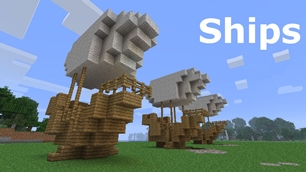
As the name of the plugin suggests, you can create your own ship and move it with just a single click.
Works with all blocks
There is a fully-fledged list where you can configure every block to react differently for the ships, including being able to add a block type to interact with Ships, detect it as a collide, and even not react at all.
Teleport to ships
There have been many requests to be able to teleport to ships for not only this plugin but others like it. This feature has been added to Ships, however, if it is something you do not wish, then you can disable to command by not adding the command.
Falling Ships
Ships will fall/sink if requirements are not met, this could be done through your own interaction such as running out of fuel, or by something else such as a TNT explosion.
Ship types
| Airship | Link |
| Ship | Link |
| Marsship | Link |
| Submarine | Link |
| Plane | Link |
| Hybridship | Coming soon |
Move the ship:
In Ships, movement is done by signs. You can see all signs here
Collide types:
| Name | ID | Description |
|---|---|---|
| Detect collide | DETECT_COLLIDE | If Ships detects this block in the way of a ship moving then the ship will not move with the error of this block being in the way |
| Material | MATERIAL | Material means that you can build a ship out of this block and the Ships block detection system will detect it as part of your ship |
| Ignore | IGNORE | If Ships detects this block in the way of a ship moving then the block will break and the ship will take its place |
Permissions
| Permission node | Description |
|---|---|
|
ships.cmd.info |
Allows the player to use the command '/ships info' |
|
ships.cmd.blockinfo |
Allows the player to use the command '/ships blockinfo' |
|
ships.cmd.shiptype.create |
Allows the player to use the command '/ships shiptype create' |
|
ships.cmd.config.set |
Allows the player to use the command '/ships config set' |
|
ships.cmd.config.view |
Allows the player to use the command '/ships config view' |
|
ships.cmd.blocklist.set |
Allows the player to use the command '/ships blocklist set' |
|
ships.cmd.blocklist.view |
Allows the player to use the command '/ships blocklist view' |
|
ships.cmd.ship.track |
Allows the player to use the command '/ships ship track' |
|
ships.cmd.ship.eot |
Allows the player to use the command '/ships ship eot' |
|
ships.cmd.ship.crew |
Allows the player to use the command '/ships ship crew' |
| ships.move.own.ships.airship | Allows a player to move own airship |
| ships.move.own.ships.watership | Allows a player to move own ship |
| ships.move.own.ships.marsship | Allows a player to move own marsship |
| ships.move.other.ships.airship | Allows a player to move anyones airship |
| ships.make.ships.airship | Allows a player to make a airship |
| ships.remove.other |
Allows a player to destroy anyones ships sign |
Developers:
Looking for a development wiki? maven/gradle dependencies? or something else relating to ships or translate core? Take a look at the getting started wiki
Comments


-

mosemister Owner
-

_ForgeUser7695435 Former Author
-
View User Profile
-
Send Message
Posted May 2, 2014@Drazhar753
just taken a look at the code. Nothing seems to be wrong with the creating of the Materials list, not sure why it did it. works fine for me
-
View User Profile
-
Send Message
Posted May 2, 2014@MoseMister
Okay thanks :)
-
View User Profile
-
Send Message
Posted May 2, 2014@MoseMister
thank you ^_^
-
View User Profile
-
Send Message
Posted May 2, 2014@Drazhar753
The materials list should create itself without the useMaterialsList being true. I'm currently at collage, when I have time, I will look at the code.
In the mean time if you create a YML file called Materials.yml and copy ans paste the following txt from the link in, it should read it.
Materials config
-
View User Profile
-
Send Message
Posted May 2, 2014@MoseMister
yes I deleted the old config and allowed 3.2.6 to make a new one. And then I stopped the server, set material list to true and it did not create it.
-
View User Profile
-
Send Message
Posted May 2, 2014@garamaru
i have reasently started on a page linked to this page that tells you what every config option does
Config.yml
-
View User Profile
-
Send Message
Posted May 2, 2014@MoseMister
ah ok thanks :D about the UseMaterialsList... i was kinda lazy searching for why the submarine didnt work and looked at all the files via an online java decompiler and looked at the class-files from the file i downloaded yesterday (because its mostly 99% of my own fault why stuff doesnt work :( )
-
View User Profile
-
Send Message
Posted May 2, 2014@Drazhar753
Hmm.. that's odd. Did you restart your config with the upgrade to 3.2.5/6 from 3.2.4?
If you didnt try restarting your main config for this plugin.
-
View User Profile
-
Send Message
Posted May 2, 2014@MoseMister
Speaking of the config, I am having trouble with the config in version 3.2.6. It will not create a material list, which I think may be the problem I've been having as to why dak oak logs, stairs and slabs are not working on Ships. I had this problem on 3.2.5 as well. I set "UseMaterialList" to true, but won't create one.
I did check the changelog for instructions on how to install these builds that use the '3.3 config' but could not find any information there.
-
View User Profile
-
Send Message
Posted May 1, 2014@garamaru
DefaultWaterLevel is a water level fix for ship based vessels.
UseDebug: its shown in the config so you can access it vie the log.txt
UseMaterialsList: yes its the thing in ShipsSettings (im guessing your reading the GitHub version ... it has improved since then)
ProtectFire: its there for servers that dont have a fire protect system ... this version stops jungle based woods from burning
i dont like uploading to a .zip file, i did have info about the config on this page.... i guess it went when i fully updated this page
-
View User Profile
-
Send Message
Posted May 1, 2014ah ok " well it would be nice if >> DefaultWaterLevel: 63 (is that the lowest block for flying ships/max-height for other ships?) >> UseDebug: false (will there be a separate file for it or will it show in the normal log?) >> UseMaterialsList: false (is that the list from ShipsSettings.class what works and what not?)
ProtectFire: true (for what is that variable? because normally firestuff is handled on most servers via pex/essentials)
would be maybe commented " and also if its possible to add another FuelAlt like the wood types(only if its easy to do with some lines)
and if theres nothing to be able to comment about in the file...how about an info.txt or so with the config explained?"
-
View User Profile
-
Send Message
Posted May 1, 2014@garamaru
Comment more stuff on the config file .... what sort of things would you like me to talk about in the config? i did say i have made 3.2.5 config as the 3.3 config, so you will just be able to boot up 3.3 and it works without restarting your config.
The method the config file gets created, means it can not have notes on it (sadly) so sorry about your point 2.
as for the non usable vessels that have been hyped up for the release of 3.3. they have been there because of the betas and pre releases of 3.3. However they are staying on because a new pre release of version 3.3 is coming out soon. i will make this page different so you can tell what vessels are inactive.
-
View User Profile
-
Send Message
Posted May 1, 2014would be nice if you could do the following:
comment more stuff on the config file :D
also the declaration which block is needed could be controlled by that file...
also if you don´t mind...please label ships like the submarine as not usable atm... i dunno if the rest works, but as far as i understand the class files, the last ships arent implemented (yet)... it´s like no vessel that could meet the requirements is found. but airship works really well :D would be nice if you label the stuff more (which one works and which one doesnt
-
View User Profile
-
Send Message
Posted May 1, 20143.2.6
due to a reasent discovery of a massive bug, i am working on 3.2.6 that should fix the bug in 3.2.5 where you can not destroy the [ships] sign. this is because it puts 2 chat colours on the 3rd line. so when you destroy your own sign it does not match your name.
sorry about this bug, i believe it will only occur if 'UsePermissions' is set to false
-
View User Profile
-
Send Message
Posted May 1, 2014@Drazhar753
i knew about the me.Mose.ShipsMaping.MapingBlock(ShipsMaping.java.188) because you are trying to move the world. its just a bit big for my plugin to handle
-
View User Profile
-
Send Message
Posted Apr 30, 2014@MoseMister
Yeah I hadn't tried putting a spawner on a ship until now. Only other bug I have run into is the
Me.Mose.Ships.ShipsMaping.MapingBlock(ShipsMaping.java:188)
When right-clicking any sign that's not part of a ship. This is still version 3.2.4.
-
View User Profile
-
Send Message
Posted Apr 30, 2014Thanks to a bug found by a user. 3.2.5 is now not stable anymore, due to the fact of some code that was in 3.3 beta 8 and above.
The bug dupes the chat colour on the sign stopping the txt matching you name. I will work my ass of fixing this problem and release a new one asap.
Betas ... For testing for bugs However if no one says anything then I can not fix
-
View User Profile
-
Send Message
Posted Apr 30, 2014@MayorMike
i was thinking of adding debugs to your other plugins (so they run normally but spam the console with messages that i create), we can then see what plugins are active at that point in time (narrow down the problem) then work out what to do from there.
i may not be there with you (in my time zone you would be on 9pm to 11pm - im not usually on mc at that time)
-
View User Profile
-
Send Message
Posted Apr 30, 2014@Drazhar753
i guessed as much, i put out pre releases of 3.2.1 asking for people to check these things. and again with my testers. i asked them to check for this sort of thing (i am one man with not much free time ... i need assistance to run this plugin by others finding the bugs).
I will see what i can do, however no promises
-
View User Profile
-
Send Message
Posted Apr 30, 2014@MoseMister
Hey Mose, it would seem spawners do not retain what mob they will spawn when the ship moves, it always goes back to being a pig spawner. : /
Using version 3.2.4, would you be able to temp fix this for this version, as you added the spawner block to the material list, but yeah it changes to a pig spawner whenever the ship moves.