
Ships
Ships
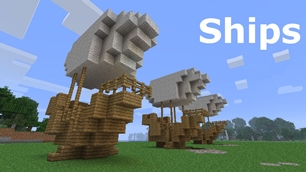
|
|
|
|
|
|
|
Source Code - Github |
JavaDocs |
Sponge version |
Discord channel |
Translate Core |
|---|




Looking for Dev builds?
Dev builds give off new features and bug fixes before they are officially released, however these features and bug fixes may not have been tested as much as a release on here
Old page:
I am testing this new page out. I am aware of some parts that are missing such as ship types, but please say if there is anything that you wish to see. I plan on making a FAQ's that includes common questions such as how to change ship requirements.
If you want to see the old page, it is here
Video tutorial
Ships 6 changes
Ships has gone through many changes, Ships 6 is the latest rewrite of the plugin. The latest rewrite fixes multiple bugs found in the root of previous versions of Ships.
Features
Moving ships
As the name of the plugin suggests, you can create your own ship and move it with just a single click.
Works with all blocks
There is a fully-fledged list where you can configure every block to react differently for the ships, including being able to add a block type to interact with Ships, detect it as a collide, and even not react at all.
Teleport to ships
There have been many requests to be able to teleport to ships for not only this plugin but others like it. This feature has been added to Ships, however, if it is something you do not wish, then you can disable to command by not adding the command.
Falling Ships
Ships will fall/sink if requirements are not met, this could be done through your own interaction such as running out of fuel, or by something else such as a TNT explosion.
Ship types
| Airship | Link |
| Ship | Link |
| Marsship | Link |
| Submarine | Link |
| Plane | Link |
| Hybridship | Coming soon |
Move the ship:
In Ships, movement is done by signs. You can see all signs here
Collide types:
| Name | ID | Description |
|---|---|---|
| Detect collide | DETECT_COLLIDE | If Ships detects this block in the way of a ship moving then the ship will not move with the error of this block being in the way |
| Material | MATERIAL | Material means that you can build a ship out of this block and the Ships block detection system will detect it as part of your ship |
| Ignore | IGNORE | If Ships detects this block in the way of a ship moving then the block will break and the ship will take its place |
Permissions
| Permission node | Description |
|---|---|
|
ships.cmd.info |
Allows the player to use the command '/ships info' |
|
ships.cmd.blockinfo |
Allows the player to use the command '/ships blockinfo' |
|
ships.cmd.shiptype.create |
Allows the player to use the command '/ships shiptype create' |
|
ships.cmd.config.set |
Allows the player to use the command '/ships config set' |
|
ships.cmd.config.view |
Allows the player to use the command '/ships config view' |
|
ships.cmd.blocklist.set |
Allows the player to use the command '/ships blocklist set' |
|
ships.cmd.blocklist.view |
Allows the player to use the command '/ships blocklist view' |
|
ships.cmd.ship.track |
Allows the player to use the command '/ships ship track' |
|
ships.cmd.ship.eot |
Allows the player to use the command '/ships ship eot' |
|
ships.cmd.ship.crew |
Allows the player to use the command '/ships ship crew' |
| ships.move.own.ships.airship | Allows a player to move own airship |
| ships.move.own.ships.watership | Allows a player to move own ship |
| ships.move.own.ships.marsship | Allows a player to move own marsship |
| ships.move.other.ships.airship | Allows a player to move anyones airship |
| ships.make.ships.airship | Allows a player to make a airship |
| ships.remove.other |
Allows a player to destroy anyones ships sign |
Developers:
Looking for a development wiki? maven/gradle dependencies? or something else relating to ships or translate core? Take a look at the getting started wiki
Comments


-

mosemister Owner
-

_ForgeUser7695435 Former Author
-
View User Profile
-
Send Message
Posted Feb 14, 2014@MoseMister
i dont know wat happend but i can fly now!
-
View User Profile
-
Send Message
Posted Feb 14, 2014dispenser ... dont like my code but other blocks do ...
the code i used to try to make dispenser items stay in ... does not work with the dispenser ... but it works with the dropper .... so recycling code for you ;-)
-
View User Profile
-
Send Message
Posted Feb 13, 2014@birdman51
will do
-
View User Profile
-
Send Message
Posted Feb 13, 2014@MoseMister
Okay, thanks, let us know when you fix it!
-
View User Profile
-
Send Message
Posted Feb 13, 2014@Rickolo
Can you send me the crash error
-
View User Profile
-
Send Message
Posted Feb 13, 2014@birdman51
Hey, the dispenser code is there, but its not being read my java, i am trying to fix it, it should not happen with the chests
-
View User Profile
-
Send Message
Posted Feb 13, 2014@MoseMister
if i do that the whole plugin crashes
-
View User Profile
-
Send Message
Posted Feb 13, 2014Amazing plugin! But when my ship/airship/marsship/plane moves it drops everything in its dispensers. (and i think chests too.)
This really annoys a lot of people on my server cause they wanna build cannons on their ships.
Can you please fix this?
-
View User Profile
-
Send Message
Posted Feb 12, 2014@MoseMister
That's ok, understandable. Keep up the good work, appreciate all your doing :D.
-
View User Profile
-
Send Message
Posted Feb 12, 2014@MadAdaMada
XD one vessel at a time guys
motorboat is comeing in the next update.
then we have submarines, lavaship, steamboats, solarships (beta and full) to go.
you are the first to suggest steamboats, i like the idea, but im busy working on advancedships and ships 3.3 atm. ill try to get it in 3.3 but if not (due to timing issues) ill try to get it in the next update after 3.3.
(before anyone complains about their vessels not coming out ... steamboats would be simple to program in. atm subs are either flying or flooding, solarships is eating fuel during day (the beta at least) and lavaship will not move on lava at all)
-
View User Profile
-
Send Message
Posted Feb 12, 2014Great plugin, I have been using it for a long time on a number of servers.
One suggestion I have is to add a steamboat. And I know this has probably been suggested before.
Basically a boat but with a burner involved, provides extra speed.
Nothing too fancy. Or, if there is a way that we can configure this ourselves I would highly appreciate someone telling me how! :)
-
View User Profile
-
Send Message
Posted Feb 12, 2014@Drazhar753
i am trying to make it so you can have a lot of the sub out the water (like a normal ship) but then it can sink underwater.
when i say this people will think "just add the altitude sign to ships and call it a sub" ... in theory ... yes that would work, but what a lot of people dont realise is the air block and the water blocks do not move at all when moving a vessel. so moving down keeps the waterheight and floods the sub until you move back up.
as a lot of you know, the normal ship can already act as a sub, it can move around without flooding, thats because of some code that will not allow me to use it again :( ... this is why no lavaship has come along and no sub either.
thanks for understanding that the sub is more complex then i first though, i am trying more things, however i keep craftbukkit continues updates as a priority to updating the plugin with more vessels.
-
View User Profile
-
Send Message
Posted Feb 12, 2014@MoseMister
hey man, I know you haven't finished submarines yet I just wanted to ask if you could try make it so the top of the submarine can poke out of the water, as most submarines have parascopes etc. Just thought I'd mention incase you hadn't thought of it, thanks :).
http://s1101.photobucket.com/user/Drazhar202/media/2014-02-13_034552.png.html?sort=3&o=0 - picture of my sub
-
View User Profile
-
Send Message
Posted Feb 12, 2014@Rickolo
works fine for me when i change min to 50...
idk what to suggest
-
View User Profile
-
Send Message
Posted Feb 12, 2014@MoseMister this one is witouth the error sorry for bad english
-
View User Profile
-
Send Message
Posted Feb 12, 2014@Rickolo
send your whole config over (through paste (top bukkit banner) preferably)
-
View User Profile
-
Send Message
Posted Feb 12, 2014@MoseMister
i mean is
i try to change the minimum size to 50 but i get an error
-
View User Profile
-
Send Message
Posted Feb 12, 2014@charlza
kk
-
View User Profile
-
Send Message
Posted Feb 12, 2014@MoseMister
I found the problem! During my last round of plugin upgrades and testing I removed Essentials Protect. I lost my fire protection when I didn't put Essentials Protect back into the plugin folder. doh!
-
View User Profile
-
Send Message
Posted Feb 12, 2014craftbukkit 1.7.2 - 0.3 beta build
i am giving the all clear for the craftbukkit 1.7.2 R0.3 Beta Build
i have tested it on the latest dev build of 3.3 that has no change to the bootup code or the moving code.
craftbukkit 1.7.2 - 0.4 dev build
all clear for the 3022 build of craftbukkit (craftbukkit 1.7.2 dev build 0.4 (2nd dev build))