
ServerMotd

ServerMotd allows you to change the motd of the server-list and the message to join the server. You can use all coloring and formatting codes.
Features
- This plugin is very easy to use!
- Change your MOTD in client server list
- Colorize your messages
- Change your welcome message
- Support Permissions
- Support formatting code
- Customize the plugin with commands or changing config.yml
- You can change the messages while the server runs
- Set the join message
- Set the left message
- Use the variable %player to name an user (f.e -> %player has joined the game)
- Disable the motd message if you are using other plugin (in the config)
- Set the server-icon.png of the server while it is running
- Display the balance and prefix of the player
- Display the bukkit's version
- Multi-line (line-break) in external motd message (server-list message)
Installation
- Download the plugin
- Drag the .jar file in your server's plugin folder
- Reload your server (If it's necesary)
- Ready!
Commands
- /motd (View motd)
- /setmod <message> (Set the welcome message)
- /externalmotd <message> (Set server-list motd)
- /motdjoin (set the join message)
- /motdleft (set the left message)
- /motd reload (reload the config.yml)
- /icon (set the icon of the server) (Example: /icon mypicture.png [This set a file called icono.png located at the main folder of the server, having a size of 64x64 to works correctly]
- Also, you can use this: /sm, /em, /mj and /ml (abreviatures)
Permissions
- motd.* (default: ops)
- motd.check (Check the motd) (default: all)
- motd.reload (reload the config.yml)
- motd.set (Permissions to use /setmotd, /externalmotd, /motdjoin, /motdleft)
- icon.set (Permission to use /icon command and receive notifications about possible errors with the image)
Variables
- %player (The server changes this for the player names)
- %newline (It sets a new line)
- %balance (show the player's balance) (requires vault!)
- %prefix (show the player's prefix) (requires vault!)
- %version (Display the bukkit's version)
- more soon (You can suggest variables in the comments)
Coloring and Formatting codes
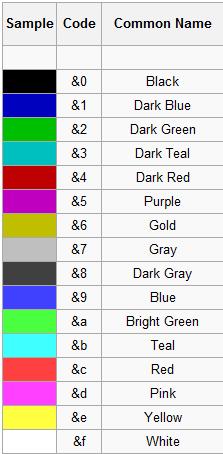
- &k Random
- &l Bold
- &m
Strike - &n Underlined
- &o Italic
- &r Reset
Configuration
- Config version: 1.3
- created by: aledanmar
- If you have other motd-server, set "enablemotd" to false, and the motd message will be removed.
- enablemotd: true
- motd:
- system: '&aServer list message'
- ingame: 'Default motd when you join the game, Change it in the config or with /setmotd <motd>'
- join: '%player joined the game'
- left: '%player left the game'
- icon:
- set: false
- name: server.png
You can change the messages in the config.yml or using commands
Known bugs
- None
Screenshots



Other languages
Bugs and Feature Requests
- Use Tickets for issues, bugs or feature requests
- Support in english and spanish!
- Plugin tested on 1.2.5, 1.3.2, 1.4.7, 1.5.2, 1.6.2, 1.7.4
Donate
Help support development of ServerMotd: Donate
Comments


%2526business%253daledanmar%2540gmail.com%2526bn%253dPP-DonationsBF%253abtn_donateCC_LG.gif%253aNonHosted%2526cancel_return%253dhttp%253a%252f%252fdev.bukkit.org%252fbukkit-plugins%252fservermotd%252f%2526lc%253dUS%2526item_name%253dServerMotd%2b(from%2bBukkit.org)%2526cmd%253d_donations%2526rm%253d1%2526no_shipping%253d1%2526currency_code%253dUSD)
-

_ForgeUser9660068 Owner
-
View User Profile
-
Send Message
Posted Nov 26, 2017I get a error for some reason..
https://pastebin.com/rM7aVcmu
-
View User Profile
-
Send Message
Posted Aug 5, 2017a variable to show is level for askyblock
-
View User Profile
-
Send Message
Posted Mar 27, 2015Hi :- ) Do you know when this plugin will update to 1.8?
Thanks!
-
View User Profile
-
Send Message
Posted Jan 21, 2015Agreed. The %player has broken in 1.8.
-
View User Profile
-
Send Message
Posted Jan 19, 2015Please add %player in the server-list, because it didn't work
-
View User Profile
-
Send Message
Posted Dec 15, 2014@razorrider7
Install vault!
-
View User Profile
-
Send Message
Posted Dec 15, 2014@Fydi
Asegúrese de que tiene bóveda
-
View User Profile
-
Send Message
Posted Dec 15, 2014@licni
Its %newline not newline xD
-
View User Profile
-
Send Message
Posted Dec 15, 2014@EryDayGames
Install vault
-
View User Profile
-
Send Message
Posted Dec 13, 2014Cant get %newline to work :/
Its looks like this:
[> ': CheesePrison :' <]ewline [News] Merry Christmas!-
View User Profile
-
Send Message
Posted Nov 18, 2014For me not working &newline
-
View User Profile
-
Send Message
Posted Nov 15, 2014Las variables no funcionan en el in-game motd!
-
View User Profile
-
Send Message
Posted Oct 19, 2014&k Random &l Bold &m Strike &n Underlined &o Italic &r Reset don't work for me...
-
View User Profile
-
Send Message
Posted Sep 22, 2014FINALLY! A simple motd plugin which doesn't have all these crazy other features you can't disable. Searched for a while to find this. Good work. My advice for future updates: Don't make any features that can't be disabled
-
View User Profile
-
Send Message
Posted Aug 20, 2014@glassbillen I have added the variable %version @falsechicken You can use the new version ServerMotd 1.4 with the command: /motd reload @Biff627 I have added the variables %balance and %prefix
-
View User Profile
-
Send Message
Posted Aug 6, 2014I may be wrong this may already be included, but can I make it so that when different people join they all have there own Motd.
-
View User Profile
-
Send Message
Posted Jul 26, 2014varibles: balance of player and their prefix/group
-
View User Profile
-
Send Message
Posted Jul 26, 2014variables: the last player was online %playerlast
-
View User Profile
-
Send Message
Posted Jul 11, 2014Is there a way you can make the %player variable to work on the server page, right before login in to the server?
-
View User Profile
-
Send Message
Posted Jun 24, 2014Make it so you can center the External MOTD so its in the middle of the screen please and thank you :D