Server GUI
Server GUI
Tired of typing boring commands?
Try the all new original Server GUI plugin. This plugin is a time-saving easy-to-use Bukkit essential!
What is Server GUI?
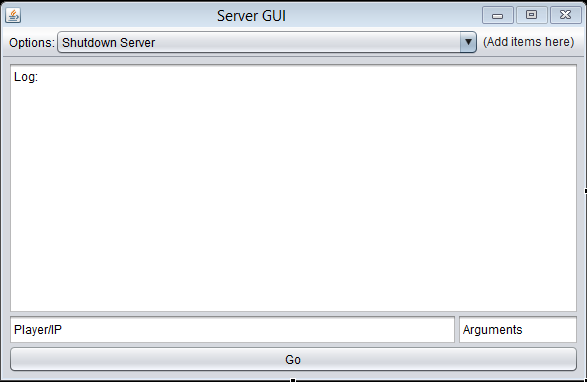
Server GUI is an awesome new plugin that allows server admins to launch a simple GUI (graphical user interface). Instead of typing the usual /kick playername or /ban 2.30.93.13 or anything like that, Server GUI allows you to just select a function from a drop down list in a simple window as shown in the picture above! Server GUI also includes an OPing GUI window which is a very simple window which allows you to set
player.setOp(true/false);
quickly without typing at all!
How do I user Server GUI?
Using Server GUI is a simple process... All it includes is typing /admingui (or whatever GUI you want to open - more coming soon - commands listed below with permissions). After you have typed this, all your essential commands will now be in one place! Now you can just select an option from the ComboBox and type the player name (or IP if you are banning an IP) and then in the text field that contains the word "Arguments" type the arguments of your command option. For example, if you were banning a player, you would type the reason for banning them in the "Arguments" box... It would be the same with kicking somebody from your server.
Features and Command Info
Below is a list of Server GUI's basic functionality and information about commands:
1. An admin GUI window:
- Command: /servergui
- Permission: servergui.base
- Usage: /servergui
- Description: Displays simple information about the Server GUI commands and descriptions.
2. An admin GUI window:
- Command: /admingui
- Permission: servergui.admingui
- Usage: /admingui
- Description: Opens a simple GUI that includes all the administrative essentials for your Bukkit server including:
- Shutdown Server - Stops the server and returns the "Server Closed" message to players.
- Reload Server - Reloads all the server Plugins and configuration (/reload)
- Ban IP - Bans the IP specified in the Player/IP text field
- UnBan IP - UnBans the IP specified in the Player/IP text field
- Kick Player - Kicks the player specified in the Player/IP text field
- Ignite Player - Sets the player specified in the Player/IP text field alite
- Blow up Player - Blows up the player specified in the Player/IP text field with a power of 4F (default for tnt)
- Ban Player - Bans the player specified in the Player/IP rexr field with the reason specified in the "Arguments" text field
- UnBan Player - UnBans the player specified in the Player/IP text field
- Kill all online players - Kills every online player regardless of their gamemode
- Kick all online players - Kicks every player on the server with the reason specified in the "Arguments" Box
3. An Server OP GUI window:
- Command: /opgui
- Permission: servergui.opgui
- Usage: /opgui
- Description: Opens a very simple GUI that can easily op/deop players instantly!
Permission Overview:
- servergui.base - allows you to view the commands available and the credits of Server GUI
- servergui.admingui - allows you to open the admin GUI as described above
- servergui.opgui - allows you to open the op GUI for making players OP easily
Screenshots

A screenshot of Server Gui's Main Window

A screenshot of some of Server Gui's Code
Credits and Info
Overall, Server GUI is a time-saving and simple plugin that could improve your server instantly!
Created by Rodit (Rodit9 mc username)
using java eclipse and jd-gui!
Thanks for viewing! Don't forget to download!
Comments

-

_ForgeUser11809249 Owner
-
View User Profile
-
Send Message
Posted Sep 21, 2013This seems useful. Can't wait for it to come out!