RpgEssentials
RpgEssentials 2.0 DEV


Wiki
Screenshots
Textures
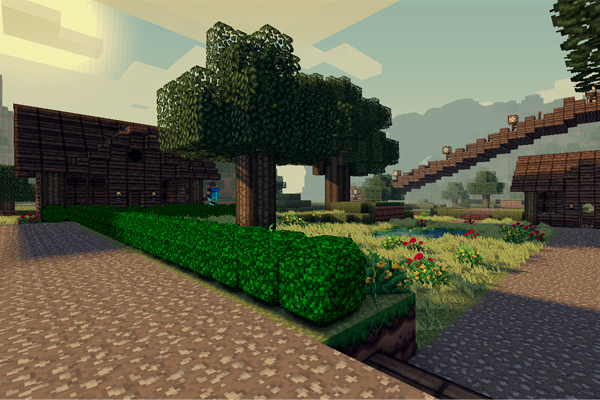
Textures are hosted at http:dl.Lynxdragon.com, Simply click the 'RPG Essentials' Category, Then click texturepack.zip from the drop-down menu. And your download will begin shortly!
Help pages
(Please read those before posting problems)
Videos
Download
Thanks to
- Lynxdragon for hosting the files
- Samkio for the anvil design
- Kaynide for some designs
Change log
Other


Please donate if you appreciate my work :D

Comments


-

_ForgeUser7498763 Owner
-
_ForgeUser7474909 Documenter
-
_ForgeUser9245383 Tester
-
_ForgeUser9646868 Author
-

Frinckles Artist
-
View User Profile
-
Send Message
Posted Jun 25, 2012just to let everyone know (I maybe not everyone) was able to get the Generator to work using multiverse and spoutplugin build 1212 (/mv create <worldname> normal -g RpgEssentials) thanks for all the work and Nice Job!!!!
-
View User Profile
-
Send Message
Posted Jun 25, 2012@angelofdev
thanx for replying ;)
-
View User Profile
-
Send Message
Posted Jun 25, 20121.3 will come out as soon as:
- I've done the split/fixed all bugs (split 87.5%) ((testing/fixing) bugs 12.5%)
- Fixed custom stores (0%)
- Added one more questing option (0%)
- Samkio tested the plugin (0%)
- Samkio made an updated video (0%)
- @scruffy made the wiki, after I've send him the features list (0%)
-
View User Profile
-
Send Message
Posted Jun 25, 2012Ok thanks! i was looking at the FAQ before. most have missed it!
-
View User Profile
-
Send Message
Posted Jun 25, 2012@ Dogdark123
As per FAQ right above yes.
In the modules.yml set texturepack to false
-
View User Profile
-
Send Message
Posted Jun 25, 2012Is there a way to turn the default texturepack off?
-
View User Profile
-
Send Message
Posted Jun 25, 2012Im pretty much in a holding pattern until 1.3 comes out.. I had tried 1.2 previously and it had too many bugs for my users to handle.. They seemed to get better.. but the generator was kinda a big issue. I love the mod though.. I cant wait to see 1.3.. At that point i hope to be able to start developing my RPG server.
Keep up the great work guys.
-
View User Profile
-
Send Message
Posted Jun 25, 2012@oldjollysanta
1.3 Dev version is not available currently.
@nicknow123
Update your spoutplugin to #1212+
Update your spoutcraft client to Latest version (before you login to the client)
@Lunthus
It's not possible with RpgEssentials atm.
-
View User Profile
-
Send Message
Posted Jun 25, 2012@Danioxo
Custom blocks are only possible with spoutplugin & spoutcraft.
-
View User Profile
-
Send Message
Posted Jun 25, 2012Is it possible to add that bush from this plugin to my server without spoutcraft? Bush plugin or some tutorial how and what to add to server and client? Can someone make it?
Anyway great plugin. Nice job man!
-
View User Profile
-
Send Message
Posted Jun 24, 2012Is the 1.3 Dev version down? I've tried to download it over the past few days and it just says file can not be found
-
View User Profile
-
Send Message
Posted Jun 24, 2012I'm probably doing something royally wrong, as this is my first time dealing with spout, but whenever I try to break a block I crash, and all the ./rpg commands bring up internal errors. In my console the list of errors was way too long to list in one post, all of them involving spout. Do I have a conflicting plugin? I have the latest dev version of Spoutcraft, Factions, WorldGuard, iconomy, and Vault.
-
View User Profile
-
Send Message
Posted Jun 20, 2012Really amazing plugin! I have a quick question though, is there a way to make an NPC created aggro on sight or attack a player on sights? If so, how?
-
View User Profile
-
Send Message
Posted Jun 20, 2012@duckdoom5
ok thanks for the quick reply! great job on the plugin :)
-
View User Profile
-
Send Message
Posted Jun 20, 2012My Server is about to go live with your plugin! Currently, I am working out populating the map with npc's and quests, etc.... This may be the best RPG plugin I've seen yet. Quick question, what texture pack are you using? I though I saw it on a post somewhere, but I can't recall the name.
Edit: Nevermind, I found it :P (xxmrpiggycompanyxx) I'll let you know when I'm up and running for production. (If you're interested in seeing it now, PM me).
-
View User Profile
-
Send Message
Posted Jun 20, 2012@duckdoom5
Ok thats sounds good. I am opening my server in about 2 to 3 weeks but i want to make a good start, so i could use a different plugin untill u have finished most of this plugin. I hope to see this plugin finished as soon as possible because it looks awsome ;)
And btw my help for stuff is still open ;) i have programming skills only havent done minecraft programming yet(for everything there is a first time ;))
With kind Regards Justberry
-
View User Profile
-
Send Message
Posted Jun 20, 2012@gotheredsox
You can fix the bushes by editing the block base in the blocks.yml.
The generator does not work atm, it will give you errors when you got it working. In the next release I will add a proper explaination on how to use the generator.
-
View User Profile
-
Send Message
Posted Jun 20, 2012hello i have 2 problems with the plugin. im using the latest version of the plugin and the version of spout that is required. when i place a bush u can see under it in caves and stuff (basically a small beta hole) which is a problem cause people can cheat to find dungeons, ores, etc. my second problem is that when i use the generator command it doesnt generate the world. ive tried it 4 times to make sure that it wasnt just a typo by me. if you know how to fix these in any way please let me know. other than that the plugin looks great ;)!
-
View User Profile
-
Send Message
Posted Jun 19, 2012@Atspulgs
Then what is that what you are looking for. Maybe I can add it
-
View User Profile
-
Send Message
Posted Jun 19, 2012@justberry
I will check out that error in a second and give you the sollution.
Yes, this will be possible in the future.
You can use skillpoints to increase your level.
I'm currently working on the official Rpge server, this means a lot of new and good stuff will be added in the up comming releases, this will also mean the updates will be a bit slower. For example: becuase of my server I tought of the idea to add restrictions to regions, you can only enter this region when > min level & < max level, you can only enter when finished quest... (Quest id). This will also be possible for leaving. Also I've added tp, when entering the region, you will be teleported to X,Y,Z