Roleplay Engine
RPEngine is the solution for your roleplay server. It manages everything from chat to player cards, nations, races and more
Dependencies:
!Without these plugins installed RPEngine won't work!
- ProtocolLib (Only for versions lower than 4.0.0)
- NametagEdit (Only for versions lower than 4.0.0)
- Vault
Some functions of the RPEngine
Chat
RPEngine has a fully integrated chat system with 2 chat channels, OOC (Out of Character) and RP (RolePlay). The OOC chat is global while RP chat is set to go a configurable distance (default 35 blocks). The chat system is also compatible with permission plugins like permissions ex and shows player prefixes and suffixes in the OOC chat
The RP chat has a few formatting tricks:
Emotes For expressing all of your character's actions! Simply use the * symbol in front of your action. For example: *walked in a circle around the flowers. Shows up as George walked in a circle around the flowers
This uses your character's name as defined in the character card. If you use quotations it'll color the text white. This helps detonate speech.

OOC in the RP chat Sometimes you need to tell the people you're rping with something, out of character. But there is no need for the whole server to see your message. So you send your message in the rp chat. Put (( in front of your message and it will turn grey so people know it's out of character

Character Cards
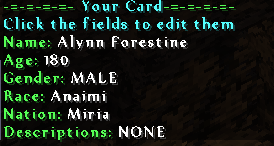
Used for displaying information about your character. Use /card to view your cards. You can either /card [value] to set values or you can directly click on the text that pops up. Since the plugin sends you json messages instead of plain text messages you can interact with the chat, so instead of remembering all the commands to edit your card you can click on the values to edit them
Birds
Birds are a way of sending long distance messages in roleplay. It wouldn't be realistic for your message to arrive instantly at the recipient, so the bird is a message that takes time to arrive to it's destination. The amount of time a bird takes depends on the distance between the two players and the configured speed of the birds (default: 20 blocks/s)

Rolls
Do you want to let chance decide what happens next to your character? How about a roll. It gives you a random number between 1 and the max you set with /roll [maxRoll]

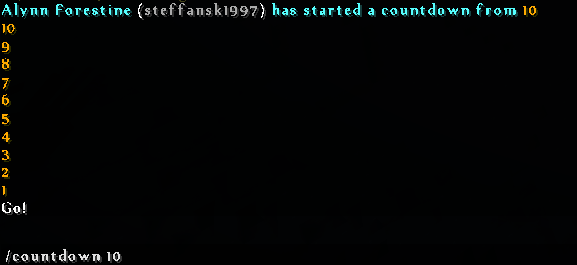
Countdown The countdown is something players can use before they start their rp or pvp battle.
Dev Builds - Not recommended for use on servers. We'll release build that are stable and meant for your server on this bukkit page
 Jenkins
Commands
- /card opens: your card
- /card name [name]: Change your rp name
- /card age [age]: Change your characters age
- /card gender [male/female]: Set your characters gender
- /card race [race]: Set your characters race (races are defined in the config)
- /card nation [nation]: Set your character nation (nations are defined in the config)
- /card desc [description]: Add a decription about your character
- /rp: Switch to the rp chat
- /ooc: Switch to the ooc chat
- /toggleooc: Disable or enable the ooc chat
- /whisper [message]: whisper something in rp (smaller range)
- /shout [message]: shout something in rp (bigger range)
- /bird [player] [message]: send a bird to a player
- /roll [max]: Roll the dice
- /countdown [startNumber]: start a countdown from [startNumber] to 1
- /spawnpoint: teleport to your own nations spawnpoint (require rpengine.spawnpoint.own)
- /spawnpoint [nation]: teleport to other nations spawnpoints (requires rpengine.spawnpoint.others)
- /spawnpoint set [nation]: set a nations spawnpoint (require rpengine.spawnpoint.own or rpengine.spawnpoint.all)
Permissions
rpengine.spawnpoint.set.own:
    description: Allows you to your own nations spawnpoint
  rpengine.spawnpoint.set.all:
    description: Allows you to set the spawnpoint for all nations
  rpengine.spawnpoint.own:
    description: Allows teleport to own nations spawnpoint
  rpengine.spawnpoint.others:
    description: Allows teleport to other nations
Config
#Database type, either sqlite or mysql
databasetype: sqlite
table-prefix: rpen_

#MySQL Connection settings, only needed when databasetype is set to mysql
mysql:
  host: localhost
  user: root
  password: 1234
  database: minecraft
  port: 3306

#Debug
debug: false

#ChatSettings
chatEnabled: true
rpRange: 35
whisperRange: 5
shoutRange: 50
logOOC: true
logRP: false

#MaxAge for if nothing is defined at the race:
MaxAge: 75
#Races
Races:
  Human:
    Color: BLUE
    MaxAge: 150
    Plural: Humans
#Nations
Nations:
  Amsterdam:
    spawnX: 52
    spawnY: 66
    spawnZ: 4
    spawnYaw: 0
    spawnPitch: 0
    spawnWorld: world

# Speed in block per second for birds
speed: 20

#Max for countdown and rolls
maxRoll: 100
maxCountdown: 20

#The cooldown in-between card changes in seconds
cardCooldown: 600

#Player health (20 is one full row of hearts and the default value)
playerHealth: 40

# What language messages are sent in
language: en_us
Comments


-

Forge_User_49511134 Owner
-
_ForgeUser10293630 Contributor
-
View User Profile
-
Send Message
Posted Jul 24, 2020I am fairly new to how plugins work in MC servers so I don't really know how most of this stuff works, but every time I try to run the commands, I get the error of "An internal error occurred while attempting to perform this command." The only commands that work successfully are the RP and OOC commands. I would like some help as to how to fix this, as I don't know how to do it myself. If anyone has any advice or ideas, please let me know.
-
View User Profile
-
Send Message
Posted May 25, 2020Is there some way someone can post a format for more than 1 race? I made my races in the same format, but they wont appear
-
View User Profile
-
Send Message
Posted Apr 22, 2020What languages are available?
-
View User Profile
-
Send Message
Posted Jan 8, 2020This is the best one-stop solution for any roleplay server.
-
View User Profile
-
Send Message
Posted Jul 13, 2019I attempted a line similar to this, but when entering the server, the /card command won't run.
#Races
Races:
..
Northman:
Color: BLUE
MaxAge: 120
Plural: Northmen
-
View User Profile
-
Send Message
Posted Jul 9, 2019I can confirm that this works with 1.14.3
-
View User Profile
-
Send Message
Posted Mar 28, 2019How do you add races I tried the config thingy but when i restart the server it doesn't come up
-
View User Profile
-
Send Message
Posted Jul 9, 2019In reply to mioea002:
I added a race similar to this. Maybe something like it will work for you. Just remember to indent properly and keep a similar format to the races above or below the race you're adding.
-
View User Profile
-
Send Message
Posted Jul 22, 2018Hey , is this mod only bukkit , or will it work with sponge ? Thanks you !
-
View User Profile
-
Send Message
Posted Jun 10, 2018Is there a way to disable nations?
-
View User Profile
-
Send Message
Posted May 12, 2018How do you edit the OOC chat to not show the following:
"[OOC] [OWNER] [OWNER] (playername)" ?
-
View User Profile
-
Send Message
Posted Jul 9, 2019In reply to TheDragonsRoost:
You can use other chat plugins as well as Essentials. Just keep in mind that this plugin is probably not compatible with EssentialsChat. I have not tested compatibility, but since this one works on the latest version of minecraft (with no changes) it should be fine to use with the base essentials plugin.
-
View User Profile
-
Send Message
Posted Oct 15, 2017Are really birds the only way of communication? I want to do a massive RP server that is somewhat on the Modern Era (Or I would say better a mix of modern era with some industrial revolution characteristics) So why cant there be a Mobile Phone system? Or just wall phones
-
View User Profile
-
Send Message
Posted Dec 19, 2016Hey, is this mod compatible in any way without MySQL? As I am completely incapable of installing MySQL.
-
View User Profile
-
Send Message
Posted Nov 19, 2016It seems like a lovely plugin. Though when I try to type in the commands stated on my server, it says "An internal server error occurred when attempting to perform this command." - I have installed all the necessary plugins, but it still won't work. Any way to solve this?
EDIT, I did not read it all. Sorry for the inconvenience.
-
View User Profile
-
Send Message
Posted Nov 26, 2016I got the same problem. How did you fix it?
Never mind, MySQL settings just fixed itself right now.
-
View User Profile
-
Send Message
Posted Nov 12, 2016Hello I have a problem with the loading of your plugin on my little dedicated server running on Spigot R01 for 1.10. I tried with all the three last versions of your plugin, same problem. Tried alot of things. The problem seems caused by MySQL
[19:56:18] [Craft Scheduler Thread - 4/WARN]: com.mysql.jdbc.exceptions.jdbc4.CommunicationsException: Communications link failure The last packet sent successfully to the server was 0 milliseconds ago. The driver has not received any packets from the server.
The rpengine command works perfectly but all the other command trigers An internal error occured while attempting to perform this command
[Server thread/ERROR]: null For Server console side
http://pastebin.com/kxMj2dFH
I'm not very good with MySQL and i don't understand where i messed up.
-
View User Profile
-
Send Message
Posted Nov 11, 2016Hello http://pastebin.com/00nPEyyn I'm not sure what I'm doing wrong here, I have vault. On Paperspigot.
EDIT: Hello, did some experiments of my own with 4.3.7 Release on normal spigot aparently iConomy (Spigot Remake) was conflicting with the plugin. Using gringots instead, works well.
-
View User Profile
-
Send Message
Posted Nov 4, 2016@ProGamerX333
Contact me on skype, steffan.venema or steffansk1997
-
View User Profile
-
Send Message
Posted Nov 3, 2016Actually, Spigot didn't help. It couldn't load plugin, cause of "invalid plugin.yml". If you would make your plugin compatible with Bukkit, then I can even buy it.