Remote Server Management Tool
Remote Server Management Tool V2
What does this plugin do?
When installing this plugin onto your Minecraft Bukkit Server, it will create an additional (invisible) communication server. With the help of the management tool, you can manage your Minecraft Server in REALTIME!
Are there any special requirements?
Yes, if you want to access your server from a different computer, you will need to portforward correctly.
Specifications (and how-to-use)
- You need to know your server IP
- The computer where the minecraft is running on, has to be portforwarded to a port of your liking.
And finally, all you have to do is add this plugin into your plugins folder, run your server, and then if you portforwarded correctly, you can access your server at any time, from anywhere with the application (link coming soon).
Features
- world time editing
- chat
- player management
- weather management
- plugin management
- server details overview
Everything that is related to this plugin, is managed (and can be edited) through the tool. The tool has a console which shows everything the server console shows.
Commands
There are no available commands for this plugin. However, with the tool you can send EVERY command of EVERY plugin on your server.
Permissions
You may define accounts in the server which you can configure to be able to manage specific things in the tool. Possibly I will try to hook the account system into the actual minecraft account system but I'm not even sure if this is possible.
Any ideas are welcome!
Status
V2 is in development! Due to the way Bukkit works (and I don't want to modify each bukkit update) I cannot remotely launch or shutdown bukkit servers. Sorry. (It is possible but only with a huuuuge workaround)
New features:
- (CANCELLED) Encapsulated mechanics
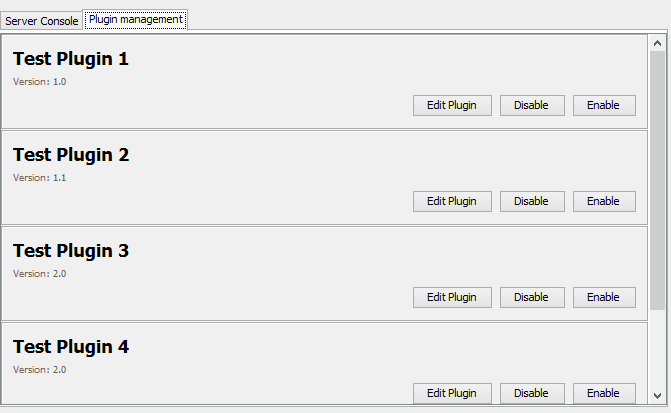
- Plugin management
- More server information
Screenshot: 
Another note: To make sure fixing bugs and errors goes most efficiently, please use the ticket system to create a ticket for the bug you witnessed. This allows me to have a clear view over the plugin's status.
Comments

-

_ForgeUser10175293 Owner
-
_ForgeUser14243980 Author
-
View User Profile
-
Send Message
Posted Mar 5, 2013This is awesome i just did all the portforwarding and stuff, went to the web tool and it works.
Thank you for your time and this is a well done console.
I can't wait till full verison. Can you tell us how much time it is going to take u more aproximately?
-
View User Profile
-
Send Message
Posted Mar 4, 2013sun.plugin2.applet.Plugin2ClassLoader.loadClass0(Plugin2ClassLoader.java:249) at sun.plugin2.applet.Plugin2ClassLoader.loadClass(Plugin2ClassLoader.java:179) at sun.plugin2.applet.Plugin2ClassLoader.loadClass(Plugin2ClassLoader.java:160) at java.lang.ClassLoader.loadClass(ClassLoader.java:247) at sun.plugin2.applet.Plugin2ClassLoader.loadCode(Plugin2ClassLoader.java:678) at sun.plugin2.applet.Plugin2Manager.createApplet(Plugin2Manager.java:3045) at sun.plugin2.applet.Plugin2Manager$AppletExecutionRunnable.run(Plugin2Manager.java:1497) at java.lang.Thread.run(Thread.java:680) Exception: java.lang.UnsupportedClassVersionError: com/codiction/web/App : Unsupported major.minor version 51.0
Im on a Mac, does that have anything to do with this error. Btw, my friend lives in a different state than me. Can i still access the soon to be Console that you are making?
-
View User Profile
-
Send Message
Posted Mar 3, 2013@Datswatshesaid
That is strange.... Everything is java-based, internet explorer should not affect this. The player list gets cleared every time it gets an update, to be filled again with all the names.
For the console, I am aware that it is not working, this is not a full version. I just wanted to give the people an idea of what they can expect.
-
View User Profile
-
Send Message
Posted Mar 3, 2013This works great! Although there is a couple of bugs like player names appear more than once in the Player Management Tab, and also there seems to be nothing showing up in the Server Console under the Server Management Tab. I'm using Internet Explorer by the way maybe that's the problem.
-
View User Profile
-
Send Message
Posted Mar 3, 2013@TanveerGT5
More than a console. However with the introductive version the "console" function is not enabled. but in the next version there will be full console view with all the commands.
And maybe, in the future I might make a android app. But this is currently not planned.
-
View User Profile
-
Send Message
Posted Mar 3, 2013this is console basically? any android apps?
-
View User Profile
-
Send Message
Posted Mar 3, 2013@storm345
Hello, I am sorry for the inconvenience. The "bla" means that the applet didn't load successfully. The password is stored in the "config.yml" file in your plugin folder. To get the applet loaded, try using the latest version of firefox with a java 1.7 runtime JRE installed.
I chose the license "all rights reserved" meaning the source code is not public. I did this because my plugin is the only plugin with this purpose.
-
View User Profile
-
Send Message
Posted Mar 3, 2013Where is the password set? When i go on the online tool its a white page with the word bla? And also where is the source code?
-
View User Profile
-
Send Message
Posted Mar 3, 2013Awesome ! :D