RealShopping
Real Shopping v0.50
ALPHA VERSION IS AVAILABLE
An early version of 0.51 update is available for download upon approval. Please test it and help us release it bugfree! Read the disclaimer in the changelog page before downloading!
RealShopping is a shop plugin which aims to be as realistic as possible. It can use Vault for economy integration, which is highly recommended. Pre 0.30 source code is included in the jar, later on GitHub
How it works
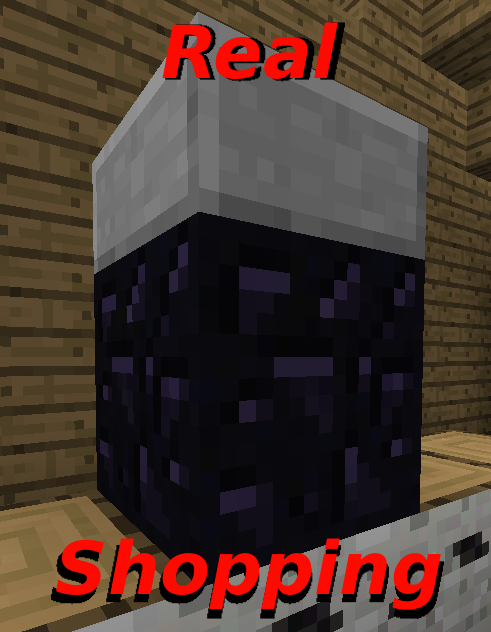
You enter a store by right-clicking the "door", which is either a glass block or a glass pane. The plugin teleports you inside and remembers everything in your inventory. You can then take the items which you want to purchase from chests in the store. Then you walk up to the cash register (an obsidian block with a slab on top), right click it, and the plugin sees which items you have taken and charges you for them. At last you can exit the store by standing at the exit and right-clicking the door.
These are the basics, and how everything started. Now, RealShopping has lots of additional features. Take a look at the different pages here to see if you find something which suits you!
If you don't feel like reading a lot of instructions, you can get a hold of the basics by watching the video tutorial further down the page! :)
(click images for a higher resolution)


Features
- Ability to create an infinite number of stores.
- Aliases for item IDs and data values which you can use in commands.
- Separate prices for each store.
- Self-refilling chests.
- Minecarts with chests acting like shopping carts
- Delivery of the items in your shopping cart to a chest at your home.
- Selling to stores, if the owner approves it.
- Language-packs.
- Both admin and player-owned stores.
- Kick or banish players from your stores.
- A punishment for players trying to steal items.
- A mostly command free experience for users.
- An automatic updater!
Installation
Just put the RealShopping.jar in your plugins folder and start and stop the server. A directory named RealShopping with a couple of files is created. You can edit the realshopping.properties config file if you like, but the default settings will suit most people.
I highly recommend Vault together with an economy plugin for the best economy management.
Documentation


Video tutorial
(This one is kinda old, feel free to make your own version and PM it to me)
Thanks to IngrownPenguin for making this tutorial!
Changelog
v0.50
Besides a rewrite of a lot of stuff, RealShopping version 0.50 comes with a few new, but important features. The smaller improvements which I originally had planned for 0.50 are postponed to 0.51, but here's what you get in this version:
- Added search option to /rsprices. Instead of browsing through several pages of prices you can now search for the item you need.
- Added aliases - Six hundred of them! That's more than enough for every item ID and data value combination. Instead of typing item IDs when executing commands you can write the name of the item, and the plugin will recongnize it. For a complete list and more detailed instructions, see the plugin page.
- Added interactive prompts for /rsset, /rssetstores and /rssetchests. This simplifies creating stores (especially ones with many entrances) and managing self-refilling chests. In case something goes wrong, all prompts can be aborted with quit.
- Added free manage mode to the /rssetchests prompt. Open a chest, put items in, and close it. The chest contents will be permanently updated.
- Added the multiplication sign to additems and delitems in /rssetchests. If you want to add the same item stack several times in a row to a chest, you can type it once and put a multiplication sign followed by a number behind. Examples are on the plugin page.
v0.44
I'm releasing this version just to add one function which I think is needed. Now stores will buy and sell partly-broken tools with a discount equal to the durability percentage.
Note that I am in the middle of rewriting parts of the code. Some of the commands now have slightly improved help options, but otherwise this makes it more likely for bugs to turn up. If you encounter one, please report it in the Tickets section and I will get it fixed. If you're wondering something, feel free to ask in the comments :)
Future features
These are some ideas that are on my mind for the future of RealShopping. If you have any, please post in the comments. I appreciate every suggestion :)
- The this alias, which you can use for the currently held item.
- The /rsme command, for managing store "news" subscriptions amongst others.
- Further improvement of the automatic store management.
- Extended and more customizable notifications.
- More creative ways to punish thieves and an improvement of the current.
- Even more smaller improvements!
Comments

-

_ForgeUser8903000 Owner
-
_ForgeUser11684063 Author
-
View User Profile
-
Send Message
Posted Apr 18, 2013@notmyaccount
My server is ran off of an online host, and it hasn't been offline for even a minute in over 4 weeks.
-
View User Profile
-
Send Message
Posted Apr 18, 2013@kuben0
i cant find that folder, all i have is plugin.yml and i cant find the punishment permission in it
-
View User Profile
-
Send Message
Posted Apr 18, 2013@Incompy
this is obvious, you didny save your server before closing the command prompt, so it had a roll-back to the servers last save
-
View User Profile
-
Send Message
Posted Apr 18, 2013So my shop's entrance and exit points were suddenly cleared so now I have to remake a shop with over 200 items with it. Why did this happen?
-
View User Profile
-
Send Message
Posted Apr 18, 2013@notmyaccount
Set punishment to hell and hell-location to world,0,0,0 in realshopping.properties.
If they're able to steal, you probably have something set up wrong though
-
View User Profile
-
Send Message
Posted Apr 17, 2013How do i turn the punishment on, people can still steal items, idk how to make them go to the viod if they steal
-
View User Profile
-
Send Message
Posted Apr 14, 2013@kuben0
Okay awesome! Thanks! Keep up the good work!
-
View User Profile
-
Send Message
Posted Apr 14, 2013@phlegacy
No, I'm gonna add it some time in the future. Defining store-regions (like in WorldGuard) or something like that, but it's gonna take a lot of time.
Thanks! :D
-
View User Profile
-
Send Message
Posted Apr 14, 2013@kuben0
Awesome! Thanks on both of those replies!!!!!
One more question. Is there a feature that it automatically enters/exits the store without clicking the entrance/exits blocks. Like if you just walk over them? Other than that I LOVE THIS PLUGIN! hahaha
-
View User Profile
-
Send Message
Posted Apr 13, 2013@phlegacy
/rsstores NAMEOFSTORE buyfor 50
Where the number is how many percent of the original price the store will buy for. It can of course be any number between 1 and 100 (or 0 to disable selling to this store)
All the commands are here
@phlegacy
This is already possible. Just create a store with the same name but different entrances and your store will have multiple ones
-
View User Profile
-
Send Message
Posted Apr 13, 2013Feature Idea: -Adding multiple Entrances and Exits to 1 store. (This way we can extend the entrance and exit to more than just 1 block and also have different areas to enter from.
Just a thought. Thanks! Love this plugin btw!
-
View User Profile
-
Send Message
Posted Apr 13, 2013How do you change the "buy-back" prices. So if a player wants to sell back to the store. How do i make it so the price is less than what they paid?
-
View User Profile
-
Send Message
Posted Apr 12, 2013@Bomberboy123
No, it can't. I don't know if it really would simplify anything but yeah, it's a cool feature. I might add it in the future, but there's a lot of stuff for me to add now, so it won't be for long.
-
View User Profile
-
Send Message
Posted Apr 11, 2013Can this use in game currency? like can you buy things with like iron/gold/diamonds/ etc... etc.... ??? I think that would be a really cool feature and simplify some things.
-
View User Profile
-
Send Message
Posted Apr 11, 2013Yeah, I figured that on my own.
-
View User Profile
-
Send Message
Posted Apr 11, 2013@Incompy @reckertiii
As of the chests, I discovered that their height was changed in minecraft 1.4.4. Now when you stand on a chest you stand 0.875 blocks high. For the chest command to work you have to be 1.000-1.999 blocks over the chest so to say.
In creative you can fly those 0.125 blocks over the chest. If you want to use the command in survial you can either place a slab on top of the chest (hold in shift not to open it) and stand on the slab, or break the chest and put a regular-sized block when changing something.
I will fix this to 0.50, and also make it possible to choose chests with right-click, but for now you'll just have to use the solutions above, sorry.
-
@reckertiii The only thing that I can think of with the selling problem is that you're selling items to your own store. Or that you haven't added prices of the items you want to sell. If it's not one of these things please tell me.
Just 1 is what you should write. The /rsimport command opens up a prompt, so whatever you write gets directly to the mod. It is possible that when you tried it the prompt had already timed out.
Did it say anything when you tried /1 and /rsimport 1 ?
Regards, kuben0
-
View User Profile
-
Send Message
Posted Apr 10, 2013HI i am having a few issues when installing this plugin. I also ma having the issue with the infinte chests. I am able to create them and add the items but when i leave and enter the shop to check the chest there is nothing inside of it and i cant put anything in it as well. The Second thing i am having trouble with is being able to sell things from my inventory to the store. The items are taken from me by the store and i know that i have set up the percentage to buy the item for but i do not get any money for the items. I am using vault and craftconomy 3. Lastly when trying to import the excel file for the prices it asks from me to input the number corresponding to the excel file to import, I dont know what the format for the command is to confirm the import. i have tried /1,/rsimport 1, as well as just 1. thank you so much for the awesome plugin.
-
View User Profile
-
Send Message
Posted Apr 10, 2013@Incompy
Does it say anything when you're trying to delete or add items to it? Perhaps you're stadning wrong, though of course it can alse be a bug.
-
View User Profile
-
Send Message
Posted Apr 10, 2013Sometimes when I try to set a chest for infinite buying, it says it creates the chest and it does, but then I can't do anything with it. I can't delete it, and I can't add items to it. It's just there. If I try to anything with it, I get an error saying something relevant to the chest not existing. If I break the chest, leave the shop, and enter, it respawns back. It is taking up space and really frustrating. How can I fix this?
-
View User Profile
-
Send Message
Posted Apr 7, 2013@szymekpl
Good that it works now, but I'll have to check this on my own some time. It's weird that it didn't work the first time.
Thanks! :)