Power Machine
Features:
- No commands necessary.
- No permissions required. (But are supported)
- No configuration required. (Unless you want to use permissions, then just set config variable to true and add permission nodes)
Command:
- /getWrench: Gives the super Wrench.
- /powermachine: Gives the number of machine.
- /addenergy: Gives energy
- /energy: View current energy value
Type of Machine:
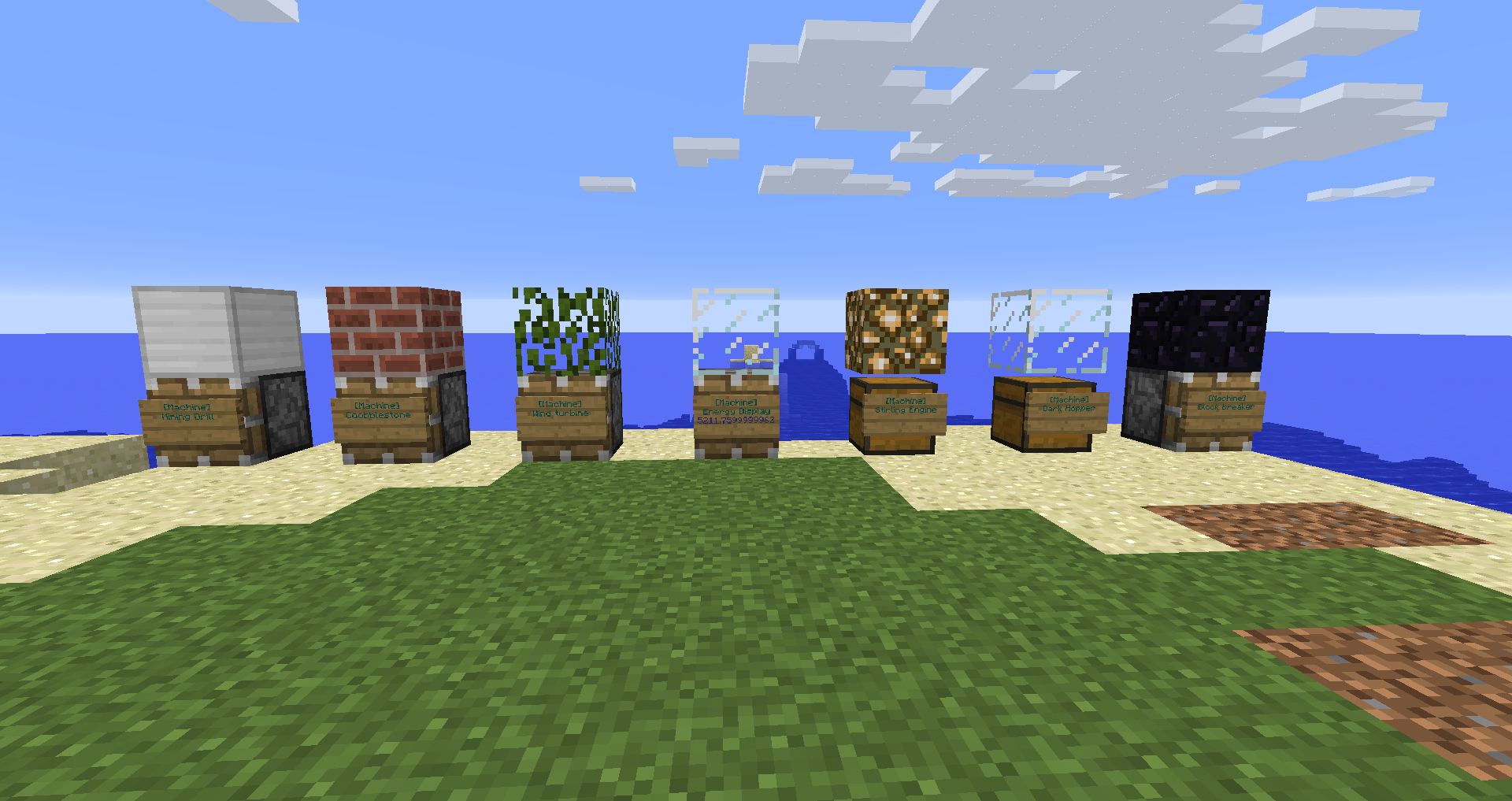
- Wind turbine: Produces energy
- Coobblestone generator: Produces coobblestone
- Mining Drill: Digs the ground under itself
- Energy Display: Shows the energy of the owner of the machine
- Stirling Engine: Burns the item inside the chest to produce energy
- Dark Hopper: Picks the item around itself
- Block breaker: Breaks the block under itself
- Rain Generator: Produce energy when it is raining
How to create a machine
- Build the multiblock structure
- Add a sign and write "[Machine]" in the first line
Configuration file:
Enable permission: false
#Id of the item of the wrench
Wrench item id: 280
#Name of the file that containts the energy of the player
energy file: energy.data
#Name of the file that containts the machine in the world
machine file: machine.data
#Number of tick between every fast machine update
Machine update: 5.0
#Energy limit
Energy limit: 100000.0
#Number of tick between every slow machine update
speed of the drill: 80
# Id of block to create the multiblock structures
# $0 Means the block at the bottom
# $1 Means the block at the top
Wind turbine $0: 33
Wind turbine $1: 18
Coobblestone generator $0: 33
Coobblestone generator $1: 45
Mining Drill $0: 33
Mining Drill $1: 42
Energy Display $0: 33
Energy Display $1: 20
Stirling Engine $0: 54
Stirling Engine $1: 89
Dark Hopper $0: 54
Dark Hopper $1: 20
Block breaker $0: 33
Block breaker $1: 49
#Energy consume to produce 1 block of coobblestone
cost of coobblestone: 50.0
cost per block break by the mining drill: 200.0
cost per block break by the block breaker: 150.0
#Energy per smelted item by the Stirling Engine
Energy per smelted item: 100.0
Dark Hopper Range: 5
Permissions:
- powermachine.*: Gives access to all the functionality of the plugin (default: op only)
- powermachine.create: Allows players to create new machine (default: op only)
- powermachine.energy: Allows player to use /energy command (default: everyone)
Version:
I have develped this plugin for minecraft 1.11, but it should work with the previous versions.
Bug Report / Feature Request:
This plugin is still in Beta so fell free to give me any suggestion.
If you have found a bug, please report it.
Comments

-

Forge_User_97990361 Owner
-
View User Profile
-
Send Message
Posted Aug 22, 2017O/ Nice one.
This plugin is bizzarly small and does alot. It's also lightning fast
and had no impact on my "nearly overloaded" server after 20 mins timings.
It may be possible to use block id 144 as base and top so
skull items (custom skin properties/textures/uuid) so anyone can
make a machine out of any skin skulls. Mmmm!
If I may ask a few questions and suggest some
things tpoppo, please? Sorry for the long post!
Energy. Grid and layout.
I am lost in space... ! I'm also the greatest SlimeFun Energy/Cargo
player ever to live, sort of. This one bullies me! Please,
"esplainlikeI'm5 wif a picture" :))) Diagram or schematic?
What shape is the energy grid? How far can machines be from a
power source before it cannot be powered by it? I might have missed
a help file somewhere, sorry! I'm sures it;s easy to get just..
as a new user to the plugin I'm totally lost. Staff will have a hard time
explaining how it works to players when they do not know! :D
Mining Drill!
I noticed the Mining Drill hit bedrock then stopped. Is that a max
eye level thing or is it detecting bedrock? If it is detecting bedrock
this function might make it easy to set up a block ID blacklist or whitelist
allowing servers to utilise that as a fallback anti grief function. Maybe
Mining Drill already has an internal safe allowed blocks list? I dont know.
Something like a new config entry, where it would normally say in the source
dont drill block id 7 get it to look up a list of blocks in new section of config.
can-dril:
- "56"
cannot-dril:
- "57"
- "154"
Example would be the Mining Drill is set at the top of a mountain
but digs down to eye level 7 where it hits a hopper to collect the
entire colum's blocks, so the drill would stop at the hopper,
not drill through it. If it can skip air and bedrock it can skip a hopper!
Also, assuming there is a regular energy supply, does the Mining Drill
repeatedly keep trying to and failing to break bedrock or does it
stop drilling attempts when it hits bedrock? I noticed when place a
bedrock block above sandstone at eye level 20 the drill above breaks
the sandstone under the bedrock. There is a chance if you set the
min hieght for the drill at 0 it's going to constantly drill at the void?
It should stop drilling attempts completely soon as it hits bedrock.
Logging/Rollbacks for Drill.
Would it be possible to tag the block break events as a fake player or
"TNT" or something that CoreProtect 2 or other logger/rollback
plugins could detect? This way Mining Drills could be rolled back
or recorded at least who did it. A griefer might have set the drill way up in
sky giving staff a hard time seeing who left the hole during inspects?
Recording XYZ location, type, player name of [Machine] signs.
Done.
https://dev.bukkit.org/projects/signlogger
Updated in comments for 1.12+ Adds ALL signs placed to server console logs.
Tiny file size! This tags world name X Y Z location of [machine] signs
and shout the placer's name in server logs when they are placed.
Now you can track who, where and when.
Extract all logs and with notepad++ do a find in folder in all files
"[machine]" or "SignLogger" Shows the full content of the sign also.
Dark Hopper
I could not get this to pick up nearby objects at all. Maybe it was out of power range?
Does Dark Hopper have an internal max range that cannot be exceeded regardless of
config setting. (I am aware of issues checking for nearby entities causing lag over very
large ranges, for example LWC Magnet Chests.) Does it have a max amount of
entities to check for per tick amount? It probably should if it has no max internal range.
I thank you much for the plugin, it is a great concept, well done. Thank you also
for reading and considering my thoughts on Power Machine.
For now I'm going to attempt to create a set of Power Machines that actually
use slimefun blocks. If it works :O bling ding! Extra well done for you! I LOVE that this plugin allows the customisation of machine block types also.
Also..
[PowerMachine] Task #11 for PowerMachine v1.1.1 generated an exception 23.08 02:03:34 [Server] INFO java.lang.NullPointerException: null
Suspect: Drill trying to break a bedrock
block that was removed in creative mode?
While it is a tiny console error it was repeated untill broke Mining Drill.
-
View User Profile
-
Send Message
Posted Aug 23, 2017In reply to Jabberwockie666:
Thank you for your feedback. I'll try to answer to all yuor question.
-
View User Profile
-
Send Message
Posted Jul 18, 2017Great plugin, but ive got a great request for you, add slimefun compatibility! that way slimefun gets a great addon, and you get more downloads! win win!