Plots Generator - PlotGen
Plots Generator with advanced configuration
What does it do
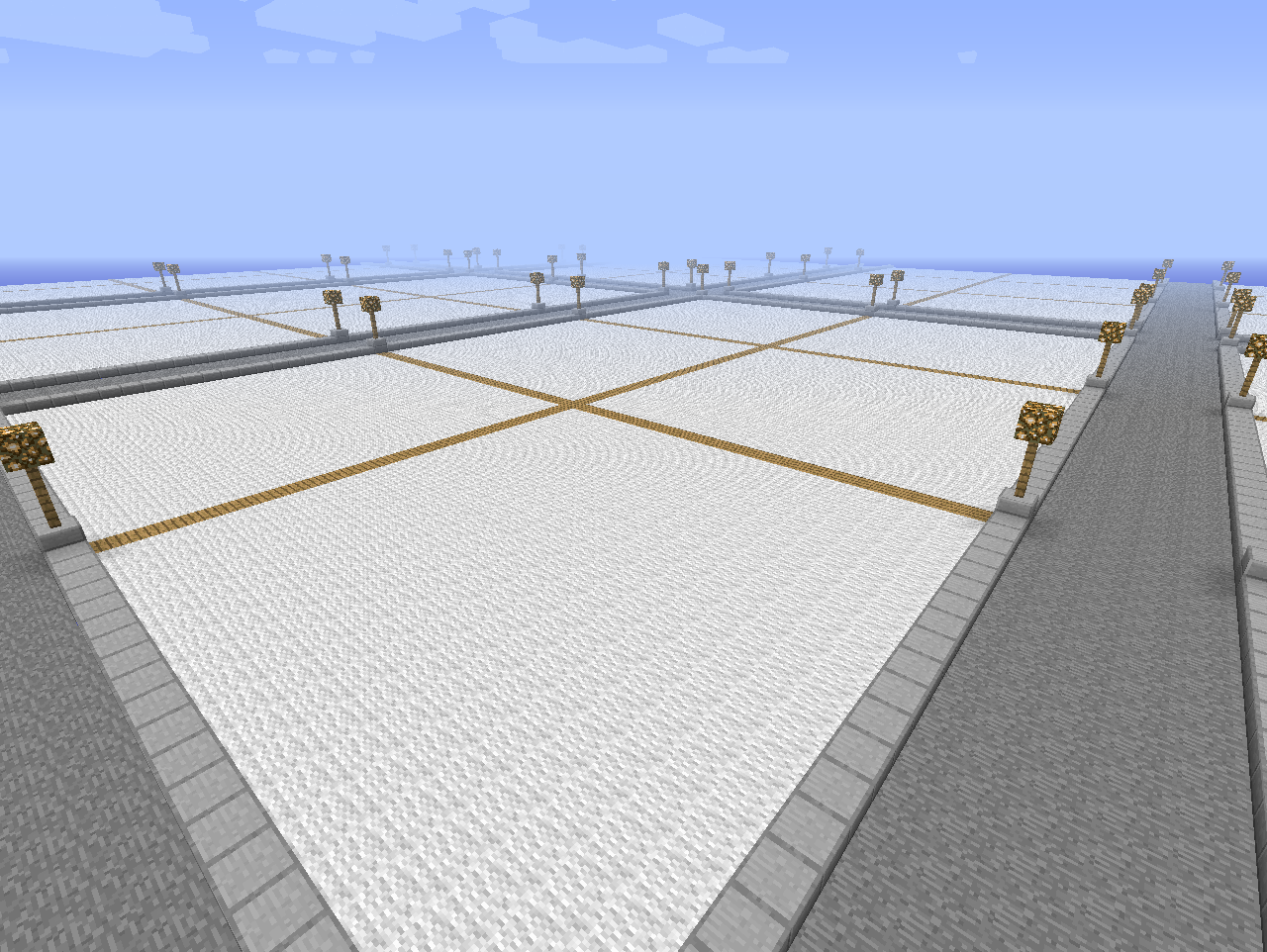
This plugin generate terrain for plots


Configuration
- Height - level (y) where terrain generation should be start
- PathSize - Path width between plots
- PlotSize - Size of one plot (updated config now set value like 3x3)
- PlotGroup - Amount of groups at one plot
- Path_Material - Path Material between plots
- Plot_Material - Material on a plots
- Under_Plot_Material - Material under plots
Future Idea
New generator systemNew items supportOptimize
How to install
- Drop the jar file in your plugins directory.
- Open bukkit.yml and paste at end:
worlds:
  worldname:
    generator: PlotGen
3. Restart your server
How to use
It is just a generator. Put your .jar to plugins directory, paste config to bukkit.yml, restart server and check the terrain :D
Generation with multiverse (recommended)
/mv create {NAME} normal -g PlotGen
Source
https://github.com/S3baso/PlotGenerator
Known Bugs
None
Suggestions
Do you like to change something? PM me :)
Society
http://www.facebook.com/PlotsGenerator
Donate

Comments


-

Forge_User_09815584 Owner
-
Forge_User_27159865 Maintainer
-
View User Profile
-
Send Message
Posted Jun 17, 2015is it working good for new releases of bukkit ?
-
View User Profile
-
Send Message
Posted Nov 27, 2014Update it to 1.7.2 R0.2 please :(
-
View User Profile
-
Send Message
Posted Sep 21, 2014@buba0529
do you have 'multiverse' that you use /mv ?
.... READ the f.... descriptions
if still cant use it, then educate on other world terrain generators :) and if you have a problem POST A TICKET
-
View User Profile
-
Send Message
Posted Sep 20, 2014so i do /mv create ploworld normal -g plotgen it says unknown command even when i just do /mv
-
View User Profile
-
Send Message
Posted Feb 2, 2014@Swimmer128
In config PlotSize 500x500 ?
-
View User Profile
-
Send Message
Posted Feb 2, 2014I want to make the plots 500 by 500. how would I do that?
-
View User Profile
-
Send Message
Posted Jan 3, 2014the world generated fine, but how do i asign plots? because when i tried to claim one, there was no plot to claim.
-
View User Profile
-
Send Message
Posted Sep 4, 2013will i be able to build somthing on one and it puts it on everyone plot
-
View User Profile
-
Send Message
Posted Jul 30, 2013I have a question. After scouring the internet for days, I still cannot find a plot generator for SINGLEPLAYER maps. Why? It seems like a great idea if you were building a city, where you needed nice even streets, and even sized buildings.
-
View User Profile
-
Send Message
Posted May 31, 2016Hello creeperkillers! I know this is like 3 years later but if you still have the idea of singleplayer plot gen (but no claiming) you can watch this video! It explains how to use command blocks to make a plot generator to whatever size you want.YOUTUBE VIDEO FOR PLOTGEN IN SINGEPLAYER
Or what you could do it go to www.getspigot.org and get a server for localhost. Then get worldedit and make it in that world with worldedit or plotme or plotsquared. Then stop the server and down load the world and put it in your minecraft saves folder. I hope this helped and thankyou for your time ;)
P.S. If you need to contact me:
trent27on@outlook.com
-
View User Profile
-
Send Message
Posted May 7, 2013@DicoTheRedstoner
I think you have the wrong plugin.
-
View User Profile
-
Send Message
Posted Apr 4, 2013/MV create Creative normal -g PlotGen
results in
Invalid generator! 'PlotGen'. Aborting world creation.
for me. I have added
worlds:
Creative:
generator: PlotGen
to bukkit.yml I have Multiverse-Core 2.5 and PlotGen v.1.2 installed. Using Bukkit 1.5.1-R0.1 (Build #02735), other plugins are Essentials, EssentialsSpawn, MultiInv, Multiverse-Portals, TuxTwoLib, Vault and WorldEdit. I've restarted the server multiple times.
--------------
Console output:
20:26:50 [INFO] [Multiverse-Core] Version 2.5-b665 (API v18) Enabled - By Rigby, fernferret, lithium3141 and main--
20:27:17 [WARNING] [Multiverse-Core] Failed to get the default chunk generator: java.lang.NullPointerException
20:27:17 [WARNING] [Multiverse-Core] This is a bug in PlotGen, NOT a bug in Multiverse!
-
View User Profile
-
Send Message
Posted Apr 2, 2013@Cookiezowner
Go in PlotMe configuration, and replace the world called "plotworld" with whatever name you want the world to be called. Set the generator options for it (not required). Then restart your server, go online and type "/mv create {WORLDNAME-WHICH-YOU-DEFINED-IN-PLOTME-CONFIG} normal -g PlotMe
-
View User Profile
-
Send Message
Posted Mar 19, 2013@Cookiezowner
Define 'normal'
If you want to use PlotGen without auto managing use plotgen If you want to use plotme use plotme generator, simple as that.
-
View User Profile
-
Send Message
Posted Mar 18, 2013@kolorafa
Thx For Telling Me BUT, Just How Do U Make A NORMAL PlotWorld!
-
View User Profile
-
Send Message
Posted Mar 18, 2013@Cookiezowner
plotgen is a simple generator, and only that
plotme is plot protrction with generator plugin as far as i know plotme doesnt allow external generators like plotgen
so do what plugin says
-
View User Profile
-
Send Message
Posted Mar 17, 2013when i type it /plotme auto in the world i created using multiverse and plotgen, It says Internal ERROR Occured While Exucuting this Command and when i do /plotme claim It Says: this is not a plotworld..........PLZ TELL ME HOW TO FIX IT
-
View User Profile
-
Send Message
Posted Mar 10, 2013@gregwalsh13
Why? Any logs ?
-
View User Profile
-
Send Message
Posted Mar 5, 2013dose not worke for me
-
View User Profile
-
Send Message
Posted Feb 17, 2013Work Great good jod i recromend this plugin for sure