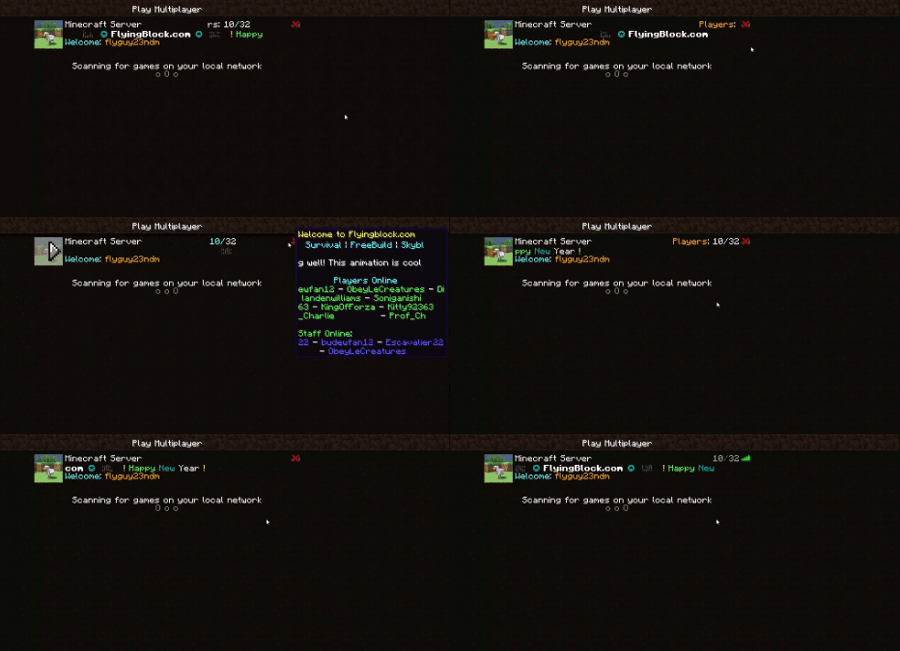
Player Count Message
Player Count Message
- now animated
By: flyguy23ndm
Thanks for 20k+ downloads

made from my config
Intro
This is my first plugin and has grown much beyond my original sights and has grown in size by a factor of 20 reaching into the 10's of thousands of downloads. The plugin has recently been adapted to allow animated server pings with moving text and a gif for the server Icon. I saw someone was offering an animated config for $12 a download and I thought, I can do that and better, for free. Then, the mega-upgrade of my original plugin had begun and hopefully you will enjoy the fruits of my work. So, if you want an animated ping for you minecraft motd, you've come to the right place.
Also, the old config (earlier than v4.0) has been replaced by a new file. The server will not atuo-transfer from the old config. And I got rid of the motd.txt file.
Note, you need Protocol lib to run this plugin
Tutorial
For a tutorial with the new system, go here
Video I made, it's pretty bad but it should work :P https://www.youtube.com/watch?v=biH75H36K0Q
Commands and Permissions
Commands and permissions are here
Configs
Config explanations are here
My example config is here
Plugin Information
Tags and information about them are here
Animation information is here
Also, if you want to use an outdated version of the plugin, check out the old pages
UPDATE
Hello, I would like to apologize to anyone that wanted to use this plugin. The latest version of minecraft broke this plugin (that was a few months ago). I was discouraged by this so much that I just abandon the project and refused to look at it. This is unacceptable behavior from a content creator and I shouldn't have acted this way. I will post the source code for the broken plugin soon. This code will not work but anyone can see the code that made the magic work (undocumented scrawl is the real magic. I will never document it... that is way too much work for the time I have now). Hopefully this will be of some consolation. I may change the software so that it will work as the initial versions did without the animation. Apparently 37k of you have downloaded the software and I thank you for your support and not reporting me constantly for the small support that I have given.
here is the source code:
bukkit: https://github.com/nicholas-maltbie/PlayerCountMessage
bungee: https://github.com/nicholas-maltbie/Player-Count-Message-Bungee
Feel free to modify, copy or update the code as you please; I only request that you cite me. Also, if you make any cool projects with my work, send me a like and I'd love to see what you have made.
Comments

-

_ForgeUser10168259 Owner
-
View User Profile
-
Send Message
Posted Jan 26, 2015Я скачал этот плагин, написание / pcm motd - он vydaet- /pcm [args] просто напишите / motd - пишет он, - /pcm motd [args] . И так с каждой командой! Что делать? Новейшие плагины. Помогите!!! Просто когда я открываю serverinfo.yml - и редактирует, что-либо, то никаких мутаций, как время будет отображаться! Может ошибка где-то? расходы spigot 1.7.10
-
View User Profile
-
Send Message
Posted Jan 26, 2015In the server console I always get this:
26.01 19:10:41 [Server] WARN An exceptionCaught() event was fired, and it reached at the tail of the pipeline. It usually means the last handler in the pipeline did not handle the exception.
I've experimented and found that it is Player Count Message causing it. Also somehow whenever I have Player Count Message on my server all of my server statuses say that the server is offline. I'm guessing that's due to the version glitch when it says it's out of date. This is all in PlayerCountMessage v4.0 jre 1.7.0_71.
-
View User Profile
-
Send Message
Posted Jan 25, 2015@flyguy23ndm
THANKS!!!!! To create a server-icon.gif manually helped me!!!!! Thank you a lot. This plugin is sooooooo awesome :)
-
View User Profile
-
Send Message
Posted Jan 25, 2015@EnergizerBEAST1
Set the loops for each line to -1, it will continue looping until the animation length has elapsed.
-
View User Profile
-
Send Message
Posted Jan 25, 2015@flyguy23ndm
I was sure I did everything correctly, and apparently I did, because now it works? :P
And I have searched for this, but couldn't find it: How do I make the MOTD loop endless?
-
View User Profile
-
Send Message
Posted Jan 24, 2015@checkplys
I think you have the wrong version of the plugin, that is an outdated version of the config. Please try downloading version 4.0 (for jre7 or jre8 depending on which one you have installed), try that and tell me how it works.
-
View User Profile
-
Send Message
Posted Jan 24, 2015My config only write
#To edit, simply repeat what is done with line one and put two spaces before a - then one space and your new line in quotes.
#Use the '&' instead of the other character in formatting codes found on http://minecraft.gamepedia.com/Formatting_codes
#Don't worry if you delete this config, it will revert back to this, the default
#
#To update just do /pcm load or restart the server.
#Or edit it from in game with /pcm add, /pcm set, or /pcm delete
#
#Additionally, if you have %player% in a line, the plugin will replace %player% with a player's name who is online.
#If you have more occurrences of %player% in your message than there are players online, it will skip that line. So don't worry about putting 10 lines with %player% in it.
#You can also have formatted text in a line with %player% in it so you could have a hyphen before it or have the plyaer's name in red or something
# ex: - "&f - &c%player%"
# It will show up with a white "-" then a red name of a player after it or skip this line if no one is online.
Lines:
- "&4Hello, this is line 1"
- "&eTo edit this, use the command"
- "&e /pcm help"
My motd is: for information on changing the motd, do &6/motd help&r
How to change this?
Help me please
-
View User Profile
-
Send Message
Posted Jan 24, 2015@EnergizerBEAST1
Try reading over this page http:dev.bukkit.org/bukkit-plugins/player-count-message/pages/a/usage/animations/, It's about images and stuff. And read this http:dev.bukkit.org/bukkit-plugins/player-count-message/pages/a/usage/tutorial/#w-customize-your-message
New images need to be in the player count message directory and you need to include the file extension when you set the name ("server-icon.gif" instead of "server-icon")
-
View User Profile
-
Send Message
Posted Jan 24, 2015It looks like it isn't possible to change the server-icon? I have edited the config, but it doesn't change. I have tested it too with an other image name.
-
View User Profile
-
Send Message
Posted Jan 23, 2015@Dani5835
Ok, the plugin is failing to load a non-existant class, makes sense, in a certain sub-routine. To avoid this sub-routine, create an image file in your player count message folder and name it the same as the name in your serverInfo.yml image.name (by default this is "server-icon.gif"). That should avoid the sub-routine and allow you to run the plugin. Be careful because this sub-routine is called whenever the server-icon is updated/re-created if no image file is found in your player count message directory (read more here).
Tell me how this solution works. I should have it fixed next update, I can't justify one line of change in code for an update. Also, I typed this on my phone, so sorry if there were any spelling errors ;)
-
View User Profile
-
Send Message
Posted Jan 22, 2015@flyguy23ndm
So I tried everything you had said: I unistalled my Java 7, 8 and tried re-installing java from here: http:www.oracle.com/technetwork/java/javase/downloads/jre8-downloads-2133155.html. I installed the Java 8 25 (64 Bit and 32 Bit.exe) and nothing worked for me.I love the old version of your plugin, because it worked so amazing. I get the same error:
-
View User Profile
-
Send Message
Posted Jan 22, 2015@Andy3202
YES, as long as you have a version of protocol lib that works
-
View User Profile
-
Send Message
Posted Jan 22, 2015Is this working in craft bukkit/spigot 1.8 builds?
-
View User Profile
-
Send Message
Posted Jan 21, 2015@flyguy23ndm
That didn't work.
-
View User Profile
-
Send Message
Posted Jan 20, 2015@tobster78
Try deleting the config and restarting the server
-
View User Profile
-
Send Message
Posted Jan 20, 2015Please help I got this
[Server thread/ERROR]: Cannot load plugins/PlayerCountMessage/serverInfo.yml org.bukkit.configuration.InvalidConfigurationException: while parsing a block mapping in 'string', line 82, column 3: frame_size: 50 ^ expected <block end>, but found Scalar in 'string', line 87, column 6: - 'scroll forward' ^
at org.bukkit.configuration.file.YamlConfiguration.loadFromString(YamlConfiguration.java:57) [custom.jar:git-Spigot-1642] at org.bukkit.configuration.file.FileConfiguration.load(FileConfiguration.java:226) [custom.jar:git-Spigot-1642] at org.bukkit.configuration.file.FileConfiguration.load(FileConfiguration.java:169) [custom.jar:git-Spigot-1642] at org.bukkit.configuration.file.YamlConfiguration.loadConfiguration(YamlConfiguration.java:180) [custom.jar:git-Spigot-1642] at com.flyingblock.pcm.save.ConfigAccessor.reloadConfig(ConfigAccessor.java:54) [PlayerCountMessage.jar:?] at com.flyingblock.pcm.save.PingAnimationConfig.<init>(PingAnimationConfig.java:99) [PlayerCountMessage.jar:?] at com.flyingblock.pcm.PcmMain.onEnable(PcmMain.java:29) [PlayerCountMessage.jar:?] at org.bukkit.plugin.java.JavaPlugin.setEnabled(JavaPlugin.java:316) [custom.jar:git-
-
View User Profile
-
Send Message
Posted Jan 20, 2015@ThisUsernameIsMine
If you need an updated version of protocol lib, there are some un-approved ones for 1.8.x, Here is what aadnk said on the Protocol Lib page:
Up-to-date development builds of ProtocolLib can be found here: http:ci.shadowvolt.com/job/ProtocolLib/ Older development builds (and Cauldron builds) can be found here: http:assets.comphenix.net/ These builds have not been approved by the BukkitDev staff. Use them at your own risk.
They should suit your server fine for 1.8 protocol lib compatibility.
-
View User Profile
-
Send Message
Posted Jan 19, 2015Is it possible to make it ProtocolLib independent? I like the animated server icon but don't plan to use all of the plugin's features.
I'm asking this because i often had problems with ProtocolLib on my 1.8.x server while i was using the updated version for 1.8 =/
-
View User Profile
-
Send Message
Posted Jan 19, 2015@Dani5835
Hmm, I used org.apache.commons.io.FileUtils to copy the files and I realize that that is not officially part of the jre, although, it has been included in all downloads that I have seen. I will patch this in the next update to only use java.nio.Files (which should be more universal). Try re-installing your java from here: http:www.oracle.com/technetwork/java/javase/downloads/jre8-downloads-2133155.html I just tried that and it worked (I uninstalled my java, as you should do also, and then re-installed it from that link, and make sure you get the .exe file, not the .tar.gz).
Btw, I did release a version for JRE 7, because some people can't update the java with systems that they are using, and that may be easier to use.
-
View User Profile
-
Send Message
Posted Jan 19, 2015@flyguy23ndm
I updated my Java Version to Java 8 Update 25, but I get a new error: