
PixelGym Commands
Player Commands:
| Command | What it does | Permission node |
|---|---|---|
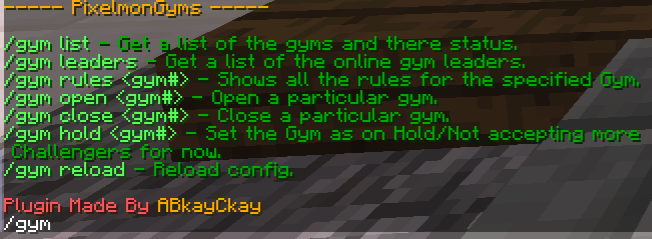
| /gym | Opens the list of available commands. | N/A |
| /e4 | Opens the list of available elite 4 commands. | N/A |
| /gym scoreboard | Disables the scoreboard at the right of the screen for that player | N/A |
| /gym list | List's all the enabled gym's and displays there status and level cap | N/A |
| /e4 list | List's all the e4 level's and displays there status | N/A |
| /gym leaders | Shows all the online gym leaders and what gym they are leader of | N/A |
| /e4 leaders | Shows all the online elite 4 leaders and what elite 4 level they are leader of | N/A |
| /gym join <gym#> | Joins a queue for the specified gym | N/A |
| /gym leave <gym#> | Leaves the specified queue, if you were in it | N/A |
| /gym check <gym#> | Checks your position in a gym queue | N/A |
| /gym rules <gym#> | Displays the rules for the specified gym | N/A |
| /e4 rules <gym#> | Displays the rules for the specified elite 4 level | N/A |
| /gym see (player) | Displays the players won badges, like a badge showcase. | N/A |
Gym Leader Commands:
For the gym leader commands, you will see pixelgym.gym#, this means they need the same permission for running the specific gym. For example, to open gym1, the gym leader would need the permissions pixelgym.leader and pixelgym.gym1 to open gym1.
| Command | What it does | Permission node |
|---|---|---|
| /gym open <gym#> | Opens the specified gym | pixelgym.leader + pixelgym.gym# |
| /gym close <gym#> | Closes the specified gym | pixelgym.leader + pixelgym.gym# |
| /gym check <gym#> | Checks the queue size of your gym | pixelgym.leader + pixelgym.gym# |
| /gym next <gym#> | Grabs the first player from the specific gym and teleports them to your gym to battle | pixelgym.leader + pixelgym.gym# |
| /gym win <gym#> (player) | Gives the player in (player) the gym# badge allowing them to join the next gym queue | pixelgym.leader + pixelgym.gym# |
| /gym lose <gym#> (player) | Sets the player in (player) to a loss and gives them a 1 hour cooldown before they can join the queue again | pixelgym.leader + pixelgym.gym# |
| /gym giveTM <gym#> [Player] | Gives the TM to the challenger if they did not receive it | pixelgym.gym# |
| /gym skip <gym#> [Player] | Skips the cooldown of the player for the specific gym | pixelgym.gym# |
| /gym heal | Heals the gym leaders pixelmon | pixelgym.leader |
Elite 4 Leader Commands:
For the gym leader commands, you will see pixelgym.e4#, this means they need the same permission for running the specific elite 4 level. For example, to open e411, the gym leader would need the permissions pixelgym.e4leader and pixelgym.e41 to open e41.
| Command | What it does | Permission node |
|---|---|---|
| /e4 open <gym#> | Opens the specified elite 4 level | pixelgym.e4leader + pixelgym.e4# |
| /ge4 close <gym#> | Closes the specified elite 4 level | pixelgym.e4leader + pixelgym.e4# |
| /e4 heal | Heals the e4 leaders pixelmon | pixelgym.e4leader |
Admin Commands:
| Command | What it does | Permission node |
|---|---|---|
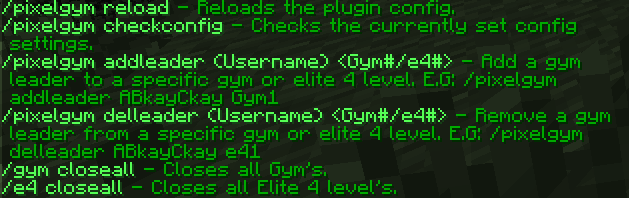
| /pixelgym | Displays all admin commands | pixelgym.admin |
| /pixelgym checkconfig | Displays the main config settings. | pixelgym.admin |
| /gym closeall | Closes all gym's | pixelgym.admin |
| /pixelgym reload | reloads the config | pixelgym.admin |
| /pixelgym addleader <gym#/e4#> (player) | Adds the player in (player) as the specified gym or elite 4 leader | pixelgym.admin |
| /pixelgym delleader <gym#> (level) | Sets the level cap of a gym | pixelgym.admin |
| /pixelgym setlevel <gym#/e4#> (player) | Removes the player in (player) as the specified gym or elite 4 leader | pixelgym.admin |
| /pixelgym setrule <gym#> (#) (Rule_here) | Sets a specific rule for a specific gym | pixelgym.admin |
| /gym givebadge <gym#> (player) | Gives the player in (player) the specified badge | pixelgym.admin |
| /gym delbadge <gym#> (player) | Removes the player in (player) the specified badge | pixelgym.admin |
| /gym addTM <gym#> | Sets the badge in hand as a collection to the RandomTM in extras.yml for the specified gym | pixelgym.admin |
Comments