PdxTrackRouter
PdxTrackRouter
Check out the new screenshots!
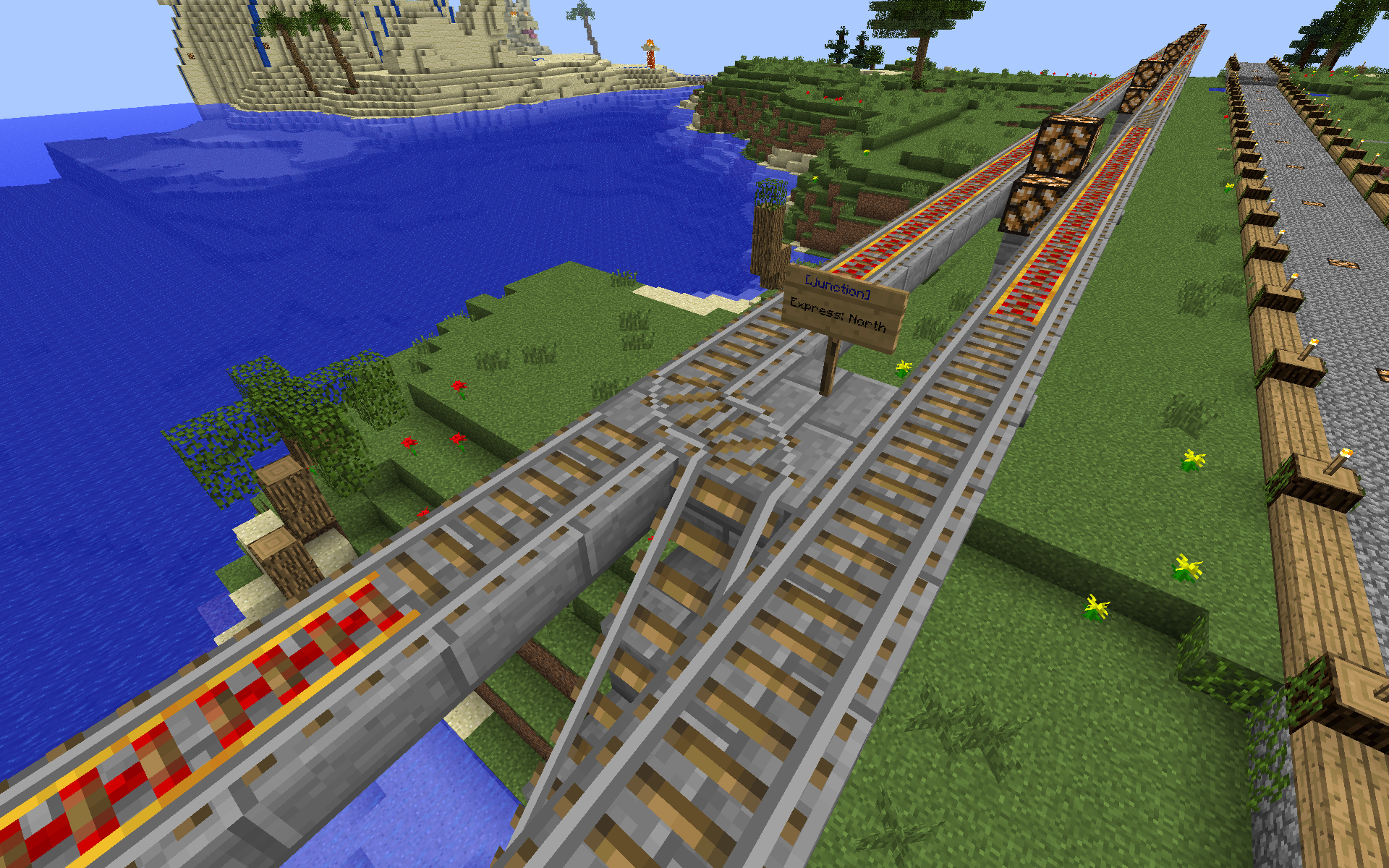
The PdxTrackRouter plugin allows users to create automatically routed mine cart rail systems. This is accomplished through a combination of "destination" signs and "junctions" signs. Minecarts will behave normally in the absence of any junction signs.
Destination signs should be placed wherever a user might want to select a new destination. The format for the signs is:
- [destination]
- destination name
- freeform text
- freeform text
When a user right clicks on a destination sign his destination tag will be stored.
Junction signs create automatic switching tracks. The signs should be placed at the corner of a 3/4 way rails junction or above the junction as a wall-sign, or below the block the junction is built on. Many of these signs may be stacked vertically if more lines are needed. The format of the junction sign is:
- [junction]
- DESTINATION: DIRECTION
- DESTINATION: DIRECTION
- ...
The destination can be any string which fits on the sign and should correspond to [destination] signs available to the user. The direction should be one of "north","south","east","west". (Only the first letter is checked).
Empty carts are always routed to the "empty" destination. Chest carts are routed to the "chest" destination. Powered carts are routed to the "engine" destination. Any cart will match the "default" destination. If no route on the junction sign matches the junction will attempt to send the cart straight through the junction without turning. These destinations are configurable in config.yml
The plugin will scrub all whitespace and color/formatting from the signs, so users are free to make their signs pretty using a plugin like Essentials.
The plugin does not stop players from breaking tracks or signs. A block protection plugin should be used for that.
Right click on an empty cart or chest cart with a sign in your hand to transfer your destination preference to that cart. This is great for moving chest carts full of goods along with you on the rail system. Carts with destinations set will move at full speed so that you can go with them. The tool is configurable.
Commands
/destination [DESTINATION] - Override your destination preference or clear it if left unspecified.
/changesign # TEXT - Change a line on the sign your cross-hairs are pointing at. This is a privileged operation and requires op or trackrouter.changesign
Example: /changesign 4 New line here
/junctions - Search for destinations which are connected to the piece of track you are standing on. This can be slow as it has to load chunks, so it runs in the background to avoid creating lag.
Junction Editing
To edit a junction, right click on the [junction] sign or the junction rail block and enter any of the following commands. BE CAREFUL giving this command to people as they can easily edit other kinds of protection signs at this point by placing a junction sign over an existing sign and edit through to the next sign. I'm open to ideas for how to protect against this. Line numbers start a 1 for the first line after the [junction] and continue through the whole stack of signs.
- /junction insert # TEXT - Insert a new line at position #
- /junction delete # - Delete the line at position # and move the others up
- /junction change # TEXT - Change the line at position # and leave the rest alone
- /junction list - Print the lines of the current junction sign
Automatic Storage Cart (un)loading
The plugin supports configurable loading and unloading of storage carts into chests. When a storage cart passes over a gold block it will load from the chests touching the sides of that gold block. When a cart passes over a diamond block it will unload into the chests touching that block. The blocks are configurable and the feature can be disabled using config.yml.
BE CAREFUL with this feature. If a player can build next to a chest he can extract the items from it.
Permissions
- trackrouter.changesign - Change lines on signs in-place - default op
- trackrouter.junctions - Use the /junctions command - default op
- trackrouter.destination - Use the /destination command - default true
- trackrouter.sign.junction.create - Create new junction signs - default true
- trackrouter.sign.junction.edit - Edit junction signs in place - default op
- trackrouter.sign.destination.create - Create new destination signs - default true
- trackrouter.sign.destination.use - Use destination signs - default true
- trackrouter.transfertool - Transfer your destination preference to a cart - default true
Source
Source code is available on github and is licensed under GPLv3
Demo
See the plugin live at pdxmc.com Head down the elevators to the "Train Station" floor 1 and try out the various stations. Additionally, there are a number of small examples on floor 2. The hub uses elevators: Destination floors can be select by right clicking on the sign above the button at an elevator.
Comments


-

_ForgeUser9483503 Owner
-
View User Profile
-
Send Message
Posted Sep 11, 2012@Dragoon209
The change you requested will be in version v0.6.
If you are curious what was involved in the change the commit is on GitHub
I have a few other things to finish exploring before I'll be ready to do another release, but you can build from source if you have to have it now ;-)
-
View User Profile
-
Send Message
Posted Sep 10, 2012@glguy
Correct, that is what I meant.
Yes, I agree there are lots of ways to find out your direction, however the debug screen doesn't require any additional plugin, and I thought it might be easier. I will admit that I have no plugin coding experience, so I won't hazard a guess as to how 'easy' it might be. Just a suggestion!
-
View User Profile
-
Send Message
Posted Sep 10, 2012@Dragoon209
You want to enter the 'f' field? 0: south 1: west 2: north 3: east?
There are a lot of ways to figure out your direction: using a mini map, dynmap, runecraft compass rune, /compass in Essentials, surely more. (fyi)
-
View User Profile
-
Send Message
Posted Sep 10, 2012@glguy
Perhaps one more request...
the ability to use the direction number from the debug screen instead of trying to figure out the direction? Not as pretty to read, but with hiding the signs below the track, it doesn't matter!
Since the last switch, I keep entering the wrong direction, and have already ran a cart full of stuff into my cart disposal system....(Lava)... oops! Remember kids! Never test on production tracks!
-
View User Profile
-
Send Message
Posted Sep 9, 2012@Dragoon209
Ask and you shall receive. Version 0.5 is uploaded and when it is approved you can hide signs underneath
-
View User Profile
-
Send Message
Posted Sep 9, 2012Just wanted to say thanks for this plugin. Its been fantastic so far during the setup of my subway system.
I have one request: Could you allow the sign to be placed just BELOW the junction, to allow them to be hidden?
And I have to admit, i've been using the Changesign command a whole lot, its something I have always wished there was a way to do! its very helpful.
Thanks!
-
View User Profile
-
Send Message
Posted Aug 31, 2012@AndyCYXU
Hi Andy,
A YouTube tutorial is a great idea. I'll have to figure out some good capture software and post one.
I think you understood the plug-in. It doesn't change mine cart behavior in general; it just updates the junction track blocks when you get to a junction sign. You still build a normal mine cat station.
Good luck with your subway and let me know if you need any help!
-
View User Profile
-
Send Message
Posted Aug 31, 2012Hi your plugin seems like something that would work great for subway system i havent tried it but for sure going on my server. However how about little short Destinations for Dummies TUT? I try to stop by your server maybe i figure it out but little steb by step sample TUT would be nice. so far i can only guess user hits the dest sign they them place the cart on power rail Off get inside the cart press button to activate power rail and minecart with user inside jjust follows to where the dest sign is ? i suupose hitting few jcts on the way with signs changig jct to guide cart to correct dest selected by user in first step? does it sound right is this what happens? thx
-
View User Profile
-
Send Message
Posted Aug 28, 2012Sound cool.