ParticleCannons

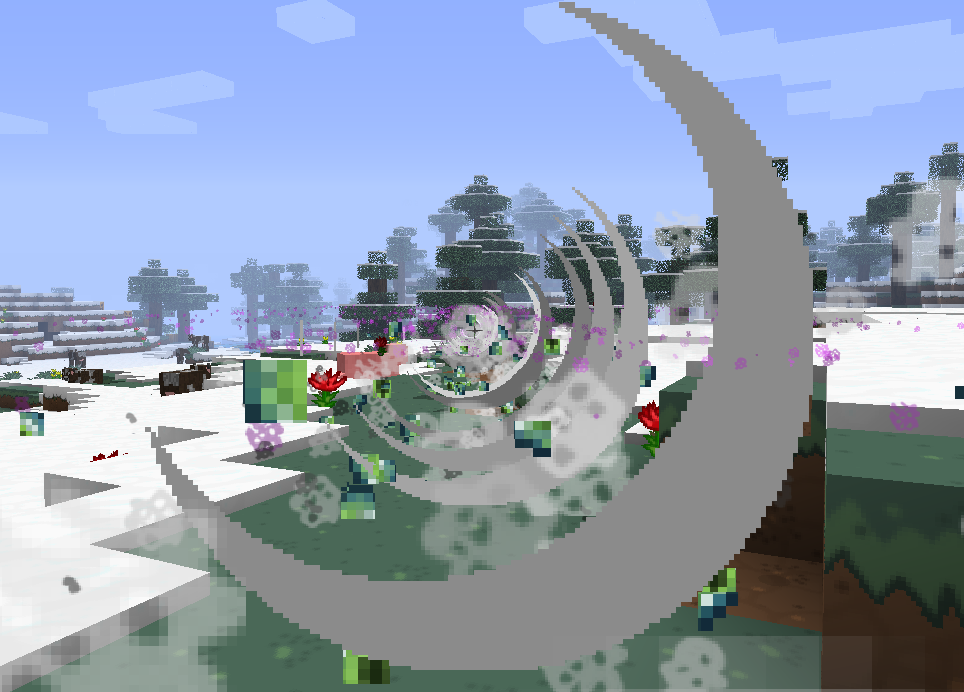
Particle Cannons is a fun plugin that adds "particle cannons" to the game. When a player right clicks with the cannon item and with enough ammunition, there will be a line of explosions, destroying blocks in front of the player and adding a whole new level of strategy to PvP.
This can be a very powerful weapon in PvP, as you can damage players greatly from a distance, launch them into the air to take fall damage, or launch yourself away to escape. To balance this I have made the default items hard to get and it will cost one diamond per shot of the cannon by default.
All items and the range of the cannon are configurable using the commands or in the config file.
------------------------------------------
Commands:
/PCSetRange <Number>
- Set the range, measured in blocks, for how far the cannon will fire. The default is 40 blocks.
/PCSetItems <ItemID> <ItemID> <Number>
- The first parameter is the item ID for the cannon item, the item you will right click to fire. The default is a blaze rod.
- The second parameter is the item ID for the ammunition item, by default a diamond.
- The third parameter is how much of the ammo item will be used up per shot.
/PCToggleGrief
- Toggle block damage.
Look in the config file for more options.
You can find item IDs on the minecraft wiki:
http://minecraft.gamepedia.com
------------------------------------------
Permissions:
particlecannons.use:
- Allows a player to use the particle cannon plugin.
particlecannons.admin:
- Allows a player to use the commands for changing range/items.
------------------------------------------
Protecting Areas:
The only plugin I have tested so far to protect a certain area is world guard. Please feel free to test this with other plugins (towny and factions maybe?) and tell me the results, I will compile a list of plugins that are compatible from this.
To protect an area using world guard, make a region and set the "other-explosions" flag to deny.
Players who do not have permission for a region will not be able to destroy it at all.
------------------------------------------
Changing Particles:
There are two config options to change what type of particles are displayed when the cannon is fired, Particle-Type and Particle-Modifier.
The particle-type options lets you choose between 5 different type of particles.
Setting it to 0 will cause smoke particles, 1 is block breaking particles, 2 is splash potion particles, 3 is enderperl particles, and 4 is fire particles.
The particle-modifier option lets you change what the block and the potion particles look like.
When using block breaking particles for example, having a modifier of 10 will give you lava particles, and a modifier of 1 will give you stone.
------------------------------------------
Download:
Use the "Files" button to download the latest version.
------------------------------------------
Videos:
http://www.youtube.com/watch?v=gvbX2ss5VP8
Credits: jithins
------------------------------------------
Suggestions for changes and improvements are welcome.
If you are having trouble getting the plugin to work, make sure the config file was created properly.
This is what is should look like:
http://dev.bukkit.org/bukkit-plugins/particlecannons/pages/default-config/
Thanks for reading
-Waffles
Comments


-

waffu_ Owner
-
View User Profile
-
Send Message
Posted Oct 26, 2013Could you put this plugin on github?
-
View User Profile
-
Send Message
Posted Oct 25, 2013This plugin is gread! Works fine!
-
View User Profile
-
Send Message
Posted Oct 25, 2013@Arthurhoeke edit: nvm I see how it wold work.
-
View User Profile
-
Send Message
Posted Oct 25, 2013tergerg
-
View User Profile
-
Send Message
Posted Oct 25, 2013Looks nice! Is it a idea to add that if you right click a sign with the text [Cannon] You shoot it? That would be nice ;D
-
View User Profile
-
Send Message
Posted Oct 25, 2013Sound great! Im waiting for the release!
-
View User Profile
-
Send Message
Posted Oct 25, 2013@xskillmc
Because it is not downloadable yet :P
-
View User Profile
-
Send Message
Posted Oct 25, 2013i cant download because File button not exists :P
-
View User Profile
-
Send Message
Posted Oct 25, 2013Suggestion:
New command that can be run from a command block or the console that fires from a specified location.
Example command:
/pcfire [x] [y] [z] [yaw] [pitch]
/pcfire 334 72 -882 42 0
This would fire a cannon from the location (334,72,-882) as if a player was there firing it (but without item/ammo requirements). It would use the yaw and pitch arguments to substitute for where a player is looking when firing.
If you need to, you could make a random entity (maybe a squid) spawn there and have it be invisible so you have an entity to work with. You'd probably need to despawn that entity afterwards, but if you can't do that I'm sure an invisible squid wouldn't have a noticeable death on land somewhere (and if it's in water, it doesn't really matter then, that's where squids should be anyways) ;D
If you decide to do this, you might want to test firing it in unloaded chunks and see if there are any severe problems with that.