Orebfuscator
Orebfuscator - Anti X-RAY:
For all releases of 1.9/1.9.1/1.9.2/1.9.4/1.10/1.11/1.12.x/1.13.x: Version 4.4.3
Now with support for CraftBukkit 1.9/1.9.1/1.9.2/1.9.4/1.10/1.11/1.12.x/1.13.x!
This plugin is used to counter X-RAY Client mods.
It modifies data that are sent to clients to hide blocks of your choice, such as Ore, chests, dungeons, etc.
It does not manipulate blocks in the world file, thus is safe to use.
ProximityHider is a feature that hides chests that are far from players.
As of 4.3.3, Proximity Hider has been enhanced to use line-of-sight checks, not just proximity! Upgrade today.
Configuration Guide
https://github.com/lishid/Orebfuscator/wiki/How-to-properly-configure-Orebfuscator
https://github.com/lishid/Orebfuscator/wiki/Configuration-File
FAQ
https://github.com/lishid/Orebfuscator/wiki/FAQ
DOWNLOAD
Please read compatibility information before downloading as not all releases work with all versions of CraftBukkit.
Latest version should be on BukkitDev, or as a release on the Github page: https://github.com/lishid/Orebfuscator/releases
Please also download ProtocolLib and install it in the plugins folder.
- Is compatible only with version 4.0.0 or newer.
- For 1.9.4 support, you must use build 277 or newer of Protocollib 4.0
- For 1.10 support, you must use build 293 or newer of Protocollib 4.0
- For 1.11 support, please use latest stable builds of ProtocolLib for 1.11.
- For 1.12 support, please use ProtocolLib 4.3.0 or newer.
- For 1.13 support, please use ProtocolLib 4.4.0 or newer.
- Download link: https://www.spigotmc.org/resources/protocollib.1997/
- Legacy Link: http://dev.bukkit.org/server-mods/protocollib/
Features
- Advanced algorithm that hides ore, chest and and anything you specify in the configuration
- Spout compatible, but optional
- No modifications to CraftBukkit.jar is needed
- Customize the blocks you want to hide
- HIDES DUNGEONS and other blocks that are in the dark
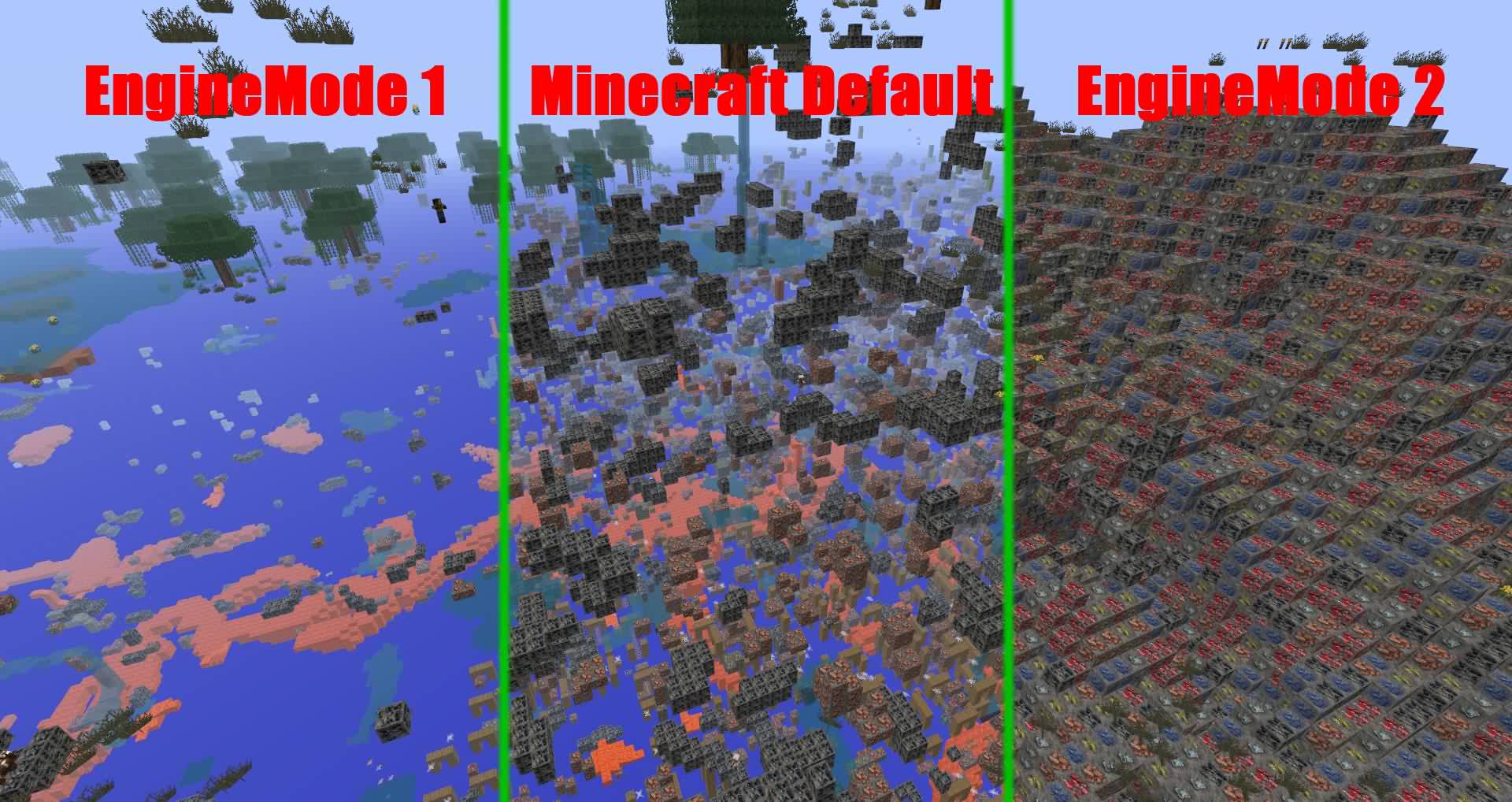
- Different hiding mode, or scrambling.
- Extensive configuration. Change updating methods depending on your bandwidth and processing speed.
- Hide hidden chests and furnaces until a player is close to it.
- Hide hidden chests and furnaces until a player can see it.
Usage
Install:
- Copy "orebfuscator-4.4.3.jar" to your plugins folder
- If you're upgrading from Orebfuscator.jar, move the contents of the "Orebfuscator3" folder to the "Orebfuscator4" folder
- Restart your server.
Configuration
See this: https://github.com/lishid/Orebfuscator/wiki
Commands
See this: https://github.com/lishid/Orebfuscator/wiki
Permissions
See this: https://github.com/lishid/Orebfuscator/wiki
Source Code
Here you go! (Hosted on Github) - please post issues and requests for help there
Metrics
- This plugin utilizes Hidendra's plugin metrics system, which means that anonymous information of your OS and setup will be collected and sent to mcstats.org
- Opting out of this service can be done by editing plugins/Plugin Metrics/config.yml and changing opt-out to true.
Thanks!
- Aleksey_Terzi, single-handedly updating to CraftBukkit 1.9, 1.11, and 1.12!
- DevotedMC for taking over management of the project
- AFFORESS, major help on code optimization and spout support!
- Lishid, for years(!) of maintaining this plugin, and MarioG1 for recent patch support
- raphfrk, helped with packet processing
- Many donators!
Bugs
- See the issues page for any outstanding problems.
TODO
- A command that generates the world cache for the existing chunks.
Changelog
Version 4.4.3
- Support for Minecraft 1.13.2 latest builds (CraftBukkit/Spigot/etc)
Version 4.4.2
- Fixes for reported issues during use -- please update
Version 4.4.1
- Support for Minecraft 1.13 and 1.13x (CraftBukkit/Spigot/etc)
- Some enhancements under the covers, including better support for tile entity hiding and state management
Version 4.3.3
- Includes fixes for portions of #164
- NEW FEATURE: Gaze based proximity hiding. If you can't see it due to blocks in the way, it stays proximity hid, regardless of your physical closeness! For full details, read here: PR#16
- New example configs! Find them here: https://github.com/lishid/Orebfuscator/tree/master/Plugin/src/main/resources/resources
Version 4.3.0
- Support for Minecraft 1.12 (CraftBukkit/Spigot/etc)
Version 4.2.1
- #135 : Resolved issue that plugin doesn't work unless you delete the config and force reload and clear cache after startup
Version 4.2.0
- Support for Minecraft 1.11 (CraftBukkit/Spigot/etc)
- Remove ChunkReloader due to performance issues at scale.
- Addressed #66. Limit Cache retention configuration options added.
- Proximity Hider blocks are by default orebfuscated, if both are active.
- Implemented #62. Per World Configuration -- have unique configurations per world.
- Addressed DevotedMC#8. Allow for unique proximity Y height per material hidden.
- Fixed #113. Item frames sometime disappeared.
- Fixed #124. Glitches when used FastAsyncWorldEdit.
- Fixed #125. Prevent obfuscation for NPC, for ex. NPC from plugin Citizens.
- Fixed #128. EntityChangeBlockEvent was not causing block updates.
Version 4.1.4
- Fixing ChunkLoader error: https://github.com/lishid/Orebfuscator/issues/110
- Improving performance of ChunkReloader
Version 4.1.2
- It is now possible to use Worlds list either as blacklist (i.e. all worlds are subject for obfuscation excluding listed) or as whitelist (i.e. only listed worlds are subject for obfuscation)
- Fixed bug with using ProximityHider and Signs. It is now possible to add WALL_SIGN and SIGN_POST to ProximityHider obfuscation.
- Updated wiki so commands and configuration pages are matching to the current Orebfuscator.
Version 4.1.1
- Various Small fixes
- Fix which might resolves problem described in https://github.com/lishid/Orebfuscator/issues/100
- Config file now supports block names additionally to IDs
Version 4.1.0
- Support for CB 1.10 - thanks Asgarioth!
Version 4.0.14
- Single jar supports all releases of 1.9.x now!
- Some chunk reload issues are corrected (on teleport, etc.)
Version 4.0.12.1
- Add support for 1.9.4 - this release does not support prior versions.
Version 4.0.12
- Fixed entity list reload issue
Version 4.0.11
- Fixed failure to deobfuscate along chunk boundaries under specific conditions.
Version 4.0.10
- Fixed crash for PaperSpigot servers
Version 4.0.9
- Fixed crash when chunk section (16 x 16 x 16) has more than 127 different block types
- Implemented different "transparent block" lists for Engine Mode 1 and Engine Mode 2. For now only difference is with lava block, for mode 1 it is non-transparent, for mode 2 it is transparent.
- Implemented possibility to specify which blocks are transparent and not in the config file, sections: TransparentBlocks and NonTransparentBlocks.
- Fix which may have solved java.util.ConcurrentModificationException
- Fix for phantom blocks (visible after chunk reloaded) when player is digging straight line on the chunk border.
Version 4.0.7-beta
- Corrected transparent block list. For example, lava blocks marked as transparent and therefore adjacent blocks are not obfuscating anymore
- Improved performance of ProximityHider function
Version 4.0.5-alpha
- Fixes teleport / join in the End causing client-side crashes.
- Fixes failure to deobfuscate immediately on join.
Version 4.0.3-alpha
- Updated to MC1.9.
Full release notes: In Github Release
Version 3.0.5
- Updated to MC1.8.3.
Full history: https:github.com/lishd/Orebfuscator/wiki/Version-History
A quick donation is always appreciated :D
Devoted Patreon or General Inquiry
Legacy versions Forum link
Comments


-

_ForgeUser7455464 Owner
-

devotedmc Author
-
View User Profile
-
Send Message
Posted May 7, 2013The engine 1 is not working, still appears some blocks true ... I use the latest versions!
http://i.imgur.com/dvNYES3.png
-
View User Profile
-
Send Message
Posted May 7, 2013@lishid
http://i.imgur.com/JsqY0sx.png
It does filter obsidian however, but wood is still visible in the xray as you can see.
Edit: Oh yeah, also there's an option in the xray, when you use it you can only see transparent blocks and stuff like chests, which is what I was aiming to counter with the use of transparent blocks in the generator. And proximityhider just doesn't cut it, it doesn't work well with darknesshider because a chest hidden in the darkness by the darknesshider is shown when you get close enough for proximityhider to show it.
-
View User Profile
-
Send Message
Posted May 7, 2013@Robby250
Only transparent blocks are stripped during config loading.
Also, your xray client probably filters out TNT and the others, such as wood, obsidian, etc
-
View User Profile
-
Send Message
Posted May 7, 2013@lishid
Well, unless the randomblocks used turn to default instead of just ignoring the non-solid blocks, it's still strange because I'm pretty sure I changed (added & removed) some of the solid blocks too.
What's stranger is that in the default config in randomblocks I saw the block ID for TNT (46), and probably others which never showed up in the game. Edit: and I'm positive that TNT is visible by the Xray, just checked now.
-
View User Profile
-
Send Message
Posted May 7, 2013@Robby250
Oh, RandomBlocks does not allow you to add any non-solid non-full blocks. This is done because having anything in there that is not a full solid block will lag the hell out of clients.
-
View User Profile
-
Send Message
Posted May 7, 2013@lishid
But it does show chests, lava, and pretty much everything I added in the randomblocks section; they never show up though. I'm 100% sure of it, because that's why I added those blocks in the randomblocks section in the first place. To add to the point I've edited the config with the randomblocks a lot of times and in many ways but it always looks like this, which is the default (to me at least). I'm using craftbukkit 1.5.2-R0.1 and the latest new orebfuscator version you linked on the forum if it helps.
-
View User Profile
-
Send Message
Posted May 7, 2013@Robby250
Your xray mod probably isn't showing all the other blocks...
@ArmanA1451
you need a full restart to get the plugin in there.
@morshu9001
They made it so that plugin devs have to release a new version for every minecraft version update.
-
View User Profile
-
Send Message
Posted May 7, 2013@lishid
BukkitDev has to approve minor updates like these? And why does every update break most plugins anyway? So annoying. Anyway, thanks a lot for the link. This plugin is great.
-
View User Profile
-
Send Message
Posted May 7, 2013Ok. I installed it, reloaded, and it says its up to date and it works, but i deopped myself and moved myself to default. this is what me and all other players i asked see: http://s1296.photobucket.com/user/ArmanA12/media/2013-05-07_173351_zpsad3b04ff.png.html Please try to get this to work for me. i depend on this plugin to keep my server economy stable and the PvP fair. Fantixray hides ores even without xray on, which is not good.
-
View User Profile
-
Send Message
Posted May 7, 2013I did as you suggested, and in my first comment when I said that I reloaded the server I actually meant that I restarted the server, so nothing changed now either. Here's the screenshot: http://i.imgur.com/m0k8jIx.jpg
-
View User Profile
-
Send Message
Posted May 7, 2013@lishid
Sorry for the late reply, I have the xray plugin installed but it is definately not active.
-
View User Profile
-
Send Message
Posted May 7, 2013New version is up!
Wait for bukkitdev to approve the file or download it at the forums: http://forums.bukkit.org/threads/38385/page-55#post-1661843
-
View User Profile
-
Send Message
Posted May 7, 2013it not works for me,
using latest CB 1.5.2 beta
2013-05-07 11:40:21 [INFO] [Orebfuscator] Enabling Orebfuscator v1.9.2
2013-05-07 11:40:21 [INFO] [OFC] Your version of CraftBukkit is not supported.
2013-05-07 11:40:21 [INFO] [OFC] Please look for an updated version of Orebfuscator.
2013-05-07 11:40:21 [INFO] [Orebfuscator] Disabling Orebfuscator v1.9.2
i used the link above and downloaded 1.5.2 version
-
View User Profile
-
Send Message
Posted May 6, 2013@Robby250
Hmm do this: first clear the cache with command "/ofc clearcache", then restart the server (a full restart with /stop), then if it's not working post a screenshot with xray mod.
-
View User Profile
-
Send Message
Posted May 6, 2013Hi, I'm having problems with the config of this, my engine mode is set to 2 and every other setting such as disabling proximityhider and enabling darknesshider worked, but I can't for the life of me change the random blocks picked by orebfuscator in engine 2 to replace stone and stuff like that. I did add and remove the block IDs I wanted in randomblocks so that it looks like this: http://pastebin.com/wWdMknaB but it still does the default, nothing at all changes. I've also tried changing the ObfuscateBlocks part and nothing happened there either. I did reload the server and deleted the cache as well.
Am I doing anything wrong?
-
View User Profile
-
Send Message
Posted May 6, 2013upgrade 1.5.2 please. (if not updated) nvm saw link: http://forums.bukkit.org/threads/sec-orebfuscator-1-9-2-anti-x-ray-cb1-4-5-cb1-5-1.38385/page-55#post-1654852
-
View User Profile
-
Send Message
Posted May 6, 2013@lishid
Thanks!
I did a little looking but I ended up just finding a bunch of negative comments from some pretty rude ppl...
Thanks again.
-
View User Profile
-
Send Message
Posted May 6, 2013@MCCharlieCraft
Update for 1.5.2 was out a while ago on dev version: http://dev.bukkit.org/server-mods/orebfuscator/?comment=5084
-
View User Profile
-
Send Message
Posted May 6, 2013What to do about xrayers until there is an update..... Here is an idea.. Ban them. Its very nice having a plugin like this working 98% of the time.. But what happens when it doesn't work anymore. Just do what you used to do in the past.
Ban the cheaters.
Thanks for you wonderful plugin that makes my job easier, In the mean time I guess I will just work a tad bit harder to keep my server safe from cheaters.
Cheers.
-
View User Profile
-
Send Message
Posted May 5, 2013@Puppylover649
Yep.