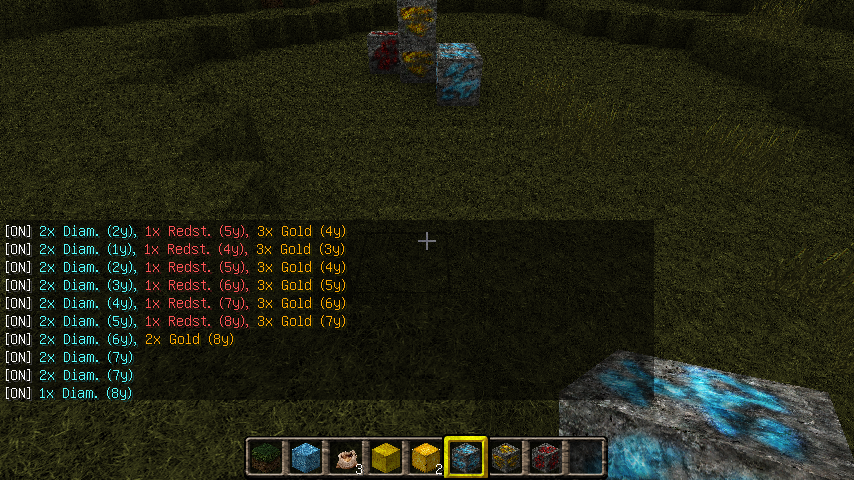
OreNotifier v2.0.0-configuration
Configuration
Plugin use 3 yaml files
- config.yml - for global, group a blocks settings
- players.yml - for players individual settings
- translations.yml - for almost all texts used by this plugin
config.yml
#usable colors: AQUA,BLACK,BLUE,BOLD,DARK_AQUA,DARK_BLUE,DARK_GRAY,DARK_GREEN,
#DARK_PURPLE,DARK_RED,GOLD,GRAY,GREEN,LIGHT_PURPLE,RED,WHITE,YELLOW,RESET
#RESET - it resets all font formating and coloring, can be used as default color

#global section
global:
  #minimum raidus, it affects only commands, plugin will always scan from 0 to maxradius
  minradius: 1
  #max allowed radius, this affects searching and commands and can not be higher then 32
  #however i suggest set it to max 16 blocks radius because of server load (depend on how
  #much is your server populated or/and how good is your server, 32radius = 274 625 blocks
  #scanned per player block move, example: 10 walking players in same time = 11 726 487 blocks
  #scanned/sec, if they have set 32 blocks radius, but if they will set 8block as is default
  #of default group it will be 209 785 blocks/sec and its less then one player with 32radius)
  maxradius: 12
  #max height for scanning, its because if u will scan at coordinates higher then is your
  #world height it will return blocks from bottom of your world
  maxheight: 255
  #min height
  minheight: 0
  #true will prints messages only when line is not equal to line before
  onlyonchange: false
  #units for range, format is: <short_unit_name>,<unit_name> or <unit_name> (if <short_unit_name>
  #is not set then <short_unit_name> will equal to <unit_name>
  unitname: 'y,yards'
  #default text for blocks (if they are not set)
  #usable variables: <code> <count> <name> <radius> <short_unit_name> <unit_name> <radius_alias>
  defaulttext: '<count>x <name> (<radius><short_unit_name>)'
  #default color for all texts printed by this plugin
  defaultcolor: 'WHITE'
  # prefix of all messages, format: [prefix] text
  prefix: 'ON'
  #color of commands in help
  helpcommandcolor: 'AQUA'
  #default text of radius alias if you will not set it
  defaultradiusalias: somewhere
  #it should be antispam interval and its in milliseconds :)) it will print messages about block
  #around you only after this interval, example if you set it to 333 it will print max 3 messages/sec
  spaminterval: 0

#section for blocks definition (global for plugin)
blocks:
  #block code (must be one letter and unique)
  D:
    #block name displayed in text (<name>)
    name: 'Diamond'
    #block id
    id: 56
    #displayed color
    color: 'AQUA'
  W:
    name: 'Water'
    id: 8
    color: 'BLUE'
    #block text for notifying, it will ovewrite defaulttext from global section
    text: '<name> is <radius_alias>'
    #next ids, for exaple; 9 is static water and 8 is flowing water
    aliases:
    - 9

# group section
groups:
  #group name
  default:
    #group blocks, players with this group can use only these blocks
    blocks: 'DGICLRS'
    #max usable radius in this group, players cant set higher radius and if not set then maxradius
    #from global settings is used
    radius: 8
    #aliases for radius (<radius_alias>), higher value = closest and undefined alias = defaultradiusalias
    #from global settings, examle: this group have set radius 1-3 = very close, 4-6 = close, 7-9 = closer,
    #10-12 = far away, 13-32 = somewhere
    radiusaliases:
    - very close
    - very close
    - very close
    - close
    - close
    - close
    - closer
    - closer
    - closer
    - far away
    - far away
    - far away
  special:
    blocks: 'DGICLRSVWMH'
    radiusaliases:
    - very close
    - very close
    - very close
    - close
    - close
    - close
    - closer
    - closer
    - closer
    - far away
    - far away
    - far away
players.yml
Players individual settings!
#player name, default name must be always presented, it is used as template for new players!
default:
  range: 8
  group: default
  blocks: DGS
  enabled: true
z0ny:
  #player custom blocks, they can use only blocks from their group
  blocks: DGS
  #player custom radius
  range: 8
  #player group
  group: special
  #has notifying enabled?
  enabled: true
translations.yml
In this config are stored almost all texts used by orenotifier plugin. All texts are stored in sections help, commands, global and some has own group. Help section has format:
help.<plugin_name>.<command_section>.<command_option>.description
command section has format:
commands.<plugin_name>.<command_section>.<command_option>.description
commands.<plugin_name>.<command_section>.<command_option>.usablevariables
usablevariables has no use and is here only for you what variables you can use in description. Global section format is:
global.<error_name>.description
global.<error_name>.usablevariables
All other texts have usually format:
<class_name>.<method_name>.description
<class_name>.<method_name>.usablevariables
#short example
help:
  orenotifier:
    texts:
      get:
        description: prints partial nodes
commands:
  orenotifier:
    players:
      set:
        groupnoexists:
          usablevariables: <group_name>
          description: Group "<group_name>" does not exists
global:
  mustbenumber:
    description: option <command_option> must be number
    usablevariables: <command_option>
playerinfo:
  tochatstring:
    description: '<player> => enabled: <enabled>, blocks: <blocks>, radius: <radius>, group: <group_name>'
    usablevariables: <radius> <blocks> <group_name> <enabled> <player>