MySQL Top Usage Example
Usage Example
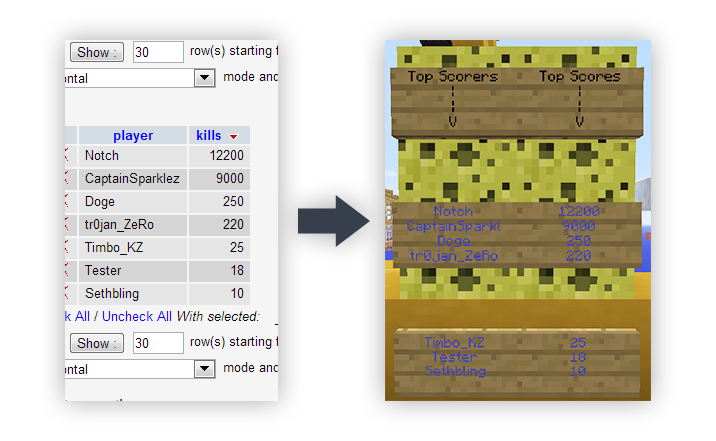
Let's say we want to define a list called TopScorers that will display values from table top_scorers. Let's take a look at table top_scorers that I have created earlier: (in this example I'm using PHPMyAdmin interface):

Here we can see that my table in this example is located in a database called server_database. The table name is top_scorers, but we knew this before. They field we want to display is obviously the on containing players' names, which in this case is called player. Additionally, we want to order the list by players' score, so we need remember that the field is called score and, as we want top scorers on the top, we will order it in descending order, so we will indicate our order as DESC.
First of all, we need to configure the plugin. For this purpose, open config.yml and edit it following the instruction specified there. In my case, I'll be using localhost as my host, standard 3306 port, username timbokz and my password, 123456. I'll specify server_database as my database because this is the one where table I'm interested in is located.
Here's how my config.yml will look like (please note that I've changed pluginConfigured to true):
# MySQL Top Config

# If set to true, will enable the plugin, while setting it to false will disable the plugin.
enablePlugin: true

# Set this to true to tell plugin you've configured the plugin.
# This setting is here to prevent plugin from attempt connection
# with dummy settings.
pluginConfigured: true

# If you're not familiar with MySQL and MySQL configuration, you'll probably find this part ambigious.
# In this case, it's not recommended for you to use this plugin.
host: "localhost" # Your MySQL host (Default: localhost)
port: "3306" # MySQL port !!! AS A STRING !!! (Default: 3306)
user: "timbokz" # Your MySQL username. (Default: root)
pass: "1234567" # Your MySQL user's password. (if default user is "root", pass is usually "" [null])
db: "servers_database" # MySQL database to fetch data from. There is no default, it should be created by you or someone else.
When this is done, we need to reload the server. Do it the way you find best but in my case I would use /reload. Then, we need to define our list, which will be called TopScorers, as we've decided in the beginning of this tutorial. Use /mysqltop define <List Name> to define it:
/mysqltop define TopScorers
Now, we just need to configure our TopScorers list using the information we've got from the picture above.
/mysqltop set TopScorers table top_scorers
/mysqltop set TopScorers display player
/mysqltop set TopScorers orderby score
/mysqltop set TopScorers order DESC
Additionally, we want to make this list public (all lists initially are only available to players with mysqltop.admin permission):
/mysqltop set TopScorers ispublic true
We can also speficy a color for this list. Let's make this list blue! &9 stands for Blue, according to this page. MySQL Top uses the same format but § is replaced with & (ampersand).
/mysqltop set TopScorers color &9
Our list is now ready to be displayed!
We can check if it's working using /toplist TopScorers, which should display the list of players with highest scores from our table.
Now, we can display a list on a sign or several signs.
There are 2 commands we can use:
/mysqltop sign TopScorers keys
/mysqltop sign TopScorers values
The one ending with keys will output the list of records from our specified display field, which is player, while the other one, values, will display a list of records from our order field, which is score.
Let's create some signs for our so called "Hall of Fame". Here's my arrangement:

As you can see, some signs has Place for keys and others have Place 4 values written on them. This is not a plugin requirement but a way of showing you where I'll place things.
Let's deal with key signs first. This is what we'll do:
/mysqltop sign TopScorers keys
***Right-Click on first "key" sign***
/mysqltop sign TopScorers keys 2
***Right-Click on second "key" sign***
As you can see, I've added "2" after second command. This digit stands for the number of the page will be displayed on sign. As sign can display only 4 lines of content, each page can hold up to 4 records. If the page is empty, the sign will be empty for now, but when more records will appear the sign will be updated.
Let's do the same for the sign which holds values:
/mysqltop sign TopScorers values
***Right-Click on first "key" sign***
/mysqltop sign TopScorers values 2
***Right-Click on second "value" sign***
Here's a screenshot of what I've got:

Now, you're good to go!
Oh, I nearly forgot. The signs will be updated every 30 seconds, so, if someone's scores will be updated and he or she will move up and become the first top scorer, it will appear on the sign.
Comments