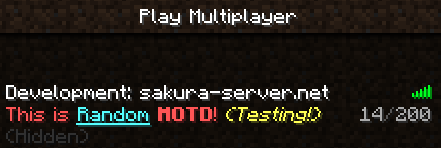
MotdManager
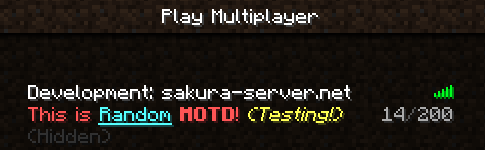
MotdManager
version 1.41
Description:
You can change server list motd (displayed to the player before they join) on game command!
This plugin allows display random message with any formatting code!
Features:
- Very easy to use!
- Support Permission!
- Support random MOTD!
- Support coloring & formatting code!
- Can show fake max server players count!
- Replace strings!
- Lightweightly!
Planned updates:
- Add send motd mode (random/select)
- Random color support
Please give me ideas!
Installation:
- Put the MotdManager.jar into your plugin folder and reload/restart your server.
- Open config.yml and make any changes you want, then use "/motdmanager reload" command.
Permissions:
- motdmanager.add
Allow using /motdmanager add command! (default: op) - motdmanager.remove
Allow using /motdmanager remove command! (default: op) - motdmanager.list
Allow using /motdmanager list command! (default: op) - motdmanager.maxplayer
Allow using /motdmanager maxplayer command! (default: op) - motdmanager.reload
Allow reloading configuration file! (default: op)
Commands:
/motdmanager Aliases: /motd, /mm
- /motdmanager add <motd>
To add motd to motd list (permission: motdmanager.add) - /motdmanager remove <id>
To remove motd from motd list (permission: motdmanager.remove) - /motdmanager list
To see current motd list (permission: motdmanager.list) - /motdmanager maxplayer <maxplayer>|disable
To change fake server maxplayer count (permission: motdmanager.maxplayer) - /motdmanager reload
To reload config.yml (permission: motdmanager.reload)
Supporting Color & Format Codes
Color Codes:
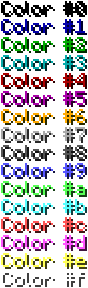
Format Codes:
- &k Random
- &l Bold
- &m Strike
- &n Underlined
- &o Italics
- &r Reset
- &p Random Color (original format code!)
( Check: http://www.minecraftwiki.net/wiki/Formatting_codes )
What's replace strings?:
It's constant strings for set dynamically changes value.
| String | Description | Example | Usage |
|---|---|---|---|
| %ver | Server minecraft version | 1.4.2 | [%ver] Welcome to our server! |
| %players | Online players count | 19 | Currently Online: %players |
Bugs and Feature Requests:
Use the Tickets tab to submit any bug reports or feature requests.
Or Post them in this thread.
Links:
Full Changelog
Source - Github
Dev builds - Jenkins
Development builds of this project can be acquired at the provided continuous integration server. These builds have not been approved by the BukkitDev staff. Use them at your own risk.
Comments

-

_ForgeUser8810853 Owner
-
View User Profile
-
Send Message
Posted Nov 12, 2012@syamn
No? Strange.. maybe use mc.PvPlanet.de:25565
I use ColourMotd the moment, but it hasn't all the features I want.
With that plugin you can change the motd directly in the server.properties and set the color and formatting codes there. And if you use &k the letters get that magic format.
-
View User Profile
-
Send Message
Posted Nov 12, 2012@Darkblader10
mhmm, I added but cannot see that motd.
Do you know another plugin that can use magic format?
-
View User Profile
-
Send Message
Posted Nov 12, 2012@syamn
But with other plugins it is possible. But I want to use yours ;) Add mc.PvPlanet.de and wait for the motd, you will see that it works
-
View User Profile
-
Send Message
Posted Nov 12, 2012@Darkblader10
May minecraft client does not support that.
-
View User Profile
-
Send Message
Posted Nov 12, 2012@syamn
When I use &k in the motd with your plugin I get the letters randomly coloured. But I want something like that: http://www.wiki.vg/File:Random_chat.gif
-
View User Profile
-
Send Message
Posted Nov 11, 2012@Darkblader10
What is the difference between a "magic format" and current random format?
-
View User Profile
-
Send Message
Posted Nov 11, 2012@syamn:
Can you add the magic format code pls?
It's not the random format code like I thought.
-
View User Profile
-
Send Message
Posted Nov 11, 2012Why is it working on my local server but when I bring it to my main it just keeps resetting to the default config? It will support the colors but not the the font styles such as bold.
-
View User Profile
-
Send Message
Posted Nov 10, 2012@syamn
Thank you my master _0_
-
View User Profile
-
Send Message
Posted Nov 9, 2012MotdManager has been added random format code!
I waiting approval for motdmanager ver1.3 :D
-
View User Profile
-
Send Message
Posted Nov 9, 2012@Darkblader10
It says that's a "Planned Update" above.
-
View User Profile
-
Send Message
Posted Nov 7, 2012Why is the format code "random" not working?
This is something I really need
-
View User Profile
-
Send Message
Posted Nov 6, 2012MotdManager has been added auto-replace constant strings!
I waiting approval for motdmanager ver1.2 :D
-
View User Profile
-
Send Message
Posted Nov 4, 2012Great mod, I have been looking for this. Thanks,
-
View User Profile
-
Send Message
Posted Nov 4, 2012@ThisUsernameIsMine
Thanks xD
-
View User Profile
-
Send Message
Posted Nov 3, 2012Nice mod, i like! :)
-
View User Profile
-
Send Message
Posted Nov 3, 2012@Adrenalineq
Yes, this is only displayed to the player before join server.
Remove default motd to /motdmanager remove 1
Add that motd to /motdmanager add &cMY EXTRA SERVER &b1.4 &f [SURV]
Then so you can see your motd in your server information (on your minecraft client)
-
View User Profile
-
Send Message
Posted Nov 3, 2012@syamn
But HOW it plugin appear? when i install this? looks like this ?
-
View User Profile
-
Send Message
Posted Nov 3, 2012@Adrenalineq
Sorry, this plugin doesn't have feature of appear MOTD on website.
@ManBeastPigDev
Please download v1.1 again. May you have using verion 1.0
@Rat_Cat12
Not yet. But I put it on my todo list.
-
View User Profile
-
Send Message
Posted Nov 3, 2012Is this compatible with other plugins that change the MOTD (such as LockDown)