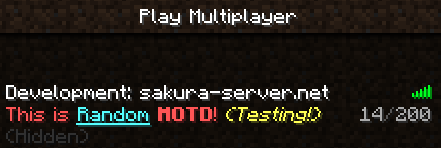
MotdManager
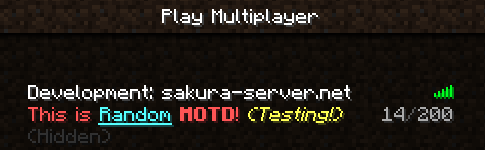
MotdManager
version 1.41
Description:
You can change server list motd (displayed to the player before they join) on game command!
This plugin allows display random message with any formatting code!
Features:
- Very easy to use!
- Support Permission!
- Support random MOTD!
- Support coloring & formatting code!
- Can show fake max server players count!
- Replace strings!
- Lightweightly!
Planned updates:
- Add send motd mode (random/select)
- Random color support
Please give me ideas!
Installation:
- Put the MotdManager.jar into your plugin folder and reload/restart your server.
- Open config.yml and make any changes you want, then use "/motdmanager reload" command.
Permissions:
- motdmanager.add
Allow using /motdmanager add command! (default: op) - motdmanager.remove
Allow using /motdmanager remove command! (default: op) - motdmanager.list
Allow using /motdmanager list command! (default: op) - motdmanager.maxplayer
Allow using /motdmanager maxplayer command! (default: op) - motdmanager.reload
Allow reloading configuration file! (default: op)
Commands:
/motdmanager Aliases: /motd, /mm
- /motdmanager add <motd>
To add motd to motd list (permission: motdmanager.add) - /motdmanager remove <id>
To remove motd from motd list (permission: motdmanager.remove) - /motdmanager list
To see current motd list (permission: motdmanager.list) - /motdmanager maxplayer <maxplayer>|disable
To change fake server maxplayer count (permission: motdmanager.maxplayer) - /motdmanager reload
To reload config.yml (permission: motdmanager.reload)
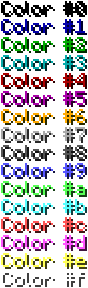
Supporting Color & Format Codes
Color Codes:
Format Codes:
- &k Random
- &l Bold
- &m Strike
- &n Underlined
- &o Italics
- &r Reset
- &p Random Color (original format code!)
( Check: http://www.minecraftwiki.net/wiki/Formatting_codes )
What's replace strings?:
It's constant strings for set dynamically changes value.
| String | Description | Example | Usage |
|---|---|---|---|
| %ver | Server minecraft version | 1.4.2 | [%ver] Welcome to our server! |
| %players | Online players count | 19 | Currently Online: %players |
Bugs and Feature Requests:
Use the Tickets tab to submit any bug reports or feature requests.
Or Post them in this thread.
Links:
Full Changelog
Source - Github
Dev builds - Jenkins
Development builds of this project can be acquired at the provided continuous integration server. These builds have not been approved by the BukkitDev staff. Use them at your own risk.
Comments

-

_ForgeUser8810853 Owner
-
View User Profile
-
Send Message
Posted Dec 19, 2019Tranks!
-
View User Profile
-
Send Message
Posted Jul 8, 2019Gj man,Thanks!
-
View User Profile
-
Send Message
Posted Mar 20, 2016The plugin is completely broken for 1.9! I would highly appreciate if you updated it. Thanks so much!
-
View User Profile
-
Send Message
Posted Feb 29, 2016Is it possible to make a new line with strings/variables? That way we won't have to keep spacing, and plus, spacing varies and makes it look horrible in some resource packs.
-
View User Profile
-
Send Message
Posted Dec 19, 2015How do I Use the second line of the motd?
-
View User Profile
-
Send Message
Posted Jun 30, 2015@MCer202
Its because you have to delete the default one with /motdmanager remove [id] You can find the ID with /motdmanager list (Its probably 1)
-
View User Profile
-
Send Message
Posted Jun 30, 2015I have a question, as put down in a Motd one that I've already created?
-
View User Profile
-
Send Message
Posted May 29, 2015When will this be updated for 1.8.6? I love this plugin!
-
View User Profile
-
Send Message
Posted Dec 20, 2014sdrg
-
View User Profile
-
Send Message
Posted Jul 30, 2014Anyone wanting the %player variable. I've added it in this fork. https://github.com/acecheese/MotdManager
-
View User Profile
-
Send Message
Posted May 26, 2014This works fine with multiple lines in the motd, you just have to use YAML multiline delimiter:
Result:
-
View User Profile
-
Send Message
Posted May 25, 2014Tutorial em Português (Brasil) Tutorial in Portuguese (Brazil)
Link: https://www.youtube.com/watch?v=VboJcKk0eQM
by: Bukkit Brasil
-
View User Profile
-
Send Message
Posted Apr 23, 2014Does this plugin have %newline% or \n to use the second line?
-
View User Profile
-
Send Message
Posted Apr 22, 2014Suddenly the only message that pops up is This is the Default MOTD! - though I have a ton already set and none of them include this.
-
View User Profile
-
Send Message
Posted Jan 31, 2014@endercraft98
Hi i don`t want to spam but this plugin is rally outdated, it works with 1.7.4 but there´s a new plugin, its name is PersonalMOTD look for it. it has the name option
-
View User Profile
-
Send Message
Posted Jan 30, 2014New idea: Player's Clint name in the MOTD.
e.g. Hello %player% Click to join in now!
Hello playername Click to join now!
-
View User Profile
-
Send Message
Posted Jan 28, 2014But it works fine with 1.7.2
-
View User Profile
-
Send Message
Posted Jan 20, 2014Pls update and input %player into next update.
Helle %pplayer, you not online last weeks.........
^^^^^^^^^^^^^
-
View User Profile
-
Send Message
Posted Jan 18, 2014Can u please add a string to the next MOTD line? Like %n or %newline
Thanks!
-
View User Profile
-
Send Message
Posted Jan 5, 2014@syamn
I have been using it in 1.7.2 with no errors. The only thing that would need to be added is some options with the second MOTD line that has been added.