Minecraft Market

Login/Register | Twitter | Plugin Stats
What is MinecraftMarket?
MinecraftMarket is a web based shopping platform that allows you as a Minecraft server owner to sell collections of in-game commands to players.
How do I create a webstore?
In order to create your store you will need to register an account here: https://www.minecraftmarket.com after the registration process you will be prompted to create a fresh store which will have some examples pre enabled.
How do my players use my store once created?
Once you have created your MinecraftMarket store and setup various categories and items to sell, your players can visit your store and make purchases. You will then receive the money via gateways you have setup in our control panel.
What payment gateways do you currently support?
Right now we currently support 4 major payment gateways with many more in the pipeline:
- PayPal
- Paymentwall
- Stripe
- PayGol
We are also currently developing integrations for the following:
- G2A Pay
- Coinbase
Which platforms/Minecraft server jars do you support?
In our efforts to be as cross platform compatible as possible we currently support the following:
- Spigot
- Bukkit
- Nukkit
- BungeeCord
- Sponge
If you are using a platform that we don't support please open a ticket here: https://www.minecraftmarket.com/tickets/
Some of our features include:
- Multiple stores
- Team accounts with permissions
- Discount codes
- Sales
- Cumulative categories
- All-in-one Design/Store editor
- Multiple payment gateways
- Built in ticket system for account support
- Built in knowledge base
Commands:
- /MM help: Shows the help menu
- /MM apikey <key>: Change your api key
- /MM check: Manually check for new purchases
- /MM updateSigns: Updates plugin signs
- /MM reload: Reloads all the configs
- /MM version: Shows current plugin version
To use any of these commands you need to have the permission “minecraftmarket.use”.
Purchases:
Every 2 minutes by default the plugin will check for new purchases and execute them if they meet the required parameters. You can change the check frequency in the config or if you want you can run a manual check by using “/MM check”.
GUI:
GUI can only be used on Spigot and Bukkit servers! You can show all of your current Categories and Items thru a GUI by setting a command to be used in the config (default /Shop and /Buy).
The GUI is customizable you can edit all of it the layouts config.
Signs:
You can add a recent donor signs by placing a sign then typing "[RecentDonor]" on the first line and in the second line type the recent donor position, if there is no recent donor in that position it will display a waiting for purchase sign.
To remove a sign you can break it and it will get removed automatically. On Spigot servers after adding a sign you can set a head on top of the block where the sign is and it will display the recent donor player skin after you do "/MM updateSigns".
Signs are updated every 2 minutes by default but you can change this in the config or if you want you can update them manually by using "/MM updateSigns".
Check out our demo store: https://example.minecraftmarket.com
This account does not actively monitor private messages, for all support and inquiries please use one of the following:
- If you have a MinecraftMarket account please create a ticket here: https://www.minecraftmarket.com/tickets/
- If you do not have an account please use our contact page here: https://www.minecraftmarket.com/contact/
Comments


-

_ForgeUser2762339 Owner
-
View User Profile
-
Send Message
Posted Apr 15, 2014@Kevinzuman22
Good point, however I still feel this change is not needed as I really dont understand the need for multiple markets because of needing them for different currencys when there is a dropdown menu which converts the prices anyways?
-
View User Profile
-
Send Message
Posted Apr 15, 2014@xXxKillDogxXx
But the problem is, I cannot put 2 different API keys in the config of MinecraftMarket, so how could I be able to link 2 markets to 1 server?
-
View User Profile
-
Send Message
Posted Apr 14, 2014@ParadoxGods
Confirmed to be fixed.
-
View User Profile
-
Send Message
Posted Apr 14, 2014@CookooCam
You need to setup a CNAME record pointing towards the subdomain you choose with MinecraftMarket, but then also you need to enter the CNAME you created into the Market settings area where you also created your subdomain.
This is crucial as the system wont link your cname with your market otherwise.
-
View User Profile
-
Send Message
Posted Apr 14, 2014@ParadoxGods
Could you go to the front page and open a live support ticket please, cause I think we may have fixed this about 30 mins ago however i just want to confirm this with you.
-
View User Profile
-
Send Message
Posted Apr 14, 2014@ParadoxGods
Working on this now give me 5 mins to track down the issue and correct it.
-
View User Profile
-
Send Message
Posted Apr 14, 2014@CookooCam
I'm having the same issue. I'm thinking of just taking the extra charge and switching to BuyCraft. Great plugin, but as stated it's still in Beta.
-
View User Profile
-
Send Message
Posted Apr 14, 2014I am kind of nooby when I comes to cnames, but I am having trouble with it. Instead of redirecting me to my shop, I get redirected to the homepage. Do I need to set up anything with MinecraftMarket, or is Godaddy not letting cname redirects goto subdomains?
-
View User Profile
-
Send Message
Posted Apr 14, 2014My users are experiencing an issue where, upon typing /shop in-game, going to the item they want, the /checkout/ will not show.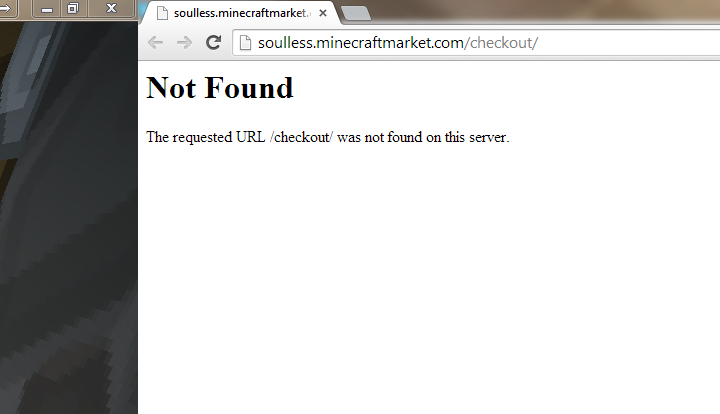
-
View User Profile
-
Send Message
Posted Apr 14, 2014@Kevinzuman22
Well you can already create multiple markets, and multiple servers so this should not be a problem. Plus on every market you can change the currency anyway so I don't see a reason for multiple markets just for currency conversion.
-
View User Profile
-
Send Message
Posted Apr 14, 2014You should add the posibility to add more than 1 market to a server, because I want a separate market for Euro payments & USD payments. Could that be added, or is that already added, or impossible to add?
-
View User Profile
-
Send Message
Posted Apr 11, 2014@xXxKillDogxXx
PM Sent, please refer to inbox. Thank you.
-
View User Profile
-
Send Message
Posted Apr 11, 2014@ParadoxGods
Okay ill take a look at the query script tomorrow as i have to anyways, and ill get this fixed, can you just tell me the server ip please?
-
View User Profile
-
Send Message
Posted Apr 11, 2014@TheOnlyRealTGS
Well, my serverhost has no option for 25565 so I'm using 25665.
-
View User Profile
-
Send Message
Posted Apr 11, 2014@xXxKillDogxXx
1.6.4, I'm running an Attack of The B Team server.
-
View User Profile
-
Send Message
Posted Apr 11, 2014@ParadoxGods
It should work perfectly fine, what minecraft server version are you running?
-
View User Profile
-
Send Message
Posted Apr 11, 2014@michalet
This wont happen sorry.
-
View User Profile
-
Send Message
Posted Apr 11, 2014@ParadoxGods
Which port are you connecting with?
-
View User Profile
-
Send Message
Posted Apr 11, 2014Server Status Module - This feature is not working for me. I have the correct IP and the correct port. Is it possible that it's because it's not 25565 but rather 25665 for the ports?
-
View User Profile
-
Send Message
Posted Apr 11, 2014@xXxKillDogxXx
An option to export & import tokens stats would be useful, as I think many use separate plugin for this and the option to import would make the transfer much easier.