
Setup

Installation
- Place the MiConomy.jar into your servers plugins folder.
- Start your server
Config
The config is located in your 'plugins/miconomy' folder.
Currency Name
To change the currency name, change "MoneyName" to your currency's name.
Also change "MoneyNamePlural" to the plural version of your currency's name.
EG:

Start Balance
To change the amount of money players start with, change "StartBalance" to your choosing.
EG:

MySQL
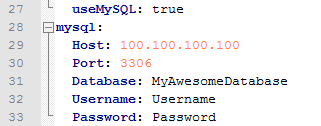
To use MySQL instead of storing data locally, change "useMySQL" to true.
You also need to enter your MySQL database's info.
Change:
"Host" to the url/ip where your MySQL database is located.
"Port" to the MySQL database's port number (99% of the time, 3306)
"Database" to the MySQL database's name.
"Username" to the username used to access the database.
"Password" to the password used to access the database.
EG:
Multi-World
To make player's balances the same in different worlds, list all of the child worlds under the main one.
EG:

This would make player's balances in worlds: world, world_nether and world_the_end the same.
Payday
To change the payday options, go into the world config. EG: "plugins/miconomy/MyWorld/config.yml"
If you have multiple worlds connected together, go into the parent world's config (The parent worlds is the one with all of the child worlds you set in the config).
EG:

Comments