McDesktopInfo
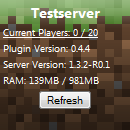
With McDesktopInfo you can show information about your server live on your desktop. This package includes a bukkit server plugin and a Windows Sidebar gadget (The sidebar is only available in Windows Vista and 7). The plugin, once started, opens up a socket on a configurable port, that is used to exchange data with the gadget. When the socket gets a query to do something from the gadget it automatically processes this query by getting the queried data from the server and sending it back to the gadget.
Features
- Leightweight plugin that uses a socket to exchange data with the gadget
- Configurable Windows Sidebar gadget with multiple backgrounds
- Secure: No HTTP requests to the socket are able to get behind the plugin
- Use special admin functions directly from your desktop using a password system
- Kick players via the gadget
Features
- Servername
- Current / Max players
- Plugin version
- Craftbukkit version
- Playerlist
- Kicking players
- Used / total RAM
- Tickrate
- Chat history
I will NOT implement any queries that would harm the server in any way.
Instructions
TODO
- Gadget design overhaul
- Send chat messages from gadget
- Planned queries: CPU load, uptime (Feel free to suggest even more via Forum/Comments/PM)
Comments


-

_ForgeUser6896944 Owner
-
View User Profile
-
Send Message
Posted Feb 5, 2015I don't seem to be getting anything on the gadget. I installed the plugin on my server, and it does work there (I can go mcdi help, etc). I have set the gadget to listen on the public IP that works for players just fine, and on port 6868. I was a bit confused as to the password, right now I've got the one that I use to login to my WebUI for the server, although I have tried numerous others with no result. I have gone /mcdi setPassword [password] , and it responded that is was done sucessfully, but still no luck. I also restarted the server after I changed the password.
I am running Bukkit 1.8.1
-
View User Profile
-
Send Message
Posted Jan 12, 2015Updating soon?
-
View User Profile
-
Send Message
Posted Jun 21, 2014Works really nice, just its a bit small, would it be possible for you to add in a Resize Option, cause its so small i almost have problems reading what it says, make it so when you right click on it you can change the size please.
-
View User Profile
-
Send Message
Posted Jun 17, 2014it don't work. i'm just tried with cb1.7.2-r0.3.
-
View User Profile
-
Send Message
Posted Jun 16, 2014Wow, this plugin is amazing. Thanks a lot for making it.
I recommend to make us able to re-size the gadget so we make it bigger and add more features. Also please add live-chat, the chat history doesn't refresh automatically.
-
View User Profile
-
Send Message
Posted Jun 15, 2014Video pls?
-
View User Profile
-
Send Message
Posted Jun 15, 2014How do this work?
-
View User Profile
-
Send Message
Posted Jun 4, 2014Hello people!
I'm alive and kicking. I just finished my last test for A-Levels and decided to pick this project back up again. Because I've been inactive for so long, there's some maintenance to do, which will be the main purpose of the next update. Currently I am rewriting the communication between gadget and server to use JSON, a great format, which I sadly ignored before. Aside from that I need to look into the issue with RAM and tickrate display not working for people. Stay tuned folks, the update should be ready in a day or two!
-
View User Profile
-
Send Message
Posted Mar 2, 2014I instalated that on 1.7.2 r02
and Ram and tickrate don't work!
Same plugin?
This pugin is abandonated?
-
View User Profile
-
Send Message
Posted Oct 10, 2013@surechoice
It works fine for me other than the RAM and Tickrate.
-
View User Profile
-
Send Message
Posted Sep 24, 2013it doesn't work with 1.6.4...
-
View User Profile
-
Send Message
Posted Sep 11, 2013Just installed CB1.6.2-R1.0 and the mem and tickrate vars don't seem to display anything anymore.
-
View User Profile
-
Send Message
Posted Sep 11, 2013@dpersson
Enable Gadget support in Windows 8 and you probably could.
-
View User Profile
-
Send Message
Posted Jun 29, 2013You should make the sidebar thing available to Windows 8 users. :)
-
View User Profile
-
Send Message
Posted Apr 28, 2013@R3tr0Sl1m3
Use it with 1.5.x. There won't be any problems.
-
View User Profile
-
Send Message
Posted Apr 28, 2013can you update this for 1.5.1?
-
View User Profile
-
Send Message
Posted Apr 16, 2013Feature Request: Only show vanished players in Player List if Admin pwd is supplied.
The player list shows all players, even those who are hidden/vanished via plugins like VanishNoPacket. I don't want regular pleyers who run your plugin to see vanished players. Only people with the Admin pwd should be able to see them.
-
View User Profile
-
Send Message
Posted Apr 7, 2013@curiosguy
Could you please post/PM me the error messages then?
-
View User Profile
-
Send Message
Posted Apr 6, 2013yea mcdi is enabled but console keep throwing out some error from mcdesktop constantly. and yep its correct port
-
View User Profile
-
Send Message
Posted Apr 5, 2013@curiosguy
Then you probably did something wrong. Have you set the correct port in the gadget and do you see messages in the serverlog that mcdi was enabled?