MazePvP
MazePvP
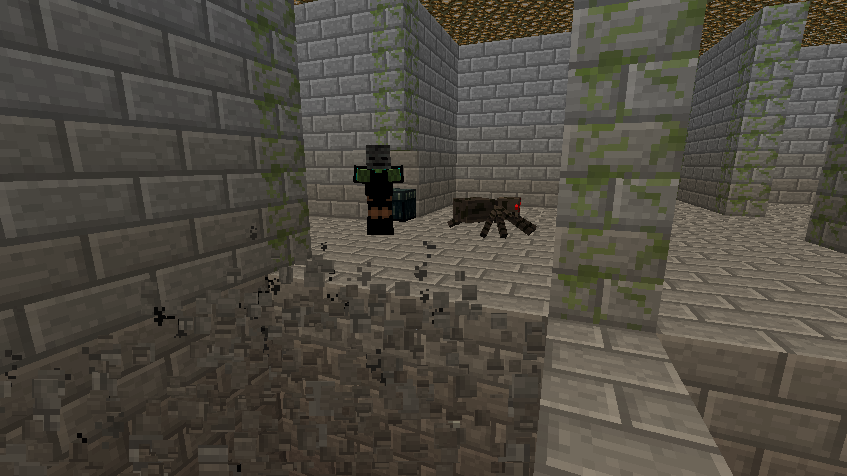
Tired of fighting other players on a dull, easy-to-navigate terrain? With this plugin, you can fight in a maze which is constantly changing shape while you're not looking! Even the players can reshape the maze with the right items. Beware of the mobs that appear and be on a lookout for treasure chests.
The source of this plugin is available in the jar files and also on github.
Features
- Ability to create multiple mazes of any size
- Indestructible bosses that can teleport and kill players instantly (by default)
- Projectile items such as eggs, snowballs and ender pearls behave differently inside mazes
- Mobs and chests randomly appear
Chasms
Holes can appear in the floor either naturally or because of players. They are filled with spikes, and anyone who falls into them instantly dies, so be sure not to fall! These can actually be jumped over if the timing and angle is exactly right.

Items
When a player enters a maze, he will get some items to use. When exiting the maze, the inventory gets cleared, so don't go near the exit if you are still planning to fight inside. You can find more items inside treasure chests, and you can store them in ender chests so that you don't lose them after dying. Some items behave differently inside mazes.
Eggs
Eggs can be used to break the walls and floor. However, they do not break the "pillars" that are marked as mossy stone bricks. The floor will smoke for a few seconds before disappearing, so use that time to find safe footing!
Snowballs
You can use snowballs to restore parts of the floor or walls. Just throw them at a pillar or in a chasm.
Ender pearls
Instead of teleporting to where the pearl landed, you will teleport to a random location inside the maze, and you won't suffer any damage. These can really come in handy if you're falling into a chasm or facing a lot of enemies!
Bosses
Bosses are zombies with black clothes and a wither skeleton mask. By default, one will appear in every maze. He can teleport to any location, so you never know when you'll encounter him! If he falls into a chasm, he will teleport away before hitting the bottom. His HP and strength can be customized in the config file. By default, he cannot be killed and he can kill players with one hit.

How to use/install, quick setup
To install the plugin, just drop the jar in your plugins folder.
Here's a quick example setup:
- Create a two-floored, 4x4 maze named "myMaze" where you are standing by using the command /mpcreate myMaze 4 2 2
- If you'd like your players to enter the maze using join signs instead of the entrances, put three signs next to each other somewhere, look at the first one and type /mpjoinsign myMaze
- Change the minimum amount of players by typing /mpsetplayernum myMaze 1 5
This will allow at most 5 players to join, and 1 player is enough to start the fight. - If you want players to be transported to a waiting area while they are waiting for other players, build your waiting room and inside it, type /mpsetwp myMaze
- Put up a sign somewhere in the waiting area, then look at it and type /mpleavesign myMaze
This will create a sign that allows players to leave the waiting area if they get bored.
Now you're set! To test your maze, click on the join sign to get transported inside it. If you die 3 times or disconnect, you will return back to the join sign with your previous items.
You should only set the minimum players to 1 if you're testing the maze. When it's ready for other players to use, set it to a higher number.
Check the commands section below for details about the commands. You can also change the text of the signs and much more by editing the config.yml. Check the configuration section to see how.
Commands
These commands can be used to manage the mazes:
| /mpcreate <name> <width> [height] <entrancenum> [X] [Y] [Z] | Creates a maze with name <name> at [X] [Y] [Z] (or player's position if not specified). <width> is the number of 5x5 passages the maze should have, (for example, setting it to 5 will generaze a 25 block wide maze). [height] is the number of floors the maze should have (1 if omitted). Note that larger size mazes will take more time to generate (widths above 10 might take several seconds). <entrancenum> is the number of entrances/exits the maze should have. |
| /mpdelete <name> | Removes the maze with the specified name, deleting all its blocks and killing all mobs inside it |
| /mplist | Lists all mazes in the current world and their locations |
| /mpclear <name> | Clears a maze, making it ready for a new fight. It removes all entities in it and fills the chasms |
| /mpjoinsign <name> | Turns the sign in front of the player into a join sign for the specified maze. If the join sign's text is longer than 4 lines, there must be more signs next to each other. (If you use the default text, you need to have 3 signs next to each other) |
| /mpsetplayernum <name> <minplayers> <maxplayers> | Sets the minimum amount of players needed to start a fight and the maximum amount of players that can join. This only applies to mazes with join signs. |
| /mpsetwp <name> [X] [Y] [Z] | Sets the waiting place position for a maze to the specified coordinates, or to the players position if they are left out. When a player joins that maze using join signs, he gets teleported to the waiting place. |
| /mpleavesign <name> | Turns the sign in front of the player into a "leave sign" that can be used to leave the waiting place of the specified maze. This sign should be inside the waiting place of that maze |
| /mpremovewp <name> | Removes the waiting place for a maze. |
| /mpstopfight <name> | Stops the fight in the specified maze. This only applies to mazes with join signs. |
| /mpset [mazename] <property> <value> | Used to set a property for a maze. The properties can be found in the maze's config file. If the maze name is omitted, the default property (that gets copied to newly created mazes) is set instead. You cannot set the item properties (like bosses.bossX.drops or startItems) with this. For that, use /mpadditem or /mpremoveitem instead |
| /mpget [mazename] <property> | Shows the current value of the specified property of a maze. If the maze name is omitted, it shows the default property instead |
| /mpadditem [mazename] <property> [itemID] [amount] [weigh] | Adds an item to an item property, like startitems. If mazename is omitted, the default property is set. If itemID, amount and weigh is omitted, the item in the player's hand is used (this only copies the id and amount of the item, but special data like enchantments aren't copied in the current version of this plugin). If you specify something like startitems.item2 for property, that item will be overwritten instead of a new item getting added |
| /mpremoveitem | There are two ways to use this command: |
- /mpremoveitem [mazename] <property> [itemID] [amount], the property being something like startitems
In this case, the item with the specified id and amount gets removed from the property. If itemID and amount is omitted, the item in the player's hand is used. - /mpremoveitem [mazename] <property>, the property being something like boss.drops.item2
In this case, the item specified by property is removed.
| /mpaddboss [mazename] | Adds a new boss to a maze (or to the default config if mazename is omitted) with default properties |
| /mpremoveboss [mazename] <bossNum> | Removes the boss with number bossNum from the maze |
| /mpcopyboss [mazename] <bossNum> | Adds a new boss to the maze by copying the boss with number bossNum |
| /mprecover <mazename> | If there's saved player data for a maze (can only happen when the server crashed during a fight), this command recovers the items, enderchest content, gamemode and position of the players who were inside the maze |
Permissions
mazepvp: Gives access to all commands in MazePvP. By default, this is given to all ops.
Configuration
This plugin has a config.yml file, in which various settings can be changed. Each maze also has its own config file in the Minecraft world folder with the name <mazename>.yml. When a new maze is created, it gets the configuration values from the main config.yml file.
Some settings can be changed individually for each maze by editing their config file or with the /mpset command. These settings will be marked in italics.
| showHeadsOnSpikes | Whether the heads of fallen players and mobs should appear on the spikes |
| canPlayersSpectate | Whether players can enter the maze as spectators when the fight has already started |
| canSpectatorsSeeEachOther | Whether spectating players can see other spectators |
| replaceMobsWithBoss | Whether a boss should replace another mob when he respawns. This could be useful when there's a limit on how many mobs are allowed per chunk |
| protectMazes | Whether maze blocks should be protected from players breaking them |
| fightStartDelay | The amount of seconds before a fight starts after enough players have joined. You can set this to 0 if you want the fight to start immediately, but then there won't be time for additional players to join at the last moment |
| playerLives | The amount of lives a player has in a fight. If they run out, the player gets thrown out of the maze. |
| bosses.bossCount | The number of bosses in the maze |
| bosses.bossX.name | The name of the boss that should appear in the chat |
| bosses.bossX.hp | The health of the boss, in half-hearts. For a normal zombie, this value would be 20. If this is 0 or less, the boss will have infinite HP |
| bosses.bossX.attack | The strength of the boss. If this is 0 or less, the boss will have infinite attack |
| bosses.bossX.mazeLevel | The maze floor that the boss is bound to (1, 2, 3, etc.) 0 if he's not bound to any floor |
| bosses.bossX.drops.itemX | Items that the boss could drop. An item with higher weigh will have a higher chance of getting dropped |
| bosses.bossX.drops.itemCount | This number indicates how many items there are in bosses.bossX.drops.* For example, if bosses.bossX.drops has item1 and item2 set, this value should be 2 |
| commands.* | These are commands that get executed at certain events. You can use special symbols that get substituted as something else. These symbols are: |
- <player>: The name of the player who triggered the event
- <allPlayers>: If this is in the text, the command will execute for every player and their names will be substituted where this is found
- <otherPlayers>: Same as <allPlayers>, except that it doesn't contain the player who triggers the event.
| commands.fightStarted | The command to execute when the fight starts. <player> takes no value |
| commands.fightRespawn | The command to execute when a player respawns. <player> is the name of the respawning player |
| commands.fightPlayerOut | The command to execute when a fighting player leaves the maze, either by quitting or by losing all lives. <player> is the name of the leaving player |
| commands.fightWin | The command to execute when a player wins. <player> is the name of the winning player |
For example, if you want to teleport all players to the respawning player, you should put the following into commands.fightRespawn:
tp <otherPlayers> <player>
| texts.* | These are the texts that are showed to the players on a sign or during a fight. You can use special symbols that get substituted as something else. These symbols are: |
- <name>: The name of the maze the text is referring to
- <currentP>: The current number of players that joined the maze
- <minP>: The minimum number of players needed to start the fight
- <maxP>: The maximum number of players allowed in the maze
- <remainingP>: The number of players that have to join before the fight can start. This is basically minP − currentP
- <state>: The state of the maze: This shows whether the fight has started or not
- <timeLeft>: The amount of seconds left until the fight starts. This should only appear in the countdown message
- <livesLeft>: The amount of lives the player has left. This should only appear in the respawn message
If you're not sure how to use these, check the default configuration file to see how they are used.
| texts.startedState | The text that should replace <state> when the fight has started |
| texts.waitingState | The text that should replace <state> when the fight hasn't yet started |
| texts.joinSign | The text that appears on a join sign. This can have multiple lines. If it has more than 4 lines, the rest of the text is shown on the next sign |
| texts.leaveSign | Same as texts.joinSign, just for the "leave sign" that is used to leave a waiting area |
| texts.joinBroadcast | The message that gets sent to joined players when another player joins or leaves |
| texts.joinBroadcastWhenFull | Same as texts.joinBroadcast, except that this is sent when the required amount of players have joined already |
| texts.countdown | The message that gets sent to joined players each second during the countdown |
| texts.fightStarted | The message that gets sent to joined players when the fight starts |
| texts.fightRespawn | The message that gets sent to a player when he respawns during a fight |
| texts.fightRespawnLastLife | Same as texts.fightRespawn, except that this is sent when the player has 1 life left |
| texts.fightPlayerOut | The message that gets sent to players still in fight when a player loses all lives |
| texts.fightWin | The message that gets to the last remaining player |
| texts.fightStopped | The message that gets sent when someone uses the /mpstopfight command |
| texts.onJoin | The message that gets sent when a player joins a maze |
| texts.onLeave | The message that gets sent when a player leaves a maze |
| texts.onJoinAfterFightStarted | The message that gets sent when a player tries to join when the fight has already started |
| texts.onJoinWhenMazeFull | The message that gets sent when a player tries to join when the maze is full |
| texts.onJoinWhenAlreadyJoinedOtherMaze | The message that gets sent when a player tries to join a maze while he has joined another one |
| probabilities.groundReappear | The rate at which chasms in the ground will heal. If this is set to a low value, they will disappear slower |
| probabilities.chestAppear | The chance for a chest to appear at certain intervals. |
| probabilities.enderChestAppear | The chance for an ender chest to appear at certain intervals. |
| probabilities.mobAppear | The chance of a mob appearing at certain intervals. |
| chestItems.itemX | Items that can appear inside chests. Items with higher weigh will have a higher chance of appearing in treasure chests. |
| chestItems.itemCount | Like bosses.bossX.drops.itemCount, this number indicates how many items there are in chestItems.* For example, if chestItems has item1 through item10 set, this value should be 10 |
| startItems.itemX | Items that players get when entering a maze |
| startItems.itemCount | Like bosses.bossX.drops.itemCount, this number indicates how many items there are in startItems.* For example, if startItems has item1 through item4 set, this value should be 4 |
| blocks.* | These properties specify what kind of blocks the maze is made of. They store the block id and data of the blocks that make up some part of the maze. For example, if blocks.floor has the following value: |
98:1 98 98 98:1
98 41 41 98
98 41 41 98
98:1 98 98 98:1
That means that the floor has gold blocks in the middle, stone bricks on the sides, and mossy stone bricks at the four edges.
If these values are set using /mpset, then for the value you have to write all the blocks in each row as one line, with the values separated by some character that's not ":" (because that's used to specify the data value for a block). For example, you can change the floor to the above pattern with the following:
/mpset blocks.floor 98:1_98_98_98:1_98_41_41_98_98_41_41_98_98:1_98_98_98:1
| blocks.wall | The blocks for the walls of the maze |
| blocks.higherWall | The blocks for the walls of higher levels |
| blocks.outerWall | The blocks for the outermost walls |
| blocks.pillar | The blocks for the pillars (the ones that are by default covered with mossy cobblestone) |
| blocks.outerPillar | The blocks for the outermost pillars |
| blocks.floor | The blocks for the floor |
| blocks.higherWall | The blocks for the floor of higher levels |
| blocks.lowerFloor | The blocks for the part that's directly under the spikes |
| blocks.spikes | The blocks for the spikes in a chasm |
| blocks.ceiling | The blocks for the ceiling |
Support
If you have any suggestion or encounter a bug, post a comment or send me a PM!
Comments

-

_ForgeUser12979648 Owner
-
View User Profile
-
Send Message
Posted Jan 26, 2014@Mortalsinn
Well, the purpose of the maze is not to "solve" it (get from one entrance to the other) but to use it as a PvP arena. But the height thing seems like a good idea, although it might be complicated to implement it, and I'm not sure what should happen to the chasms then. I'll think about it.
@blokzeil1
Well, together with a plugin like Multiverse, you can just put each maze in a separate world.
-
View User Profile
-
Send Message
Posted Jan 26, 2014@suggestion: Why you dont make a seperate world for every maze? for like a daily event....
-
View User Profile
-
Send Message
Posted Jan 26, 2014Some requests to make this more challenging.
- Make the entrance / exit on the same side with multi levels. So say you had a 25 wide maze, but you could also define the height IE: 10 levels high with stairs etc... have the entrance on the bottom, exit on the top on the same side or something along the lines
Right now the exit / entrance is always pretty much in a straight line and it's actually quite easy to solve.
-
View User Profile
-
Send Message
Posted Jan 25, 2014UPDATE (The new files will be available once they are approved):
The structure of the config file changed a little, so if you used a previous version of the plugin, be sure to update your config.yml! Or, you can delete it and let the plugin generate a new one.
-
View User Profile
-
Send Message
Posted Jan 25, 2014@SnelleEdje
Well, unfortunately I couldn't find what might be causing the lag. The only thing I could imagine were the heads on spikes, but there doesn't seem to be any code to do with them that should cause lag. Anyways, I'll put in an option to disable the heads in the next version, perhaps that will fix the issue.
@Others:
Is anyone else experiencing lag in the newer version of the plugin? It would be good to know whether others have this problem too.
-
View User Profile
-
Send Message
Posted Jan 23, 2014Your title here... ======Thanks for your quick reply.
There was only one maze in a Flatland world (muliworld). The size was 17 I think, with 3 entrances.
-
View User Profile
-
Send Message
Posted Jan 23, 2014@SnelleEdje
Thanks, I'm glad people are enjoying my plugin! I'm not sure what changes could cause the lag, though. I will try to look into it. Can you tell me how many mazes there are in the lagging world, and how big they are?
-
View User Profile
-
Send Message
Posted Jan 22, 2014Wow, great plugin. The kids love it. Nice addition to our server. We still use the initial release, because release 1.1.1 gives lag in the world where a maze is created. We don't have a real fast server, but the initial release gives no lag. Is it just me, or do others have the same experience?
Thanks again, great plugin!
-
View User Profile
-
Send Message
Posted Jan 20, 2014can you add more control to the boss. I would like to see an configurable setting for boss so it can be killed and adjustable hit points.
thanks
-
View User Profile
-
Send Message
Posted Jan 16, 2014UPDATE (The new files will be available once they are approved):
-
View User Profile
-
Send Message
Posted Jan 14, 2014@PlutoniumWeddingRing
Okay nice :D
-
View User Profile
-
Send Message
Posted Jan 13, 2014@Arthurhoeke
Yeah, I was planning to put up the source on github or some other site sooner or later. I will add some new features and update the plugin for 1.7 when I get some time, and then I'll probably also make it open source.
-
View User Profile
-
Send Message
Posted Jan 13, 2014Could you make a open source? :)
-
View User Profile
-
Send Message
Posted Jan 11, 2014@WildZassian
Kill Campers?!
-
View User Profile
-
Send Message
Posted Jan 11, 2014Since the boss is impossible to kill, what's the point of it?
-
View User Profile
-
Send Message
Posted Jan 11, 2014Ahh, this plugin looks very promising. Can't wait till it gets approved.
-
View User Profile
-
Send Message
Posted Jan 11, 2014@diannetea
That seems like a good idea, thanks for the suggestion! Regarding the name, the maze is supposed to be a PvP area, and the mobs are only in there to make the fights harder/more interesting. Although it can be used for PvE too.
-
View User Profile
-
Send Message
Posted Jan 11, 2014the bottom of the holes should be filled with iron fences to simulate spikes
Also I think the title would be more appropriate as PvE not PvP