
LoginSecurity

LoginSecurity
LoginSecurity is a lightweight password authorization plugin. You can optionally set a password each time you enter the server, adding a double layer of security to your account. The password is stored inside the configuration file, nobody else except the server owner can access or modify it.
How does it work?
Install the pluign to your /plugins/ directory, then start your server.
Type /register <password>, your account is now locked with a password.
For each time you login, make sure to use /login <password>.
Features
- Register your account optional or required (change in config)
- 5 Useful commands to mangage your password
- Advanced administrative control
- Advanced documentation via wiki
- Secure password storage using BCrypt
- Secure sessions storing to improve user experience
- Customizable time-out
- Map captcha upon registration (user friendly)
- Conversion from AuthMe and xAuth (check wiki for more info)
- Premium support through AutoIn
- Automatic update with changelog overview
- Username filtering (length and characters)
- Highly detailed configuration
- Automatically updated translation manager (user-submitted)
- Prevents being kicked by orther players loging in with your name
Session login allows the user to log in right after they logged out and not have to type in their password again. (1 minute time limit of being logged out, stores IP during that time to keep everything safe)
Commands
/lac - Admin command, rmpass and reload
/register <password> - Set your password
/login <password> - Login with your password
/changepass <old> <new> - change your password
/logout - Logout
Permissions
- loginsecurity.admin - allows admin command
- loginsecurity.update - shows update notifications
Video
Thanks to ServerMiner for making this informative tutorial
Orther tutorials: German (by MineCraftler4Live)
Planned
- Add translation interface for easier language selection
- Suggestions?
Known Bugs
- Players can mount/dismount and ride on vehicles while not logged in
Disclaimer
By default, LoginSecurity will check for updates from bukkitdev every 3 hours.
This feature can be disabled by setting "update-checker" to "false"
Anyone with the permission node ls.admin will be notified of updates, and it also able to download them via /lac update.
Which again can be disabled by disabling the update-checker
This plugin utilises Hidendra's plugin metrics system, which means that the following information is collected and sent to mcstats.org:
- A unique identifier
- The server's version of Java
- Whether the server is in offline or online mode
- The plugin's version
- The server's version
- The OS version/name and architecture
- The core count for the CPU
- The number of players online
The Metrics version Opting out of this service can be done by editing plugins/Plugin Metrics/config.yml and changing opt-out to true.
Additionally, when the language setting is changed, information is retrieved from lang.lenis0012.com to aquire up to date translations.
Links
- v3.0.2 - Download (18 - 1.15)
- Source code (GitHub)
- https://github.com/lenis0012/LoginSecurity-2/wiki (Wiki)
- https://github.com/lenis0012/Translations/wiki/Contribute (Translation Contribution)
Donate
If you want to support me working on this project, please donate.
It helps me alot to keep my projects up.
Donate at the top right corner
Comments


-

lenis0012 Owner
-
View User Profile
-
Send Message
Posted Jul 17, 2016We love your plugin so we decided to create a video to showcase its features!
We created a YouTube video tutorial for you, feel free to use it on your plugin info area: https://www.youtube.com/watch?v=3re8ZqjwreM
-
View User Profile
-
Send Message
Posted Jul 16, 2016@leonman1999123
Checking player passwords is not possible. Passwords can be removed by typing /lac rmpass playername
@leonman1999123
The /lac command was broken in older versions of LoginSecurity and is supposed to work from build #4 http://ci.lenis0012.com/job/LoginSecurity%202/4/ and upwards. Though it's probably best to try the latest (newest) build as it might fix some other problems as well (i.e. loss of player inventories). I'm pretty sure it works for 1.9.4 as well.
-
View User Profile
-
Send Message
Posted Jul 16, 2016which is for 1.9.4 because I see the new one is for 1.8 .19 1.10. I download this but not work on my server ,can't use /lac
-
View User Profile
-
Send Message
Posted Jul 16, 2016Sorry ,How to check the player password?? and how to remove the password???
-
View User Profile
-
Send Message
Posted Jul 11, 2016The plugin didn't work on my server it just hide and not enabling
-
View User Profile
-
Send Message
Posted Jul 11, 2016@Zorsus
No:
database.yml
-
View User Profile
-
Send Message
Posted Jul 10, 2016Hello, does this plugin require a MySQL db?
-
View User Profile
-
Send Message
Posted Jul 9, 2016@arturek1666
Without SQL?
But there's MySQL and there's SQLite.
I'm experiencing the problem with SQLite, but MySQL is also SQL
So... ?¿?
-
View User Profile
-
Send Message
Posted Jul 9, 2016There is an issue with sql when inventory is saved in sql than when server resets players don't have items. The best way is to do it without sql.
-
View User Profile
-
Send Message
Posted Jul 9, 2016@lenis0012
Thank you. Though there's more to it.
I've posted an up-to-date post on Spigot forum's LoginSecurity discussion forum.
-
View User Profile
-
Send Message
Posted Jul 8, 2016@hutt132
I will look into it. It might take a fgew days as i am on vacation.
@boringwolf
@ThisUsernameIsMine
will take a look as well.
-
View User Profile
-
Send Message
Posted Jul 7, 2016@hutt132
I have the same but with the default database and with "hide-inventory: true"
So:
unfortunately isn't true =(
@ lenis0012: With the new builds (currently using build #9) i can delete user accounts again but it still throws a NPE when deleting someone's account ;-)
@boringwolf Keep in mind the author/dev of AutoIn has recently abandoned the project (see Spigot resource) and recommends to use the plugin FastLogin instead.
-
View User Profile
-
Send Message
Posted Jul 5, 2016http://pastebin.com/HAB0kRtX
The database error
-
View User Profile
-
Send Message
Posted Jul 4, 2016http://pastebin.com/ZLuWFxr2
I have error with AutoIn
-
View User Profile
-
Send Message
Posted Jul 3, 2016LoginSecurity v2.1.3 Spigot 1.10.2
When using the MySQL database and having "hide-inventory: false" in the config, players who have registered have their inventory wiped when they join. Their inventory is still wiped even after logging in.
Here is the error produced when they log in: http://pastebin.com/tJJqHqxv
Their inventory_id in MySQL is set to NULL.
-
View User Profile
-
Send Message
Posted Jul 2, 2016I have a problem, i installed the plugin and switched to offline mode the server, but ALL the players lost their ranks, inventories, etc. A solution? I want to take the server on offline mode
-
View User Profile
-
Send Message
Posted Jun 28, 2016Work In Progress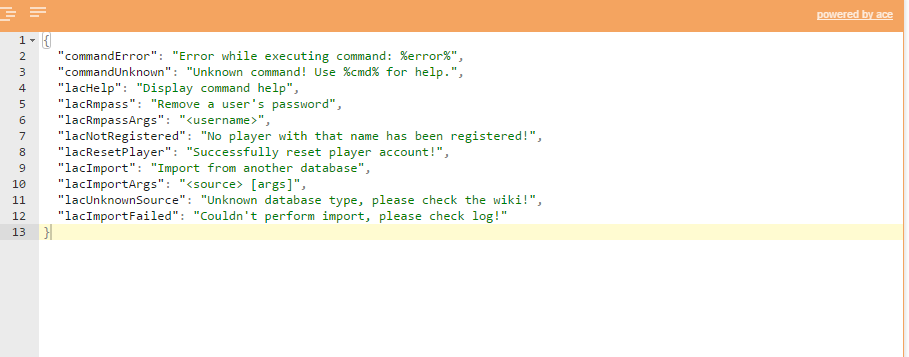
-
View User Profile
-
Send Message
Posted Jun 28, 2016@arturek1666
what error?
-
View User Profile
-
Send Message
Posted Jun 28, 2016@lenis0012
There is still error when I connect to mysql with the database I had already had before
-
View User Profile
-
Send Message
Posted Jun 25, 2016@mormaii2
I don't know whats going on there.
I will check it out tomorrow :)
Update is coming as soon as i fixed an apparent mysql error
EDIT: Build server is back