This project is inactive and its default file will likely not work with the most recent version of Minecraft. The author may have abandoned it, or it may have outlived its usefulness.
Hi, i dont know what you mean with the part of my script,
you can use 2 ips or 2 ports ´this is your part, you only need the servers on the same root/vroot. I Use on my server 2 ips.
what do you mean as its running? your server or my script?
try that:
1. Make sure bash is installed and working:
Code:
which bash
2. Make sure directory (mount point) has permission to run a shell script. Some time it is disabled on directory such as /tmp. Run script from your own directory. Try to run it as follows:
Code:
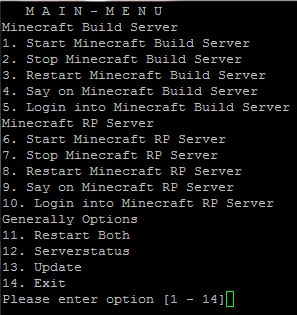
Hi, Startscript User, if you have any Ideas for Features or something else, please let me know, i will try to make this Script perfektly :P
So use it and have fun
Rollback Post to RevisionRollBack
To post a comment, please login or register a new account.


-
View User Profile
-
Send Message
Posted Feb 10, 2012@Smiley43210
try reupload the script, i have update to 5.2.1
-
View User Profile
-
Send Message
Posted Feb 9, 2012I get the following errors:
-
View User Profile
-
Send Message
Posted Feb 6, 2012@ZeroCrash16
Hi, i dont know what you mean with the part of my script,
you can use 2 ips or 2 ports ´this is your part, you only need the servers on the same root/vroot. I Use on my server 2 ips.
what do you mean as its running? your server or my script?
-
View User Profile
-
Send Message
Posted Feb 5, 2012for c in $(seq 1 5); do
echo -n "!"
sleep 1
done
echo !
Really? You had too much fun writing that script!
This would make a great addition to my Minecraft server, as it's running
So, how exactly does the multiserver setting work? Do I need to have a different port configured on each server?
-
View User Profile
-
Send Message
Posted Feb 2, 2012@Smiley43210
Oh sorry i havent read it exactly
try that:
1. Make sure bash is installed and working:
Code:
which bash
2. Make sure directory (mount point) has permission to run a shell script. Some time it is disabled on directory such as /tmp. Run script from your own directory. Try to run it as follows:
Code:
chmod +x startserver.sh
./startserver.sh
OR
Code:
bash startserver.sh
sh startserver.sh
-
View User Profile
-
Send Message
Posted Feb 2, 2012@Tealk123
What point? it starts with
#!/bin/bash
# version 5.1.0 (31.01.2012)
# Author: Tealk @ anzahcraft.de
-
View User Profile
-
Send Message
Posted Jan 31, 2012<reply 518728>
./startserver502.sh line 1: #!/bin/bash: No such file or directory
./startserver502.sh line 639: syntax error: unexpected end of file
this is a upload Error try:
mcedit startserver.sh
and delete in the first row the point
-
View User Profile
-
Send Message
Posted Jan 30, 2012Doesn't work for me.
-bash: /path/to/file/startserver.sh: /bin/bash^M: bad interpreter: No such file or directory
That's what I get.
-
View User Profile
-
Send Message
Posted Jan 30, 2012Seems pretty good, Im gonna test it out
-
View User Profile
-
Send Message
Posted Jan 28, 2012@Tallcraft
Then say me a better place
-
View User Profile
-
Send Message
Posted Jan 18, 2012I guess thats the wrong place for a linux-script? Its not a server-mod / plugin.
-
View User Profile
-
Send Message
Posted Jan 18, 2012Hi, Startscript User, if you have any Ideas for Features or something else, please let me know, i will try to make this Script perfektly :P
So use it and have fun