This project is inactive and its default file will likely not work with the most recent version of Minecraft. The author may have abandoned it, or it may have outlived its usefulness.
im getting this error:
./startserver.sh: line 642: xmlstarlet: command not found
Startscript have a update, please update to
sorry that i dont opened a ticket.
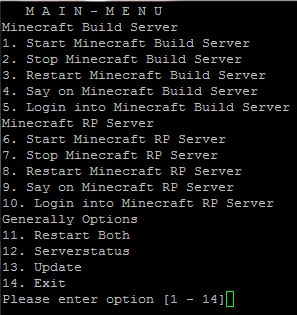
you can manage with this script 2 servers, i have create it for my projekt, i have a build and a rp Server so that i use this names, you can edit this all
Once installed ... do login into Putty and put my password for my server ...than I see the menu? and...what is the difference between "Start Build Minecraft Server" and "Start Minecraft RP Server?"
thanks for your reports, but i would be happyer if you would use the ticket system :P
i have confert it to ansi now and close the if tag, in my new version 5.2.5
(thats a bad misstake^^ )
I do this: create /home/minecraft and in this folder rp build and backup. Script is in folder /home/minecraft, i copy craftbukkit.jar to rp and build. And use comand chmod 0777 -R /home/minecraft
When i going wrong :/
you must have your script in the main folder, in this folder eg. rp in rp you must have the server files like craftbukkit.jar
on my server it running fine
Script looks good but when i start script then i got message:
Directory or file not found.
: command not found
: command not found
: command not found
.
.
.
/startserver.sh line 48 error in this line
/startserver.sh line 48 'STARTS1 () {
I know that, I mean I dragged the script into Terminal and pressed enter. It did absolutely nothing. Just another line for me to do another command from my user directory.
I ran the script and it did absolutely nothing. It just "finished". No errors, no output, just "". Am I doing something wrong? After I gave the script "run" permission, I simply dragged the script in and pressed enter.
Rollback Post to RevisionRollBack
To post a comment, please login or register a new account.


-
View User Profile
-
Send Message
Posted Mar 31, 2012im getting this error: ./startserver.sh: line 642: xmlstarlet: command not found Startscript have a update, please update to sorry that i dont opened a ticket.
-
View User Profile
-
Send Message
Posted Mar 28, 2012@levisn1
you can manage with this script 2 servers, i have create it for my projekt, i have a build and a rp Server so that i use this names, you can edit this all
-
View User Profile
-
Send Message
Posted Mar 28, 2012Once installed ... do login into Putty and put my password for my server ...than I see the menu? and...what is the difference between "Start Build Minecraft Server" and "Start Minecraft RP Server?"
-
View User Profile
-
Send Message
Posted Mar 27, 2012Works like a charm :D
-
View User Profile
-
Send Message
Posted Mar 16, 2012@bentech1
thanks for your reports, but i would be happyer if you would use the ticket system :P
i have confert it to ansi now and close the if tag, in my new version 5.2.5
(thats a bad misstake^^ )
-
View User Profile
-
Send Message
Posted Mar 16, 2012Looks like you forgot
fiin
MULTISERVER_UPto end
-
View User Profile
-
Send Message
Posted Mar 16, 2012That was caused by UTF-8 Encoding converting to ansi fixed but now i get
-
View User Profile
-
Send Message
Posted Mar 16, 2012Hi i get this
CentOS 5.5
-
View User Profile
-
Send Message
Posted Feb 27, 2012@Spojler
Can you please open a tickit therefore?
-
View User Profile
-
Send Message
Posted Feb 27, 2012I do this: create /home/minecraft and in this folder rp build and backup. Script is in folder /home/minecraft, i copy craftbukkit.jar to rp and build. And use comand chmod 0777 -R /home/minecraft
When i going wrong :/
-
View User Profile
-
Send Message
Posted Feb 27, 2012@Spojler
you must have your script in the main folder, in this folder eg. rp in rp you must have the server files like craftbukkit.jar
on my server it running fine
-
View User Profile
-
Send Message
Posted Feb 27, 2012Debian, screen is installed. Before use script i create folder "rp" "build" and "backup"
-
View User Profile
-
Send Message
Posted Feb 27, 2012@Spojler
what os are you using?
use the command
"apt-get install screen wget"
-
View User Profile
-
Send Message
Posted Feb 27, 2012Script looks good but when i start script then i got message:
Directory or file not found.
: command not found
: command not found
: command not found
.
.
.
/startserver.sh line 48 error in this line
/startserver.sh line 48 'STARTS1 () {
-
View User Profile
-
Send Message
Posted Feb 24, 2012@Smiley43210
Please open a Ticket, and past there the script part whitch you have edited, ans please screens from your putty
-
View User Profile
-
Send Message
Posted Feb 22, 2012@Tealk123
I know that, I mean I dragged the script into Terminal and pressed enter. It did absolutely nothing. Just another line for me to do another command from my user directory.
-
View User Profile
-
Send Message
Posted Feb 19, 2012@Galexrt
atm you can't but i can write it so, you can open a ticket therefor
-
View User Profile
-
Send Message
Posted Feb 19, 2012where can i define with how much ram the servers are starting??(maybe that i can define every server once like so server A 4gb server B 6gb)
-
View User Profile
-
Send Message
Posted Feb 17, 2012@Tealk123
you know that this is a bash shell script and not a plugin for minecraft?
-
View User Profile
-
Send Message
Posted Feb 12, 2012I ran the script and it did absolutely nothing. It just "finished". No errors, no output, just "". Am I doing something wrong? After I gave the script "run" permission, I simply dragged the script in and pressed enter.