
LagMeter

Lets you check the server lag, in ticks-per-second.
Bukkit version does not matter for this plugin.
Description
A lot of plugins tell you that something happens "every X seconds, depending on lag." That's because when the server is overworked, there are less than 20 ticks per second. This plugin will measure the number of ticks per second, and output it on your screen as a "Lag Meter." The plugin can also output the amount of memory free, alert those with a specific permission node when the ticks per second or free RAM goes down too far, and even measure the server's ping to google.com.Tutorials and Reviews
Some of them are a little out of date, but you get the idea.
Download
CI/build (Jenkins) serverYou can always pick up the latest compiled version of LagMeter on my CI server. Note that BukkitDev doesn't warrant the safety of these builds, etc, but it's all pulled from GitHub anyways, so you could compile it yourself or look at the commits. Lagmeter is more stable than Lagmeter-bleed.
Stable
Version: 1.17.0
Build date: 3 March 2016
 BukkitDev Download: Latest Build
Javadocs
Version: 1.15.0
Build date: 23 November 2013
 Dropbox Download (zipped; standard doclet)
Source Code
Bugs and Feature Requests
 Bug reports & Feature Requests
Features
- Simple, minimum-fuzz installation
- Configurable without drowning you in options
- Checks the server performance
- Ability to check the ping between the server and Google.com
- When someone says "GAH! LAG!", you can /lag, and tell them "Dude, it's your computer sucking."
- Supports Bukkit's built-in permissions system, for example via [the official plugin](http://forums.bukkit.org/threads/permissionsbukkit-official-default-groups-plugin-1000.26785/)
- Support for the "old-school" Permissions, as well as PermissionsEX
- Logging of the lag, if you want it.
- Logging of players online, with the above, if wanted.
- Suggestions?
Change Log
Change LogCommands & Permissions
Commands & PermissionsConfiguration Explanation
ConfigurationExample output:
[####################] 20.0 TPS
...or if your server isn't doing so hot...
[##########__________] 10.0 TPS
Comments


-

TheLunarFrog Owner
-

_ForgeUser7441740 Former Author
-
Dexterous3042 Documenter
-
View User Profile
-
Send Message
Posted May 4, 2012Just perfect! Thank you.
-
View User Profile
-
Send Message
Posted May 3, 2012@noxturno
Are you sure your server recognizes the memory you have allocated to it? It uses Bukkit's methods to get your max ram.
@stgram
I'll look into adding something similar to this in the near future.
-
View User Profile
-
Send Message
Posted May 2, 2012@sharkale31
Can I ask what you use to get that?
-
View User Profile
-
Send Message
Posted May 2, 2012Hi, wonderful plugin, but can you please add a /broadcost/ function? One setting, every 30sec maybe, configurable, when to send a broadcast with the /lag command, and one setting, which says whether to msg whenever the tps drops bellow 15, so everyone knows. :)
-
View User Profile
-
Send Message
Posted May 1, 2012my server has 12288MB ram allocated but the plugin only shows 10922MB how come?
-
View User Profile
-
Send Message
Posted Apr 30, 2012could you add to the log the number of entities, players and loaded chunks all per world and ram usage ;] ? it would be very helpful
-
View User Profile
-
Send Message
Posted Apr 24, 2012Love the choice of license. :) Thx for the software.
-
View User Profile
-
Send Message
Posted Apr 21, 2012I have a suggestion. When you get to a low ammount of RAM free (maybe configurable), it will warn you through chat.
-
View User Profile
-
Send Message
Posted Apr 12, 2012Implemented a new feature which allows for use of a logs folder inside the LagMeter data folder (where you put the configuration for LagMeter). This will make LagMeter use a new file daily, but beware it is still somewhat experimental, so if you run a server from day 1 to day 2 and it's still online on day 2, it might log in day 1's file.
I'll be uploading this version soon.
-
View User Profile
-
Send Message
Posted Apr 11, 2012Amazing :)
-
View User Profile
-
Send Message
Posted Apr 11, 2012@Jenssss91
Anything that would help me make something like that would be much appreciated
-
View User Profile
-
Send Message
Posted Apr 11, 2012Thanks for making and sharing this plugin. I have LagMeter 1.8 installed on a CraftBukkit 1.2.5-R1.0 server (Ubuntu Server 10.04, 64-bit) and it works great.
LHammonds
-
View User Profile
-
Send Message
Posted Apr 10, 2012@hGabbeh
i will ask the other author, if we could share this plugin for munin.
-
View User Profile
-
Send Message
Posted Apr 9, 2012@Jenssss91
Any chance I could have look at the source on that?
-
View User Profile
-
Send Message
Posted Apr 2, 2012@Sadragos
I just use a cron job script to copy off the log to another directory and then let the lagmeter repopulate a new log.
-
View User Profile
-
Send Message
Posted Apr 2, 2012Is it possible to limit the Log somehow? Anything like keep the log of the last 24 hours or 7 days? Would be a really great feature I think :) Its already a great Plugin already, but that would make it even better for me :)
-
View User Profile
-
Send Message
Posted Mar 29, 2012@MontegroDK
It already is. There is a new feature, but I prefer to wait until a RB for 1.2.4 is released to release the new jar.
-
View User Profile
-
Send Message
Posted Mar 27, 2012Any word on when the plugin will become compatible with 1.2.4, or is it already compatible?
-
View User Profile
-
Send Message
Posted Mar 10, 2012@iVMoRiginal
try to use munin for that.
you just have to write a php plugin.
like this: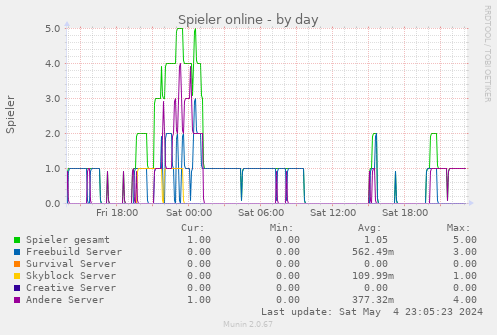
-
View User Profile
-
Send Message
Posted Mar 10, 2012@Jobsti2
I'll look into adding that. I dunno if there's a way to count mobs in the world, though.
@iVMoRiginal
In order to add an average, I'd need to make a huge memory section to store all the data for the previous 24h, then have it erase old data. This would end up in a huge memory leak, probably.
As for the web interface, I don't have enough time for that. Sorry.