Kingdoms 2
What is Kingdoms 2?
Kingdoms 2 is a chunk based town-nation hierarchy very loosely based on Towny.This plugin has been running on our server since December of 2011. One of the major reasons we were pushed to create this system is at that time Towny was very very unstable and unreliable and we had to do a lot to patch it up, as well as it was lacking MySQL support. We then created this plugin to fill those holes as well as put our own spin on the plugin.
Beta release is now available in the downloads section!. Please forward any issues over to me view the github ticket system. Thank you!
But what happened to Kingdoms 1?
Kingdoms 1 was my first attempt at the town-nation hierarchy and it used WorldGuard for its protection system instead of creating our own (Hense why our API has WorldGuard/WorldEdit sections dedicated to it). At the time we thought this was very beneficial as we wouldn't have to maintain that aspect of the plugin and could do bigger things. It was a good idea, but from it came a large list of bugs. So recently I decided to develop up Kingdoms 2 to fix those issues.
If you would like to take a look at this plugin before installing you can check out our server @mc.imdeity.com and type /hub to go to the hub where we are testing it atm
Features
- MySQL!
- DeityProtect backing it up!
- Town/Kingdom permission system
- Built in friend system
- Town's senior assistants can replace the mayor with a town vote
- Town borders so that other towns cannot expand towards yours
- Kingdom border so that any town cannot be created within your land unless the king allows it.
- Tax system!
- Players manage their land the way they want with control over who can build/destroy/use items/walk on their plots
- If a town belongs to a Kingdom, residents can claim plots in multiple towns within the kingdom!
- Town/Kingdom Chat system (for use with DeityChat)
- Multi-world support
- Towns can create their own Pvp Arenas!
Requirements
- DeityAPI (With a valid MySQL connection)
- DeityProtect
- A brain
Long list of commands
Note: All of these commands are currently implemented successfully on the ImDeity Kingdoms Minecraft Server. Also note that there is in-game help files for all these commands with the use of DeityAPI so you can /<command> help <page-number>
Resident Commands
- /resident info <player-name> <-o>: This command will show your or 'player-name''s status. It is equivalent to the /resident [player-name] command in the current kingdoms- Requires kingdoms.resident.info
- /resident add-friend [player-name]: This command will add a resident to your friends list. This is mostly if you decide to use the F permission- Requires kingdoms.resident.add-friend
- /resident remove-friend [player-name]: This command will remove a resident from your friend list. This is mostly if you decide to use the F permission- Requires kingdoms.resident.remove-friend
- /resident set gender [male/female]: This will change your gender in the game. Used for user titles- Requires kingdoms.resident.set
- /resident set permissions edit [P/F/T/K/TS/KS]: See the permissions section below. Default is TS- Requires kingdoms.resident.set
- /resident set permissions use [P/F/T/K/TS/KS]: See the permissions section below. Default is TS- Requires kingdoms.resident.set
- /resident set permissions access [P/F/T/K/TS/KS]: See the permissions section below. Default is T- Requires kingdoms.resident.set
Town Commands
- /town list: This will list all current towns- Requires kingdoms.town.list
- /town info <town-name> <-o>: This will show a town's status- Requires kingdoms.town.info
- /town create [town-name]: This will create a new town with you as the mayor.- Requires kingdoms.town.create Note that you must abide by distance restrictions now, and may be required to move farther away from towns
- /town chat <message>: This will allow you to chat with your town- Requires kingdoms.town.chat
- /town delete: This will remove your town- Requires kingdoms.town.delete
- /town claim: This will claim a new town plot. Note that the same restrictions apply for this as the town create command- Requires kingdoms.town.claim
- /town unclaim: This command will unclaim the town plot you are currently standing on- Requires kingdoms.town.unclaim
- /town add [player-name]: This will add a resident to your town pending that they are online- Requires kingdoms.town.add
- /town kick [player-name]: This will kick a resident from your town- Requires kingdoms.town.kick
- /town set town-board [message]: This will change your town board- Requires kingdoms.town.set
- /town set plot-price [amount]: This will change the default plot price of the town- Requires kingdoms.town.set
- /town set spawn: This will change the town spawn location. Note that the spawn has to be located on an unclaimed plot- Requires kingdoms.town.set
- /town set public [on-off]: This will restrict the town to towns-members only- Requires kingdoms.town.set
- /town set permissions edit [P/F/T/K/TS/KS]: See the permissions section below. Default is T- Requires kingdoms.town.set
- /town set permissions use [P/F/T/K/TS/KS]: See the permissions section below. Default is T- Requires kingdoms.town.set
- /town set permissions access [P/F/T/K/TS/KS]: See the permissions section below. Default is P- Requires kingdoms.town.set
- /town spawn <town-name>: This will teleport you to the towns spawn- Requires kingdoms.town.spawn
- /town leave: This will remove you from the town- Requires kingdoms.town.leave
- /town deposit <town> [amount]: This will deposit money into the town- Requires kingdoms.town.deposit
- /town withdraw [amount]: This will withdraw money from the town pending on you being senior assistant+- Requires kingdoms.town.withdraw
- /town promote [player-name]: This will move 'player-name' up to the next rank. Note you set the new mayor by promoting a senior assistant- Requires kingdoms.town.promote
- /town demote [player-name]: This will move 'player-name' down to the next rank- Requires kingdoms.town.demote
- /town vote create: This command is not yet implemented. This will create an assistant vote for a new mayor- Requires kingdoms.town.vote
- /town vote [assistant-name]: This command is not yet implemented. This will cast your vote for the assistant. Note only assistants will be able to vote- Requires kingdoms.town.vote
- /town vote check: This command is not yet implemented. This will show the status of the current vote- Requires kingdoms.town.vote
- /town warp list: This command will give a list of town warps- Requires kingdoms.town.warp.list
- /town warp [warp-name]: This command will warp you to a warp, for a price- Requires kingdoms.town.warp.use
- /town warp add [warp-name]: This command will add a town warp, for a configurable price (Assistant+)- Requires kingdoms.town.warp.add
- /town warp remove [warp-name]: This command will remove a town warp (Assistant+)- Requires kingdoms.town.warp.remove
Plot Commands
- /plot claim: If the plot is for-sale, this command will claim the plot for you- Requires kingdoms.plot.claim
- /plot unclaim: This will unclaim your plot, or if you are a helper+ it will unclaim the plot you are standing on- Requires kingdoms.plot.unclaim
- /plot set for-sale <price>: This will set the plot for sale for either the default town price or the specified price. Note: This is an assistant+ command- Requires kingdoms.plot.set
- /plot set not-for-sale: This will remove the plot from buyers. Note: This is an assistant+ command- Requires kingdoms.plot.set
- /plot set mob-spawning [allow/deny]: This will either allow or deny mob spawning on a plot. Note: This is an assistant+ command- Requires kingdoms.plot.set
- /plot set pvp [allow/deny]: This will either allow or deny pvp on a plot. Note: This is an assistant+ command- Requires kingdoms.plot.set
- /plot set explode [allow/deny]: This will either allow or deny explosions on a plot. Note: This is an assistant+ command- Requires kingdoms.plot.set
Kingdom Commands
- /kingdom list: This command will list all kingdoms- Requires kingdoms.kingdom.list
- /kingdom info <kingdom-name>: This will show the kingdoms status- Requires kingdoms.kingdom.info
- /kingdom create [kingdom-name]: This will create a kingdom. Note that a distance check is in place as with the towns- Requires kingdoms.kingdom.create
- /kingdom chat <message>: This will allow you to chat with your kingdom- Requires kingdoms.kingdom.chat
- /kingdom remove [town-name]: This will remove 'town-name' from your kingdom- Requires kingdoms.kingdom.remove
- /kingdom leave: This will remove your town from the kingdom provided that you are not the king- Requires kingdoms.kingdom.leave
- /kingdom withdraw [amount]: This will take money out of the kingdom bank. Note this is a king only command- Requires kingdoms.kingdom.withdraw
- /kingdom deposit <kingdom-name> [amount]: This will add money to a kingdom- Requires kingdoms.kingdom.deposit
- /kingdom request list: This is for the king only to accept /deny requests- Requires kingdoms.kingdom.request
- /kingdom request accept [request-id]: This is for the king only, to accept requests to join his kingdom- Requires kingdoms.kingdom.request
- /kingdom request deny [request-id]: This is for the king only, to deny requests to join his kingdom- Requires kingdoms.kingdom.request
- /kingdom request join [kingdom-name]: This is for towns or prospective towns to join a kingdom- Requires kingdoms.kingdom.request When a king accepts a request, if that user does not have the town it will give them a permit to make a town in the kingdoms land (atm 1000 blocks away from any kingdom land). When the user creates their town it will automatically be assigned to the kingdom that accepted them. If the user does have a town already it will simply add their town to the kingdom. If you are denied then you will either have to walk farther away from the kingdom in order to make your town, or find another kingdom to join.
Kingdoms Command
- /kingdoms info: Gives some information about the plugin and the kingdoms/towns/residents- Requires kingdoms.kingdoms.info
- /kingdoms prices: List town/kingdom related prices- Requires kingdoms.kingdoms.prices
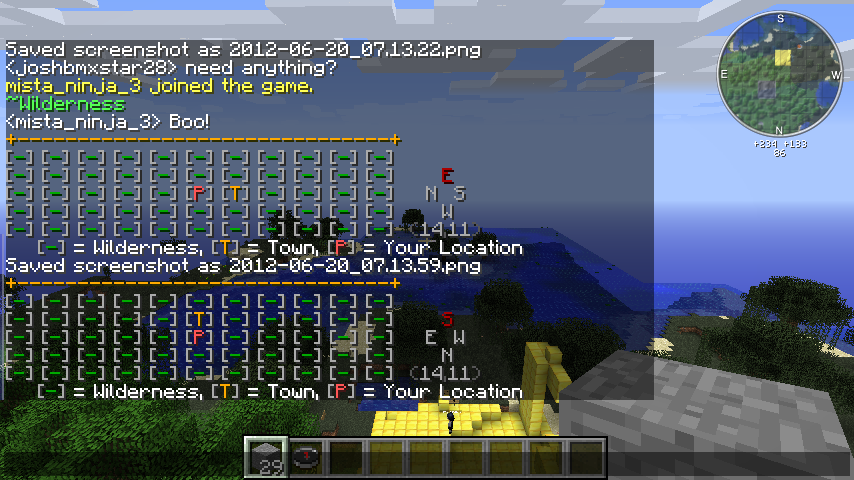
- /kingdoms map <on/off>: Turns on a map for you to see where towns are relative to you- Requires kingdoms.kingdoms.map Note that this map's top (highest up chat line) is in the direction you are facing, use the compass on the right if you are confused
Possible Ranks
- The King: He is the top dog, He owns all towns and has control over everything within his kingdom
- The Mayor: He is the top of the bunch, He owns the town and has access to all town permissions
- The Senior Assistant: He is the second in charge, He is there to take a bullet for the mayor or take over in his absence, he also has access to all town permissions
- The Assistant: He may not be the top dog, but he is a trusted member. He has access to edit plot permissions with the /plot set and /plot un-claim commands
Town/Resident Permissions
There are several different permission types/groups and i will outline them below
Permission Types
- Edit: This permission will give users both block breaking and placing access
- Use: This permission will give users the ability to toggle redstone as well as place items such as boats and minecarts
- Access: This permission will allow a user to walk on your chunk. If they somehow teleport onto a restricted chunk, the permission will kick in when they step off your land.
Permission Groups
- Public [P]: This is the lowest form of group, Anyone has access to the permission type
- Friend [F]: This is applicable for resident plots. Only your friends will have access to the permission type
- Town [T]: Only the town's members will have access to the permission type
- Kingdom [K]: Only the kingdom's members will have access to the permission type
- TownStaff [TS]: Only the town's staff will have access to the permission type
- KingdomStaff [KS]: Only the kingdom's staff will have access to the permission type
Extra Links
Source: GitHub

Comments


-

_ForgeUser6833465 Owner
-
_ForgeUser6866240 Author
-
_ForgeUser9434760 Contributor
-
View User Profile
-
Send Message
Posted Aug 7, 2012@kaitoshijo
Testers are always welcome. Its being used on 2 large minecraft servers (ImDeity.com and Realmc.net) so im expecting the most issues from them, and a bunch have already been caught. The main reason that its still in beta is because i havent implemented some things i intend to, so until thats done beta it is!
Also this plugin has no relation to the released plugin named Kingdoms, its just by fluke that we both used the same name for the plugin. Our version of the original Kingdoms is older then the other however it was not released or publicly shown at all...
-
View User Profile
-
Send Message
Posted Aug 6, 2012Do you need any testers? I have my own private server that I can use to test the plugin with and without other plugins.
I do not currently use Kingdoms or Kingdoms2, but I plan to as soon as the rest of the plugins on my server recover from the Minecraft update.
-
View User Profile
-
Send Message
Posted Aug 6, 2012@shintarutaru
Check the DeityAPI startup logs above the world generation. It should give you a reason as to why the Data API is offline (Most likely you have configured the MySQL settings incorrectly.
-
View User Profile
-
Send Message
Posted Aug 6, 20122012-08-06 22:10:55 [WARNING] [DeityAPI] com.imdeity.kingdoms.main.KingdomsMain attempted to access the data api which is offline (Check startup logs)
2012-08-06 22:10:55 [SEVERE] Error occurred while enabling Kingdoms-2 v12.08.05 (Is it
more to the error code afterwords didn't want to just post it all here though.
-
View User Profile
-
Send Message
Posted Aug 6, 2012@ProjectInfinity
That is the original plan. The current system is just temporary as I explained in the comments below.
@shintarutaru
DeityAPI should work on 1.3, This being said if some of the dependencies fail to load in DeityAPI then kingdoms may require them. Check your startup logs to see what needs updating....
-
View User Profile
-
Send Message
Posted Aug 6, 2012Any idea when the deityAPI will be updated to 1.3? Kingdoms fails to load at the moment due to errors with deity.
-
View User Profile
-
Send Message
Posted Aug 6, 2012How about excluding all chat code and have it as a standalone plugin.
Towny did this and it was probably the only successful move it's ever made (lately). It also allowed for other plugins to compete such as the Towny channel module for ChannelChat, which is a way more desirable thing than having the plugin use it's own chat system.
-
View User Profile
-
Send Message
Posted Aug 5, 2012@RadioRoscoe
Yeah, I've been in contact with the RealmCraft owner and we have talked about certain things in the plugin. Its nice to see a community take initiative to learn something for themselves!
-
View User Profile
-
Send Message
Posted Aug 5, 2012Again, thanks for your reply.
I think that adding fire and explosion protection to Kingdoms would be great because it would allow plot owners to make the decision without getting an admin involved. People like their fireplaces! :)
I play on one of the larger public servers, and we are getting ready to transition over to Kingdoms from Towny, due to what the admin says is chronic problems with world corruption and lag. Although everyone liked Towny, most of us are excited for the change.
-
View User Profile
-
Send Message
Posted Aug 5, 2012@rmh4209
Great to have another to the list! <3
-
View User Profile
-
Send Message
Posted Aug 5, 2012@vanZeben
Alright. I'm very much looking forward to what you do with this plugin! :) Switched over.
-
View User Profile
-
Send Message
Posted Aug 5, 2012@rmh4209
Yeah, that was the plan. Its a system inspired by herochat originally. It wont be a full chat system, because I dont feel that this should be an "all in one" solution, and it should have external solutions for aspects like that. That being said ill implement something for integration with popular/requested chat systems.
-
View User Profile
-
Send Message
Posted Aug 5, 2012@vanZeben
In honesty, Towny's chat system (or at least their implementation of channels) is my preferred style. Their implementation is so that if you type "/g <message>", it displays that message to the "g" channel. Alternatively, you can do a "/g". After that, any messages you type get sent to that channel unless you use the method above or refocus. It's a good system in my opinion; I'm not sure if you'd use something like that, but it would be nice. :P
On a different note:
Are you able to create (for lack of a better word) "sanctuaries" where towns/kingdoms cannot claim land?
-
View User Profile
-
Send Message
Posted Aug 5, 2012Does this work with Tekkit? Towny doesn't and that's really annoying...
-
View User Profile
-
Send Message
Posted Aug 5, 2012@rmh4209
Lovely to hear! The current chat system is temporary until i get some of the other things done (taxes/voting). Currently the chat system is very simple, I would like to extend it a bit to make it more "channel" like
-
View User Profile
-
Send Message
Posted Aug 5, 2012So I see you're working on the chat thing... Excellent. Might be switching over to this from Towny.
-
View User Profile
-
Send Message
Posted Aug 4, 2012@RadioRoscoe
We have worldguard in addition to this. And the Sign Protection is more of an extra precaution towards people placing blocks in chunks they dont own. DeityProtect wasn't intended to be a standalone protection system, It was ment for plugins such as this that use specific regions, however I can accommodate some more protection types in it, such as firespread and explosions and stuff like that
-
View User Profile
-
Send Message
Posted Aug 4, 2012@vanZeben
Thanks for the reply. As for the sign protection, I was referring to the DeityProtect. I saw that it seemed to support sign protection in the code, and I made an assumption (in ignorance) that Kingdoms used it.
I am a bit concerned about the firespread. Once of the nice things about Kingdoms is that it does not require WorldGuard, so I assume it is much faster. What do you guys use on your server to protect against this?
-
View User Profile
-
Send Message
Posted Aug 4, 2012@IronPython
I ment that the only thing that the Economy addon to DeityAPI does is add some extra handling on things through vault... Short answer yes it uses vault.....
-
View User Profile
-
Send Message
Posted Aug 4, 2012@vanZeben
not sure what you mean by "exclusively an extension on vault" im taking that as a yes to my question "does this use Vault" lol but i may be miss reading that ^,..,^