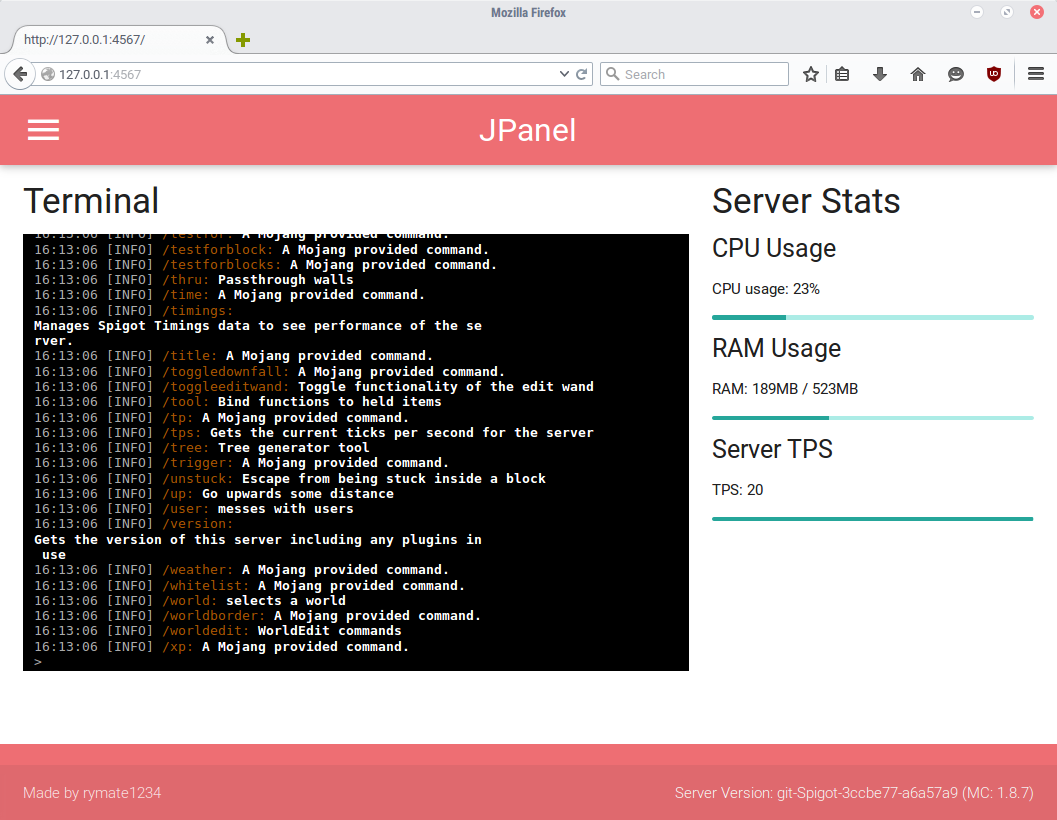
JPanel - Minecraft Webpanel
JPanel - A plugin based web panel for Bukkit
What is this?
JPanel is a plugin based control panel for your minecraft server. It is viewable within a web browser, and does not require running any external web servers, or knowledge of PHP or databases. This plugin is in beta, and has a number of key features, including:
- A live view of the server console
- Live view of the server ram usage, cpu usage and ticks per second
- User permissions
- Modify player groups (requires vault)
- Easily kick or ban online players (not currently implemented in new player manager)
- Manage server files
- Passwords hashed with a salt
Before installing
THIS PLUGIN REQUIRES JAVA 8. ALSO BE AWARE IT'S STILL IN BUGS, AND THERE MIGHT BE BUGS OR INCOMPLETE FEATURES.
Installing
Since this plugin doesn't require anything else other than the Bukkit server, installation is extremely easy
- Put the plugin jar file in your plugins folder
- Restart the server
- Ensure that port 4567 are port forwarded (this can be tested with this tool here)
- In the server console, use /addlogin <username> <password> to add a user to the panel
- OPTIONAL: Stop the server and edit the config file to allow you access to the JPanel features
For developers
As of JPanel Beta 5, you can now add pages to the panel. For more information, please see the guide.
Commands
- /addlogin <username> <passsword> - allows you to add a user to a panel
- /passwd <username> <oldpassword> <newpassword> - change the password of a user
All commands can only be executed through the console, either via JPanel or a standard minecraft console.
HTTPS support
In the latest beta (Beta 6) I've added standalone https support! This requires some configuration.
-
First, you'll need to put a keystore file in the JPanel folder. You can either attempt to generate one using these instructions or download a premade keystore file from here. The pre-made keystore has an unsigned certificate that'll get you going with security warnings in most browsers, so isn't recommended unless you can't use an actual certificate.
-
Stop the server, and enter the name of the keystore file (with file extension) under keystore-name and the password for the keystore file under keystore-password in the JPanel config.yml. If you're using the premade keystore, use the password 'password' (ultra secure).
-
Restart the server, then access the panel normally except with https.
HTTPS should now be working!
Panel Permissions
- canEditFiles - allows a JPanel user to edit files
- canChangeGroups - allows a JPanel user to change the groups of a user
- canSendCommands - allows a JPanel user to send commands through the console
These are modified through the config file. Once modified, restart the server.
Non browser Clients
I'm developing a series of apps that you can use to access the panel. Currently, there is an app for windows 10.
- Windows 10 App - https://www.microsoft.com/en-us/store/apps/jpanel/9nblggh1rnm5 (source will be released later)
- Android app - coming soon!
- iPhone app - due to a lack of $99 a year, a Mac computer and a device to test on, this is unlikely to be coming any time soon
Source Code
All source code is avaliable on github, check it out!
Comments


-

jesster1234 Owner
-

_ForgeUser6869333 Contributor
-
View User Profile
-
Send Message
Posted Jun 2, 2020This plugin works grate, im using it on an Asus Desktop using java 14 and no issues, how would i add custom pages though? i wand to implement my vote page but i cant get it to register.
-
View User Profile
-
Send Message
Posted Apr 1, 2020SCROLLBACK 0 error, how do I fix it?
-
View User Profile
-
Send Message
Posted Sep 27, 2019Everyone, this plugin still works but the author is not working on it anymore. If you still want to use it, the way i found that works is that you need to download the windows store version of Jpanel. The website version does not work.
Website: https://www.microsoft.com/en-us/p/jpanel/9nblggh1rnm5
-
View User Profile
-
Send Message
Posted Nov 20, 2018it s loading infinitly... how to fix it ?
-
View User Profile
-
Send Message
Posted Oct 12, 2018Can you make an easier way to use this plugin, rather then having to do all this complicated port forwarding stuff.
The login process doesn't even work, as it requires a link, that doesn't even work either, thus, making this plugin completely useless.
-
View User Profile
-
Send Message
Posted Jul 22, 2018Great plugin! Just one suggestion could you add a remove login command!
-
View User Profile
-
Send Message
Posted Jun 10, 2018Why i can't upload file ??????
-
View User Profile
-
Send Message
Posted Mar 11, 2018is this plugin even still active i did have it at one point for my network but we've took it down since then now we are planning on rebuilding i do remember this plugin being pretty good
-
View User Profile
-
Send Message
Posted May 29, 2017Hello! The author ~
I think this plugin is very good.
I hope to help you do some Chinese translations.
You can make lang in "plugins/Jpanel/"
Thank you!!
-
View User Profile
-
Send Message
Posted May 26, 2017Please ignore my comment i have solved the problem
-
View User Profile
-
Send Message
Posted May 26, 2017I did all the steps however when i go onto the panel and type in the username and password and press login it takes me to a page that says:
"Error 500 Internal Error" what should i do
-
View User Profile
-
Send Message
Posted Jan 24, 2017Hello all here, does this work on Minecraft 1.11.2? (Yes, I know it's beta but would like to try it
-
View User Profile
-
Send Message
Posted Mar 19, 2017Yes, it works. I've tested it on newest Spigot/PaperSpigot 1.11.2.
-
View User Profile
-
Send Message
Posted Apr 3, 2017In reply to MiroTczPL:
-
View User Profile
-
Send Message
Posted Oct 29, 2016Works perfectly fine, best Web UI ever!
-
View User Profile
-
Send Message
Posted Oct 4, 2016Is there a way to set the webpage's title? I keep getting the website as the title and I want to change it to sometime else...
-
View User Profile
-
Send Message
Posted Sep 8, 2016@DusterTheFirst
It depends entirely on your build setup - I use a gradle task to copy SparkJava to my jar file, as seen https://github.com/rymate1234/JPanel/blob/master/build.gradle#L26 however this depends entirely on how you're building your plugin
-
View User Profile
-
Send Message
Posted Sep 7, 2016@rymate1234
Sorry If I Am Bugging You But, How Did You Get Eclipse Jetty In Your Jar File.. I Am Using Jetty But It Won't Export The Jetty Files With It So I Keep Getting NoClassDefError
-
View User Profile
-
Send Message
Posted Sep 6, 2016I've been following this for a while and I'm really liking what I'm seeing here, a Windows 10 app, the Monaco editor, etc. :)
-
View User Profile
-
Send Message
Posted Sep 6, 2016Ok, so I've released a new update that may or may not resolve the issues with copying files.
If you're still having issues with files not being copied to the JPanel-public folder, enable the new debug mode in the config folder. This makes the console spam a lot more when loading JPanel, but gives me some extra info that might help debug it. A sample successful load with debug mode should look like https://gist.github.com/rymate1234/6ffba84d57acc4e97fcb47460c52731e
If all the files are successfully being copied to the folder, please let me know.
Thanks!