
Join and Quit Messages

Join and Quit Messages is a plugin that gives you the opportunity to customize the messages when a player joins or leaves your server. It is really easy to use and gives a personal touch to your Minecraft server. You can customize your own join and quit messages easily by changing the information within the config.
Give brand new players their own welcome, give each rank its own message, use different messages per world, let staff join unseen, and make any part of a message clickable.
Requirements
- Spigot or Paper 1.16 or newer
- Java 17 or newer
- PlaceholderAPI (optional)
Hex colors
It is possible to use hex colors or standard Minecraft colors. You can pick your own hex colors here. You can completely customize your own messages. However, the hex colors need to be like this: <#RRGGBB>. This is also shown in the config below.

The result of this config is the following:

Standard Minecraft colors
You do not have to use hex colors. The standard Minecraft colors work too, and you can mix both in the same message. You can choose from the following colors:
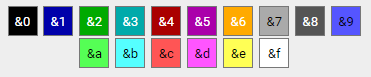
Your config will then look like the following:

Then this will be the result of this config.

A single & that is not followed by a real color code is left alone, so a message like Tom & Jerry joined shows exactly as written.
Clickable and hover messages
Any part of a message can run a command, open a link, copy text, or show a tooltip when hovered.
joinmessage: "&7[&2+&7]&a%player% <click:suggest_command:/msg %player% ><hover:show_text:&7Send a message>&8[msg]</hover></click>"| Tag | What it does |
|---|---|
<click:run_command:/spawn>text</click> |
Runs the command as the player who clicks |
<click:suggest_command:/msg Steve >text</click> |
Puts the command in their chat box |
<click:open_url:https://example.com>text</click> |
Opens a link |
<click:copy_to_clipboard:hello>text</click> |
Copies text to their clipboard |
<hover:show_text:&7Tooltip>text</hover> |
Shows a tooltip on hover |
Click and hover can be combined and nested, colors carry across a tag, and placeholders work inside a tag's value. Use /jqm test <message> to try one out — it renders the result clickable and tells you if a tag has a typo.
Only messages in your own config can create clickable text, so another plugin supplying a custom nickname can never inject a clickable command into your join messages.
First join messages
Players who have never joined before can get their own message.
first_join:
  enabled: true
  message: "&7[&2+&7] &6Welcome &e%player% &6to the server! &7(&a#%playercount_online%&7)"
Permission based Messages
Give each rank its own join and quit message. A player who holds several of these gets the one listed first under priority.
permission_messages:
  enabled: true
  priority:
    - myserver.premium
    - myserver.vip
  join:
    "myserver.vip": "&7[&6VIP+&7] &6%player% &7joined with style!"
    "myserver.premium": "&7[&5PREMIUM+&7] &5%player% &7entered the server!"
  leave:
    "myserver.vip": "&7[&6VIP-&7] &6%player% &7left the server"
    "myserver.premium": "&7[&5PREMIUM-&7] &5%player% &7departed"
Messages per world
Show a different message depending on which world the player is in. You can set these up in game, without touching the config file — changes save and apply straight away.
/jqm world list
/jqm world add <world> <join|leave> <message>
/jqm world remove <world> [join|leave]
The message is everything after join or leave, so it does not need quotes. World names and join/leave are tab-completable.
Per-world messages use the world the player is in at the moment they join or quit, so walking through a portal does not trigger them.
Silent join and quit
Players with the joinandquitmessages.silent permission are not announced at all. Useful for staff, and it works nicely alongside vanish plugins. Suppressed messages are still written to the console so you keep a record.
Random Messages
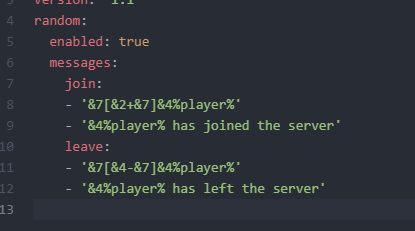
It is possible to show arbitrary join and quit messages and you can edit the list. In the config.yml there are 2 lists for the messages, which can be edited for other random messages. The same line is never picked twice in a row.
Which message wins
When more than one could apply, they are used in this order:
- Silent — players with the silent permission are never announced
- First join message
- Permission message
- World message
- Random message
- The default join or quit message
🎯 Commands
| Command | Description | Permission |
|---|---|---|
/jqm test |
Test configured join message | joinandquitmessages.test |
/jqm test <message> |
Test custom message | joinandquitmessages.test |
/jqm quittest |
Test configured quit message | joinandquitmessages.test |
/jqm quittest <message> |
Test a custom quit message | joinandquitmessages.test |
/jqm world list |
List worlds that have a message | joinandquitmessages.world |
/jqm world add <world> <join|leave> <message> |
Set a message for a world | joinandquitmessages.world |
/jqm world remove <world> [join|leave] |
Remove a world's message | joinandquitmessages.world |
/jqm reload |
Reload configuration | joinandquitmessages.reload |
🔐 Permissions
| Permission | Description | Default |
|---|---|---|
joinandquitmessages.use |
Access to main command | true |
joinandquitmessages.test |
Test message formatting | true |
joinandquitmessages.reload |
Reload configuration | op |
joinandquitmessages.world |
Add and remove per-world messages | op |
joinandquitmessages.silent |
Join and quit without being announced | false |
joinandquitmessages.checkupdate |
Be notified when an update is available | op |
Placeholders
- %player% : Player name
- %displayname% : Player display name
- %world% : World name where the player leaves/joins
- %playercount_online% : Current amount of players (also works as %online%)
- %playercount_max% : Maximum amount of players (also works as %max%)
Placeholder API
Within the join and quit messages you can also use the placeholder API. This lets you customize the messages even more. More information about what you can use can be found here.
Metrics
This plugin uses bStats to record which features are actually used, so development can follow what servers really configure. Only on/off flags and counts are sent, never message content, player names or world names. You can turn it off in plugins/bStats/config.yml.
Comments


-

TheDutchRuben Owner
-
View User Profile
-
Send Message
Posted Nov 22, 2025Hi
I like this plugin, thanks. But it gives a warning and tells that it is loading legacy support. Disabled this plugin and gone is the warning. I think it has to do with the 1.15 and older solution. Maybe an idea to upload 2 versions? As server memory usage goes up with 300mb only to load that legacy and thats just for a welcome message haha.