ItemSlotMachine
What is it?
ItemSlotMachine adds realistic slot machines with item frames as reels to your server. Each slot machine has its own jackpot (money and/or items) which increases with every spin.
Features
- Create and manage multiple slot machines
- Create and manage your own slot machine designs (default design is built-in)
- Customize each slot machine individually
- Display statistics of slot machines and players
- Create coin shops for players
- Customize all plugin messages
All listed features above are always referring to the newest version of ItemSlotMachine!
Metrics
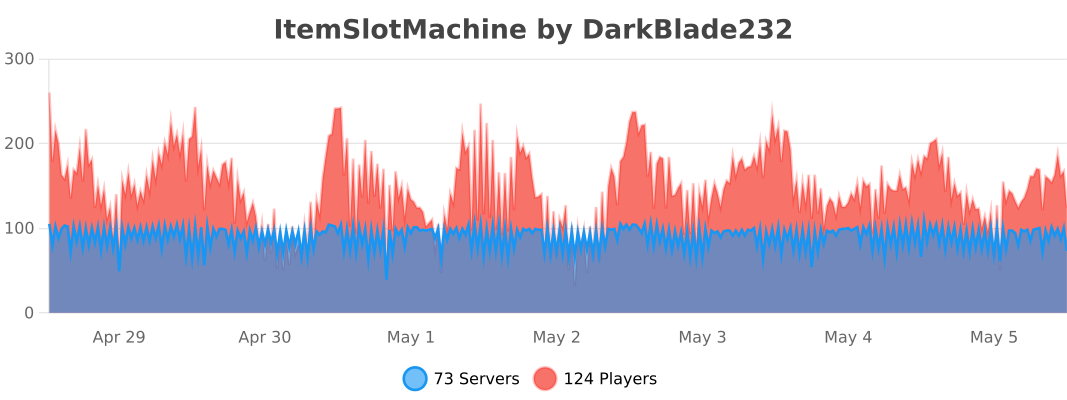
This plugin uses Metrics by BtoBastian to collect various data from servers.
If you don't want Metrics to collect your data you can disable it easily by setting enabled to false in the config file at plugins/bStats/
Upcoming features
- Support for larger numbers on signs
- Customizeable sign layout and with more placeholders (for example <player>)
Commands & Permissions:
| Command | Description | Permission |
| /design wand | Gives the player a design wand | itemslotmachine.command.design.wand |
| /design create [name] | Creates a new design from your selection | itemslotmachine.command.design.create |
| /design remove <name> | Removes an existing design | itemslotmachine.command.design.remove |
| /design list | Displays a list of all available designs | itemslotmachine.command.design.list |
| /design invert <name> | Inverts the item frame order of a design | itemslotmachine.command.design.invert |
| /design reload [name] | Reloads all designs or a single design | itemslotmachine.command.design.reload |
| /design help [page] | Displays help pages for the design command | - |
| /coin buy <amount> | Gives the player coins in exchange for money | itemslotmachine.command.coin.buy |
| /coin give <player> <amount> | Gives an amount of coins to a player | itemslotmachine.command.coin.give |
| /coin help [page] | Displays help pages for the coin command | - |
| /slot build <design> [name] | Builds a new slot machine | itemslotmachine.command.slot.build |
| /slot remove <name> | Removes an existing slot machine | itemslotmachine.command.slot.remove |
| /slot list | Displays a list of all available slot machines | itemslotmachine.command.slot.list |
| /slot tp <name> | Teleports the player to a slot machine | itemslotmachine.command.slot.tp |
| /slot rebuild <name> | Rebuilds a broken slot machine | itemslotmachine.command.slot.rebuild |
| /slot move <name> <amount> | Moves a slot machine in your view direction | itemslotmachine.command.slot.move |
| /slot stop <name> | Stops a slot machine instantly without paying out | itemslotmachine.command.slot.stop |
| /slot money <name> <clear/deposit/withdraw/set> [default/amount] | Modifies the money pot of a slot machine | itemslotmachine.command.slot.money |
| /slot item <name> <clear/add/set> [default/hand/items] | Modifies the item pot of a slot machine | itemslotmachine.command.slot.item |
| /slot reload [name] | Reloads the plugin or a single slot machine | itemslotmachine.command.slot.reload |
| /slot help [page] | Displays help pages for the slot command | - |
| /statistic show <slot/player> <name> | Displays the statistic of a slot machine or player | itemslotmachine.command.statistic.show |
| /statistic top <slot/player> <category> | Displays the top ten of slot machines or players for a category | ItemSlotMachine.command.statistic.top |
| /statistic reset <slot/player> <name> | Resets the statistic of a slot machine or player | ItemSlotMachine.command.statistic.reset |
| /statistic help [page] | Displays help pages for the statistic command | - |
| - | All plugin permissions | itemslotmachine.* |
| - | All command permissions | itemslotmachine.command.* |
| - | All design command permissions | itemslotmachine.command.design.* |
| - | All coin command permissions | itemslotmachine.command.coin.* |
| - | All slot machine command permissions | itemslotmachine.command.slot.* |
| - | All statistic command permissions | itemslotmachine.statistic.* |
| - | Modify a specific slot machine | itemslotmachine.slot.modify.<name> |
| - | Modify all slot machines | itemslotmachine.slot.modify.* |
| - | Inspect a slot machine by right clicking it | itemslotmachine.slot.inspect |
| - | Use a slot machine | itemslotmachine.slot.use |
| - | Use all slot machines | itemslotmachine.slot.use.* |
| - | Create a coin shop | itemslotmachine.shop.create |
All listed commands and permissions above are always referring to the newest version of ItemSlotMachine!
How to: Coin Shop
You have to write [CoinShop] in the first line of a new sign and click done in order to create a coin shop sign automatically. You can change the amount of coins you want to buy by pointing your cursor at the sign and scrolling up or down. (if you hold shift while scrolling, the amount will increase/decrease by 10) Simply right click the sign after you've chosen the amount of coins you want to buy to make a purchase.
Source
The source code can be found in my repository on GitHub!
Contribute
If you find a bug or encounter an error, please open a new ticket on CurseForge or GitHub, send me a private message or comment down below! Suggestions and ideas for new features are always welcome and can be submitted via the previously mentioned ways.
Videos
Comments


-

DarkBlade232 Owner
-

_ForgeUser12580406 Artist
-

rangewonk Tester
-
View User Profile
-
Send Message
Posted Oct 26, 2013It doesnt works with 1.6.4...
-
View User Profile
-
Send Message
Posted Oct 26, 2013@kingduncan1999
Well that can be a bug of iConomy, as I can remember there was one version which had the bug that all the money got wiped if you used a flatfile for storing it! So you could try to switch to MySQL and see if the same thing happens.
-
View User Profile
-
Send Message
Posted Oct 22, 2013I'm using Iconomy, essentials and vault. When I reset my server the players money get reset if they were on during the time. Any idea on what to fix it or what went wrong? I'll help in anyway I can.
-
View User Profile
-
Send Message
Posted Oct 17, 2013@TNTUP
Oh didn't noticed it has it already ._. Sorry :D
-
View User Profile
-
Send Message
Posted Oct 12, 2013Important sign creation bug!!
Any player who has no admin permissions can create CoinShop sings! If they type in the exact lines to a normal sign with correct color codes that sign becomes a CoinShop sign. Please fix this asap. (The PaintWar plugins join signs possibly have this bug also. Please fix that too.)
Thank you
-
View User Profile
-
Send Message
Posted Oct 9, 2013I'm currently a bit busy so the development of the new version will still take a while! You can still post suggestions which will be implemented if they're good!
-
View User Profile
-
Send Message
Posted Oct 5, 2013@TNTUP
Umm, didn't you see that option in the config? It's called "Lock" ;)
-
View User Profile
-
Send Message
Posted Oct 3, 2013I have an issue with players... when someone puts alot of money, theres a risk that another player steals it.
Player A used $250 in teh public machine... Player B sees the POT is $250, he buys X coins, then Player B steals PlayerA's machine. Theres should be a cooldown so the 2nd player wont steal. Player A can still play because hes using the machine, but Player B can't use it. "This slot machine is occupied by "PlayerA". Please pick another machine" Like that.
-
View User Profile
-
Send Message
Posted Sep 21, 2013Hello,
I run a server that uses this plugin. We recently have been getting this error.
[SEVERE] Could not pass event BlockBreakEvent to ItemSlotMachine v1.2.8
We are not trying to do anything with the Slots they are laying dormant and no one can use them. Could anyone help me figure out what has gone wrong? We have been using them for a month perfectly fine till this happened one day. Thanks
-EDIT-
Issue resolved itself when we deleted a slot machine in a M.V world that had been unloaded. Had to delete information for slot machine through the .yml file due to not being able to remove the slot machine through the command.
-
View User Profile
-
Send Message
Posted Sep 20, 2013Do you think you could work in a /slot win command? I have the pay out to 1bill in game money. (diamonds are 10k) so... if that explains the heft of the payout. I have the win chance to 1/100000 and i'd like a /win command so they're not completely discouraged.
-
View User Profile
-
Send Message
Posted Sep 20, 2013@evo400
The "/slot wand" works like the WorldEdit wand (left click = set position 1, right click = set position 2) And for the frames to appear on the correct side you just have to relog as it's stated on the download page...
-
View User Profile
-
Send Message
Posted Sep 19, 2013There is no explanation on how to use "/slot wand" or how to fix the frames coming out on the wrong side as it was told on the video that you have posted here. Can I get some help?
-
View User Profile
-
Send Message
Posted Sep 19, 2013Current coding progress: 85%
Current tasks: Adding commands, help pages, optimize slot machines and testing
-
View User Profile
-
Send Message
Posted Sep 17, 2013@LavashTeam
''You don't need a style you can just do "/slot generate", "style" is an extra argument if you want to create a slot machine with your own style! ''
:)
-
View User Profile
-
Send Message
Posted Sep 17, 2013what does style mean?? /slot generate style?
-
View User Profile
-
Send Message
Posted Sep 16, 2013@jessefjxm
Hmm, well this bug will be fixed in the new version for sure ;)
-
View User Profile
-
Send Message
Posted Sep 14, 2013@DarkBladee12
I've already changed it to CoinItem: "371,88" ,but what I bought is still 371 .Really strange...
-
View User Profile
-
Send Message
Posted Sep 14, 2013Hmm what does style mean?? /slot generate style?
-
View User Profile
-
Send Message
Posted Sep 14, 2013@bigpeyton
That's already planned, each slot machine has its own config file in the new version which includes settings for chance, lock, combos etc. ;) Only a few general settings in the config.yml will remain!
-
View User Profile
-
Send Message
Posted Sep 14, 2013Hey i have a idea. Make it so some slot machines i can have the pot at 1000 and others 10000 but with diferant chances to win.