ItemSlotMachine
What is it?
ItemSlotMachine adds realistic slot machines with item frames as reels to your server. Each slot machine has its own jackpot (money and/or items) which increases with every spin.
Features
- Create and manage multiple slot machines
- Create and manage your own slot machine designs (default design is built-in)
- Customize each slot machine individually
- Display statistics of slot machines and players
- Create coin shops for players
- Customize all plugin messages
All listed features above are always referring to the newest version of ItemSlotMachine!
Metrics
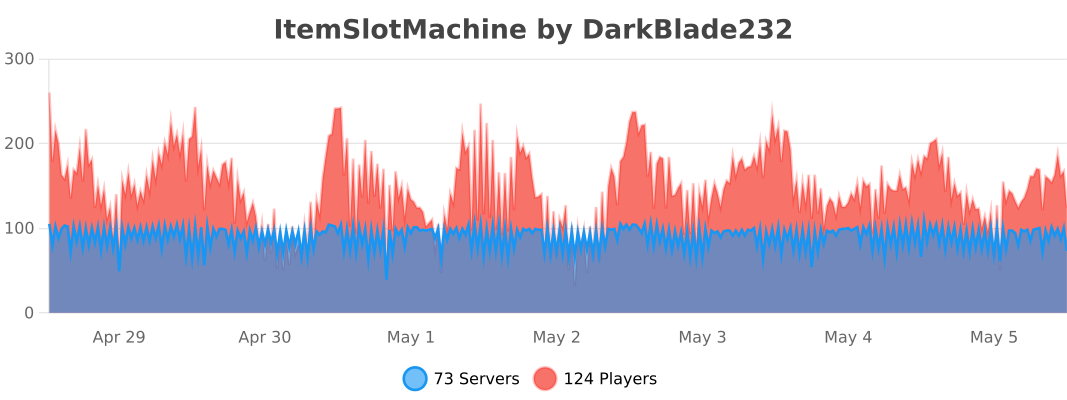
This plugin uses Metrics by BtoBastian to collect various data from servers.
If you don't want Metrics to collect your data you can disable it easily by setting enabled to false in the config file at plugins/bStats/
Upcoming features
- Support for larger numbers on signs
- Customizeable sign layout and with more placeholders (for example <player>)
Commands & Permissions:
| Command | Description | Permission |
| /design wand | Gives the player a design wand | itemslotmachine.command.design.wand |
| /design create [name] | Creates a new design from your selection | itemslotmachine.command.design.create |
| /design remove <name> | Removes an existing design | itemslotmachine.command.design.remove |
| /design list | Displays a list of all available designs | itemslotmachine.command.design.list |
| /design invert <name> | Inverts the item frame order of a design | itemslotmachine.command.design.invert |
| /design reload [name] | Reloads all designs or a single design | itemslotmachine.command.design.reload |
| /design help [page] | Displays help pages for the design command | - |
| /coin buy <amount> | Gives the player coins in exchange for money | itemslotmachine.command.coin.buy |
| /coin give <player> <amount> | Gives an amount of coins to a player | itemslotmachine.command.coin.give |
| /coin help [page] | Displays help pages for the coin command | - |
| /slot build <design> [name] | Builds a new slot machine | itemslotmachine.command.slot.build |
| /slot remove <name> | Removes an existing slot machine | itemslotmachine.command.slot.remove |
| /slot list | Displays a list of all available slot machines | itemslotmachine.command.slot.list |
| /slot tp <name> | Teleports the player to a slot machine | itemslotmachine.command.slot.tp |
| /slot rebuild <name> | Rebuilds a broken slot machine | itemslotmachine.command.slot.rebuild |
| /slot move <name> <amount> | Moves a slot machine in your view direction | itemslotmachine.command.slot.move |
| /slot stop <name> | Stops a slot machine instantly without paying out | itemslotmachine.command.slot.stop |
| /slot money <name> <clear/deposit/withdraw/set> [default/amount] | Modifies the money pot of a slot machine | itemslotmachine.command.slot.money |
| /slot item <name> <clear/add/set> [default/hand/items] | Modifies the item pot of a slot machine | itemslotmachine.command.slot.item |
| /slot reload [name] | Reloads the plugin or a single slot machine | itemslotmachine.command.slot.reload |
| /slot help [page] | Displays help pages for the slot command | - |
| /statistic show <slot/player> <name> | Displays the statistic of a slot machine or player | itemslotmachine.command.statistic.show |
| /statistic top <slot/player> <category> | Displays the top ten of slot machines or players for a category | ItemSlotMachine.command.statistic.top |
| /statistic reset <slot/player> <name> | Resets the statistic of a slot machine or player | ItemSlotMachine.command.statistic.reset |
| /statistic help [page] | Displays help pages for the statistic command | - |
| - | All plugin permissions | itemslotmachine.* |
| - | All command permissions | itemslotmachine.command.* |
| - | All design command permissions | itemslotmachine.command.design.* |
| - | All coin command permissions | itemslotmachine.command.coin.* |
| - | All slot machine command permissions | itemslotmachine.command.slot.* |
| - | All statistic command permissions | itemslotmachine.statistic.* |
| - | Modify a specific slot machine | itemslotmachine.slot.modify.<name> |
| - | Modify all slot machines | itemslotmachine.slot.modify.* |
| - | Inspect a slot machine by right clicking it | itemslotmachine.slot.inspect |
| - | Use a slot machine | itemslotmachine.slot.use |
| - | Use all slot machines | itemslotmachine.slot.use.* |
| - | Create a coin shop | itemslotmachine.shop.create |
All listed commands and permissions above are always referring to the newest version of ItemSlotMachine!
How to: Coin Shop
You have to write [CoinShop] in the first line of a new sign and click done in order to create a coin shop sign automatically. You can change the amount of coins you want to buy by pointing your cursor at the sign and scrolling up or down. (if you hold shift while scrolling, the amount will increase/decrease by 10) Simply right click the sign after you've chosen the amount of coins you want to buy to make a purchase.
Source
The source code can be found in my repository on GitHub!
Contribute
If you find a bug or encounter an error, please open a new ticket on CurseForge or GitHub, send me a private message or comment down below! Suggestions and ideas for new features are always welcome and can be submitted via the previously mentioned ways.
Videos
Comments


-

DarkBlade232 Owner
-

_ForgeUser12580406 Artist
-

rangewonk Tester
-
View User Profile
-
Send Message
Posted Jul 23, 2013This plugin doesn't seem to work very well with multiworld plugins. This comes up every time I place a block in another world than where the slot machines are:
http://pastebin.com/rKHaSKgK
The multiworld plugin I use is Multiverse.
-
View User Profile
-
Send Message
Posted Jul 23, 2013so how exactly do I use that XD
-
View User Profile
-
Send Message
Posted Jul 23, 2013@kitt3ykat3
For example:
http://wiki.ess3.net/wiki/Group_Manager
groups:
Default:
default: false
permissions:
- -bukkit.command.kill
- itemslotmachine.use
inheritance:
- g:groupmanager_default
- g:bukkit_default
- g:essentials_default
- g:towny_default
info:
prefix: '&e[Guest] '
build: false
suffix: ''
-
View User Profile
-
Send Message
Posted Jul 23, 2013but how? T.T
@Antibes
-
View User Profile
-
Send Message
Posted Jul 23, 2013@kitt3ykat3
Have you added the permission ItemSlotMachine.use ?
-
View User Profile
-
Send Message
Posted Jul 23, 2013people on my server who are not an op cannot use the slot machines, but they can buy coins....help?
-
View User Profile
-
Send Message
Posted Jul 23, 2013@Antibes
I'll add that for some multiple world managemant plugins and PlotMe, because it seems to work fine if it loads after those plugins!
-
View User Profile
-
Send Message
Posted Jul 20, 2013@DarkBladee12
I'm using Multiverse-Core (Build #670), Multiverse-Inventories (Build #357) and PlotMe 0.13b. Works fine if the slot machines are in world 'world' with PlotMe, but if they are in another world the errors appear on server restart and they won't load unless PlotMe is removed.
I've made a temporary fix which seems to work, I added loadbefore: [ItemSlotMachine] to the Multiverse-Core plugin.yml !
-
View User Profile
-
Send Message
Posted Jul 20, 2013@TheNicklander
Are you using any multiworld plugins/plotme? If yes then please post me the names of those plugins, I tested ItemSlotMachine with the "Multiworld" plugin and it worked fine!
-
View User Profile
-
Send Message
Posted Jul 19, 2013Hello,
Getting this error, please help :
http://pastebin.com/GivTvcRj
Craftbukkit b2815 1.6.2-R0.1
ItemSlotMachine 1.2.7 (newest)
-
View User Profile
-
Send Message
Posted Jul 19, 2013@DarkBladee12
It's something to do with multiple worlds. I managed to get PlotMe and ItemSlotMachine working together with world, world_nether, world_the_end and plotworld, but if I add another world and generate slot machines in it I get the error on server restart and the frames can't be found. If I remove PlotMe all is well again, it's really strange.
It's definitely a multi world problem, the slot machine in the world 'world' works, but the two in another world don't if PlotMe is loaded.
-
View User Profile
-
Send Message
Posted Jul 19, 2013Getting this error with the latest dev build of Spigot: http://pastebin.com/u3GB3q7e
ItemSlotMachine_1.2.7
-
View User Profile
-
Send Message
Posted Jul 19, 2013@Antibes
Hmm that's strange, I'll take a look into the source code of PlotMe to see what is causing ItemSlotMachine errors!
-
View User Profile
-
Send Message
Posted Jul 18, 2013@DarkBladee12
I've done some testing and found the cause of the error. Unbelievably, ItemSlotMachine will not play with PlotMe! I have no idea why, but if I remove PlotMe there are no errors.
Have you got any ideas how to solve this? We love your plugin, it's awesome, but I don't think anyone is going to want their plot removed. 1.2.4 still works, but with no sound.
I eliminated 62 plugins to find this and there are no slot machines in the plotworld!
-
View User Profile
-
Send Message
Posted Jul 18, 2013@Antibes
Try to delete your old slotmachines.yml and regenerate them! This version works fine for my testers who had the same problems before.
-
View User Profile
-
Send Message
Posted Jul 18, 2013@DarkBladee12
Hi, I downloaded 1.2.7 and everything looked great until I restarted the server and got this http://pastebin.com/PyXa5t1d
1.6.2-R0.1 (Build #02815)
-
View User Profile
-
Send Message
Posted Jul 17, 2013@JordanMG
At the moment you can't download it, because it still has to be approved by a bukkit team member! After it's approved you can download it on this page ;)
-
View User Profile
-
Send Message
Posted Jul 16, 2013@DarkBladee12
Where can we find said version?
-
View User Profile
-
Send Message
Posted Jul 16, 2013New version has been uploaded!
-
View User Profile
-
Send Message
Posted Jul 16, 2013Cant wait for update :D