ItemSlotMachine
What is it?
ItemSlotMachine adds realistic slot machines with item frames as reels to your server. Each slot machine has its own jackpot (money and/or items) which increases with every spin.
Features
- Create and manage multiple slot machines
- Create and manage your own slot machine designs (default design is built-in)
- Customize each slot machine individually
- Display statistics of slot machines and players
- Create coin shops for players
- Customize all plugin messages
All listed features above are always referring to the newest version of ItemSlotMachine!
Metrics
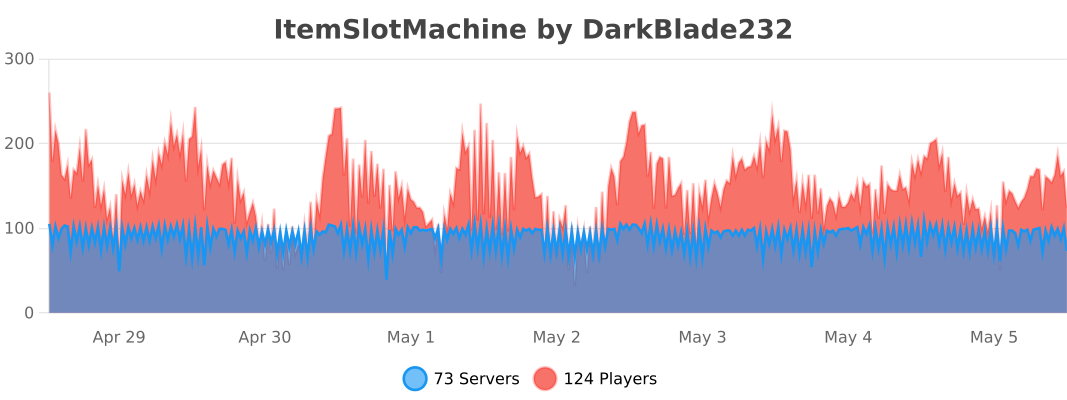
This plugin uses Metrics by BtoBastian to collect various data from servers.
If you don't want Metrics to collect your data you can disable it easily by setting enabled to false in the config file at plugins/bStats/
Upcoming features
- Support for larger numbers on signs
- Customizeable sign layout and with more placeholders (for example <player>)
Commands & Permissions:
| Command | Description | Permission |
| /design wand | Gives the player a design wand | itemslotmachine.command.design.wand |
| /design create [name] | Creates a new design from your selection | itemslotmachine.command.design.create |
| /design remove <name> | Removes an existing design | itemslotmachine.command.design.remove |
| /design list | Displays a list of all available designs | itemslotmachine.command.design.list |
| /design invert <name> | Inverts the item frame order of a design | itemslotmachine.command.design.invert |
| /design reload [name] | Reloads all designs or a single design | itemslotmachine.command.design.reload |
| /design help [page] | Displays help pages for the design command | - |
| /coin buy <amount> | Gives the player coins in exchange for money | itemslotmachine.command.coin.buy |
| /coin give <player> <amount> | Gives an amount of coins to a player | itemslotmachine.command.coin.give |
| /coin help [page] | Displays help pages for the coin command | - |
| /slot build <design> [name] | Builds a new slot machine | itemslotmachine.command.slot.build |
| /slot remove <name> | Removes an existing slot machine | itemslotmachine.command.slot.remove |
| /slot list | Displays a list of all available slot machines | itemslotmachine.command.slot.list |
| /slot tp <name> | Teleports the player to a slot machine | itemslotmachine.command.slot.tp |
| /slot rebuild <name> | Rebuilds a broken slot machine | itemslotmachine.command.slot.rebuild |
| /slot move <name> <amount> | Moves a slot machine in your view direction | itemslotmachine.command.slot.move |
| /slot stop <name> | Stops a slot machine instantly without paying out | itemslotmachine.command.slot.stop |
| /slot money <name> <clear/deposit/withdraw/set> [default/amount] | Modifies the money pot of a slot machine | itemslotmachine.command.slot.money |
| /slot item <name> <clear/add/set> [default/hand/items] | Modifies the item pot of a slot machine | itemslotmachine.command.slot.item |
| /slot reload [name] | Reloads the plugin or a single slot machine | itemslotmachine.command.slot.reload |
| /slot help [page] | Displays help pages for the slot command | - |
| /statistic show <slot/player> <name> | Displays the statistic of a slot machine or player | itemslotmachine.command.statistic.show |
| /statistic top <slot/player> <category> | Displays the top ten of slot machines or players for a category | ItemSlotMachine.command.statistic.top |
| /statistic reset <slot/player> <name> | Resets the statistic of a slot machine or player | ItemSlotMachine.command.statistic.reset |
| /statistic help [page] | Displays help pages for the statistic command | - |
| - | All plugin permissions | itemslotmachine.* |
| - | All command permissions | itemslotmachine.command.* |
| - | All design command permissions | itemslotmachine.command.design.* |
| - | All coin command permissions | itemslotmachine.command.coin.* |
| - | All slot machine command permissions | itemslotmachine.command.slot.* |
| - | All statistic command permissions | itemslotmachine.statistic.* |
| - | Modify a specific slot machine | itemslotmachine.slot.modify.<name> |
| - | Modify all slot machines | itemslotmachine.slot.modify.* |
| - | Inspect a slot machine by right clicking it | itemslotmachine.slot.inspect |
| - | Use a slot machine | itemslotmachine.slot.use |
| - | Use all slot machines | itemslotmachine.slot.use.* |
| - | Create a coin shop | itemslotmachine.shop.create |
All listed commands and permissions above are always referring to the newest version of ItemSlotMachine!
How to: Coin Shop
You have to write [CoinShop] in the first line of a new sign and click done in order to create a coin shop sign automatically. You can change the amount of coins you want to buy by pointing your cursor at the sign and scrolling up or down. (if you hold shift while scrolling, the amount will increase/decrease by 10) Simply right click the sign after you've chosen the amount of coins you want to buy to make a purchase.
Source
The source code can be found in my repository on GitHub!
Contribute
If you find a bug or encounter an error, please open a new ticket on CurseForge or GitHub, send me a private message or comment down below! Suggestions and ideas for new features are always welcome and can be submitted via the previously mentioned ways.
Videos
Comments


-

DarkBlade232 Owner
-

_ForgeUser12580406 Artist
-

rangewonk Tester
-
View User Profile
-
Send Message
Posted Jul 3, 2013@DarkBladee12
Sorry for the delay, here are the errors: http://pastebin.com/Fa44ys3Y
-
View User Profile
-
Send Message
Posted Jun 26, 2013@Lukethenuke
Thx i've got other plugins now and this helped me figure out how to fix them aswell. This should fix all my problems for now. When im done ill give you guys the IP :) Thx Flaming3mbers
-
View User Profile
-
Send Message
Posted Jun 25, 2013@Flaming3mbers
Open up the config.yml in the Item Slot Machine folder and look for this line:
-
View User Profile
-
Send Message
Posted Jun 25, 2013Also is there a way to increase the price of the coins as i want to so it fits in with the rest of the economies prices.
Thx Flaming3mbers
-
View User Profile
-
Send Message
Posted Jun 25, 2013@Lukethenuke
yeh thx, I was doing that after i posted the comment but when i r-installed the plug-in the MAchines were still there so what i've done is deleted the plug-in, made what i wanted and re-installed the plugin. Hope this help other people with the problem. Flaming3mbers
-
View User Profile
-
Send Message
Posted Jun 25, 2013@Flaming3mbers
I've had that happen too. The only way to remove them is stopping the server, removing the plugin and starting up without it. I'm hoping he'll look at the 2 errors posted in these comments.
-
View User Profile
-
Send Message
Posted Jun 25, 2013It's really weird, whenever this error generates, the plugin only prints "/slot help" on the screen even if I type /slot help it does that. Here is my error log:
[INFO] [ItemSlotMachine] styles.yml successfully loaded. 2013-06-19 13:04:45 [INFO] [ItemSlotMachine] config.yml successfully loaded. 2013-06-19 13:04:45 [WARNING] [ItemSlotMachine] Failed to get item frame 0 of slot machine slot1! 2013-06-19 13:04:45 [WARNING] [ItemSlotMachine] Failed to get item frame 1 of slot machine slot1! 2013-06-19 13:04:45 [WARNING] [ItemSlotMachine] Failed to get item frame 2 of slot machine slot1! 2013-06-19 13:04:45 [SEVERE] Error occurred while enabling ItemSlotMachine v1.2.6 (Is it up to date?) java.lang.NullPointerException at org.bukkit.Location.getBlock(Location.java:82) at com.DarkBlade12.ItemSlotMachine.SlotMachine.SlotMachine.loadPotSign(SlotMachine.java:97) at com.DarkBlade12.ItemSlotMachine.SlotMachine.SlotMachine.initialize(SlotMachine.java:73) at com.DarkBlade12.ItemSlotMachine.SlotMachine.SlotMachine.<init>(SlotMachine.java:52) at com.DarkBlade12.ItemSlotMachine.ItemSlotMachine.initialize(ItemSlotMachine.java:265) at com.DarkBlade12.ItemSlotMachine.ItemSlotMachine.onEnable(ItemSlotMachine.java:88) at org.bukkit.plugin.java.JavaPlugin.setEnabled(JavaPlugin.java:217) at org.bukkit.plugin.java.JavaPluginLoader.enablePlugin(JavaPluginLoader.java:457) at org.bukkit.plugin.SimplePluginManager.enablePlugin(SimplePluginManager.java:381) at org.bukkit.craftbukkit.v1_5_R3.CraftServer.loadPlugin(CraftServer.java:282) at org.bukkit.craftbukkit.v1_5_R3.CraftServer.enablePlugins(CraftServer.java:264) at net.minecraft.server.v1_5_R3.MinecraftServer.j(MinecraftServer.java:304) at net.minecraft.server.v1_5_R3.MinecraftServer.e(MinecraftServer.java:283) at net.minecraft.server.v1_5_R3.MinecraftServer.a(MinecraftServer.java:243) at net.minecraft.server.v1_5_R3.DedicatedServer.init(DedicatedServer.java:151) at net.minecraft.server.v1_5_R3.MinecraftServer.run(MinecraftServer.java:382) at net.minecraft.server.v1_5_R3.ThreadServerApplication.run(SourceFile:573)
-
View User Profile
-
Send Message
Posted Jun 25, 2013Hey can you also give examples of how to do the commands as i am a little stuck on resetting the pot, and also it would not allow me to remove the slot machine so i cut it out with world edit, but now it wont let me build there. When i try to remove them again it still comes up with the error {An internal error occured while attempting to perform this action.} Is this my fault or is it a bug? A fix is maybe putting a command in where it resets the whole plug-in and removes everything all the saves and machines so you can start over again. Thx Flaming3mbers
-
View User Profile
-
Send Message
Posted Jun 25, 2013@DarkBladee12
Just incase, here is another pastebin of an error that occurs when you try to remove a slot machine with a command. http://pastebin.com/6mbJ99at
I really hope you can fix this.
-
View User Profile
-
Send Message
Posted Jun 25, 2013@Flaming3mbers
Well you just have to relog and it'll be fine, this is also stated on the download page!
-
View User Profile
-
Send Message
Posted Jun 25, 2013Hey, I would really like to use this plug-in on my server but there's one problem. When i generate the Slot Machine the item frames spawn on the opposite side of the wood planks, and i cannot modify the Slotmachine as it will not let me. Any help is appreciated. Thx Flaming3mbers
-
View User Profile
-
Send Message
Posted Jun 24, 2013@DarkBladee12
I'm also having some issues with this plugin. I've setup the slots so that there is one space between each one when they are back to back but after saving and restarting the server, they will randomly stop working. Even if I relog to fix the client glitch it will give me errors in the console like this: http://pastebin.com/WMLvTtVe
This happens whenever someone tries to use a slot machine and I made a casino building just for this plugin alone almost so I'm hoping that pastebin will help you fix it.
Cheers.
-
View User Profile
-
Send Message
Posted Jun 23, 2013@Maxi1223
You should give them "ItemSlotMachine.buy" and "ItemSlotMachine.use".
-
View User Profile
-
Send Message
Posted Jun 23, 2013Hey, What are the permissions for this plugin so that I can give them to the default class?
Ty
Maxi
-
View User Profile
-
Send Message
Posted Jun 23, 2013@Antibes
Well could you send me these error messages? And are you using slot machines in a world made with Multiverse/Multiworld?
-
View User Profile
-
Send Message
Posted Jun 23, 2013Hi, ItemSlotMachine is awesome, but I can't get 1.2.6 to work and I've had to revert to 1.2.4. I can only get 1.2.6 to work if I start from scratch with fresh config and new slot machines, but when the server restarts the plugin errors and can't find the slot machines. Its' a real shame because the extra features of 1.2.6 are great.
-
View User Profile
-
Send Message
Posted Jun 22, 2013@CraftySubZero
Yes, I'm planning to implement such a feature next version so that normal items can be used to active the slot machine or with the traditional coins! But I don't think that I'm going to make the tag changeable. There will be also changable messages for win and lose (Maybe a list where the plugin picks out a random one).
-
View User Profile
-
Send Message
Posted Jun 18, 2013Would you consider allowing users to customize the messages that players receive when using the slots machines? As well as the [SlotMachine] tag. If so, I'de really appreciate it! :)
Also, anyway of having an option to allow for a specific item to be used as the coin, without having the name of Coin. Such as a normal emerald for example :)?
Either way, good work on the plugin :)
-
View User Profile
-
Send Message
Posted Jun 18, 20131.2.6 makes the item frames dissapear after relog. Please fix.
Edit: Removing slots gives internal error: http://pastebin.com/EdB4AeW1
Right clicking on CoinShop signs gives severe error. Got 1gb log in 5hours.
Restart crashes the plugin if you have your slots in a Multiverse-Core created world.
Sorry but I am not going to use this plugin anymore. Spent 10hours+ debugging this and none helps...
-
View User Profile
-
Send Message
Posted Jun 17, 2013@cman54b
Sorry I did a reload and it worked Sorry to bother you