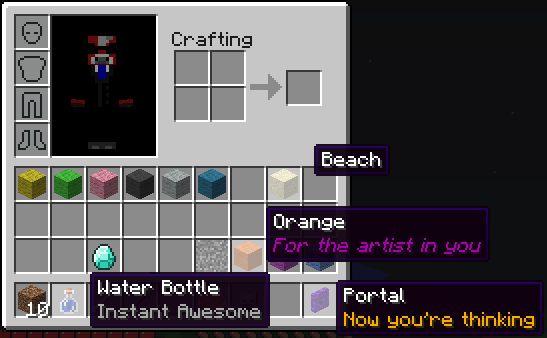
Item Renamer
Tired of blocks called Sand? Want your enderpearls to say Grenade instead? Want to add extra lines of text below item names? Do all that and more with ItemRenamer. You can create your own custom item names for all items in your server, but still let users rename with an anvil. You can create your very own language pack!
Installation
- Download ProtocolLib and put it in your plugins folder
- Place ItemRenamer.jar in your plugins folder, on server start the configuration will be generated
- Test out the example config by setting your world to run the example pack, to see how it works
- Go crazy and make your own language pack
Developer Build
Development builds of this project can be acquired at the provided continuous integration server.
These builds have not been approved by the BukkitDev staff. Use them at your own risk.
Jenkins server
For developers
ItemRenamer 2.0.0 contains a fully-fledged API. Click here for more information.
Configuration
Default configuration can be found here.
| Config | Default | Ranges | Description |
|---|---|---|---|
| autoupdate | true | [true/false] | Will remind you when a new version is available |
| creativedisable | true | [true/false] | Will disable ItemRenamer while you're in creative mode |
| worlds.<worldname> | Pack name | Will set this world to run the pack you put here | |
| packs.<packname>.<itemid>.<data>.name | Any string | Will rename itemid:data to your string | |
| packs.<packname>.<itemid>.all.name | Any string | Will rename all itemid data values to your string | |
| packs.<packname>.<itemid>.other.name | Any string | Will rename all unset itemid data values to your string | |
| packs.<packname>.<itemid>.<data>.name | Any string | Will add your name to itemid:data | |
| packs.<packname>.<itemid>.<data>.lore | Any string | Will add your lore list to itemid:data | |
| packs.<packname>.<itemid>.<first>-<last>.name | Any string | Will add your name to every itemid with a data value of the give range. | |
| packs.<packname>.<itemid>.<first>-<last>.lore | Any string | Will add your lore list to every itemid with a data value of the give range. | |
| packs.<packname>.<itemid>.all.lore | Any string | Will add your lore list to all itemid data values | |
| packs.<packname>.<itemid>.other.lore | Any string | Will add your lore list to all unset itemid data values |
- Note: place lore in [square brackets] OR on seperate lines starting with a dash -
Player-specific packs
If you want to customize the renamer pack for a specific group of players, regardless of world, you may use the player info itempack along with the desired renamer pack. This feature requires Vault and a permission/chat plugins that supports player info.
This can be done as follows with PermissionEx:
users:
  Player:
    group:
     - Members
    options:
      itempack: none
Usage
It's possible to configure ItemRenamer without ever having to touch the configuration file or deal with the more complicated (but powerful) commands. Simply select an item you want to rename, and type the following:
/renamer select hand
That will select your current item's ID and durability (except for armor and tools), along with any enchantments, potion/fireworks effect, etc. Then use set name and add lore to rename the item and every other like it on the server:
/renamer set name Nameless Tool
/renamer add lore Unknown Artifact
This will automatically be applied to the current world you're in. Use "renamer set pack" to apply it to a different item pack, or teleport to the world with the item pack you want to rename.
Commands
- Change whether or not to automatically check for updates:
/renamer set setting autoupdate [true|false] - Get what item pack has been assigned to a particular world:
/renamer get world [world_name] - Assign an item pack to the given world:
/renamer set world [world_name] [pack_name] - Add a new item pack:
/renamer add pack [pack_name] - Delete an item pack:
/renamer delete pack [pack_name] - Select a item pack to use for all subsequent commands:
/renamer select pack [pack_name] - Rename all items similar to the one the player currently is holding:
/renamer select hand - Deselect the current item pack, going back to manually typing it:
/renamer select none - Get the rename rule for a particular item:
/renamer get item [pack_name] [itemID] [all|other|0-32767] - Set the name of an item(s) matching a single or multiple damage values:
/renamer set name [pack_name] [itemID] [all|other|0-32767] [0-32767] [name (with spaces)] - Add a new lore line to an item(s) matching a single or multiple damage values:
/renamer add lore [pack_name] [itemID] [all|other|0-32767] [0-32767] [lore (with spaces)] - Remove all the existing lores for a particular set of items:
/renamer delete lore [pack_name] [itemID] [all|other|0-32767] [0-32767] - Add a new enchantment to a set of items: /renamer add enchantment [pack_name] [itemID] [all|other|0-32767] [0-32767] [enchantment_name] [level]
- Remove an existing enchantment for a set of items: /renamer remove enchantment [pack_name] [itemID] [all|other|0-32767] [0-32767] [enchantment_name] [level]
- Reload configuration:
/renamer reload - Save configuration now instead of during server shutdown:
/renamer save
All commands default to OP, but also have permissions.
Modify enchantments
It is also possible to add or remove existing enchantments to any given item. The easiest method is to mark the item you want to modify in your hotbar, and type the following command:
/renamer select hand
/renamer add enchantment NO_ATTRIBUTES 1
Every vanilla enchantment is supported:
- Bow: POWER, PUNCH, INFINITY, FLAME
- Weapon: SHARPNESS, BANE_OF_ARTHROPODS, SMITE, FIRE_ASPECT, KNOCKBACK, LOOTING, UNBREAKING
- Tool: FORTUNE, EFFICIENCY, UNBREAKING, SILK_TOUCH
- Armor: RESPIRATION, PROTECTION, BLAST_PROTECTION, FEATHER_FALLING, FIRE_PROTECTION, PROJECTILE_PROTECTION, THORNS, AQUA_AFFINITY
There's also three custom enchantments:
- GLOW 1: Preserve the enchantment glow with no visible enchantment name
- NO_ATTRIBUTES 1: Remove all the attribute lines introduced in 1.6.1 and 1.6.2.
- NO_DURABILITY 0: Remove any visible durability on the item. Switch out 0 with any other number to force a durability value.
Permissions
itemrenamer.config.get — read-only access to configs
itemrenamer.config.set — can edit configs or reload from disk
itemrenamer.update — gets a notification when update is ready, and can use update command
Notes
- Join us on irc at: irc://esper.net/ItemRenamer
- Items in the creative menu are only client-side, and thus cannot be renamed by this plugin. But creative players will see their items renamed in the main inventory bar.
- This plugin doesn't actually edit any items, they just appear renamed .. if you were to suddenly stop using this plugin all items should go back to normal
- If a player renames an item in an anvil, that name should take precedence over the ItemRenamer one
- When setting lore in game make sure to wrap the text in square brackets, each line separated by a comma, and enclosed in quotes if it contains special characters
Sourcecode
Access the source code via GitHub:
https://github.com/meiskam/ItemRenamer
Donate

Metrics

Comments


-

viakit Owner
-

_ForgeUser1707009 Author
-
View User Profile
-
Send Message
Posted Jun 26, 2013I have a problem, I'm using lore on a potion but it wont remove the Effect: (Time:Time) on the lore! I really need it removed, thank you.
-
View User Profile
-
Send Message
Posted Jun 26, 2013@aadnk
Yep, that's what I meant, because some plugins dosen't have the option, and also, i have a kit plugin, that support custom names, like, i can give a diamond sword with a name for example diamond sword with name "Godly sword", but the plugin dosn't have a fake enchant support and things like that, so i want only this sword to be with a fake enchant and not all the diamond swords
-
View User Profile
-
Send Message
Posted Jun 25, 2013@ravand
Thanks, though it's Meiskam who deserve most of the credit. He came up with the original idea, and was the sole maintainer until I took over in 1.6.0.
I don't think you can get rid of that particular line, unfortunately. It's entirely client side.
@amitkilo
I think I see what you're getting at. You want to be able to rename only those items that have been given a certain name or contain a specific lore line?
Sounds to be like you're trying to rename a "tool" item from a Bukkit plugin. But why not rename it in the configuration of that plugin instead (or request such an option)?
-
View User Profile
-
Send Message
Posted Jun 25, 2013@aadnk
THATS AWESOME! I tried so many renaming plugins that didn't have this feature and im surprised to hear that you made it for that particular reason :D All of your plugins are amazing keep up dude.
EDIT: I noticed that the "No effects" line doesn't get replaced by the lore. Any way for even changing that on the potions?
-
View User Profile
-
Send Message
Posted Jun 25, 2013I have a good idea, maybe, you can do, that if someone have a item named "x" it will make it with the enchants\lores\names you choosed?, so it wont be for all the items, just for items with names that you want them to be with lore\enchant\name i'm not really got at explaining, my english is bad
i hope you got what i meant if you can do that, it will be really usefull
-
View User Profile
-
Send Message
Posted Jun 25, 2013Really thanks dude!, Keep your awesome work!
-
View User Profile
-
Send Message
Posted Jun 24, 2013@ravand
You can rename them globally, yes. That is the whole purpose of this plugin. :p
As far as I can gleam from the plugin description page, the three potion IDs are 16390, 16398 and 16427. To rename these potions, simply add them under item ID 373 in your configuration:
Alternatively, you can select one of the potions, type renamer select hand and then renamer set name 10x10 Protection. That way, you don't even have to know the potion item ID and sub ID.
-
View User Profile
-
Send Message
Posted Jun 24, 2013aadnk is it possible to rename items permantenly as an admin without renaming it for every individual use?
I would need this for potion sub ID's to give them a permanent name. We run the potion protect plugin and whenever a player gets that custom potion it should automatically be called "10x10 Protection" for example
-
View User Profile
-
Send Message
Posted Jun 24, 2013@amitkilo
I've now added a new GLOW enchantment that does exactly this:
That will make the current item glow like it contains enchantment, without showing a list of enchantments. Note that this relies on a bug in the Minecraft client, and might disappear in the future. But for now it works. :)
You can get a new development version with this feature here.
-
View User Profile
-
Send Message
Posted Jun 24, 2013I can give you some source codes so you can look on that: http://forums.bukkit.org/threads/item-enchantment-glow-1-4-6.115211/#post-1447389 http://forums.bukkit.org/threads/item-enchantment-glow-1-4-6.115211/page-2#post-1493133 http://forums.bukkit.org/threads/enchantment-glow.147917/#post-1675458 http://forums.bukkit.org/threads/enchantment-glow.147917/#post-1675458 it would be awesome if you can do that
-
View User Profile
-
Send Message
Posted Jun 19, 2013@gustebeast
Try this version then.
@amitkilo
I'll look into it.
-
View User Profile
-
Send Message
Posted Jun 18, 2013It works for single items, but if I try to stack the items, it turns back into an egg with Punch I. Plus, if I am in survival mode, if I split the eggs back into single items, they stay as egg punch I. Only in creative mode do they say "Catch Egg".
-
View User Profile
-
Send Message
Posted Jun 18, 2013Great plugin!, would be awesome if you can make items to have "Fake enchant" (enchant glow effect) it's possible, a programer made me plugin like that, it worked till 1.5.2 but it's also possible now
-
View User Profile
-
Send Message
Posted Jun 17, 2013@kowuaou
Post the crash log with pastebin.com, or create a new ticket.
Also, did you install ProtocolLib?
@gustebeast
It's impossible to change the enchantment name/text without also using a client mod. Just use lore instead.
-
View User Profile
-
Send Message
Posted Jun 17, 2013Looks great but crashes on start. =(
-
View User Profile
-
Send Message
Posted Jun 17, 2013What if there was just a way to change the enchantment text? This would be usefull beyond removing it. For example someone may want "Punch" to be replaced with "Damage".
With this method you could use the formatting already in place.
/renamer select hand
/renamer set enchant Damage I
or to remove it
/renamer select hand
/renamer set enchant none
For already enchanted items it would be simple, and for non enchanted items you would have three options. 1. Give an error saying the item needs to be enchanted. 2. Add lore "&6<text>". 3. Give the item the enchant effect and set <text> as the enchantment line.
This system seems like it would be more open for several different options.
-
View User Profile
-
Send Message
Posted Jun 17, 2013@gustebeast
Ah, yes, that's because you're in creative mode. I had to add a slightly ugly hack to work around it previously, but I forgot to update the hack once I extended ItemRenamer with the ability to add or remove enchantments.
This is fixed in the latest development version, which you can get here, as always.
As for showing a glow effect without any enchantments - that really shouldn't be the default behavior. I might add that at some stage in the future, but it would have to be some kind of "effect", and not merely caused by disenchanting.
-
View User Profile
-
Send Message
Posted Jun 17, 2013Here is what I did.
1. Enchanted a stick in an anvil with Punch I
2. /renamer select hand
3. /renamer set name Catch Egg
4. /renamer add dechantment Punch 1
At the end I got a regular looking egg with the name "Catch Egg".
If I make a stack larger than 1, it goes back to its enchantment form
If I pick it up and put it back down in my inventory, it turns into a regular egg.
In general it is very buggy.
Here is what I want. An item that looks and acts exactly like an egg enchanted with Punch I except when players hover over it, it just says "Catch Egg". It will still have the glow and everything, just the name changes.
I encourage you to test around with it so you can see the issues first hand. Take an egg and a Punch I enchantment book and fuse them in an anvil then move the item around in your inventory you will see what I mean.
-
View User Profile
-
Send Message
Posted Jun 16, 2013@gustebeast
No, that's not possible in 1.7.0. But it's not terribly difficult to implement - I've now pushed a new development version with this feature.
It introduces four new commands:
For instance, to remove the Punch 1 on the egg, simply select it with renamer select hand and type in the following:
/renamer add dechantment Punch 1This will "dechant" the egg, removing the Punch 1 enchantment. You can also add new enchants:
/renamer add enchantment Knockback 1Note that this only takes effect on the client side - new enchantments will not be added with their respective enchantment effect. Conversely, the enchantment effect of existing enchantment that has been "dechanted" will be preserved.
-
View User Profile
-
Send Message
Posted Jun 16, 2013@aadnk
So I want to rename the item "Egg with Punch I" to "Catch Egg"
I went through your steps, and this was the result.
Catch Egg
Punch I
I would like to get rid of the "Punch I" in gray letters below the main title so that when players hover over it all they see is "Catch Egg". Is there any way to do this?
In the end, a player should be able to take an egg and a punch I enchantment book, fuse them using an anvil, and get an item just called "Catch Egg".