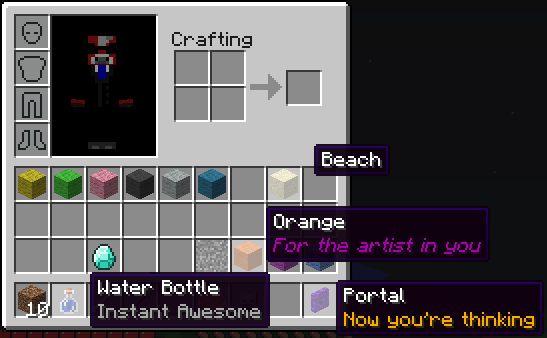
Item Renamer
Tired of blocks called Sand? Want your enderpearls to say Grenade instead? Want to add extra lines of text below item names? Do all that and more with ItemRenamer. You can create your own custom item names for all items in your server, but still let users rename with an anvil. You can create your very own language pack!
Installation
- Download ProtocolLib and put it in your plugins folder
- Place ItemRenamer.jar in your plugins folder, on server start the configuration will be generated
- Test out the example config by setting your world to run the example pack, to see how it works
- Go crazy and make your own language pack
Developer Build
Development builds of this project can be acquired at the provided continuous integration server.
These builds have not been approved by the BukkitDev staff. Use them at your own risk.
Jenkins server
For developers
ItemRenamer 2.0.0 contains a fully-fledged API. Click here for more information.
Configuration
Default configuration can be found here.
| Config | Default | Ranges | Description |
|---|---|---|---|
| autoupdate | true | [true/false] | Will remind you when a new version is available |
| creativedisable | true | [true/false] | Will disable ItemRenamer while you're in creative mode |
| worlds.<worldname> | Pack name | Will set this world to run the pack you put here | |
| packs.<packname>.<itemid>.<data>.name | Any string | Will rename itemid:data to your string | |
| packs.<packname>.<itemid>.all.name | Any string | Will rename all itemid data values to your string | |
| packs.<packname>.<itemid>.other.name | Any string | Will rename all unset itemid data values to your string | |
| packs.<packname>.<itemid>.<data>.name | Any string | Will add your name to itemid:data | |
| packs.<packname>.<itemid>.<data>.lore | Any string | Will add your lore list to itemid:data | |
| packs.<packname>.<itemid>.<first>-<last>.name | Any string | Will add your name to every itemid with a data value of the give range. | |
| packs.<packname>.<itemid>.<first>-<last>.lore | Any string | Will add your lore list to every itemid with a data value of the give range. | |
| packs.<packname>.<itemid>.all.lore | Any string | Will add your lore list to all itemid data values | |
| packs.<packname>.<itemid>.other.lore | Any string | Will add your lore list to all unset itemid data values |
- Note: place lore in [square brackets] OR on seperate lines starting with a dash -
Player-specific packs
If you want to customize the renamer pack for a specific group of players, regardless of world, you may use the player info itempack along with the desired renamer pack. This feature requires Vault and a permission/chat plugins that supports player info.
This can be done as follows with PermissionEx:
users:
  Player:
    group:
     - Members
    options:
      itempack: none
Usage
It's possible to configure ItemRenamer without ever having to touch the configuration file or deal with the more complicated (but powerful) commands. Simply select an item you want to rename, and type the following:
/renamer select hand
That will select your current item's ID and durability (except for armor and tools), along with any enchantments, potion/fireworks effect, etc. Then use set name and add lore to rename the item and every other like it on the server:
/renamer set name Nameless Tool
/renamer add lore Unknown Artifact
This will automatically be applied to the current world you're in. Use "renamer set pack" to apply it to a different item pack, or teleport to the world with the item pack you want to rename.
Commands
- Change whether or not to automatically check for updates:
/renamer set setting autoupdate [true|false] - Get what item pack has been assigned to a particular world:
/renamer get world [world_name] - Assign an item pack to the given world:
/renamer set world [world_name] [pack_name] - Add a new item pack:
/renamer add pack [pack_name] - Delete an item pack:
/renamer delete pack [pack_name] - Select a item pack to use for all subsequent commands:
/renamer select pack [pack_name] - Rename all items similar to the one the player currently is holding:
/renamer select hand - Deselect the current item pack, going back to manually typing it:
/renamer select none - Get the rename rule for a particular item:
/renamer get item [pack_name] [itemID] [all|other|0-32767] - Set the name of an item(s) matching a single or multiple damage values:
/renamer set name [pack_name] [itemID] [all|other|0-32767] [0-32767] [name (with spaces)] - Add a new lore line to an item(s) matching a single or multiple damage values:
/renamer add lore [pack_name] [itemID] [all|other|0-32767] [0-32767] [lore (with spaces)] - Remove all the existing lores for a particular set of items:
/renamer delete lore [pack_name] [itemID] [all|other|0-32767] [0-32767] - Add a new enchantment to a set of items: /renamer add enchantment [pack_name] [itemID] [all|other|0-32767] [0-32767] [enchantment_name] [level]
- Remove an existing enchantment for a set of items: /renamer remove enchantment [pack_name] [itemID] [all|other|0-32767] [0-32767] [enchantment_name] [level]
- Reload configuration:
/renamer reload - Save configuration now instead of during server shutdown:
/renamer save
All commands default to OP, but also have permissions.
Modify enchantments
It is also possible to add or remove existing enchantments to any given item. The easiest method is to mark the item you want to modify in your hotbar, and type the following command:
/renamer select hand
/renamer add enchantment NO_ATTRIBUTES 1
Every vanilla enchantment is supported:
- Bow: POWER, PUNCH, INFINITY, FLAME
- Weapon: SHARPNESS, BANE_OF_ARTHROPODS, SMITE, FIRE_ASPECT, KNOCKBACK, LOOTING, UNBREAKING
- Tool: FORTUNE, EFFICIENCY, UNBREAKING, SILK_TOUCH
- Armor: RESPIRATION, PROTECTION, BLAST_PROTECTION, FEATHER_FALLING, FIRE_PROTECTION, PROJECTILE_PROTECTION, THORNS, AQUA_AFFINITY
There's also three custom enchantments:
- GLOW 1: Preserve the enchantment glow with no visible enchantment name
- NO_ATTRIBUTES 1: Remove all the attribute lines introduced in 1.6.1 and 1.6.2.
- NO_DURABILITY 0: Remove any visible durability on the item. Switch out 0 with any other number to force a durability value.
Permissions
itemrenamer.config.get — read-only access to configs
itemrenamer.config.set — can edit configs or reload from disk
itemrenamer.update — gets a notification when update is ready, and can use update command
Notes
- Join us on irc at: irc://esper.net/ItemRenamer
- Items in the creative menu are only client-side, and thus cannot be renamed by this plugin. But creative players will see their items renamed in the main inventory bar.
- This plugin doesn't actually edit any items, they just appear renamed .. if you were to suddenly stop using this plugin all items should go back to normal
- If a player renames an item in an anvil, that name should take precedence over the ItemRenamer one
- When setting lore in game make sure to wrap the text in square brackets, each line separated by a comma, and enclosed in quotes if it contains special characters
Sourcecode
Access the source code via GitHub:
https://github.com/meiskam/ItemRenamer
Donate

Metrics

Comments


-

viakit Owner
-

_ForgeUser1707009 Author
-
View User Profile
-
Send Message
Posted Jun 15, 2013I haven't gotten any bug reports since I released the development version, so I guess it's safe to push it to BukkitDev. It should be out in the next day or two. :)
-
View User Profile
-
Send Message
Posted Jun 12, 2013-
View User Profile
-
Send Message
Posted Jun 11, 2013I have some good news! I've added the ability to rename item packs by enchantment, armor dye (by exact color), firework effects, custom potion effects, skull owner and more (automatically) as Minecraft is updated.
It's very simple. A new system allows you to specify the name and lore of any arbitrary item stack as long as you have one in your inventory. Simply call renamer select hand to use the currently selected item, and then call renamer set name NAME and renamer add lore LORE to update the name and lore of this selected item.
This will be added to the item pack in the current world by default, though this can be overriden by calling renamer select pack. These special mappings are saved as follows:
It's readable, but maybe not as writable as I'd hoped. Still, I think this is a much better system than having to specify all of these different attributes in the configuration file or through a complicated command system. I could have gone that route of course, but it would have been much harder to implement, and much harder to use.
You can get a development preview of this new feature here. Let me know if you find any bugs.
-
View User Profile
-
Send Message
Posted Jun 11, 2013@bmproductions67
I mean, have you checked that it works in survival mode? The creative menu is not supported.
-
View User Profile
-
Send Message
Posted Jun 10, 2013@aadnk
Hi, where do I check if the items are renamed elsewhere?
-
View User Profile
-
Send Message
Posted Jun 10, 2013@bmproductions67
ItemRenamer doesn't (and cannot) work with the creative menu. Have you checked if the items are renamed elsewhere (for survival players)?
Also, make sure the pack you're renaming is associated with the same world. These can be found under "worlds" in the configuration.
-
View User Profile
-
Send Message
Posted Jun 9, 2013Hi, I am trying to change the names of items, but when I reload the config the names dont change? Do you know the problem?
-
View User Profile
-
Send Message
Posted Jun 8, 2013@XvBaseballkid12vX
Have you added any renamed items to the world pack? Empty packs will be lost (due to a oversight in the saving/loading code), so you must have at least one renamed item in them.
Also, you might want to try calling "rename save". But this should be executed automatically when the plugin shuts down, however.
-
View User Profile
-
Send Message
Posted Jun 5, 2013This plugin is amazing thank you for making it :D I am having one slight problem though (probably something on my part) when I reload the plugin after setting the Name Pack to the world ( /renamer set world stone example ) it resets and I don't have the Name Pack anymore so I have to add it again using the command. Its really weird, can someone help me please?
-
View User Profile
-
Send Message
Posted Jun 3, 2013@CommodoreAlpha
Sure, I'll pm it. But it does seem like you're missing some characters (or using tab).
@nicnec7
Unfortunately no. This would require additional support, just like enchanting. And I don't have time to work on it now, in the middle of exams.
@TommehRRR
These errors are all from the YAML parser. It's not because the plugin is somehow "dis-functional".
-
View User Profile
-
Send Message
Posted Jun 3, 2013@CommodoreAlpha
Just jump to those lines - count it! probably a bad item id, maybe repeating itself, or a missing decimal.
Go threw items down the list - where you see something broken you know from there down the plugin is dis-functional.
-
View User Profile
-
Send Message
Posted Jun 3, 2013Does this plugin support leather armor dyes? If not, can you please add it? That would be a great help to my server and I.
-
View User Profile
-
Send Message
Posted Jun 2, 2013@aadnk
Wait, that's weird. In my actual config.yml, I'm not missing any spaces there, or anywhere. Either that, or I'm going blind. Somehow the paste went wrong...
Can I email you my config.yml? (I don't want to paste it because I'm just that paranoid.) You can pm me your email and I'll send it to you.
As a reminder, the error points at the following:
And thanks for the great support. :)
-
View User Profile
-
Send Message
Posted Jun 1, 2013@CommodoreAlpha
Yeah, you've made a fairly basic mistake - there's a bunch of spaces missing on line 55 and 59 in the configuration:
But I don't blame you - this is really a failure of YAML itself, along with the terrible error message from SnakeYAML. Just like Python, indentation has syntactic value and represents the level of each element in the tree structure (or DAC). Unfortunately, this is really easy to get wrong for beginners. I struggled with this myself, and don't get me started on accidentally using tabs ...
Of course, YAML is a very readable configuration format. It's just too bad it's not very writable. But it's certainly better than XML. Perhaps JSON really is the best middle ground here. Dinnerbone and the old Bukkit team certainly seems to think so, and have already chosen JSON as the data format for the upcoming resource packs (and probably Mod API), along with the new chat packet system.
-
View User Profile
-
Send Message
Posted May 31, 2013For some reason, the plugin is pointing out I did something wrong with my config.yml, but I'm pretty sure it's all configured correctly.
Here's a paste: http://pastebin.com/ZFsDbgvq
I wouldn't be surprised if it was a dumb mistake from me though. I just can't wrap my head around what I could've typed wrong.
-
View User Profile
-
Send Message
Posted May 27, 2013@gustebeast
Yup, supporting enchantments will take more work.
Unfortunately, I don't have a time table for when that will be done, as I have a couple of exams coming up. Maybe in a week or more.
-
View User Profile
-
Send Message
Posted May 26, 2013@aadnk
Okay, good, but not quite there yet.
You still cant rename enchanted items. This is probably because there is no config storing system yet.
Ideally I could rename an enchanted item such that there was no second line. It wouldnt be "item name" \ "Punch I"
-
View User Profile
-
Send Message
Posted May 26, 2013I haven't had too much time to work on ItemRenamer this weekend unfortunately, but I did finish a "rename held item" feature as suggested by gustebeast. Simply select an item in the main inventory bar and type the following:
Then you will automatically select the current world's pack and this item's ID and durability/data value. This means they will automatically be filled in wherever possible in all the other commands. So - after doing this, renaming is a relatively simple matter:
And so on. You can get this version here. The usual disclaimer regarding snapshot builds applies.
Hopefully it will be out on the Jenkins server soon, but it's not looking very good. Never use a Micro AWS instance for anything other than hosting a blog for your cat.
-
View User Profile
-
Send Message
Posted May 25, 2013@TommehRRR
Sure, you're free to fork it and make your own version. But if you release it publicly, please rename it slightly so that it's clear that it is a fork.
If you want, you can always send a pull request on GitHub instead. But I would still like to write my own version first.
-
View User Profile
-
Send Message
Posted May 25, 2013@aadnk
I might be up to helping you, if you are interested.
This is open source - so if i do it i'll send you what was done!