InfinitePlots
Description
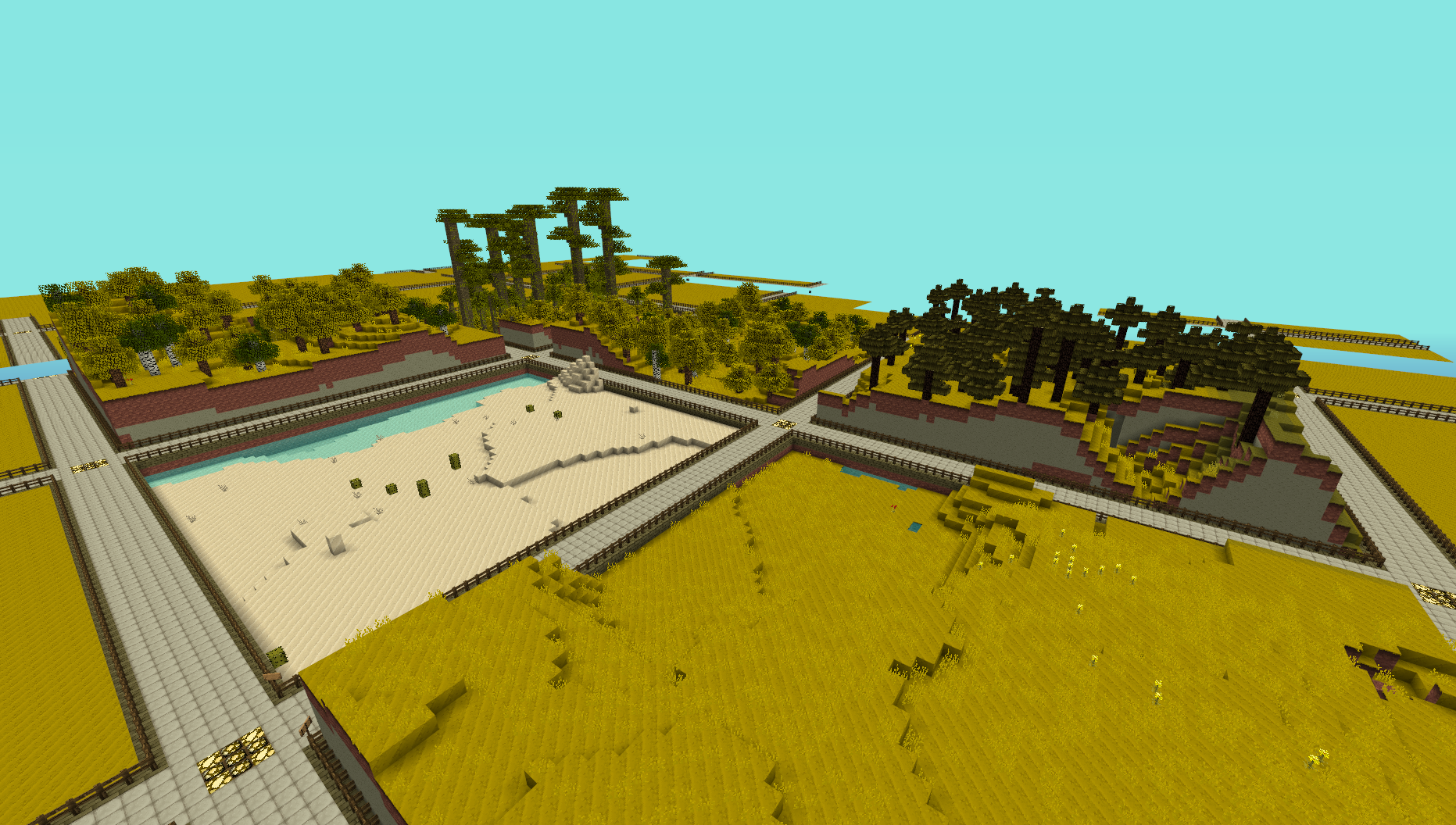
This plugin provides a simple generator for server admins to use to create an infinite world of building plots (of a configurable size), the idea is for it to be used to create a world to be used for building competitions. I made this to use on my server and am releasing it just in case anyone else is looking for the same thing.
NOTE: This does not create any worlds, you will need to use a plugin like MultiVerse or edit your world.yml file to create one using this plugins name as the generator. An example of the command used to create a world using MultiVerse would be
/mv create competition_world normal -g InfinitePlots
Bug Reports / Suggestions
If you find a bug, encounter a problem or have a suggestion, please fill out a ticket via the Tickets link above. I do not have the time to read through the comments section, any comment that fits the previous three categories will be ignored.
Plot Size
The plot-size option in the config file controls the size of the plots that are generated, it will only take effect in new areas so you may need to delete the worlds folder and have it regenerate.
You can also set the size of the plots for a given world using the generator ID parameter, for a size of 64 (the default) you can do
/mv create competition_world normal -g InfinitePlots:64
for 128 you would do
/mv create competition_world normal -g InfinitePlots:128
If the ID parameter is not specified the value from the config file will be used.
For details of the other config options see the config page.
Contributing
Contributions to the project are very much welcome, if you have a feature that you want implemented and know a nice way to do it then consider forking the repo and submitting a pull request. These will be accepted as long as the following simple guidelines are followed.
- Do not edit the structure of the pom.xml file, feel free to add a dependency if you need it but the formatting and structure should not be changed.
- If you are exposing a new API method, add a JavaDoc comment to it, but don't over-comment internal code.
- Follow the existing code style, don't antagonise over every space though !
All dependencies that are used are now available from a public Maven repo, so you don't have to worry about building several other projects just to add a simple change any more.
Source Code
Dev Builds
Changes Since Last Release
Information on the development version can be found on the new version of this page http://dev.bukkit.org/server-mods/infiniteplots/pages/main-dev/
Download
Development builds of this project can be acquired at the provided continuous integration server. These builds have not been approved by the BukkitDev staff. Use them at your own risk.
http://bukkit.jacekk.co.uk:8000/job/InfinitePlots/
Download Stats
Comments

-

_ForgeUser6967060 Owner
-
_ForgeUser4473012 Contributor
-
View User Profile
-
Send Message
Posted May 20, 2012@Nickbbeezy
Did you take the plugin out? If you take the plugin that generates the world the world Generator wont load in new chunks to your designated world generator. hope this helps
-
View User Profile
-
Send Message
Posted May 7, 2012Having a problem with the plots getting cut off, they stop spawning for some reason. Any fix for this?
-
View User Profile
-
Send Message
Posted May 5, 2012also works whit multiworld for the guys that want to know it
-
View User Profile
-
Send Message
Posted May 3, 2012@BodiGramer
This plugin does not take care of claiming. I suggest looking up InfiniteClaims for this.
-
View User Profile
-
Send Message
Posted May 3, 2012What are the commands to claim one?
-
View User Profile
-
Send Message
Posted May 3, 2012@xXReVurbXx thanks. Ill give that a shot
-
View User Profile
-
Send Message
Posted May 2, 2012@parkourisbeast1
-Stick this plugin in your /plugins folder
-Run the server
-Shut off the server
-Go into the configuration file InfinitePlots generated and tweak things to your liking
-Start the server again
-type /mv create <WorldNameYouWouldLike> NORMAL -g InfinitePlots
-It will then simply use the configuration file you set up earlier to define the plot sizes, and should work perfectly fine.
If it's not obvious enough, be sure to replace <WorldNameYouWouldLike> with a world name you'd like it to be. Be sure this name does not include the "<>" included in my example, and has no spaces in it.
-
View User Profile
-
Send Message
Posted May 2, 2012Can someone just give me a download of a plot world? I really need one
-
View User Profile
-
Send Message
Posted Apr 30, 2012When I tried to use it, it just generated a normal land. I was using multiverse, and i copied and pasted the code exactly and it didnt work. Please help me I really need this for my server!!
Parkourisbeast1 (play.mcblazecraft.us)
-
View User Profile
-
Send Message
Posted Apr 30, 2012@xXReVurbXx
Haha. No problem :D
-
View User Profile
-
Send Message
Posted Apr 30, 2012@wide_load
That awkward moment when both plugins have near the same exact name and you, in your exhausted state, accidentally post a post on the wrong plugin... sorry about that! xD
-
View User Profile
-
Send Message
Posted Apr 29, 2012@xXReVurbXx
This doesn't assign players to a plot at all, it's just the generator. It doesn't even do anything with teleporting.
You may be using InfiniteClaims ? If so the problem is probably caused by that not using the plot height correctly.
-
View User Profile
-
Send Message
Posted Apr 29, 2012@wide_load
Is there any specific reason as to why players get stuck underneath the plot's top layer and suffocate to death when being assigned a plot?
It could be something to do with bukkit.yml's option to have players spawn exactly where they logged out; and thus disabling the vanilla feature that forces entities out of blocks...
However. If this is the case, I would strongly suggest working around that in this plugin and would very much appreciate it :)
-
View User Profile
-
Send Message
Posted Apr 29, 2012@Flapcraft
You can't set the data value. There is no fix for this you just have to use block IDs only.
-
View User Profile
-
Send Message
Posted Apr 29, 2012I am having trouble with changing the path to a wool colour, it just give me somethink like chests or stairs. i entered the id: 35:15 and that gave me cobblestone-stairs -.- do you know how to fix this?
-
View User Profile
-
Send Message
Posted Apr 24, 2012@th3controller
You can set the type of blocks yourself. I don't plan on adding any presets.
Lamp posts are a cool idea though, I will give that a go :D
-
View User Profile
-
Send Message
Posted Apr 24, 2012@wide_load
Aww its ok, would it be possible for you to add configurable types of streets? Like streettype1: Street with fence, Streettyp2: Street with no fence, Streettype3: Street with Lamp posts
-
View User Profile
-
Send Message
Posted Apr 17, 2012@SquarePlayer
in your multiverse-core directory or your plot plugin directory
-
View User Profile
-
Send Message
Posted Apr 16, 2012I'm having some major probs with this plugin. It seems to be tied to shutdown / restart of the server. The plots aren't so infinite anymore. The new chunks just do flat land, one block above bedrock. Nothing shows up as errors. I'm using CB 1.2.5-R1.0 and MultiVerse 2.4devbuild527.
Any suggestions? I'm tired of deleting and recreating the world to restore the functionality.
-
View User Profile
-
Send Message
Posted Apr 15, 2012I know this is a really stupid question, but where to find world.yml ? :D