Main-Dev
Description
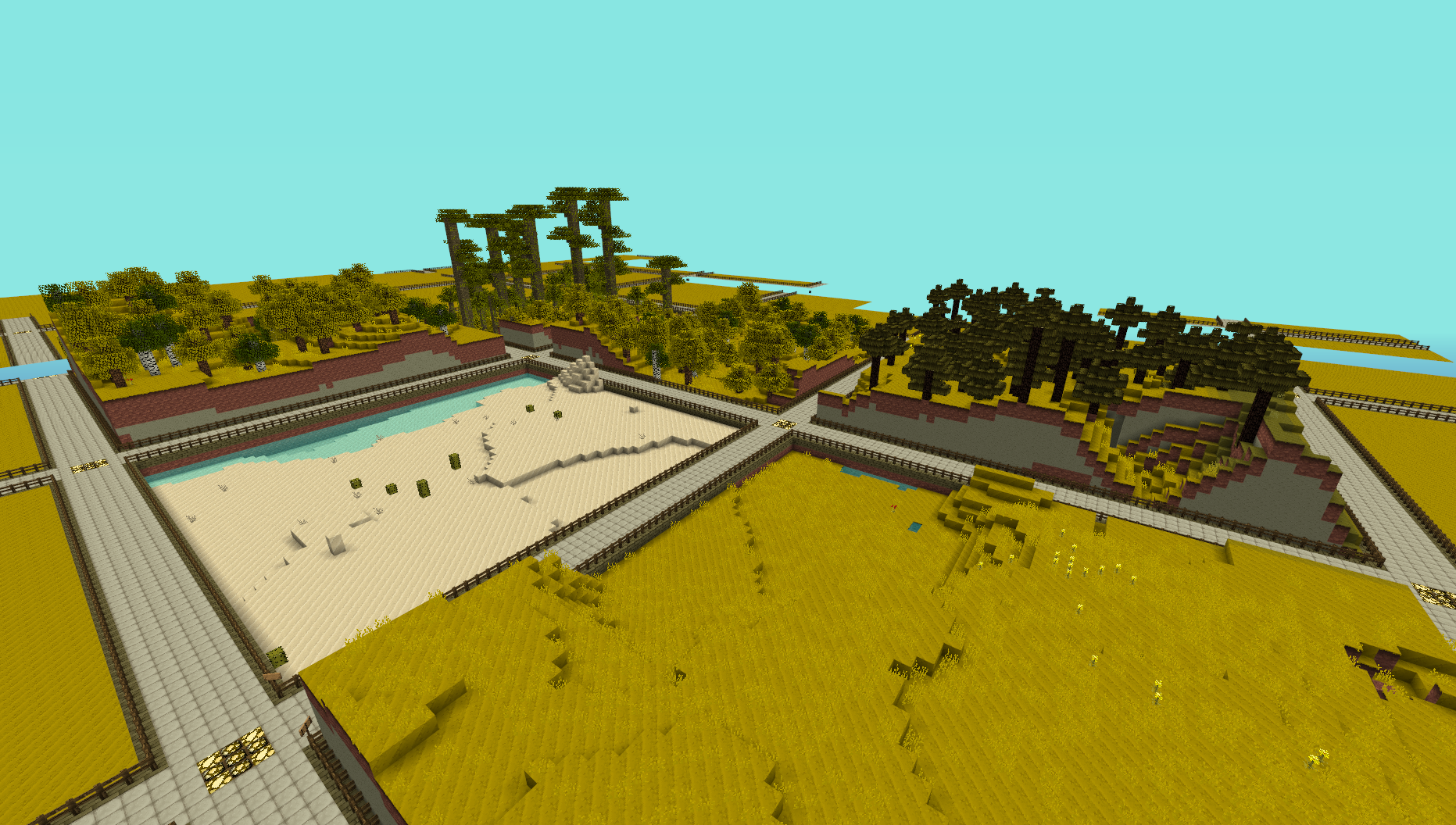
This plugin provides a simple generator for server admins to use to create an infinite world of building plots (of a configurable size), the idea is for it to be used to create a world to be used for building competitions. I made this to use on my server and am releasing it just in case anyone else is looking for the same thing.
NOTE: This does not create any worlds, you will need to use a plugin like MultiVerse or edit your bukkit.yml file to create one using InfinitePlots as the generator. An example of the command used to create a world using MultiVerse would be
/mv create competition_world normal -g InfinitePlots
you can also specify the grid size (see below) in this command allowing for worlds with larger plots
/mv create competition_world normal -g InfinitePlots:128
Bug Reports / Suggestions
If you find a bug, encounter a problem or have a suggestion, please fill out a ticket via the Tickets link above. I do not have the time to read through the comments section, any comment that fits the previous three categories will be ignored.
Config
The config file will by default look something like this.
generator-only: false
grid-size: 32
grid-height: 20
use-signs: true
track-stats: true
owner-prefix: Plot Owner
purge-safe-list: []
reset:
  delay: 5
  pertick: 2000
claim:
  protect-paths: true
  max: 25
  max-unused: 4
  cost: 0.0
blocks:
  path: 43
  path-data: 0
  lower-wall: 98
  lower-wall-data: 0
  upper-wall: 85
  upper-wall-data: 0
  surface: 2
  ground: 3
generator-only
Setting this to true will disable the claim and protection system completely.
grid-size
This controls how large each plot is, measured from the centre of the path intersections.
grid-height
This sets how high the land is, lower values are generally better.
use-signs
When set to true each plot will be labelled with a sign.
track-stats
By default InfinitePlots will keep track of some basic plot stats such as the number of blocks broken, this can be disabled by setting this to false.
owner-prefix
The string to be placed on the line above the plot owners name on the signs.
purge-safe-list
A list of players to ignore when running the /plot purge command
reset
When a plot is regenerated (via the /plot reset) command a large number of block changes are made. To prevent players being disconnected this is done a few blocks at a time over a few seconds. If you have a more powerful server you can tweak the limits here to speed up the reset or if you find that people get kicked when you reset a plot you can reduce the limits.
delay
The time to wait between each each operation, this is the number of game ticks not seconds In most cases the default should be best.
pertick
The number of blocks to change per operation, this is the number to reduce if players get kicked when resetting a plot.
claim
This section allows the claim system to be modified
protect-paths
When set to true players will not be able to build on the paths between plots they own.
max
Players will not be allowed to claim more than this number of plots. Can be set to 0 to disable the limit.
cost
How much players will be charged to claim a plot, Vault is required for this feature to work.
max-unused
Players will not be allowed to claim more plots if that already have more than this number of unused plots. An unused plot is defined as one which has not had any blocks broken or placed in it. This option is only available if track-stats it set to true and can be set to 0 to disable the limit.
blocks
This section allows the blocks used for generation to be customised.
path
The block ID to use for the path.
path-data
The data value to set for the path
lower-wall
The block ID to use for the lower part of the plot wall.
lower-wall-data
The data value to use for the lower part of the plot wall.
upper-wall
The block ID to use for the upper part of the plot wall.
upper-wall-data
The data value to use for the upper part of the plot wall.
surface
The block ID to use for the top layer of the ground.
ground
The block Id to use for the bottom layers of ground.
Commands
- /plot info - View the plots info
- /plot name - Sets the name of a plot
- /plot tp - Teleports you to a named plot
- /plot claim - Claims this plot
- /plot auto - Claims the first available plot
- /plot unclaim - Releases this plot
- /plot addbuilder - Allows a player to build
- /plot removebuilder - Removes a builder
- /plot flag - Manage the plot flags
- /plot setbiome - Sets the plot biome
- /plot reset - Resets the plot
- /plot decorate - Generates terrain in the plot (see the Decorators section below)
- /plot protection - Enable or disable build and enter protection for the plot.
- /plot list - Lists all owned plots
- /plot purge - Removed all plots owned by players that have not logged in to a number of days.
All commands work on the plot the player is standing in, /iplot can also be used in case of conflicts.
Permissions
- infiniteplots.plot.claim - Allows the player to claim plots (defaults to true)
- infiniteplots.plot.unclaim - Allows the player to unclaim plots (defaults to true)
- infiniteplots.plot.unclaim.others - Allows the player to unclaim other players plots (defaults to OP only)
- infiniteplots.plot.add-builder - Allows the player to add builders to their plots (defaults to true)
- infiniteplots.plot.remove-builder - Allows the player to remove builders from their plots (defaults to true)
- infiniteplots.plot.flag - Allows the player to modify their plots flags (defaults to true)
- infiniteplots.plot.flag.others - Allows the player to modify other players plot flags (defaults to OP only)
- infiniteplots.plot.set-biome - Allows the player to set their plots biome (defaults to true)
- infiniteplots.plot.set-biome.others - Allows the player to set biome of other player plots (defaults to OP only)
- infiniteplots.plot.info - Allows the player to view plot info (defaults to true)
- infiniteplots.plot.reset - Allows the player to regenerate their plots (defaults to true)
- infiniteplots.plot.reset.others - Allows the player to regenerate other players plots (defaults to OP only)
- infiniteplots.plot.list - Allows the player to list their plots (defaults to true)
- infiniteplots.plot.list.others - Allows the player to list another players plots (defaults to OP only)
- infiniteplots.plot.teleport - Allows the player to teleport to their plots (defaults to true)
- infiniteplots.plot.teleport.others - Allows the player to teleport to another players plots (defaults to OP only)
- infiniteplots.plot.decorate - Allows the player to decorate plots (defaults to true)
- infiniteplots.plot.decorate.others - Allows the player to decorate another players plots (defaults to OP only)
- infiniteplots.plot.protection - Allows the player to modify a plots protection (defaults to true)
- infiniteplots.plot.protection.others - Allows the player to modify another players plot protection (defaults to OP only)
- infiniteplots.plot.build-all - Allows the player to build in and enter plots they do not own (defaults to OP only)
- infiniteplots.plot.bypass-claim-limit - Allows the player to claim more plots than the limit (defaults to OP only)
- infiniteplots.plot.purge - Allows the player to remove dead plots (defaults to OP only)
Plot Flags
Each plot has a set of flags that are used to modify some game mechanics within that plot. These are similar to the flags used in most protection plugins and are only boolean values.
- water-flow - Water will only flow if this is set (defaults to true)
- lava-flow - Lava will only flow if this is set (defaults to true)
- ice-melt - Ice will only melt if this is set (defaults to true)
- snow-form - Snow will only form if this is set (defaults to true)
- redstone - Redstone will not update unless this is set (defaults to true)
- block-physics - Sand and gravel will not fall unless this is set (defaults to true)
- monster-spawn - Aggressive mobs will not spawn unless this is set (defaults to true)
- animal-spawn - Neutral mobs will not spawn unless this is set (defaults to true)
Suggestions for more flags are welcome :D
Decorators
Flat
Generates flat land, this is the default for all plot worlds.
/plot decorate flat <ground_block_name>:[data] <surface_block_name>:[data]
The data values are optional.
Biome
Generates random vanilla-style terrain with a set biome.
/plot decorate biome <biome_name>
Contributing
Contributions to the project are very much welcome, if you have a feature that you want implemented and know a nice way to do it then consider forking the repo and submitting a pull request. These will be accepted as long as the following simple guidelines are followed.
- Do not edit the structure of the pom.xml file, feel free to add a dependency if you need it but the formatting and structure should not be changed.
- If you are exposing a new API method, add a JavaDoc comment to it, but don't over-comment internal code.
- Follow the existing code style, don't antagonise over every space though !
All dependencies that are used are now available from a public Maven repo, so you don't have to worry about building several other projects just to add a simple change any more.
Source Code
Dev Builds
Changes Since Last Release
Download
Development builds of this project can be acquired at the provided continuous integration server. These builds have not been approved by the BukkitDev staff. Use them at your own risk.