Individual Signs
Description
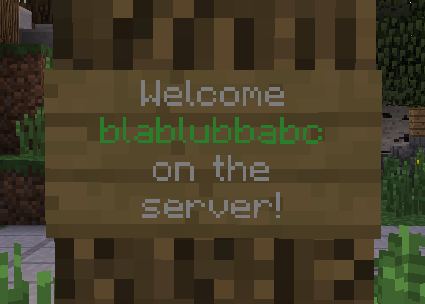
This plugin displays the text on signs for each player individual differently.
By default this plugin only replaces [PLAYER] on signs with the name and [DISPLAY] with the nick name of the player looking at it.
The permission nodes to create signs containing those tags are insigns.create.player and insigns.create.display.
However InSigns also includes an API for developers of other plugins to easily add own player-specific sign content.
This plugin could for example be used for individual greeting signs at your spawn. Your players will be amazed to see their own name on a sign!
IMPORTANT
This plugin needs ProtocolLib to work.
Make sure you have installed the right version of ProtocolLib.
This plugin should stay compatible with further versions of minecraft and bukkit as long as ProtocolLib doesn't have to change anything on it's API which InSigns is relying on, and the minecraft protocol isn't changing anything sign-related.
Quick Presentation by VariationVault
For plugin developers: easy-to-use API
Here is a small example of how you can use this in your own plugin to display player-specific values on signs.
1.) First of all: add the IndividualSigns jar to your build path (just like you do it with the bukkit.jar)
2.) You can then create a listener which listens for the SignSendEvent (just like you create listeners for bukkit events): This event gets called every time the server is about to update the sign contents for a player.
3.) The event provides easy methods to get the current sign text and to change it:
- getPlayer() - Gets the player which receives the sign packet.
- getLocation() - Gets the location of the sign which text is being sent.
- getLine(int index) - Gets the line of text at the specified index (0-3). The lines are in json format.
- setLine(int index, String line) - Sets the line of text at the specified index. Has to be in proper json format.
- isModified() - Whether or not this event was modified by some plugin.
- setCancelled(boolean cancelled) - If the event is cancelled the sign contents won't get updated for the affected player, leaving it at their current content (blank if all SignSendEvents get cancelled).
- isCancelled() - Checks whether or not some plugin cancelled this event already.
Example usage of the event to replace "[PLAYER]" with the player's name:
1 2 3 4 5 6 7 8 9 10 11 12 13 14 15 16 |
public class SignSendListener implements Listener { public SignSendListener(Plugin plugin) { Bukkit.getServer().getPluginManager().registerEvents(this, plugin); } @EventHandler(priority = EventPriority.NORMAL, ignoreCancelled = true) public void onSignSend(SignSendEvent event) { for (int i = 0; i < 4; i++) { String line = event.getLine(i); if (line.contains("[PLAYER]")) { event.setLine(i, line.replace("[PLAYER]", event.getPlayer().getName())); } } } } |
That's it. The InSigns-Plugin will handle all the needed packet manipulation for you.
Some other useful utilities provided by InSigns are:
- The SimpleChanger class which can be used to easily create a listener for simple key->value replacements and permission checks during sign creation. Example for the built-in [PLAYER] -> playerName replacement:
1 2 3 4 5 6 7 8 9 10 11 12 13 14 15 16 17 |
@Override public void onEnable() { Plugin insignsPlugin = getServer().getPluginManager().getPlugin("InSigns"); if ((insignsPlugin != null) && insignsPlugin.isEnabled()) { // Replaces "[PLAYER]" with the player's name on signs and checks for the 'insigns.create.player' permission whenever a player tries to create a sign with "[PLAYER]" on it new SimpleChanger(this, "[PLAYER]", "insigns.create.player") { @Override public String getValue(Player player, Location location) { return player.getName(); } }; getLogger().info("Plugin 'InSigns' found. Using it now."); } else { getLogger().info("Plugin 'InSigns' not found. Additional sign features disabled."); } } |
Plugins using InSigns
- Paintball War Edition - Offering individual paintball statistics signs.
- ScoreboardStats - Offering some individual general statistics signs.
Let me know if your plugin uses InSigns and you want to be mentioned here.
Statistics
This plugin uses bStats to collect anonymous usage statistics to determine the how many servers are using the plugin and with which minecraft versions it is used with the most. All collected information can be publicly viewed here: https://bstats.org/plugin/bukkit/InSigns
You can disable bStats for all plugins on your server by editing the file plugins/bStats/config.yml, or alternatively disable it only for IndividualSigns by setting 'metrics-stats' to 'false' inside InSigns' config.
Donations
If you like this plugin, consider supporting its development by making a donation.
Thanks in advance!
Comments

-

blablubb Owner
-
View User Profile
-
Send Message
Posted Apr 19, 2014Uhm... Having problem with this. I tried to use the api (Individual Signs version 1.4 and craftbukkit 1.6.4). I have succesfully imported permissions ex and listened for their events, so that is no problem.
I made a new class and everything (i know how that works, no worries :P) and i have imported your event. however, the import: import unused.SignSendEvent; the .getLine method can't be found, i have just copied your example from above.
Edit 1: Okay the event found .getLines(), which is a string List. Well, i guess i have to use that now :P
Edit 2: Aw crap. Okay, there is no setLine method :/ can i just use getLines and modify the String[]? I do not think that is going to do it, or is it?
-
View User Profile
-
Send Message
Posted Mar 9, 2014@altair123ezio
This plugin is doing nothing related to colors. You have to use a different plugin which converts color codes to colors. However you should be able to use colors and this plugin togteher without problems (like on the screenshoot in the corner above).
-
View User Profile
-
Send Message
Posted Mar 9, 2014why i cant put colors in signs?
-
View User Profile
-
Send Message
Posted Jan 28, 2014Love this plugin! Thanks for making it @blablubbabc
-
View User Profile
-
Send Message
Posted Dec 21, 2013@talariuss
- Points to the comment directly below yours -
-
View User Profile
-
Send Message
Posted Dec 20, 2013update to 1.7 please!
-
View User Profile
-
Send Message
Posted Dec 18, 2013v1.5
-
View User Profile
-
Send Message
Posted Nov 14, 2013@kikotte
But that would be a Block-Update, not a Chunk-Update... :P :)
-
View User Profile
-
Send Message
Posted Nov 9, 2013@blablubbabc
I'm trying to make an api but when I've made it so you have to log out for it to update itself.
-
View User Profile
-
Send Message
Posted Nov 9, 2013@kikotte
What are you talking about?
-
View User Profile
-
Send Message
Posted Nov 9, 2013Too bad you have not done the update chunk.
-
View User Profile
-
Send Message
Posted Oct 29, 2013Ok, thx
-
View User Profile
-
Send Message
Posted Oct 29, 2013@chlitto
You could aks here for him to add that.
-
View User Profile
-
Send Message
Posted Oct 28, 2013Another idea, could you possibly add Vault support to show two things that almost every server uses... group and money ;] ?
-
View User Profile
-
Send Message
Posted Oct 28, 2013@chlitto
Hehe. It is obviously how he was inspired by IndividalSigns. I like that.
-
View User Profile
-
Send Message
Posted Oct 28, 2013thanks for the quick reply. i thought your doing exactly what orebfuscator does, that's why i wrote that request ;] ...but on the bright side i found exactly what i was looking for (including the name:) http://dev.bukkit.org/bukkit-plugins/individualhead/ :D
-
View User Profile
-
Send Message
Posted Oct 28, 2013@chlitto
The head block is send with the chunk data, whereas the sign text is sent via a seperate packet, which allows me to "easily" intercept and modify it.
For individual blocks I would have to do more complicated chunk packet interception, similiar to how Orebfuscator works, which I have no real interest of doing that right now..
But I am sure that you can find someone who create a plugin which does that if you create a plugin request in the bukkit forums.
-
View User Profile
-
Send Message
Posted Oct 28, 2013I know it's "Individual Signs" but could you add an command for an Individual Head ;] ? /inhead + click on a head block and it appears to be the head of the player looking on it
-
View User Profile
-
Send Message
Posted Oct 24, 2013@blablubbabc
Thx very much
-
View User Profile
-
Send Message
Posted Oct 23, 2013@TheLexoPlexx
Source code is on github: https://github.com/blablubbabc/IndividualSigns