HothGenerator
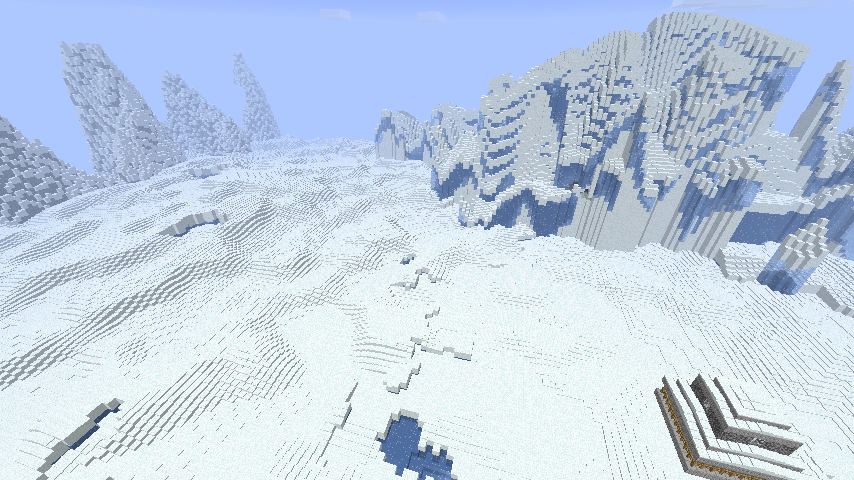
This world generator creates a real ice world that isn't just normal land covered with snow.
The plugin can actually generate more world types from the star wars movies (Tatooine, Dagobah and Mustafar worlds) but those are not described in detail here. You are left to explore and find all their secrets on your own.
Server for play testing: colonies-playground.com
Other pages
- World lore (Contains spoilers)
- Commands
- Custom schematics
- Custom loot lists
- Custom ore list
- Configuration
- Permissions
- How to create different world types
- How to process lava on Mustafar
- Videos
This generator produces an icy world with a thick ice and snow layer and the occasional snow covered mountain. Hidden below you might find tiny caves where life that once inhabited the surface still survives and perhaps you'll find strange structures left over from some ancient civilization.

It also applies some extra rules to the world:
- Ice block, packed ice blocks and snow blocks drops as blocks
- Water placed in open air or above a certain level instantly freezes
- Lava placed in open air or above a certain level is turned into stone
- snow and ice does not melt
- No rain falls, only snow
- Plants doesn't grow if exposed to the sky
- Grass and mycelium dies under open sky if it can't spread into safety
- Slime does not spawn naturally above the stone layer
- Stay out at night and you will take damage from the cold
All rules are fully optional by editing the advanced options section in the configuration file.
Players can don an environment suit to protect themselves from the environment.
- Simply wear full armour with each piece with a name starting with
Environment
Commands to create a world:
STEP 1: You must add a new world to the HothGenerator configuration. This is done using the /hothaddworld command.
/hothaddworld worldname type
Where "worldname" is the name of your world and "type" is one of hoth, tatooine, dagobah or mustafar.
STEP 2: Create the actual world.
If you are using the excellent MultiWorld plugin you can create a new world like this:
/mw create worldname plugin:HothGenerator
/mw load worldname
Do note that you should use the nether for the mustafar world. Use plugin_nether above.
And for Multiverse:
/mv create worldname normal -g HothGenerator
or for a mustafar world:
/mv create worldname nether -g HothGenerator
Comments


-

Forge_User_07138819 Owner
-

dreamzhehe Author
-
View User Profile
-
Send Message
Posted Apr 29, 2014will you show screenshots or a youtube video for all worlds later on? Also can you please list multiverse commands for generating these worlds? BTW i also wanna tell you keep up the good work im likely going to use this world as a secret exclusive world for players on my server and im sure theyll love it!
-
View User Profile
-
Send Message
Posted Apr 26, 2014YAY! You are awesome, thx 4 update!
-
View User Profile
-
Send Message
Posted Apr 25, 2014@ryudragon3
got it
-
View User Profile
-
Send Message
Posted Apr 25, 2014what is the multiverse command for tatooine
i can't get it to appear on the multiverse plugin
-
View User Profile
-
Send Message
Posted Apr 25, 2014@ryudragon3
Yeah they are hidden from the list until the files get approved. It can take several days to get a file approved.
-
View User Profile
-
Send Message
Posted Apr 25, 2014i don't see 1.16 on the bukkitdev
-
View User Profile
-
Send Message
Posted Apr 25, 2014How to create a Tatooine world:
http://dev.bukkit.org/bukkit-plugins/hothgenerator/pages/tatooine/
-
View User Profile
-
Send Message
Posted Apr 25, 20141.16 uploaded. Now with tatooine (dry desert) worlds.
-
View User Profile
-
Send Message
Posted Apr 25, 2014@ryudragon3
You can have both world types at the same time. I've added additional configuring where you can specify which type each hoth world is.
The tatooine worlds (desert) has something called thirst. Thirst will go up when exposed to the sun and down if you step into water or get into shelter. Once thirst is too high you will take damage.
-
View User Profile
-
Send Message
Posted Apr 24, 2014@ryudragon3
acually is it possible to have both worlds we have hoth on my server and we can use the desert world generator like use multiverse to set the mode
-
View User Profile
-
Send Message
Posted Apr 24, 2014@ryudragon3
is it possible to put like you are getting heat stroke you either need to find water or find shelter from the sun
-
View User Profile
-
Send Message
Posted Apr 24, 2014Love it my server players will be grateful to you thanks
-
View User Profile
-
Send Message
Posted Apr 24, 2014@ryudragon3
How about this?
http://dev.bukkit.org/bukkit-plugins/hothgenerator/images/21-desert-mode/
-
View User Profile
-
Send Message
Posted Apr 23, 2014hothgenerator 1.15 has been uploaded. Should appear in the download list shortly.
Please use at least craftbukkit 1.7.5 with this release.
-
View User Profile
-
Send Message
Posted Apr 22, 2014@Shado47
I'll release a 1.7 version during the next few days.
-
View User Profile
-
Send Message
Posted Apr 20, 2014When will the 1.7 dev build come out?
-
View User Profile
-
Send Message
Posted Apr 18, 2014I think I have solved the /reload problems. First by placing all schematic rendering in separate tasks that can be stored on disk and second by circumventing the bukkit problem of using the wrong instance of the chunk generator.
If you are making a terrain generation plugin and need to handle /reload properly then add something like this to your plugin onDisable() function:
-
View User Profile
-
Send Message
Posted Apr 12, 2014@ryudragon3
Shouldn't be too hard. I guess I could make it possible to configure if the plugin should generate a sandy world or an icy world.
But first I have to deal with the 1.7 issues and perhaps find out a way to prevent people from disabling the plugin while it is still generating chunks...
-
View User Profile
-
Send Message
Posted Apr 11, 2014@orgin_org
Is There a way you can make a desert version of hoth?
-
View User Profile
-
Send Message
Posted Apr 10, 2014I'm actually working on a 1.7.x version at the moment. Unfortunately bukkit has decided to deprecate a lot of functions so it's quite painful to go through. For instance, with the removal of the setData() function for blocks there's no way to set the height of snow. There's simply no replacement API for this.
Also being reliant on pasting external schematics based on block type ID' s into the world forces me to re-implement my own type ID to Material conversion which I will have to keep updated for every new release.
The setData problem is the big issue though since that means that I have to reimplement specific handling for each block type that takes a data parameter. Such as the rotation of chests or color of wool.
Unfortunately this all means that plugins won't be able to handle future blocks or unknown blocks properly without updating the code in the plugin.
I'd much rather had prefered if bukkit had hold on to an abstraction of the block type ID's and data values regardless of what mojang does with the id's internally so that every plugin wouldn't have to make their own abstraction.