GUIShop
This plugin simply adds one command for your players; /shop.
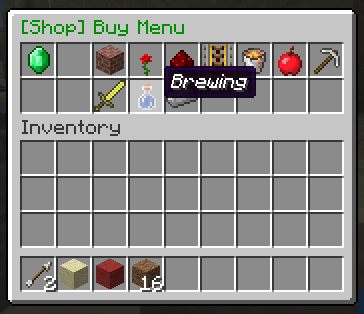
This command will open a clickable GUI with the shop on top and your inventory on the bottom.
Simply navigate to the item you want, and click on it to buy or sell it.
Please read the whole thread if you can.
Features:
1. Easy to use click GUI.
2. Buy or sell any item at a configurable price.
3. Sell enchantments books with any enchantment.
4. Sort item into categories for ease of use.
5. Hooks into vault for economy.
Permissions:
shop.buy:
description: Gives access to buying menu.
shop.sell:
description: Gives access to selling menu.
shop.enchantments:
description: Gives access to the enchantment menu.
shop.tab.<tabID>:
description: Gives access to the specified tab.
shop.tab.* to give permission for all tabs.
shop.creative:
description: Gives access to shopping in creative mode.
shop.admin:
description: Gives access to admin commands like /reloadshop.
Commands:
/shop opens the shop GUI.
/reloadshop reload prices and config for the plugin. *working in v1.3.
Download:
Direct download:
(Use the files button)
You will also need to install vault and a economy plugin like BOSEconomy or iConomy.
Images:


Configuration:
There are four configuration files, Options, Tabs, Prices and EnchantmentPrices.
Options
There are five options:
SHOP_TITLE=§2[Shop]
DONATE_MESSAGE_ON=true
DONATE_MESSAGE=§cDonate to gain access!
ALLOW_BROWSE=false
PRICE_MULTIPLIER=1.0
SHOP_TITLE will change the prefix of all messages and GUIs made by the shop plugin. This must be under 20 characters long.
DONATE_MESSAGE_ON turns the message about donating on.
DONATE_MESSAGE lets you set the message that will ask people to donate.
ALLOW_BROWSE lets players look through tabs that they do not have permission for, but they can not buy/sell anything in those tabs.
PRICE_MULTIPLIER all the prices will be multiplied by this number, good for quickly scaling up the prices to suit your server.
Tabs
tabID=0 tabName=Building_Blocks IconID=45
Each tab must have a unique ID (tabID=0 in this case). This is used to identify which tab each item goes into.
The second part (tabName=Building_Blocks) is to set what this group of items is called, in this example "Building Blocks". Instead of spaces use underscores, '_', in the name of the tab.
The last part (IconID=45) is to change the icon of the tab. It is the item ID of the icon, eg 45 is the ID for bricks. You can find the icon IDs of items on minecraft wiki.
Example:
tabID=0 tabName=Building_Blocks IconID=45
tabID=1 tabName=Decorations IconID=38
tabID=2 tabName=Redstone IconID=331
tabID=3 tabName=Transportation IconID=27
Prices
WOOD_BIRCH itemID=5:2 buyPrice=4.0 sellPrice=0.5 tabID=0
The first part (WOOD_BIRCH) is not important, just for you to remember what item the configuration is for and it is not interpreted by the plugin at all.
The second part (itemID=5:2) is the minecraft ID of an item. You can find these on minecraft wiki or just google it.
To get a different version of an item (eg birch wood instead of Oak wood) just add a semicolon (:) and the appropriate data for the alternative version (also available on minecraft wiki).
The third and fourth part (buyPrice=4.0 sellPrice=0.5) is the price of a single item, eg one wood.
The plugin will automatically generate a list of possible block for you to use, and it will set a default price for these blocks. You can always add or remove any block you want to the list, and I recommend you modify the prices o suit your server
The last part (ItemTAB=0) is which tab (group of items) in the shop GUI the item will appear in.
0 is Building Blocks, 1 is Decorations, 2 is Redstone, 3 is Transportation, 4 is Misc, 5 is Foodstuffs, 6 is Tools, 7 is Combat, 8 is Brewing and 9 is Materials, you can change these in the tabs config.
Example:
SAND itemID=12 buyPrice=4.0 sellPrice=0.5 tabID=0
GRAVEL itemID=13 buyPrice=4.0 sellPrice=2.0 tabID=0
GOLD_ORE itemID=14 buyPrice=45.0 sellPrice=22.5 tabID=0
DIRT itemID=3 buyPrice=4.0 sellPrice=0.5 tabID=0
COBBLESTONE itemID=4 buyPrice=4.0 sellPrice=0.5 tabID=0
WOOD_BIRCH itemID=5:2 buyPrice=4.0 sellPrice=0.5 tabID=0
WOOD_DARK itemID=5:1 buyPrice=4.0 sellPrice=0.5 tabID=0
Enchantments
DURABILITY enchantmentID=34 enchantmentLevel=3 enchantmentPrice=10
Again the first part (DURABILITY) is just for you; not used by the plugin.
The second part is the enchanment ID for the enchantment type, these can be found here:
http://www.minecraftforum.net/topic/1711629-enchantment-id-list/
The third part is pretty simple, just how strong the enchantment is. This one (enchantmentLevel=3) will get you unbreaking level III.
The last bit (enchantmentPrice=10) is simple as well, just the price to buy one enchantment book.
Example:
LOOT_BONUS_BLOCKS enchantmentID=35 enchantmentLevel=3 enchantmentPrice=40
PROTECTION_FIRE enchantmentID=1 enchantmentLevel=4 enchantmentPrice=30
DIG_SPEED enchantmentID=32 enchantmentLevel=5 enchantmentPrice=50
PROTECTION_FALL enchantmentID=2 enchantmentLevel=4 enchantmentPrice=50
SILK_TOUCH enchantmentID=33 enchantmentLevel=1 enchantmentPrice=100
Please comment if you use the plugin or would like to make a suggestion.
Videos
English:
http://youtu.be/bJyvUOLr33g
Credits: SimplyAussieGamer
Portuguese:
https://www.youtube.com/watch?v=u5r01sSCE-I
Credits: AbsintoJ
Metrics

Thanks for taking time to read this,
~ Waffles
Comments

-

waffu_ Owner
-

_ForgeUser11052188 Maintainer
-

Neil51298 Maintainer
-
View User Profile
-
Send Message
Posted Feb 23, 2014update... coming soon.
-
View User Profile
-
Send Message
Posted Feb 17, 2014Please update shop and items in.
-
View User Profile
-
Send Message
Posted Feb 13, 2014@Umbreonlegacy
You need to add permissions.
-
View User Profile
-
Send Message
Posted Feb 13, 2014Some suggestions:
Like this post if you like these suggestions.
-
View User Profile
-
Send Message
Posted Feb 9, 2014This is actually one of the best GUI plugins I have ever found buuuuuut when I put the same item in 2 different shops it stays the same price as the first 1 I put in. Please fix :)
-
View User Profile
-
Send Message
Posted Feb 2, 2014I Love This Plugin But Only Op's Can Use The /Shop Am I Doing Something Wrong? :( Ive Put The shop.buy In My Default Group But Still Nothing Please Help
-
View User Profile
-
Send Message
Posted Jan 25, 2014I've been looking for a shop plugin that has dynamic prices for quite a while. I never found a good one I like so I coded my own. The price system works quite well and all prices adjust based on supply and demand. I never published my plugin cause the code for the commands is a bit of mess and it's not that easy to use.
Your plugin seems to have a nice GUI and will probably be around for years to come. I wonder if there's any way I could (help you) extend your plugin with dynamic price system? Is it possible we could do some kind of co-operation?
-
View User Profile
-
Send Message
Posted Jan 25, 2014Could you add a feature to sell all the items in your inventory, or is that all ready implemented?
-
View User Profile
-
Send Message
Posted Jan 24, 2014Hi,
Can you make a file to translate messages please ? (main menu & How to Shop...)
-
View User Profile
-
Send Message
Posted Jan 20, 2014The Plugin v2.1 is broken. It gives me a error when I want to start it. I use PEX as permission Plugin. :(
-
View User Profile
-
Send Message
Posted Jan 17, 2014Server kicks all players out when a player spam clicks to sell cobblestone, 1 at a time, imagine this with a autoclicker. It would even crash the server. :|
-
View User Profile
-
Send Message
Posted Jan 16, 2014@prodigyrick
Just set up inheritance in permissions... not that hard :P
-
View User Profile
-
Send Message
Posted Jan 16, 2014Just a question, Can you make another feature so the shop can open when you right click a sign automatically? I do not want my players to have permission to open the shop wherever they want, just in the "shop"?
-
View User Profile
-
Send Message
Posted Jan 13, 2014@TotallyGian
yes enchantment tab is not working
-
View User Profile
-
Send Message
Posted Jan 8, 2014Love the plugin, however, I would prefer I didn't have to add permissions to everyone to use it. I now have issues with having to use an external permissions manager that isn't compatible with my residence plugin. A lot of issues for a few permissions. When is the next release fixing this issue? =)
-
View User Profile
-
Send Message
Posted Dec 29, 2013Thank you for creating this amazing plugin! I love it!. But please make us able to use metadata with IconID for Tabs. FX IconID=35:1 which is orange wool is not working and will cause the tab to disappear until you remove the metadata number. And please make us able to change the commands for shop it is being overidden by other plugins. And please make us able to have more shops fx "/shop donor" or just "/donorshop" I hope you get where im going. Please also give us the feature to give permission to see the shop so not everyone can see it. Id like a command that when you type it, it automatic goes into a specific shop. fx. /shop Items or /shop 1(tabID) goes into "item tab"
-
View User Profile
-
Send Message
Posted Dec 27, 2013How do you get the Enchantments tab working?
-
View User Profile
-
Send Message
Posted Dec 27, 2013Can you add a new block from 1.7.2 ? + MobEggs...
-
View User Profile
-
Send Message
Posted Dec 24, 2013None of the new stained glass blocks are able to be added
are there DEV build links?
-
View User Profile
-
Send Message
Posted Dec 23, 2013The Premissions wont work saids you ant got acess