GUI Shop
GUIShop v9.4.3c
The Ultimate GUI-Based Shop Plugin for Minecraft Servers
Fully compatible with Paper/Spigot/Folia/Bukkit 1.13 - 1.21.11



Overview
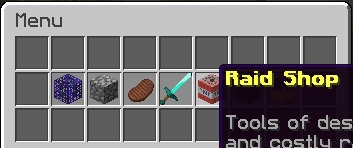
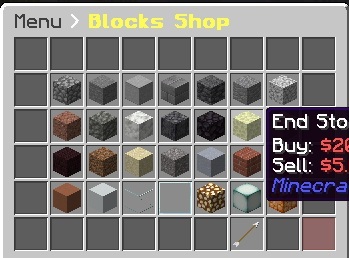
GUIShop is a powerful, feature-rich shop plugin that allows server owners to create beautiful GUI-based shops with extensive customization options. Say goodbye to confusing sign shops and chest-based systems. GUIShop provides players with an intuitive shopping experience while giving administrators complete control over pricing, items, and layout.
Key Features
- Easy-to-Use GUI System - Players browse shops through clean, organized inventory menus
- Multi-Page Shops - Create shops with unlimited pages for large item catalogs
- Dynamic Pricing - Optional supply/demand based pricing system
- Worth Display System - Shows item sell values directly in item lore (requires PacketEvents)
- Full GUI-Based Item Editor - Edit item prices, names, enchantments, and more through an intuitive GUI
- Drag-and-Drop Shop Building - Place and rearrange items in shops by simply dragging them
- Command Items - Sell commands that execute when purchased
- Custom Items - Full support for enchantments, potions, fireworks, and custom model data
- Native Spawner Support - Configure and sell mob spawners with any entity type
- Native Player Head Support - Use player UUIDs or Base64 skin textures for custom heads
- PDC Support - Uses Bukkit's Persistent Data Container API for reliable item identification
- Per-Item Permissions - Restrict specific items to certain player groups
- PlaceholderAPI Support - Use placeholders in shop names and lores
- Vault Integration - Works with any Vault-compatible economy plugin
- Built-In Economy - Optional internal economy system (no external economy plugin needed!)
- Alternate Sell GUI - Sell items without leaving the shop
- Transaction Logging - Track all purchases and sales
Screenshots
Main Menu
Shop View
Item Editor
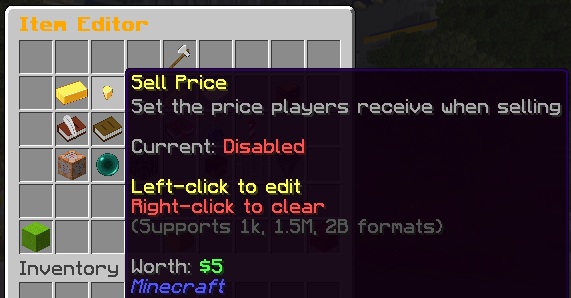
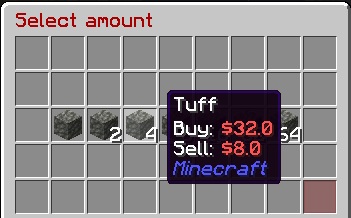
Quantity Selector
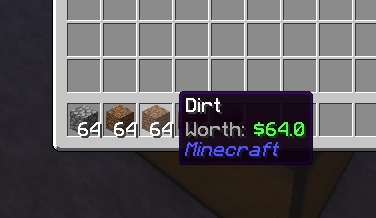
Worth Display
Commands
Player Commands
/shop, /buy          - Open the shop menu
/sell                - Open the sell GUI
/value, /val         - Check the buy/sell value of held item
Admin Commands
/gs reload           - Reload all configuration files
/gs edit             - Enter creator mode for the main menu
/gs edit menu        - Enter creator mode for the main menu
/gs edit transaction - Enter creator mode for the transaction GUI
/gs edit [shop]      - Enter creator mode for a specific shop
/gs edit [shop] [page] - Edit a specific page of a shop
/gs parsemob <type>  - Validate a mob type for spawners
/gs toggleworth      - Toggle worth display for yourself (session only)
/gs iteminfo         - Display comprehensive info about held item
Economy Commands
(Only available when internal economy is enabled)
Player Commands:
/bal, /balance, /money          - Check your balance
/bal <player>                   - Check another player's balance
/pay <player> <amount>          - Send money to a player
/togglepay                      - Toggle payment notifications on/off
Admin Commands:
/gs eco give <player> <amount>  - Give money to a player
/gs eco take <player> <amount>  - Take money from a player
/gs eco set <player> <amount>   - Set a player's balance
/gs eco balance <player>        - Check a player's balance
/gs eco reset <player>          - Reset to starting balance
All amounts support abbreviations: 1k, 1.5M, 100B, etc.
Item Info Command
The /gs iteminfo command is a powerful debugging and configuration helper. Hold any item and run the command to see:
- Material type and display name
- All lore lines
- Enchantments in config-ready format (e.g.,
SHARPNESS:5 UNBREAKING:3) - Potion info in config-ready format (type, splash, extended, upgraded)
- Firework info in config-ready format (flight, explosions, colors)
- All PDC (Persistent Data Container) values
- Custom NBT data
This makes it easy to configure complex items - just create the item you want, then use /gs iteminfo to get the exact format needed for your shops.yml.
Permissions
guishop.use          - Access to the shop (default: op)
guishop.shop.*       - Access to all shop items (default: op)
guishop.shop.<shop>.<item> - Access to specific items
guishop.reload       - Permission to reload the plugin (default: op)
guishop.creator      - Access to the in-game shop editor (default: op)
guishop.value        - Access to /value command (default: true)
guishop.sell         - Access to /sell command (default: true)
guishop.admin        - Full admin access (default: op)
Configuration
GUIShop uses several configuration files for maximum flexibility:
- config.yml - General plugin settings, commands, titles, buttons
- shops.yml - Shop layouts and item definitions
- menu.yml - Main menu configuration
- messages.yml - All plugin messages (fully customizable)
- worth.yml - Worth display system configuration
Example Shop Item Configuration
shops:
  Blocks:
    pages:
      Page0:
        '0':
          type: SHOP              # Item type (SHOP, COMMAND, SHOP_SHORTCUT, DUMMY, BLANK)
          id: STONE               # Material ID
          buy-price: 10.0         # Price to buy (or 'false' to disable)
          sell-price: 5.0         # Price to sell (or 'false' to disable)
          shop-name: '&7Stone'    # Display name in shop
          buy-name: '&7Stone'     # Name on purchased item
          shop-lore:              # Lore shown in shop
            - '&fA basic building block'
          enchantments: 'DURA:1 SHARP:2'  # Enchantments (space separated)
          quantity: 64            # Stack size to give
          permission: 'shop.vip'  # Required permission (optional)
GUI-Based Item Editor
GUIShop features a powerful, fully GUI-based item editor that eliminates the need for manual config editing. Configure every aspect of shop items through intuitive click-based menus.
How It Works
- Enter creator mode with
/gs edit(for menu) or/gs edit <shop>(for shops) - Left-click to drag and drop items - move items within the shop, rearrange positions, or place new items from your inventory into the shop
- Right-click or Shift+click any item to open the Item Editor GUI
- Click on any setting to modify it through chat input or nested selection GUIs
- Changes save automatically when you close the inventory
Creator Mode Controls
Left-click     - Pick up / place items (works between shop and your inventory)
Right-click    - Open Item Editor for the clicked item
Shift+click    - Open Item Editor for the clicked item

Navigation Buttons (pagination, back, balance):
Left-click     - Pick up and move the button
Right-click    - Open Item Editor for the button
Shift+click    - Activate the button (navigate pages, go back, etc.)
Item Editor Features
- Buy/Sell Prices - Set prices with support for abbreviated formats (1k, 1.5M, 100B)
- Item Type - Switch between ITEM, COMMAND, SHOP, SHOP_SHORTCUT, and DUMMY types
- Display Names - Set shop display name and purchased item name
- Custom Lore - Add descriptive lore lines to items
- Enchantments - Add/remove enchantments through a visual enchantment picker
- Potion Effects - Configure potion type, duration, and amplifier via GUI
- Firework Properties - Set flight duration, explosion shapes, colors, and effects
- Spawner Mob Type - Select mob type from a visual entity picker
- Commands - Configure commands to run on purchase
- Permissions - Set required permissions per item
- Quantity - Set stack size given on purchase
Worth Display System
GUIShop includes a powerful worth display feature that shows item sell values directly in the item lore. This uses packet manipulation to display worth client-side only, meaning your actual items are never modified.
Requirements: PacketEvents plugin
Worth Display Configuration (worth.yml)
enabled: true
format: "&7Worth: &a%worth%"
position: BOTTOM
add-blank-line: true
only-show-sellable: true
not-sellable-format: "&7Worth: &cNot sellable"

# Hide worth in specific inventories
blacklisted-inventories:
  - "Auction House"
  - "Crate Preview"

# Hide worth on items with specific names
blacklisted-item-names:
  - "Crate Key"
  - "Vote Token"

# Hide worth on equipped armor
hide-armor-slots: true
Advanced Item Types
Command Items
Sell commands that execute when purchased. Use placeholders like {PLAYER_NAME}, {PLAYER_UUID}, {PLAYER_WORLD}, or any PlaceholderAPI placeholder:
'19':
  type: COMMAND
  id: NETHER_STAR
  shop-name: '&6VIP Rank'
  buy-price: 10000
  sudo: false          # Run as console (default) or as player (true)
  commands:
    - 'lp user {PLAYER_NAME} parent set vip'
    - 'broadcast {PLAYER_NAME} purchased VIP!'
Available Placeholders:
{PLAYER_NAME}or%player_name%- Player's name{PLAYER_UUID}or%player_uuid%- Player's UUID{PLAYER_WORLD}or%player_world%- Player's current world{PLAYER_BALANCE}or%player_balance%- Economy balance- Any PlaceholderAPI placeholder (if PAPI installed)
Sudo Mode: Set sudo: true to run commands as the player instead of console. Useful for commands that check player permissions or are player-only.
Enchanted Books
'20':
  type: SHOP
  id: ENCHANTED_BOOK
  buy-price: 1000
  enchantments: 'SHARP:5 FIRE_ASPECT:2'
Potions
Configure potions with the potion-info section. Supports regular, splash, and lingering potions.
# Regular Potion (Extended Speed)
'21':
  type: SHOP
  id: POTION
  buy-price: 500
  potion-info:
    type: SPEED
    splash: false
    lingering: false
    extended: true
    upgraded: false

# Splash Potion (Healing II)
'22':
  type: SHOP
  id: SPLASH_POTION
  buy-price: 600
  potion-info:
    type: HEALING
    splash: true
    lingering: false
    extended: false
    upgraded: true

# Lingering Potion
'23':
  type: SHOP
  id: LINGERING_POTION
  buy-price: 700
  potion-info:
    type: POISON
    splash: false
    lingering: true
    extended: true
    upgraded: false
Potion Info Fields:
| Field | Description |
|---|---|
type |
Potion effect (SPEED, HEALING, STRENGTH, POISON, etc.) |
splash |
Whether it's a splash potion |
lingering |
Whether it's a lingering potion |
extended |
Extended duration version |
upgraded |
Level II/stronger effect version |
Spawners
Native spawner support with any valid entity type (use /gs parsemob <type> to validate):
'22':
  type: SHOP
  id: SPAWNER
  buy-price: 50000
  mob-type: ZOMBIE
  shop-name: '&6Zombie Spawner'
Fireworks
'23':
  type: SHOP
  id: FIREWORK_ROCKET
  buy-price: 100
  firework-info:
    flight: 2
    explosions:
      - shape: ball_large
        flicker: true
        trail: true
        colors: [11743532, 2437522]
        fade-colors: [1973019, 15790320]
Player Heads
Support for player UUIDs or Base64 skin textures:
# Using player UUID
'24':
  type: SHOP
  id: PLAYER_HEAD
  buy-price: 1000
  skull-uuid: 'player-uuid-here'

# Using Base64 skin texture (from minecraft-heads.com, etc.)
'25':
  type: SHOP
  id: PLAYER_HEAD
  buy-price: 500
  skull-uuid: 'eyJ0ZXh0dXJlcyI6eyJTS0lOIjp7InVybCI6Imh0dHA6Ly90ZXh0dXJlcy5taW5lY3JhZnQubmV0L3RleHR1cmUvYWJjMTIzIn19fQ=='
Statistics & PlaceholderAPI
GUIShop tracks player shop statistics and integrates with PlaceholderAPI for use in scoreboards, holograms, and chat.
Tracked Statistics
- Total money spent (buying from shops)
- Total money earned (selling items)
- Total items bought/sold
- Top 3 most bought items per player
- Top 3 most sold items per player
Available Placeholders
%guishop_total_spent%           - Money spent (with commas)
%guishop_total_spent_formatted% - Money spent (abbreviated: 1.5M)
%guishop_total_earned%          - Money earned (with commas)
%guishop_total_earned_formatted% - Money earned (abbreviated)
%guishop_items_bought%          - Items purchased count
%guishop_items_bought_formatted% - Items purchased (abbreviated)
%guishop_items_sold%            - Items sold count
%guishop_items_sold_formatted%  - Items sold (abbreviated)
%guishop_top_bought_1%          - #1 most bought item (Material: Qty)
%guishop_top_sold_1%            - #1 most sold item (Material: Qty)
Statistics are stored in SQLite (plugins/GUIShop/Data/player_statistics.db).
Dynamic Pricing System
GUIShop includes a built-in supply/demand economy system that makes item prices fluctuate based on trading activity.
How It Works
- When items are bought: Supply decreases → prices increase
- When items are sold: Supply increases → prices decrease
- Over time: Prices gradually normalize back to base values
Configuration
Enable in config.yml:
dynamic-pricing: true
Configure in dynamicpricing.yml:
price-change-per-item: 0.01    # 1% change per item
max-price-multiplier: 2.0      # Up to 200% of base price
min-price-multiplier: 0.5      # Down to 50% of base price
normalization-rate: 0.001      # How fast prices return to normal
normalization-interval: 300    # Seconds between normalization ticks
Per-Item Overrides
Configure different volatility settings for specific items:
item-overrides:
  DIAMOND:
    price-change-per-item: 0.005  # More stable (0.5% per item)
    max-price-multiplier: 1.5
    min-price-multiplier: 0.75
Linked Pricing
Make items affect other items' prices - perfect for crafting relationships:
item-overrides:
  DIAMOND_BLOCK:
    affects:
      DIAMOND: 9.0           # 1 block = 9 diamonds in crafting
      DIAMOND_ORE: 1.0       # Also affects ore prices

  BREAD:
    affects:
      WHEAT: 3.0             # 1 bread = 3 wheat in crafting
When a player buys 1 DIAMOND_BLOCK, DIAMOND prices change as if 9 diamonds were bought. This creates realistic economic relationships!
Per-Item Control
Exempt specific items from dynamic pricing:
'0':
  id: DIAMOND
  buy-price: 100
  sell-price: 50
  dynamic: false  # Uses static pricing
Admin Commands
| Command | Description |
|---|---|
/gs market status |
View system status |
/gs market info <item> |
Check item's market status |
/gs market reset <item> |
Reset item to base price |
/gs market resetall |
Reset all prices |
Developer API
GUIShop provides a comprehensive API for developers to integrate with:
// Check if an item can be sold
boolean canSell = GUIShopAPI.canBeSold(itemStack);

// Get buy/sell prices
BigDecimal buyPrice = GUIShopAPI.getBuyPrice(itemStack, quantity);
BigDecimal sellPrice = GUIShopAPI.getSellPrice(itemStack, quantity);

// Sell items programmatically
GUIShopAPI.sellItems(player, SellType.COMMAND, items);

// Worth Display API
BigDecimal worth = GUIShopAPI.getItemWorth(itemStack);
BigDecimal stackWorth = GUIShopAPI.getStackWorth(itemStack);

// Per-player worth toggle
GUIShopAPI.toggleWorthForPlayer(player);
GUIShopAPI.enableWorthForPlayer(player);
GUIShopAPI.disableWorthForPlayer(player);

// Hook for persistent per-player worth settings
GUIShopAPI.setExternalWorthCheck(player -> {
    return myPlugin.hasWorthDisabled(player.getUniqueId());
});
Full API documentation available on the Wiki.
Dependencies
Required:
- Vault (for economy API)
Optional:
- Economy Plugin (EssentialsX, CMI, etc.) - OR use GUIShop's built-in economy!
- PacketEvents (for worth display feature)
- PlaceholderAPI (for placeholder support)
Note: GUIShop includes its own economy system! Enable it in economy.yml to use GUIShop as your server's economy without needing EssentialsX or similar plugins.
Folia Support:
GUIShop fully supports Folia - Paper's regionized multithreading fork for improved performance on large servers. No additional configuration required!
Installation
- Download GUIShop and place it in your plugins folder
- Install Vault and an economy plugin (EssentialsX, CMI, etc.) - OR enable GUIShop's internal economy
- (Optional) Install PacketEvents for worth display
- (Optional) Install PlaceholderAPI for placeholder support
- Restart your server
- Configure shops in
plugins/GUIShop/shops.yml - Use
/gs reloadto apply changes
Support
Developed by pablo67340
If you enjoy GUIShop, please consider leaving a review!
Comments


-

pablo67340 Owner
-
View User Profile
-
Send Message
Posted Jan 25, 2017Quick check, I'm running FTB Infinty Evolved (Sadly It's on 1.7.10) Am I able to use this plugin with Mod Support, for example if I wanted to sell ComputerCraft Computers?
-
View User Profile
-
Send Message
Posted Jan 21, 2017when i type /plugins the plugin shows up in red text. im using CraftBukkit 1.11. i do have vaut installed. i did download the right version of guishop...not sure why its not working
-
View User Profile
-
Send Message
Posted Jan 25, 2017REQUIRES VAULT
Quote directly from the page.
-
View User Profile
-
Send Message
Posted Jan 16, 2017I'm having 2 main issues with the plugin.
1. When the server restarts or I reload I am unable to use /shop. Nothing happens. I have to delete the config files and the jar files.
2. The permission node guishop.use isn't working.
I'm running Spigot 1.8
-
View User Profile
-
Send Message
Posted Jan 15, 2017Hello, i got some realy anoying problems the problems are
only Ops can use the shop and when i add the premade shop its empty i hope someone can help me with this problem!
-
View User Profile
-
Send Message
Posted Jan 9, 2017I made 5 shops. Four of them are running well, the fifth wont load. Shows icon, but if I open It. the shop is empty. Its not writing any bad line in log.
Second and a big problem, the /shop reload - is not working. /shop is fine . But if i put /shop reload, it shows bad command, use /help (Spigot help)
Runing 1.11.2 Spigot
Allso a mssage in log:
[16:33:34] [Server thread/ERROR]: Error occurred while enabling GUIShop v5.9 (Is it up to date?)
java.lang.NullPointerException
at com.pablo67340.shop.handler.Shop.loadShop(Shop.java:203) ~[?:?]
at com.pablo67340.shop.handler.Shop.loadShops(Shop.java:131) ~[?:?]
at com.pablo67340.shop.main.Main.onEnable(Main.java:122) ~[?:?]
at org.bukkit.plugin.java.JavaPlugin.setEnabled(JavaPlugin.java:271) ~[minecraft_server.jar:git-Spigot-7d78b81-a6d8fa2]
at org.bukkit.plugin.java.JavaPluginLoader.enablePlugin(JavaPluginLoader.java:337) [minecraft_server.jar:git-Spigot-7d78b81-a6d8fa2]
at org.bukkit.plugin.SimplePluginManager.enablePlugin(SimplePluginManager.java:405) [minecraft_server.jar:git-Spigot-7d78b81-a6d8fa2]
at org.bukkit.craftbukkit.v1_11_R1.CraftServer.enablePlugin(CraftServer.java:375) [minecraft_server.jar:git-Spigot-7d78b81-a6d8fa2]
at org.bukkit.craftbukkit.v1_11_R1.CraftServer.enablePlugins(CraftServer.java:325) [minecraft_server.jar:git-Spigot-7d78b81-a6d8fa2]
at net.minecraft.server.v1_11_R1.MinecraftServer.t(MinecraftServer.java:419) [minecraft_server.jar:git-Spigot-7d78b81-a6d8fa2]
at net.minecraft.server.v1_11_R1.MinecraftServer.l(MinecraftServer.java:380) [minecraft_server.jar:git-Spigot-7d78b81-a6d8fa2]
at net.minecraft.server.v1_11_R1.MinecraftServer.a(MinecraftServer.java:335) [minecraft_server.jar:git-Spigot-7d78b81-a6d8fa2]
at net.minecraft.server.v1_11_R1.DedicatedServer.init(DedicatedServer.java:272) [minecraft_server.jar:git-Spigot-7d78b81-a6d8fa2]
at net.minecraft.server.v1_11_R1.MinecraftServer.run(MinecraftServer.java:542) [minecraft_server.jar:git-Spigot-7d78b81-a6d8fa2]
at java.lang.Thread.run(Thread.java:745) [?:1.8.0_102]
-
View User Profile
-
Send Message
Posted Jan 8, 2017i cant configure it with items from1.11 altough i have the right version...
-
View User Profile
-
Send Message
Posted Dec 24, 2016[Server thread/ERROR]: Could not pass event InventoryClickEvent to GUIShop v5.6
org.bukkit.event.EventException
at org.bukkit.plugin.java.JavaPluginLoader$1.execute(JavaPluginLoader.java:302) ~[craftbukkit-1.10-R0.1-SNAPSHOT-latest.jar:git-Bukkit-10c10b3]
at org.bukkit.plugin.RegisteredListener.callEvent(RegisteredListener.java:62) ~[craftbukkit-1.10-R0.1-SNAPSHOT-latest.jar:git-Bukkit-10c10b3]
at org.bukkit.plugin.SimplePluginManager.fireEvent(SimplePluginManager.java:501) [craftbukkit-1.10-R0.1-SNAPSHOT-latest.jar:git-Bukkit-10c10b3]
at org.bukkit.plugin.SimplePluginManager.callEvent(SimplePluginManager.java:486) [craftbukkit-1.10-R0.1-SNAPSHOT-latest.jar:git-Bukkit-10c10b3]
at net.minecraft.server.v1_10_R1.PlayerConnection.a(PlayerConnection.java:1788) [craftbukkit-1.10-R0.1-SNAPSHOT-latest.jar:git-Bukkit-10c10b3]
at net.minecraft.server.v1_10_R1.PacketPlayInWindowClick.a(SourceFile:33) [craftbukkit-1.10-R0.1-SNAPSHOT-latest.jar:git-Bukkit-10c10b3]
at net.minecraft.server.v1_10_R1.PacketPlayInWindowClick.a(SourceFile:10) [craftbukkit-1.10-R0.1-SNAPSHOT-latest.jar:git-Bukkit-10c10b3]
at net.minecraft.server.v1_10_R1.PlayerConnectionUtils$1.run(SourceFile:13) [craftbukkit-1.10-R0.1-SNAPSHOT-latest.jar:git-Bukkit-10c10b3]
at java.util.concurrent.Executors$RunnableAdapter.call(Unknown Source) [?:1.8.0_111]
at java.util.concurrent.FutureTask.run(Unknown Source) [?:1.8.0_111]
at net.minecraft.server.v1_10_R1.SystemUtils.a(SourceFile:45) [craftbukkit-1.10-R0.1-SNAPSHOT-latest.jar:git-Bukkit-10c10b3]
at net.minecraft.server.v1_10_R1.MinecraftServer.D(MinecraftServer.java:690) [craftbukkit-1.10-R0.1-SNAPSHOT-latest.jar:git-Bukkit-10c10b3]
at net.minecraft.server.v1_10_R1.DedicatedServer.D(DedicatedServer.java:360) [craftbukkit-1.10-R0.1-SNAPSHOT-latest.jar:git-Bukkit-10c10b3]
at net.minecraft.server.v1_10_R1.MinecraftServer.C(MinecraftServer.java:646) [craftbukkit-1.10-R0.1-SNAPSHOT-latest.jar:git-Bukkit-10c10b3]
at net.minecraft.server.v1_10_R1.MinecraftServer.run(MinecraftServer.java:550) [craftbukkit-1.10-R0.1-SNAPSHOT-latest.jar:git-Bukkit-10c10b3]
at java.lang.Thread.run(Unknown Source) [?:1.8.0_111]
Caused by: java.lang.NoSuchMethodError: org.bukkit.event.inventory.InventoryClickEvent.getClickedInventory()Lorg/bukkit/inventory/Inventory;
at com.pablo67340.shop.listener.PlayerListener.onShopClick(PlayerListener.java:125) ~[?:?]
at sun.reflect.NativeMethodAccessorImpl.invoke0(Native Method) ~[?:1.8.0_111]
at sun.reflect.NativeMethodAccessorImpl.invoke(Unknown Source) ~[?:1.8.0_111]
at sun.reflect.DelegatingMethodAccessorImpl.invoke(Unknown Source) ~[?:1.8.0_111]
at java.lang.reflect.Method.invoke(Unknown Source) ~[?:1.8.0_111]
at org.bukkit.plugin.java.JavaPluginLoader$1.execute(JavaPluginLoader.java:300) ~[craftbukkit-1.10-R0.1-SNAPSHOT-latest.jar:git-Bukkit-10c10b3]
... 15 more
-
View User Profile
-
Send Message
Posted Dec 18, 2016Dose this Version compatible with Spigot-Essentials?
I'm running Spigot server and Spigot-Essentials-ECO enabled,
and I got
[13:53:39 INFO]: [GUIShop] Plugin couldn't detect Vault or an Economy plugin (Such as Essentials ECO). Disabling.
-
View User Profile
-
Send Message
Posted Dec 19, 2016It must mean spigot-essentials isnt hooking into vault correctly. Do you have vault enabled?
-
View User Profile
-
Send Message
Posted Dec 14, 2016I downloaded the Version from 2 hours ago. but when i left click on a item after /shop i can take the items from the gui and it wont work as a shop anymore . The Server is on 1.11
-
View User Profile
-
Send Message
Posted Dec 19, 2016Ill look into this thanks.
-
View User Profile
-
Send Message
Posted Dec 14, 2016Most of the reported bugs should be fixed. Please try out the latest version and report back.
-
View User Profile
-
Send Message
Posted Dec 14, 2016Hey, I just installed this plugin and it's exactly what I'm looking for apart from I'm unable to sell items either by clicking them in my inventory or left clicking them in the gui. It just purchases more items. I hope you can fix this soon since it's an amazing plugin. -Thanks
-
View User Profile
-
Send Message
Posted Dec 14, 2016I just posted a fix for this. The file is pending approval right now from bukkit staff. You can get it right now from my personal site: https://craftedplugins.com/scripts/view/9
-
View User Profile
-
Send Message
Posted Dec 14, 2016Hey, it still doesn't let you sell items by right clicking in the buy shop, and if it's possible can you add commands to add an item you are holding to the shop. I really need this feature to sell custom weapons in the shop.
-
View User Profile
-
Send Message
Posted Dec 14, 2016Right clicking in the buy shop isnt supposed to sell. It was never a feature in GUIShop. There is supposed to be an entire sell GUI.
-
View User Profile
-
Send Message
Posted Dec 14, 2016Oh ok, and is there anyway that custom items can be added into the shop at all?
-
View User Profile
-
Send Message
Posted Dec 14, 2016I will be adding this in next update. Along with timed commands.
-
View User Profile
-
Send Message
Posted Dec 8, 2016I am able to use /shop but as soon as i do the whole plugin breaks.
if i do /sell it will say sorry you are not able to sell that item. Then if i do /shop again i can take the items from the gui and it wont work as a shop anymore im running spiggot 1.11
any help would be greatly appreciated