GlobalMarket
GlobalMarket is a global market system. It allows players to buy and sell items via a convenient in-game interface. It's similar WoW's Auction House or Runescape's Grand Exchange. I created this plugin awhile ago (back in the days of WebAuction, it's what inspired me) for private use, but I've decided to release it to the public. This plugin requires Vault and ProtocolLib, other than that, just drop it in plugins (make sure you have Vault plus a supported economy plugin installed) and start trading!
Features
- Players can put any item up for sale using a dead simple in-game GUI system (see below)
- Uses ProtocolLib for proper item serialization that supports Bukkit, Spigot, and Cauldron
- Real time interface, all trades show up immediately without having to 'refresh' or close the GUI
- No maintenance or admin interaction required
Mailbox system that allows you to set up market areas or auction houses(not currently in 2.0.0)A built in price guide that compiles average prices from previous transactions(not currently in 2.0.0)
Latest Dev Build
Development builds of this project can be acquired at the following continuous integration server.
These builds have not been approved by the BukkitDev staff. Use them at your own risk.
http://build.survivorserver.com/job/GlobalMarket%202.0.0/
Changelog
Usage
- The Interface
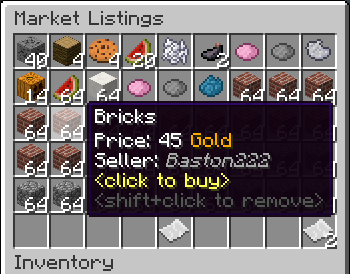
- This is a display of all current listings, you click an item to buy it. You can shift+click to remove a listing if you own it, or if you have the "globalmarket.listingsadmin" permission. Listings automatically expire after 1 week (configurable). You can use
/marketto access the menu.

- Stock
- When you purchase an item it will be sent to your stock. Stock is an entirely optional system but is suggested to be enabled, as disabling it will disable certain other features like
/market send. The stock system can hold a configurable amount of stacks of items in a configurable amount of slots. Once you place an item in your stock, you can list it to be sold to other players. Players can also send items to other players' stock via/market sendif they have the "globalmarket.command.send" permission.

- Server Listings
- You can create 'infinite listings' that do not expire and can't be bought out. Create them with
/market createinf <price> <[amount]>. There's a dedicated section to server listings in the Market menu. You'll need the "globalmarket.command.createserverlisting" permission to do this. Or you can disable this system all-together in the config.
Commands
| Command | Description | Permission |
|---|---|---|
| /market | Opens the Market menu. | globalmarket.use |
| /market ? | Shows command help. | <no permission> |
| /market send <player> <[amount]> | Sends the item you're holding to <player>'s stock. Amount is optional. | globalmarket.command.send |
| /market createinf <price> <[amount]> | Creates a server listing. Amount is optional. | globalmarket.command.createserverlisting |
| /market reload | Reloads config.yml | globalmarket.command.reload |
Permissions
- globalmarket.use - base permission, required to use /market
- globalmarket.listingsadmin - ability to remove all listings
- globalmarket.command.send - ability to use /market send
- globalmarket.command.createserverlisting - ability to use /market createinf
- globalmarket.command.reload - ability to use /market reload
Config
All config values have comments that explain what they do in config.yml, how convenient for me!
If you wish to blacklist items from being used on the Market, there is blacklist.json. You can add material values with meta values:
- APPLE:0 - blacklist apples
- INK_SAC:-1 - blacklist all dies
If you're running Cauldron, you can do things like:
- oredict:ingotSteel - blacklist any item with an OreDictionary value matching ingotSteel
- extracells:storage.component:-1 - blacklist all ExtraCells storage cells
Locale
Virtually every string in the plugin is editable via the "en_US.json" file, inside the plugin's JAR. It's pretty straightforward to edit. Don't replace or edit the %s or %1$s's, these are variables. For example, "Item sold: %s" would appear as "Item sold: Cobblestone" in-game. You can add/edit colors by typing & plus a color code. So light green (the color code is a) would be &a. You can find color codes here: http://ess.khhq.net/mc/
You can also create an entirely different language set, name it something like ch_CN.json, stick it in the server's JAR, and change the appropriate config value in config.yml to use it.
Source
https://github.com/Dasfaust/GlobalMarket
That's all for now. Sorry if things are unclear, I'll be updating this page with more information periodically. If you're stuck just add a reply and I'll do my best to help!
Comments


-

xdasfaust Owner
-
View User Profile
-
Send Message
Posted Jun 7, 20142 things do to:
- Do aliases (/sell <price>) - Do categories (/market create <price> <category>), the categories can be created in configs or commands.
-
View User Profile
-
Send Message
Posted Jun 5, 2014Hey we have an issue where all books added to the market are turned into transaction logs. GlobalMarket version 1.3.0-SNAPSHOT-b145 Thanks
-
View User Profile
-
Send Message
Posted Jun 5, 2014@tubbytoad42
Pretty interesting, thanks.
@UltrafaceGuy
I wouldn't know why. Getting any messages from GM in the console?
-
View User Profile
-
Send Message
Posted Jun 4, 2014I'm having issues with items being placed in the market changing ID value or vanishing in the most recent dev build. Any idea why this is happening? I'm afraid I don't have too much information on it D:
-
View User Profile
-
Send Message
Posted Jun 4, 2014@xdasfaust
Thanks for your quick response! Something I came across recently was the plugin NetEvents, which is relatively new and claims to provide seamless multi-server plugin communication. I'm not sure about the feasibility of applying this to global market, though it may be something to look at for a multi-server solution.
-
View User Profile
-
Send Message
Posted Jun 3, 2014@tubbytoad42
I'm looking into different solutions. MySQL is just too slow for what GM does. You'd get bad tickrate lag when people are browsing. But I do want to have multi-server support, it's just finding a decent way to do it.
-
View User Profile
-
Send Message
Posted Jun 3, 2014Have you considered maybe adding an option to disable the caching when MySQL is enabled, i.e. for changes to the market to update instantly in the MySQL database? This could allow bungee servers to run the market from separate server instances and run one big global market
-
View User Profile
-
Send Message
Posted Jun 1, 2014@booshy32
You'll have to post the error log.
@RAGEmond
First is no, and the second one is planned.
@Solblade45
Yes. I doubt I'll ever do more advanced sorting than there already is in the dev builds. GUIs in Bukkit are severely limited and the more stuff you have, the more and more complex it gets.
-
View User Profile
-
Send Message
Posted May 28, 2014this working with 1.7+? i love the simplicity of this plugin although it does need a couple more features like looking for items under a certain price range and maybe having an average price option other than that good job on this =)
-
View User Profile
-
Send Message
Posted May 27, 2014Hello two questions
would it be possible to directly send the item to the inv of the users without the usage of a mailbox?
Also could you implement buy orders? For example im searching for cobblestone and paying 12 each. So users can sell cobblestone and get money for it
-
View User Profile
-
Send Message
Posted May 25, 2014Is it possible to get other peoples market history as an admin?
-
View User Profile
-
Send Message
Posted May 24, 2014Hi, I have played on servers with this plugin and I love it! After getting it on my own server, I could not do any commands. It just said "An initial error occurred while attempting to preform this command". I have installed vault as well. Any ideas on how to fix this?
-
View User Profile
-
Send Message
Posted May 23, 2014@xdasfaust
Sent to you. I didn't try 145, but was using 143 which was current up until you updated recently! ;)
-
View User Profile
-
Send Message
Posted May 23, 2014@Gametista
I actually meant the latest build of GM, if you're not using that already. You can use Dropbox or something and PM me a link. It could be UUID related but I don't see why they would drop support for player names. I have tested buying with Vault 1.2.31, and latest Essentials and GM builds, everything worked okay. So maybe it's a config issue.
@UltrafaceGuy
Fixed in build 145 :)
-
View User Profile
-
Send Message
Posted May 22, 2014Issue in dev build 144
"you_have_new_mail" mesage from locale.yml plays when you log in, if you merely have items listed in the market (as items you have listed show up in your mail box). Its not a big deal, just a little thing that can be misleading ^_^
-
View User Profile
-
Send Message
Posted May 22, 2014@xdasfaust
Sorry it took so long, I had to have users put things in the GM to replicate the problem.
Unfortunately that didn't resolve it. Tried the latest dev build of Essentials and the error came back. How would I go about giving you these files?
Also: I noticed when I clicked an item in the GM, Essentials created a new file based on UUID, then it errored. Perhaps there's a conflict between usernames and UUID since I'm using the latest Essentials dev build (which I assume went to UUID)?
-
View User Profile
-
Send Message
Posted May 20, 2014@Gametista
Are you using the latest release or the dev builds? Either way I'd try the latest build and see if it resolves it. If not I'd like your GlobalMarket folder (+ DB dump if you use MySQL) and Essentials config to see if I can replicate the problem.
-
View User Profile
-
Send Message
Posted May 20, 2014@xdasfaust
Thank you very much. Is there any combination you'd like to me to attempt to help?
@ahref
Oh I know it's good, but I've never had a plugin drop the TPS that quickly after attempting a command or action within it so I thought I'd bring it up.
-
View User Profile
-
Send Message
Posted May 20, 2014@Gametista
My first guess is it's on Essential's/Vault's side. Not sure without testing though. I'll try to see if I can figure something out.
@ahref
Yeah, I'm still new to Forge but I don't think there is a way to get the localized item name from the server side. I read the server does not load lang files so the LanguageRegistry will either return something like some.mod.item.name or an empty string.
-
View User Profile
-
Send Message
Posted May 19, 2014@Gametista
A TPS of 19 is fantastic. 19.14 is basically 20.
I work with modded servers where 15 is good :P
Can you grab the log file just before those lines start to flood.