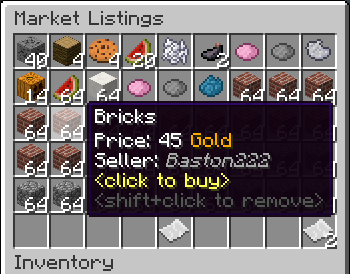
GlobalMarket
GlobalMarket is a global market system. It allows players to buy and sell items via a convenient in-game interface. It's similar WoW's Auction House or Runescape's Grand Exchange. I created this plugin awhile ago (back in the days of WebAuction, it's what inspired me) for private use, but I've decided to release it to the public. This plugin requires Vault and ProtocolLib, other than that, just drop it in plugins (make sure you have Vault plus a supported economy plugin installed) and start trading!
Features
- Players can put any item up for sale using a dead simple in-game GUI system (see below)
- Uses ProtocolLib for proper item serialization that supports Bukkit, Spigot, and Cauldron
- Real time interface, all trades show up immediately without having to 'refresh' or close the GUI
- No maintenance or admin interaction required
Mailbox system that allows you to set up market areas or auction houses(not currently in 2.0.0)A built in price guide that compiles average prices from previous transactions(not currently in 2.0.0)
Latest Dev Build
Development builds of this project can be acquired at the following continuous integration server.
These builds have not been approved by the BukkitDev staff. Use them at your own risk.
http://build.survivorserver.com/job/GlobalMarket%202.0.0/
Changelog
Usage
- The Interface
- This is a display of all current listings, you click an item to buy it. You can shift+click to remove a listing if you own it, or if you have the "globalmarket.listingsadmin" permission. Listings automatically expire after 1 week (configurable). You can use
/marketto access the menu.

- Stock
- When you purchase an item it will be sent to your stock. Stock is an entirely optional system but is suggested to be enabled, as disabling it will disable certain other features like
/market send. The stock system can hold a configurable amount of stacks of items in a configurable amount of slots. Once you place an item in your stock, you can list it to be sold to other players. Players can also send items to other players' stock via/market sendif they have the "globalmarket.command.send" permission.

- Server Listings
- You can create 'infinite listings' that do not expire and can't be bought out. Create them with
/market createinf <price> <[amount]>. There's a dedicated section to server listings in the Market menu. You'll need the "globalmarket.command.createserverlisting" permission to do this. Or you can disable this system all-together in the config.
Commands
| Command | Description | Permission |
|---|---|---|
| /market | Opens the Market menu. | globalmarket.use |
| /market ? | Shows command help. | <no permission> |
| /market send <player> <[amount]> | Sends the item you're holding to <player>'s stock. Amount is optional. | globalmarket.command.send |
| /market createinf <price> <[amount]> | Creates a server listing. Amount is optional. | globalmarket.command.createserverlisting |
| /market reload | Reloads config.yml | globalmarket.command.reload |
Permissions
- globalmarket.use - base permission, required to use /market
- globalmarket.listingsadmin - ability to remove all listings
- globalmarket.command.send - ability to use /market send
- globalmarket.command.createserverlisting - ability to use /market createinf
- globalmarket.command.reload - ability to use /market reload
Config
All config values have comments that explain what they do in config.yml, how convenient for me!
If you wish to blacklist items from being used on the Market, there is blacklist.json. You can add material values with meta values:
- APPLE:0 - blacklist apples
- INK_SAC:-1 - blacklist all dies
If you're running Cauldron, you can do things like:
- oredict:ingotSteel - blacklist any item with an OreDictionary value matching ingotSteel
- extracells:storage.component:-1 - blacklist all ExtraCells storage cells
Locale
Virtually every string in the plugin is editable via the "en_US.json" file, inside the plugin's JAR. It's pretty straightforward to edit. Don't replace or edit the %s or %1$s's, these are variables. For example, "Item sold: %s" would appear as "Item sold: Cobblestone" in-game. You can add/edit colors by typing & plus a color code. So light green (the color code is a) would be &a. You can find color codes here: http://ess.khhq.net/mc/
You can also create an entirely different language set, name it something like ch_CN.json, stick it in the server's JAR, and change the appropriate config value in config.yml to use it.
Source
https://github.com/Dasfaust/GlobalMarket
That's all for now. Sorry if things are unclear, I'll be updating this page with more information periodically. If you're stuck just add a reply and I'll do my best to help!
Comments


-

xdasfaust Owner
-
View User Profile
-
Send Message
Posted Feb 4, 2014@ircopdd
Should be resolved in the latest build. Let me know if it works out.
-
View User Profile
-
Send Message
Posted Feb 3, 2014@xdasfaust
thanks you
i use 1.3 now
have error
http://dev.bukkit.org/paste/9275/
http://dev.bukkit.org/paste/9277/
-
View User Profile
-
Send Message
Posted Feb 2, 2014@ircopdd
Try the dev builds. They are a lot more efficient in what gets refreshed when a player clicks. 1.2.2 will refresh the whole page upon a click, whereas 1.3 will refresh a single slot when needed. 1.3 is still compatible with MC 1.5.2 and its timings are generally a lot better.
@metalguitarist
No, but I can write a command to do so if you need it.
@Grant1204
Maybe some day if we can ever create GUIs without chests. But the hopper item creation is dependent on ProtocolLib, and I don't want something major like buying dependent on another plugin. Perhaps a config option for it, and without ProtocolLib it'd be really tough to do.
As for the bug update to the latest build, it is fixed. If you are using SQLite you will need to delete your database first, though. The schema had to be changed. Very unfortunate but it's a part of the development process.
@Bulymays
If you want a totally stable experience don't use the dev builds, they are hot from the compiler and aren't always tested. There will be bugs. A lot of stuff was fixed recently so make sure you are using the latest build (#118).
-
View User Profile
-
Send Message
Posted Feb 2, 2014I would LOVE to know how any server is using this without duping items. We run 5 servers and have tried this plugin literally 10 times since it came out. We have to take it out after 2-5 days up with duping bugs.
Its not off actual market but with the /market mail.
If you have a server that has figured out how to use this without duping would absolutely like to hear how you did it.?.?.
If your using this and think your players aren't duping with it, ehhhhh, don't believe it. We have 5 servers with a lot of peeps and can not get it to not dupe. We have over 150 plugins across our servers with another 50-70 custom stuff so we do know what we are doing.
This is by far the #1 requested plugin, so would really like it to work.
Like I said, its not the ghosting or duping off the market. It's the way you have items saving to the MySQL from /market mail that dupes. We have tried flatfile too and its actually a higher % dupe.
So if anyone can get this to work without duping, would like to hear how
-
View User Profile
-
Send Message
Posted Feb 2, 2014I'm using build #118 on Jenkins and the players on my server are reporting that their mailboxes are rolling back even after they take items out, causing items to duplicate. I'm using sqlite.
EDIT: This appears to happen when the server restarts by /stop. I still don't like it and we're running stable on build #94.
-
View User Profile
-
Send Message
Posted Feb 2, 2014It would be nice to be able to choose how many of a listing you want to buy. Some people may only need to buy a bone or some other item, but people sell them in bulk. There should be a menu or an option similar to the hopper item drop to select how many you want to buy, where it shows how much it will cost in total, while splitting the listing's price to resemble that. That is about the only feature that this plugin lacks that makes it less than a shop plugin like Chestshops
-
View User Profile
-
Send Message
Posted Feb 2, 2014Any way to convert database to MySQL?
-
View User Profile
-
Send Message
Posted Jan 31, 2014@xdasfaust
i use bukkit 1.5.2
GlobalMarket 1.2.2
item listings have 23 page
my server have Kid Busted
need fix this problem
thanks
-
View User Profile
-
Send Message
Posted Jan 31, 2014@ircopdd
Hmm I can't reproduce this with various fast clicking programs, at least with the dev builds. What version are you using? What's your Minecraft version, and how many listings do you have?
@newfization
Should be fixed in the latest build.
@mumblerit
Also fixed in the latest build, should have tested that xD I added the permission "globalmarket.seeannounce" to see listing announcements, will do a toggle soon.
@paintball89
Both MythicDrops and DiabloDrops seem to work fine, all item meta and enchantments are retained and persist through server restarts. What version of GM are you using? 1.2.2 has a known bug to not save some NBT data. It's been fixed in the dev builds.
@CreepahMC
It's just an economy plugin like Fe with the currency named to Gold. Gringotts might work for you, it uses items as currency and has Vault support.
-
View User Profile
-
Send Message
Posted Jan 30, 2014How did u make it in the showcase picture where the price for the bricks is 45 Gold. Is this another plugin I'm not aware of? Please inform me as I wanted to use an 'item' economy on my server. Thanks!
-
View User Profile
-
Send Message
Posted Jan 30, 2014Crackshot , Mystic Drops , Diablo Drops and most of the "Custom" drop players will not work good with this plugin Crackshot item will break Mystic and Diablo drops items get renammed and get messed up only vanilla enchantments / names work.
-
View User Profile
-
Send Message
Posted Jan 30, 2014@xdasfaust
116 had transaction error on buying, 115 seems fine
Can we get a permission or a per player toggle for announcements?
-
View User Profile
-
Send Message
Posted Jan 30, 2014I keep getting an error on shutdown... http://pastebin.com/JhdckDkg This happens across multiple builds of Global Market and Craftbukkit for me, but in the pastebin it's build 115 and craftbukkit 2997.
-
View User Profile
-
Send Message
Posted Jan 30, 2014use fast Click page (1 sec 1000 click)
can be crash server
can you fix this?
or create player Click log?
or limit click frequency
thanks
Total duration: 174506.19 ms / 600 ticks
Average duration: 290.844 ms/tick
Selected event: InventoryClickEvent[HIGHEST]
Plugin: GlobalMarket
Location: class com.survivorserver.GlobalMarket.InterfaceListener
Execution count: 30817
Cancelled: 30731 (99.72%)
-
View User Profile
-
Send Message
Posted Jan 29, 2014@mal67
Eaten items should be fixed in the newest build.
-
View User Profile
-
Send Message
Posted Jan 28, 2014@xdasfaust
it seems that the hopper is working, but i was using arrow down on the sign, instead of enter. however the items still get deleted if you click the wrong button, then click the create.
-
View User Profile
-
Send Message
Posted Jan 28, 2014@mal67
Hmm I will look into all of that. I can add an option, yeah, will edit this post when I'm done.
@Mre30
Might be the way they run the command. But there is nothing in GlobalMarket that can op players.
@Gametista
Cool, let me know how it goes.
-
View User Profile
-
Send Message
Posted Jan 28, 2014@xdasfaust
It hasn't been happening for a few days now, but I know when I scrapped everything and started from fresh it was giving de-sync errors for awhile there and eating auctions after restarts. Now, as I say it's gone. I'm trying out #114 to see if the error happens again.
-
View User Profile
-
Send Message
Posted Jan 28, 2014Warning TO ALL
DO NOT USE NEW DEV BUILD with commandNPC.
It cause a stack trace and OP anyone that right clicks a npc that you had made run the /market listings command
Even if you have op in game turned off, your players will still get op.
Its not either devs fault, its just a serious serious serious bug.
http://pastebin.com/5M2WF0s8
narrowed it down to mysql problem.
If mysql is set to lite, this wont happen??
-
View User Profile
-
Send Message
Posted Jan 28, 2014@xdasfaust
im using protocollib 3.1.3 snapshot with your 1.3.0 snapshot build and it still says things like '64 is not a valid number' :(
just realized they are all 1.3.0 snapshot but your build numbers are changed. kinda hard to keep track of what im using.
using build 114 and items keep deleting themselves if you click on the hopper or the other two icons there. and the hopper still says 64 is not a valid number.
just tested futher, its the sort by button. if you happen to click that button while holding an item. then you click the hopper while holding it. it deletes itself. if you click sort by while holding an item you *can* put it back in your inventory. just dont click the hopper or it goes byebye
is there a way to disable the hopper icon in the market until it works?