GlobalMarket
GlobalMarket is a global market system. It allows players to buy and sell items via a convenient in-game interface. It's similar WoW's Auction House or Runescape's Grand Exchange. I created this plugin awhile ago (back in the days of WebAuction, it's what inspired me) for private use, but I've decided to release it to the public. This plugin requires Vault and ProtocolLib, other than that, just drop it in plugins (make sure you have Vault plus a supported economy plugin installed) and start trading!
Features
- Players can put any item up for sale using a dead simple in-game GUI system (see below)
- Uses ProtocolLib for proper item serialization that supports Bukkit, Spigot, and Cauldron
- Real time interface, all trades show up immediately without having to 'refresh' or close the GUI
- No maintenance or admin interaction required
Mailbox system that allows you to set up market areas or auction houses(not currently in 2.0.0)A built in price guide that compiles average prices from previous transactions(not currently in 2.0.0)
Latest Dev Build
Development builds of this project can be acquired at the following continuous integration server.
These builds have not been approved by the BukkitDev staff. Use them at your own risk.
http://build.survivorserver.com/job/GlobalMarket%202.0.0/
Changelog
Usage
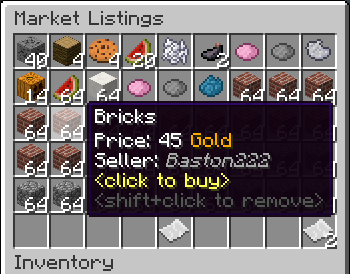
- The Interface
- This is a display of all current listings, you click an item to buy it. You can shift+click to remove a listing if you own it, or if you have the "globalmarket.listingsadmin" permission. Listings automatically expire after 1 week (configurable). You can use
/marketto access the menu.

- Stock
- When you purchase an item it will be sent to your stock. Stock is an entirely optional system but is suggested to be enabled, as disabling it will disable certain other features like
/market send. The stock system can hold a configurable amount of stacks of items in a configurable amount of slots. Once you place an item in your stock, you can list it to be sold to other players. Players can also send items to other players' stock via/market sendif they have the "globalmarket.command.send" permission.

- Server Listings
- You can create 'infinite listings' that do not expire and can't be bought out. Create them with
/market createinf <price> <[amount]>. There's a dedicated section to server listings in the Market menu. You'll need the "globalmarket.command.createserverlisting" permission to do this. Or you can disable this system all-together in the config.
Commands
| Command | Description | Permission |
|---|---|---|
| /market | Opens the Market menu. | globalmarket.use |
| /market ? | Shows command help. | <no permission> |
| /market send <player> <[amount]> | Sends the item you're holding to <player>'s stock. Amount is optional. | globalmarket.command.send |
| /market createinf <price> <[amount]> | Creates a server listing. Amount is optional. | globalmarket.command.createserverlisting |
| /market reload | Reloads config.yml | globalmarket.command.reload |
Permissions
- globalmarket.use - base permission, required to use /market
- globalmarket.listingsadmin - ability to remove all listings
- globalmarket.command.send - ability to use /market send
- globalmarket.command.createserverlisting - ability to use /market createinf
- globalmarket.command.reload - ability to use /market reload
Config
All config values have comments that explain what they do in config.yml, how convenient for me!
If you wish to blacklist items from being used on the Market, there is blacklist.json. You can add material values with meta values:
- APPLE:0 - blacklist apples
- INK_SAC:-1 - blacklist all dies
If you're running Cauldron, you can do things like:
- oredict:ingotSteel - blacklist any item with an OreDictionary value matching ingotSteel
- extracells:storage.component:-1 - blacklist all ExtraCells storage cells
Locale
Virtually every string in the plugin is editable via the "en_US.json" file, inside the plugin's JAR. It's pretty straightforward to edit. Don't replace or edit the %s or %1$s's, these are variables. For example, "Item sold: %s" would appear as "Item sold: Cobblestone" in-game. You can add/edit colors by typing & plus a color code. So light green (the color code is a) would be &a. You can find color codes here: http://ess.khhq.net/mc/
You can also create an entirely different language set, name it something like ch_CN.json, stick it in the server's JAR, and change the appropriate config value in config.yml to use it.
Source
https://github.com/Dasfaust/GlobalMarket
That's all for now. Sorry if things are unclear, I'll be updating this page with more information periodically. If you're stuck just add a reply and I'll do my best to help!
Comments


-

xdasfaust Owner
-
View User Profile
-
Send Message
Posted Dec 4, 2013What is the permission node for market listings in the latest build? i think it is #90
-
View User Profile
-
Send Message
Posted Dec 4, 2013@xdasfaust
Hey xdasfaust,
Greetings from SerendipityMC servers. I am Jung, a moderator of our community and I wanted to express my appreciation for this unique plugin. Your creativity to use the Minecraft Chest gui was genius; I could have never thought of that myself.
I am surprised that this has only 10,000 downloads. It is a remarkable plugin that is essential to all MC server communities. I'm sure that if other players know about this mod, they'll request it on their own servers. To everyone reading this, don't hesitate, download and install this plugin!
-
View User Profile
-
Send Message
Posted Dec 4, 2013@xdasfaust
Sweet I can't wait! Thanks for being a great dev who listens to their fans :) I'm going to do a video a little later on how to use the plugin :)
-
View User Profile
-
Send Message
Posted Dec 4, 2013@Kane_Hart
Yeah maybe something like "<amount> of <total>" in the tooltip if it's possible. Edit: I think I know how I'll do it, this should be possible.
-
View User Profile
-
Send Message
Posted Dec 4, 2013@xdasfaust
Yeah that seems pretty fair and would work well. I think in most cases the sorting is pretty important. I'm pretty sure when I was playing around it was just listed as when someone else had listed it. Even if you can't get more one sorting option going just price would be killer.
Now when you say grouping it would it some how tell you how many there was in that group? quantity in the description? Or would that be to taxing of a query?
Thanks :)
PS Thanks for the double charge fix!
-
View User Profile
-
Send Message
Posted Dec 4, 2013@pikepeicrer
Ah, thanks! I've fixed the double cut charging in build #91. I haven't had it enabled recently so I never noticed.
@Kane_Hart
Awesome, thanks for the suggestions (and a detailed video!) To your first suggestion, I have a counter proposal. I had something very similar to your idea suggested just a few days ago, the only real difference is instead of combining listings into one big listing, the market would queue (or group) each seller's listings of the same item and price together. So if you listed a stack of stone 10 times, the market would show your first listing of stone, once it's bought the second would appear. It's essentially the same concept, I think. This way, not much will actually change in the way of the interface, if you see 64 stone it's 64 stone. More stone will just take its place. And as the seller, you can view all of your queued listings and cancel them individually. What do you think about that method? This could be configurable too, like being able to customize the queue size, e.g. you list 15 stacks of stone (for the same price), only the first 5 would be shown until they are sold. And as you suggested the /market create command can be changed to allow listing multiple stacks at once. The "stack mode" price idea is great too.
As for sorting by category, or generally more advanced sorting, it's something I've always wanted to do and might get around to it one of these days. Sadly it's not as easy as doing SQL commands, it's just the way the storage engine is written. But sorting by price or queue/group size should be easy to do. Buy orders are definitely a planned feature (coming soon™, haha.) I had actually been waiting to rewrite a lot of the internals before adding it, and that's mostly done now, so I can get started on it.
-
View User Profile
-
Send Message
Posted Dec 4, 2013I made a quick video for a request that might make more sense then what I had posted.
http://www.youtube.com/watch?v=tkEcQFuBYq8
If you want me to explain it more I can try.
-
View User Profile
-
Send Message
Posted Dec 3, 2013Basically from what I can tell is it is chargeing $1000 - 25% when it is created charging $250 and then when the item is bought it is charging again $750 - 25% again leaving $562.5
It is double charging
-
View User Profile
-
Send Message
Posted Dec 3, 2013So I might be doing something wrong but it seems that cute is double dipping now where I don't think it was before? So when a person sells a Item we want to cute them 25% so cut: 0.25% but that seems that it charges even more. I listed this Arrow for 1000 and this is the transaction log: http://i.imgur.com/OVRPzCb.png my configs: http://pastebin.com/BC6KGZ7h
So something is happening maybe that is suppose to happen and if so is there a way to add just a fee for when a item sales the house takes 25% and no other fees?
Now the big request! Right now your mod is great but for larger servers that have a motto go big or go home your plugin is being sent home limping. What is the biggest issue? The max stack you can list. With the new description system it seems that you be better off not showing item quantity via the item but the description. Then when I have an item in my hand and I type /market create 100 10 it takes actual 640 sand out my inventory and lists the entire thing (640 in total as the description).
Now this would work but it gets confusing for a bunch of orders with out numbers... I HAVE A FIX idea for that too...
So let's say Rob and Sandy lists the following items: Rob: Sand $100 700 Rob: Sand $99 400 Sandy Sand $80 50 Sandy Sand $100 500 Sandy $120 1000
The in game would sort it this way: Sandy Sand $80 50 Rob: Sand $99 400 Rob: Sand $100 700 Sandy Sand $100 500 Sandy $120 1000
So what it is doing is sorting first by price and then the secondary sorting is done by quantity. So if there was say 10 people listing sand at $100 then the highest quantity is listed first.
Then you can do like a market update command with more sand in your hand and do something like /market update 1000 and just add more sand if you have a current stock of sand on the market as well..
Another idea is rather then do the whole /market create 100 10 as in list 10 stacks you could just do /market create 100x 640 for example and the x on the price means price per stack... So this way universally people are going for more price per stack and it auto converts it and makes it more of a real market feel to it. So even if I had only 40 sand it will still sell it and auto calculate the price down...
This then will take us to more of a buy/sell system like they do in the real world and hell maybe down the road we can do buy and sell orders...
So I guess to make this simple were just doing what they do for currency exchanges in a sense.
THEN SOMEDAY: http://bitcoin.clarkmoody.com/ :P
-
View User Profile
-
Send Message
Posted Dec 3, 2013@xdasfaust
Thanks! It worked :) I saw the plugin on another server and just had to have it :) thanks for making an awesome plugin!
-
View User Profile
-
Send Message
Posted Dec 3, 2013@rugbyman717
Replace your current Vault plugin with this version: http://dev.bukkit.org/bukkit-plugins/vault/files/40-vault-1-2-26/ it's built for 1.5.2. That should fix the issue :)
@Kane_Hart
Using the dev builds? The config has changed pretty drastically, the new documentation can be found here. There's a new limits system in place that allows you to define the cut, creation fee, max listings, expire time, etc per permissions group (keep in mind this requires a Vault-supported permissions plugin.) Here's how to do it. In the config, define something like this:
And give the group of your choice "globalmarket.limits.specialGroup", all players in that group won't get a creation fee and will get a 25% fee for selling an item (it is taken out of the seller's earnings.) Players with the permission "globalmarket.limits.merchantGroup" will only get a 10% cut (or none if you set it to 0), and so on. It's all on the new config page.
As for picking up the item, sounds like you're using 1.7.2, haha. The click events are broken in 1.7.2. You're not supposed to be able to pick up the items. You'll have to wait until Bukkit patches the bug. It's on the bug tracker, it affects all plugins using the click events. Hopefully they will get it fixed ASAP.
-
View User Profile
-
Send Message
Posted Dec 3, 2013Hello and thanks for the fixes!
A couple issues I have ran into. Cut seems to charge for all transactions and that sucks I wanted just say once someone buys it but no big deal. You have a creation fee! That seems okay I guess but if you cancel it I assume you don't get a refund. But when I tried doing a creation fee it's not percentage like it says on the page.
Right now I just want to charge the seller a 25% fee when an item sells and if their a special member group say merchant rank maybe they only get charged a 10% fee or get to ignore the fee!
The next issue I'm having is right now when you try to buy an item you click it and it's like do I drag it do I fly with it like whats going on? Clearly we found out you need to click on it and click it again but the item gets picked up right away and the user is sooo confused on what is actually going on.
Thanks!
-
View User Profile
-
Send Message
Posted Dec 3, 2013@xdasfaust
Ok finally here we go took me a while to get this http://pastebin.com/cGSPryqg
-
View User Profile
-
Send Message
Posted Dec 3, 2013@rugbyman717
Hmm, you can clear server.log, start the server, and paste the file somewhere. But if you don't want to do that, watch the console when you start the server and see if there are any errors when the plugin enables.
-
View User Profile
-
Send Message
Posted Dec 3, 2013@xdasfaust
I believe the one thats currently on the server is the newest but ive also tried all of the builds before the current one and get the same error every time. How do i paste the whole log?
-
View User Profile
-
Send Message
Posted Dec 3, 2013@rugbyman717
Thanks, which version of GlobalMarket are you using? Can you paste the whole server log from start up until you get the error with /market listings? Seems like there may be more to the error there.
-
View User Profile
-
Send Message
Posted Dec 3, 2013@Adondriel
I'm not sure lol i just know that craftbukkit 1.6.2 is installed and its a minecraft 1.5.2 FTBUnleashed Server and the error and i just copied the text in my console and made a paste on pastebin because im not sure what you mean. http://pastebin.com/LjUh5KgW hope thats enough information to figure out what is going on
-
View User Profile
-
Send Message
Posted Dec 3, 2013@Kane_Hart
Getting errors? Everything should work besides the buggy click cancellation. If you're using dev builds make sure it's the latest version, I fixed a few things that broke in previous builds.
-
View User Profile
-
Send Message
Posted Dec 3, 2013@rugbyman717
how are you running 1.6.2 AND 1.5.2? Also, please post the error that you are getting, it will be in your console.
-
View User Profile
-
Send Message
Posted Dec 2, 2013I'm running a FTB Unleashed server with CraftBukkit 1.6.2 and Minecraft version 1.5.2 and have the latest version of global market currently installed on my server. i installed the plugin into my plugins folder then restarted the server and when i do the /market command i get "An internal error occurred while attempting to perform this command" I've searched all over the web and cant seem to figure it out. Anyone know what could possibly be causing this problem?