GlobalMarket
GlobalMarket is a global market system. It allows players to buy and sell items via a convenient in-game interface. It's similar WoW's Auction House or Runescape's Grand Exchange. I created this plugin awhile ago (back in the days of WebAuction, it's what inspired me) for private use, but I've decided to release it to the public. This plugin requires Vault and ProtocolLib, other than that, just drop it in plugins (make sure you have Vault plus a supported economy plugin installed) and start trading!
Features
- Players can put any item up for sale using a dead simple in-game GUI system (see below)
- Uses ProtocolLib for proper item serialization that supports Bukkit, Spigot, and Cauldron
- Real time interface, all trades show up immediately without having to 'refresh' or close the GUI
- No maintenance or admin interaction required
Mailbox system that allows you to set up market areas or auction houses(not currently in 2.0.0)A built in price guide that compiles average prices from previous transactions(not currently in 2.0.0)
Latest Dev Build
Development builds of this project can be acquired at the following continuous integration server.
These builds have not been approved by the BukkitDev staff. Use them at your own risk.
http://build.survivorserver.com/job/GlobalMarket%202.0.0/
Changelog
Usage
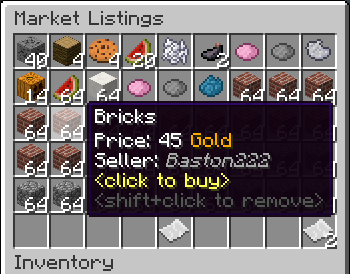
- The Interface
- This is a display of all current listings, you click an item to buy it. You can shift+click to remove a listing if you own it, or if you have the "globalmarket.listingsadmin" permission. Listings automatically expire after 1 week (configurable). You can use
/marketto access the menu.

- Stock
- When you purchase an item it will be sent to your stock. Stock is an entirely optional system but is suggested to be enabled, as disabling it will disable certain other features like
/market send. The stock system can hold a configurable amount of stacks of items in a configurable amount of slots. Once you place an item in your stock, you can list it to be sold to other players. Players can also send items to other players' stock via/market sendif they have the "globalmarket.command.send" permission.

- Server Listings
- You can create 'infinite listings' that do not expire and can't be bought out. Create them with
/market createinf <price> <[amount]>. There's a dedicated section to server listings in the Market menu. You'll need the "globalmarket.command.createserverlisting" permission to do this. Or you can disable this system all-together in the config.
Commands
| Command | Description | Permission |
|---|---|---|
| /market | Opens the Market menu. | globalmarket.use |
| /market ? | Shows command help. | <no permission> |
| /market send <player> <[amount]> | Sends the item you're holding to <player>'s stock. Amount is optional. | globalmarket.command.send |
| /market createinf <price> <[amount]> | Creates a server listing. Amount is optional. | globalmarket.command.createserverlisting |
| /market reload | Reloads config.yml | globalmarket.command.reload |
Permissions
- globalmarket.use - base permission, required to use /market
- globalmarket.listingsadmin - ability to remove all listings
- globalmarket.command.send - ability to use /market send
- globalmarket.command.createserverlisting - ability to use /market createinf
- globalmarket.command.reload - ability to use /market reload
Config
All config values have comments that explain what they do in config.yml, how convenient for me!
If you wish to blacklist items from being used on the Market, there is blacklist.json. You can add material values with meta values:
- APPLE:0 - blacklist apples
- INK_SAC:-1 - blacklist all dies
If you're running Cauldron, you can do things like:
- oredict:ingotSteel - blacklist any item with an OreDictionary value matching ingotSteel
- extracells:storage.component:-1 - blacklist all ExtraCells storage cells
Locale
Virtually every string in the plugin is editable via the "en_US.json" file, inside the plugin's JAR. It's pretty straightforward to edit. Don't replace or edit the %s or %1$s's, these are variables. For example, "Item sold: %s" would appear as "Item sold: Cobblestone" in-game. You can add/edit colors by typing & plus a color code. So light green (the color code is a) would be &a. You can find color codes here: http://ess.khhq.net/mc/
You can also create an entirely different language set, name it something like ch_CN.json, stick it in the server's JAR, and change the appropriate config value in config.yml to use it.
Source
https://github.com/Dasfaust/GlobalMarket
That's all for now. Sorry if things are unclear, I'll be updating this page with more information periodically. If you're stuck just add a reply and I'll do my best to help!
Comments


-

xdasfaust Owner
-
View User Profile
-
Send Message
Posted Dec 2, 2013inventorycloseevent is gonna have new blocks and stuff in the inventory object passed.. I assume will need an update period and not all just bukkit ;) Using spigot myself :P
-
View User Profile
-
Send Message
Posted Dec 1, 2013@xdasfaust
Thanks, i voted it up!
-
View User Profile
-
Send Message
Posted Dec 1, 2013@Adondriel
Yes, there's a notice about it at the top of the description. It seems like Bukkit doesn't properly update the client's cursor. There's a ticket about it on the leaky, vote it up so they'll take a look! https://bukkit.atlassian.net/browse/BUKKIT-4918
-
View User Profile
-
Send Message
Posted Dec 1, 2013@xdasfaust
with 1.7, you can just pick up and take the items out of the market.
-
View User Profile
-
Send Message
Posted Dec 1, 2013@xdasfaust
PM sent with links to listings and mail
-
View User Profile
-
Send Message
Posted Dec 1, 2013@externo6
Is there an error above the line "[GlobalMarket] Can't save files until this issue is resolved"? I'll need to see that. Can you upload a copy of your mail.yml and listings.yml files too?
Edit: just seen your edit. Send me your mail.yml/listings.yml files and I'll take a look!
-
View User Profile
-
Send Message
Posted Dec 1, 2013Hello, get this error on importing old data: http://pastebin.com/rVAnm2d7 Using build #88 Thanks :)
edit
had corrupt items in listings.yml but the plugin fails to import any data into mysql / sqlite. It says the following in console (no errors)
12:03:44 [INFO] [GlobalMarket] Old YAML storage found, importing your data. Note that history and pricing information will not be imported, as they are incompatbile, sorry! 12:03:44 [INFO] [GlobalMarket] Importing listings... 12:03:44 [SEVERE] Error occurred while enabling GlobalMarket v1.3.0-SNAPSHOT (Is it up to date?)
-
View User Profile
-
Send Message
Posted Nov 30, 2013@xdasfaust
Alrighty, thanks a lot!
-
View User Profile
-
Send Message
Posted Nov 29, 2013@Quinnatator
Set "
server: enable: true" to false in the config.@XZhyperX
Yep.
-
View User Profile
-
Send Message
Posted Nov 29, 2013Well this work on custom ids?
-
View User Profile
-
Send Message
Posted Nov 28, 2013Hey there! Experiencing an error, not sure what's causing it:
http://pastie.org/8516010
-
View User Profile
-
Send Message
Posted Nov 27, 2013@xdasfaust
You sir are my hero!
-
View User Profile
-
Send Message
Posted Nov 27, 2013@iBogiii
Hmm, I've never seen that problem, lore should be saved. Are you getting any errors? I want to say it's your system's encoding. If you're not getting any errors go ahead and update to the latest dev build and see how that works out.
-
View User Profile
-
Send Message
Posted Nov 27, 2013Hi,
Really wondering if you are able to fix lores being removed from the items while on restart. I tried many plugins which add Lores ( Like LifeSteal Bonus ) To items.. But at 1 point of the time they get removed in the shop and only the enchant stays.
Plugins That I used.
DiabloDrops
EpicBoss Gold Edition
ItemLoreStats
-
View User Profile
-
Send Message
Posted Nov 26, 2013@Awsmpossum1313
You can in the current version, check the Config section. Set "automatic_payments: true" in the config.
Edit: you also may want to negate/not give "globalmarket.history" to players so they can't get free books with /market history. History is no longer given via book in 1.3.
-
View User Profile
-
Send Message
Posted Nov 26, 2013I am in desperate to find a way to disable/change transaction logs for players. Our markets are being exploited to create these logs which then get traded to villagers for emeralds. A switch to turn these off would be ideal. I looked through the 1.3.0 notes didnt see it but you may already be a step ahead. Any help is greatly appreciate we love this plugin in and run it on 4 servers.
Thanks in advance for your response!
-
View User Profile
-
Send Message
Posted Nov 25, 2013@xdasfaust
It was a pretty sweet plugin :( i like the simplicity of your plugin and everything but i wanted to allow my players to have their own stalls and only shows their own items for sale XD oh well
-
View User Profile
-
Send Message
Posted Nov 25, 2013@maddyn99
Nope, currently you can only sell the whole stack at once.
-
View User Profile
-
Send Message
Posted Nov 25, 2013Is there a way to place a stack of an item on the market BUT put a unit price on it? For example I want to put a stack of redstone on the market but i want to sell it by the piece not the whole stack.
-
View User Profile
-
Send Message
Posted Nov 24, 2013@delsolsi213
No, not as of right now, sorry. I don't think the builds work either. If there's enough interest for it maybe I can update it.