GlobalMarket
GlobalMarket is a global market system. It allows players to buy and sell items via a convenient in-game interface. It's similar WoW's Auction House or Runescape's Grand Exchange. I created this plugin awhile ago (back in the days of WebAuction, it's what inspired me) for private use, but I've decided to release it to the public. This plugin requires Vault and ProtocolLib, other than that, just drop it in plugins (make sure you have Vault plus a supported economy plugin installed) and start trading!
Features
- Players can put any item up for sale using a dead simple in-game GUI system (see below)
- Uses ProtocolLib for proper item serialization that supports Bukkit, Spigot, and Cauldron
- Real time interface, all trades show up immediately without having to 'refresh' or close the GUI
- No maintenance or admin interaction required
Mailbox system that allows you to set up market areas or auction houses(not currently in 2.0.0)A built in price guide that compiles average prices from previous transactions(not currently in 2.0.0)
Latest Dev Build
Development builds of this project can be acquired at the following continuous integration server.
These builds have not been approved by the BukkitDev staff. Use them at your own risk.
http://build.survivorserver.com/job/GlobalMarket%202.0.0/
Changelog
Usage
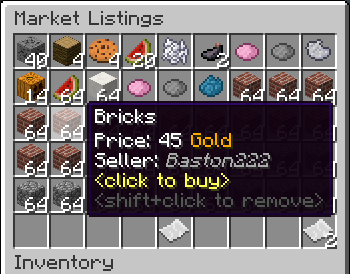
- The Interface
- This is a display of all current listings, you click an item to buy it. You can shift+click to remove a listing if you own it, or if you have the "globalmarket.listingsadmin" permission. Listings automatically expire after 1 week (configurable). You can use
/marketto access the menu.

- Stock
- When you purchase an item it will be sent to your stock. Stock is an entirely optional system but is suggested to be enabled, as disabling it will disable certain other features like
/market send. The stock system can hold a configurable amount of stacks of items in a configurable amount of slots. Once you place an item in your stock, you can list it to be sold to other players. Players can also send items to other players' stock via/market sendif they have the "globalmarket.command.send" permission.

- Server Listings
- You can create 'infinite listings' that do not expire and can't be bought out. Create them with
/market createinf <price> <[amount]>. There's a dedicated section to server listings in the Market menu. You'll need the "globalmarket.command.createserverlisting" permission to do this. Or you can disable this system all-together in the config.
Commands
| Command | Description | Permission |
|---|---|---|
| /market | Opens the Market menu. | globalmarket.use |
| /market ? | Shows command help. | <no permission> |
| /market send <player> <[amount]> | Sends the item you're holding to <player>'s stock. Amount is optional. | globalmarket.command.send |
| /market createinf <price> <[amount]> | Creates a server listing. Amount is optional. | globalmarket.command.createserverlisting |
| /market reload | Reloads config.yml | globalmarket.command.reload |
Permissions
- globalmarket.use - base permission, required to use /market
- globalmarket.listingsadmin - ability to remove all listings
- globalmarket.command.send - ability to use /market send
- globalmarket.command.createserverlisting - ability to use /market createinf
- globalmarket.command.reload - ability to use /market reload
Config
All config values have comments that explain what they do in config.yml, how convenient for me!
If you wish to blacklist items from being used on the Market, there is blacklist.json. You can add material values with meta values:
- APPLE:0 - blacklist apples
- INK_SAC:-1 - blacklist all dies
If you're running Cauldron, you can do things like:
- oredict:ingotSteel - blacklist any item with an OreDictionary value matching ingotSteel
- extracells:storage.component:-1 - blacklist all ExtraCells storage cells
Locale
Virtually every string in the plugin is editable via the "en_US.json" file, inside the plugin's JAR. It's pretty straightforward to edit. Don't replace or edit the %s or %1$s's, these are variables. For example, "Item sold: %s" would appear as "Item sold: Cobblestone" in-game. You can add/edit colors by typing & plus a color code. So light green (the color code is a) would be &a. You can find color codes here: http://ess.khhq.net/mc/
You can also create an entirely different language set, name it something like ch_CN.json, stick it in the server's JAR, and change the appropriate config value in config.yml to use it.
Source
https://github.com/Dasfaust/GlobalMarket
That's all for now. Sorry if things are unclear, I'll be updating this page with more information periodically. If you're stuck just add a reply and I'll do my best to help!
Comments


-

xdasfaust Owner
-
View User Profile
-
Send Message
Posted Oct 7, 2013Server crash: http://pastebin.com/yQj7m0P4
-
View User Profile
-
Send Message
Posted Oct 7, 2013whered the info about localmarket go? i downloaded it, but now when i go back to install/setup/use i cant find the info.
-
View User Profile
-
Send Message
Posted Oct 6, 2013@SwiftSwamp
Hmm I'll look into it, I've never used MCMMO so no promises.
@alek123222
I'll be dropping LocalMarket, I can't really give it the attention it needs, as of late I don't have much spare time due to coding GM and other projects. Maybe I can update it in the future, sorry :/
-
View User Profile
-
Send Message
Posted Oct 4, 2013fix please http://pastebin.com/Hx1AB7XM This is with using both latest dev builds released 25th September
-
View User Profile
-
Send Message
Posted Oct 3, 2013is local market working yet?
-
View User Profile
-
Send Message
Posted Sep 30, 2013Suggestion: Add McMMO "Support", when someone is using a McMMO ability...they cannot use any commands from Global Market or at least not post any items. I get players who will use a skill then put it in the global market for sale to sell it as "Efficiency X" pickaxes and things, when it's bought it goes away but they do it for scamming.
-
View User Profile
-
Send Message
Posted Sep 29, 2013Okey here are the errros I'm getting .. Help please :S
PASTEBIN
-
View User Profile
-
Send Message
Posted Sep 28, 2013Ow and also can you use an item to open the menu? Please reply to the other question!!
-
View User Profile
-
Send Message
Posted Sep 28, 2013Hi dudes does this allow more than 1 menu because I want one where you go to a menu with the resources and each one sends you to a different menu or if not I may move to the chest command plugin! Please reply!
-
View User Profile
-
Send Message
Posted Sep 28, 2013@Tunix2
I think I fixed the prefix not reloading in a recent dev build, I'll double check that. As for the mail, it only displays when you have something in your mailbox. I can make an option to disable that.
Edit: yes the prefix bug was fixed in this build.
@Rulerish
Check your log to see if you're getting any errors from GlobalMarket.
@gertjan206
Here you go :) https://dl.dropboxusercontent.com/u/16902048/mail.yml
-
View User Profile
-
Send Message
Posted Sep 27, 2013Hello,
I need your help.. My /market listings keeps getting reset .. I have no idea why .. It gets reset like every 4-5 days .. and its really annoying .. Help :S
-
View User Profile
-
Send Message
Posted Sep 27, 2013How do I disable the mailbox being in the MOTD?
-
View User Profile
-
Send Message
Posted Sep 27, 2013@gertjan206
Great idea. Ill do that.
-
View User Profile
-
Send Message
Posted Sep 27, 2013@Tunix2
you could disable them to use commands in that zone with worldguard or another plugin.
-
View User Profile
-
Send Message
Posted Sep 27, 2013@xdasfaust
Ah well I seem to be having trouble with it. I can open my local.yml, make a change, save it. and then in game do /market reload and it will not show my new changes. Specifically with the "prefix" tag. However, if I restart my server the changes will be reflected.
Also another issue I noticed. Users are going to my other signs (like info signs at spawn) and creating mailboxes. Whats the easy solution to this?
-
View User Profile
-
Send Message
Posted Sep 27, 2013@xdasfaust
i did what you said but it didn't work when the server generates a new mail.yml it has the ANSI encoding i changed that to UTF-8 i still have the error :( so that is really weird could you send me the mail.yml that worked?
-
View User Profile
-
Send Message
Posted Sep 26, 2013@Tunix2
Lol, fixed. /market reload does reload the locale, and locale already supports & color codes in the 1.2.3 dev builds.
-
View User Profile
-
Send Message
Posted Sep 26, 2013@xdasfaust
Ill look into doing it when I have some freetime. Also you replied to yourself and not gertjan206 in your last comment.
Could you make sure /market reload reloads the locale? Also can you make it to where we can use color codes in the locale?? Use this:
ChatColor.translateAlternateColorCodes('&', someString);
-
View User Profile
-
Send Message
Posted Sep 26, 2013@gertjan206
Try doing the same but move the old mail.yml and make a completely new file. The encoding on the file has changed. I copied the contents from Pastebin and stuck it in a mail.yml file, it loads correctly.
@Tunix2
Yep, it should be possible. If you use Market.getMarket() everything should be available, I haven't documented anything so PM me if you need to know something. I had attempted a web portal with sockets but didn't get very far, it's somewhere in GM's GitHub if you want to look at it.
-
View User Profile
-
Send Message
Posted Sep 26, 2013Would it be possible to use the API to make a web based shop?