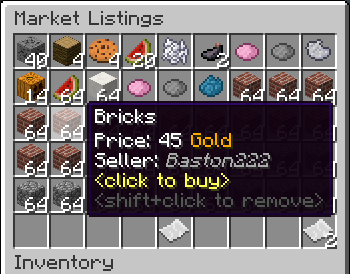
GlobalMarket
GlobalMarket is a global market system. It allows players to buy and sell items via a convenient in-game interface. It's similar WoW's Auction House or Runescape's Grand Exchange. I created this plugin awhile ago (back in the days of WebAuction, it's what inspired me) for private use, but I've decided to release it to the public. This plugin requires Vault and ProtocolLib, other than that, just drop it in plugins (make sure you have Vault plus a supported economy plugin installed) and start trading!
Features
- Players can put any item up for sale using a dead simple in-game GUI system (see below)
- Uses ProtocolLib for proper item serialization that supports Bukkit, Spigot, and Cauldron
- Real time interface, all trades show up immediately without having to 'refresh' or close the GUI
- No maintenance or admin interaction required
Mailbox system that allows you to set up market areas or auction houses(not currently in 2.0.0)A built in price guide that compiles average prices from previous transactions(not currently in 2.0.0)
Latest Dev Build
Development builds of this project can be acquired at the following continuous integration server.
These builds have not been approved by the BukkitDev staff. Use them at your own risk.
http://build.survivorserver.com/job/GlobalMarket%202.0.0/
Changelog
Usage
- The Interface
- This is a display of all current listings, you click an item to buy it. You can shift+click to remove a listing if you own it, or if you have the "globalmarket.listingsadmin" permission. Listings automatically expire after 1 week (configurable). You can use
/marketto access the menu.

- Stock
- When you purchase an item it will be sent to your stock. Stock is an entirely optional system but is suggested to be enabled, as disabling it will disable certain other features like
/market send. The stock system can hold a configurable amount of stacks of items in a configurable amount of slots. Once you place an item in your stock, you can list it to be sold to other players. Players can also send items to other players' stock via/market sendif they have the "globalmarket.command.send" permission.

- Server Listings
- You can create 'infinite listings' that do not expire and can't be bought out. Create them with
/market createinf <price> <[amount]>. There's a dedicated section to server listings in the Market menu. You'll need the "globalmarket.command.createserverlisting" permission to do this. Or you can disable this system all-together in the config.
Commands
| Command | Description | Permission |
|---|---|---|
| /market | Opens the Market menu. | globalmarket.use |
| /market ? | Shows command help. | <no permission> |
| /market send <player> <[amount]> | Sends the item you're holding to <player>'s stock. Amount is optional. | globalmarket.command.send |
| /market createinf <price> <[amount]> | Creates a server listing. Amount is optional. | globalmarket.command.createserverlisting |
| /market reload | Reloads config.yml | globalmarket.command.reload |
Permissions
- globalmarket.use - base permission, required to use /market
- globalmarket.listingsadmin - ability to remove all listings
- globalmarket.command.send - ability to use /market send
- globalmarket.command.createserverlisting - ability to use /market createinf
- globalmarket.command.reload - ability to use /market reload
Config
All config values have comments that explain what they do in config.yml, how convenient for me!
If you wish to blacklist items from being used on the Market, there is blacklist.json. You can add material values with meta values:
- APPLE:0 - blacklist apples
- INK_SAC:-1 - blacklist all dies
If you're running Cauldron, you can do things like:
- oredict:ingotSteel - blacklist any item with an OreDictionary value matching ingotSteel
- extracells:storage.component:-1 - blacklist all ExtraCells storage cells
Locale
Virtually every string in the plugin is editable via the "en_US.json" file, inside the plugin's JAR. It's pretty straightforward to edit. Don't replace or edit the %s or %1$s's, these are variables. For example, "Item sold: %s" would appear as "Item sold: Cobblestone" in-game. You can add/edit colors by typing & plus a color code. So light green (the color code is a) would be &a. You can find color codes here: http://ess.khhq.net/mc/
You can also create an entirely different language set, name it something like ch_CN.json, stick it in the server's JAR, and change the appropriate config value in config.yml to use it.
Source
https://github.com/Dasfaust/GlobalMarket
That's all for now. Sorry if things are unclear, I'll be updating this page with more information periodically. If you're stuck just add a reply and I'll do my best to help!
Comments


-

xdasfaust Owner
-
View User Profile
-
Send Message
Posted Jun 8, 2013@xdasfaust
i did not mean, ID 7 (i.e. bedrock does not work), i mean the whole blacklist feature does NOT work at all. on my linux.
could you list your test environment? what is the best practice when you test this plugin? which economy plugin do you use? which permission node management plugin do you use? it just doesn't work even i changed my config.yml as below
normal users can still make auction with bedrock, also can send bedrock to other players' mailboxes, the blacklist does not work. i did not assign .nolimit and .noqueue permissions nodes to the normal user permission groups.
==-and i also tried dev build global market 1.2.2 snapshot #38, tried to use normal users to create some blacklisted auction and use the mailbox sending to test the blacklist , but i only get some internal errors message. even non-blacklisted items, also internal errors...
-
View User Profile
-
Send Message
Posted Jun 8, 2013@SyncCraft
I have other features that need to be completed first for the sake of keeping the code clean.
@Josef27
Haha, I noticed the no reload from console the other day. I'll do it. And I'll add your translation to the list.
@alexshots
The reason why it has to be '5: 0' or '5: -1' is the data is pulled as a map. A map consists of a key and a value. So the code finds the key '5' that has the value '0', and says items with ID 5 and data of 0 can't be used to create listings. It also checks if the value is -1, if it is all damage values of '5' are blacklisted. So that's why you received errors with only '7'. Keep in mind bedrock has no damage value so its damage value always returns as 0. To blacklist bedrock you'd add '- 7: 0' to the list.
-
View User Profile
-
Send Message
Posted Jun 8, 2013global market 1.2.0 blacklist item_id: does NOT work. i use, ubuntu linux 12.04 LTS, bukkit 1.5.2 r0.1 beta. zpermissions 0.9.19 as permissions node management tool. craftconomy 3.1.3 and vault 1.2.25 as economy and money backend.
i listed the banned items in the config.yml file:
but, normal users WITHOUT bypass permissions node, they still can create aution item with bedrock and birch wood plank, could you help fix this? and your plugin looks like not working well with Essentials suite new pre-release builds, but i prefer yours, i can remove ESSentials and use other alternative plugins.
and your main page states that, blacklist should work like this.
i thought this is an error there that you forgot, due to, in yaml, if you write the listed stuff without a "minus mark" at the beginning of each lines, i.e. - , then you'd get grammar error, with bukkit 1.5.2 r0.1 beta, the sever console will tell you, "mapping errors", and reset the complete config file of the global market plugin.
and i also tried use item name to ban specific items into auction list,
but these settings in config.yml also does NOT work at all.
so, could you help check this?
and are you sure the, the "item id damage data" must keep "a space mark" between the ID and the DAMAGE value?? looks like um, it automatically changes into some other values, if i forget the space between 5: and 0, for oak wood plank item id.
-
View User Profile
-
Send Message
Posted Jun 8, 2013'/market reload' ability from console please :)
and, may i share my translations? :D Indonesian translation for v1.2.2
-
View User Profile
-
Send Message
Posted Jun 8, 2013@xdasfaust
Well, Shopkeepers is not a plugin I will be using.. Guess I will just wait. :L
Can I just ask, why is this so low down on your list, when clearly, so many of us asked for it within the first few days of release?
Thanks.
-
View User Profile
-
Send Message
Posted Jun 7, 2013@SyncCraft
Nope, sorry :/ for now you could try out Shopkeepers. It does admin shops with a GUI system.
@Bulymays
Item storage hasn't changed a bit, so new versions are totally safe to use. Did you get an error?
@Zombiemold
That looks like an error from Spigot. Might want to try updating to the latest build.
@YoFuzzy3
If you have a chat plugin it may not be letting GM cancel the chat event. Not sure what priority I have it set at, at the moment. If you haven't already try using the latest dev build and see if the problem isn't fixed.
-
View User Profile
-
Send Message
Posted Jun 7, 2013Excellent plugin!
Found one slight problem, when using the search function your message still sends. Might just be me though.
-
View User Profile
-
Send Message
Posted Jun 6, 2013Getting this error whenever anyone tries to use the search function:
http://pastebin.com/EApicQaF
It always kicks the player trying to search
-
View User Profile
-
Send Message
Posted Jun 6, 2013Ughh, same problem as MrE. New version wiped all the items off market. We have been using this literally since there was 2 downloads the minute it came out.
Listings is empty, mail still has the stuff listed.
-
View User Profile
-
Send Message
Posted Jun 6, 2013Don't suppose you have an estimated date for the unlimited items, do you?
I know quite a few of us have been waiting for a long time now. :S
Thanks
-
View User Profile
-
Send Message
Posted Jun 5, 2013@TheD4n
@Mre30
Was probably just iConomy, you can set the max price in the config.
-
View User Profile
-
Send Message
Posted Jun 5, 2013I'll keep an eye on the dev builds for this.
Thanks!
-
View User Profile
-
Send Message
Posted Jun 5, 2013No ticket system, so here you go.
iconomy support i am guessing. I first I thought it was some user that made a listing for that much money, but I looked, and can not find anything.
Thanks man!
-
View User Profile
-
Send Message
Posted Jun 5, 2013@xdasfaust
Thanks. We'll stick with permissions, but yes, we are mixed creative/survival and are already using bungee cord to run multiple servers. I suppose I'll just have to wait some time then. Thanks!
-
View User Profile
-
Send Message
Posted Jun 3, 2013Working great so far, couple of suggestions:
Thanks!
-
View User Profile
-
Send Message
Posted Jun 2, 2013@thomasmccarron
Do you have mixed creative and survival? If not just use permissions.
Multiworld support probably won't come soon. It's just lower on the todo list, and it'd take quite a bit of work. If you really want separate markets per world, you could use a BungeeCord setup.
-
View User Profile
-
Send Message
Posted Jun 2, 2013Suggestion/bugfix: Prevent players in creative mode from selling items and support for Multiverse-Inventories (e.g. A separate market for each group of worlds)
This has raised an issue on our server (it is multiverse with creative and survival available to players), which we are able to work around with perms, but still kind of annoying
-
View User Profile
-
Send Message
Posted Jun 1, 2013@Edisun
Try using an older Vault version compiled for 1.4.7, like 1.2.24.
-
View User Profile
-
Send Message
Posted Jun 1, 2013Hi there, I REALLY want to use your plugin because it looks awesome, Unfortunately, every time I try to start it up, I get this error. I am running a custom modded server, similar to FTB using MCPC+. Ever seen something like this?
EDIT: I did some searching and found out about this: https://github.com/LogBlock/LogBlock/issues/385 which is pretty much the same problem. I know your releases are backwards compatible since I am running a 1.4.7 server. Any thoughts?
-
View User Profile
-
Send Message
Posted Jun 1, 2013@delsolsi213
+1 :-((((((((